Fidelity Export and Format
unlistedby simoen
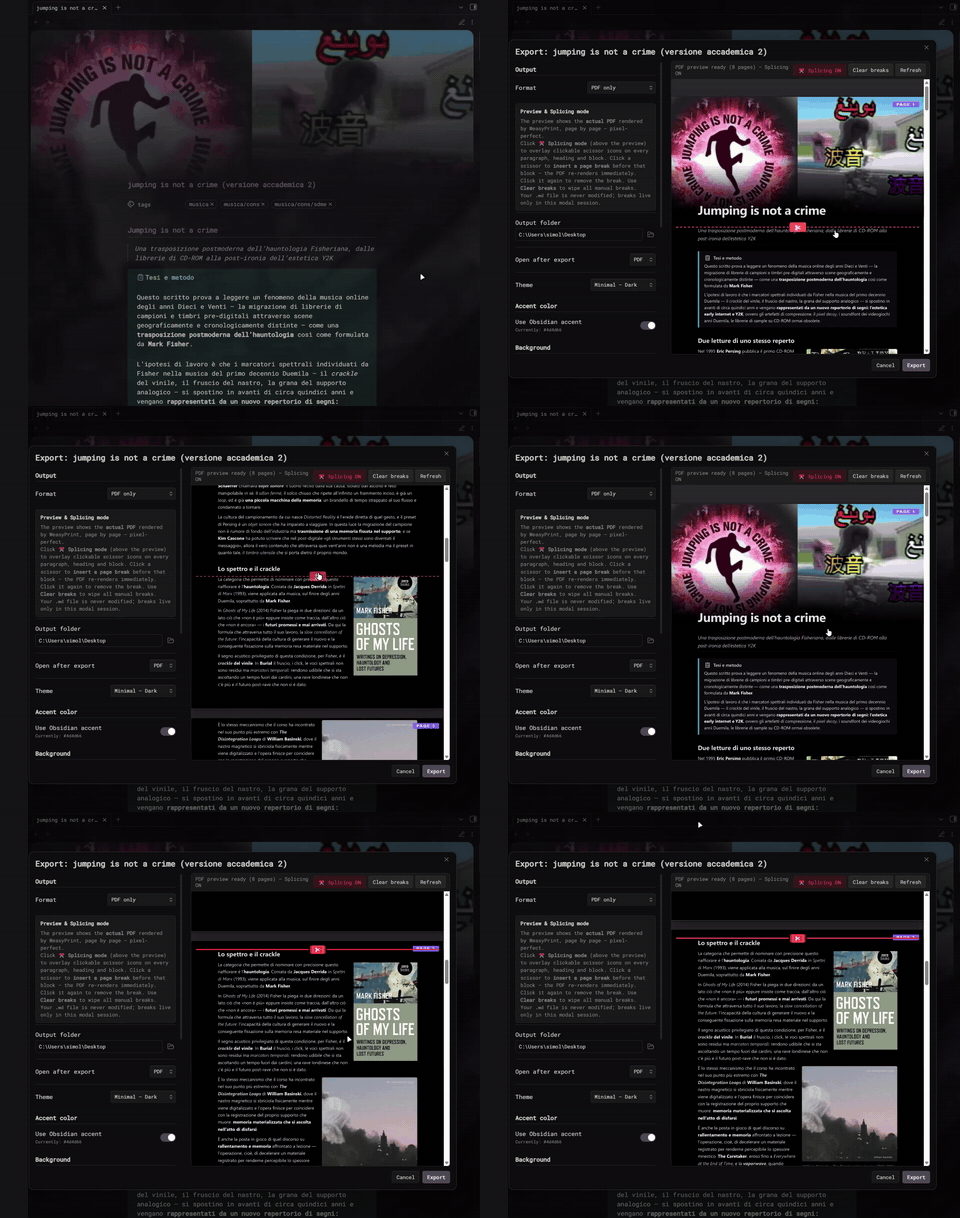
Export research and academic papers to high-fidelity HTML and PDF, right from your vault. Preserves image wrap-around, banners, captions, tables, callouts and footnotes. Live PDF preview and page-break splicing. PDF needs Python 3 + WeasyPrint.
Fidelity Export and Format
A quick, honest note on why this exists: I write up research and academic papers inside Obsidian, and every other plugin forced me out into some external editor the moment I wanted a clean export — and none of them kept the image wrap-around intact. I got tired of it, so I decided to just fix my own problem. This is the result, and I figured I'd share it in case it scratches the same itch for someone else.
Export the current note to self-contained HTML and A4 PDF while preserving the formatting you see in Obsidian's reading view — Pixel Banner banners with fade, images with float wrap-around and captions (Image Captions), embed link cards, tables, callouts, footnotes.
Under the hood: a custom Markdown parser in Python plus WeasyPrint as the rendering engine. Images are inlined as data: URIs, so the HTML output is a single portable file with no asset folders. The plugin then drives the script from a side-by-side GUI with a live preview.
Features
- Pixel Banner banners with fade gradient (reads
banner,banner-x,banner-yfrom YAML frontmatter) - Obsidian image embeds: the
![[file|caption|align|width|height]]syntax, robust to captions containing markdown links like[text](url) - Multi-paragraph float wrap-around:
|leftand|rightfloats; the following paragraphs wrap next to the image for as much vertical space as the image needs. A float that doesn't fit in the remaining page space is moved to the next page as a single block — captions never get clipped - Image Captions plugin output: muted typography under the image with clickable links
- Embed link cards:
```embedcode blocks withtitle:,description:,image:,url:render as a card; the preview image is downloaded and inlined as base64 - Tables, footnotes (with backrefs), callouts / blockquotes, inline and fenced code blocks, frontmatter tags as colored pills
- 8 color palettes picked at export time, plus a hex accent color picker for the Minimal themes (defaults to your Obsidian accent)
- Editable body font size (slider in the export modal, 10-22 px)
- Live preview inside the export modal that re-renders on every settings change (with debounce)
- Native folder picker for output destination — export anywhere on disk, not just inside the vault
- File menu entry: right-click any note → Export with fidelity...
Compatibility with other Obsidian plugins and themes
The exporter does not call Obsidian's renderer — it parses markdown itself and emits HTML that replicates the relevant plugin output. Concretely:
Replicated at export time
| Plugin / Theme | What the exporter replicates | Notes |
|---|---|---|
| Pixel Banner (GitHub) | Reads banner:, banner-x:, banner-y: from the frontmatter and emits a .pixel-banner-image div with background-image: url(...), background-position: <x>% <y>%, a 380 px full-bleed height, and a gradient fade to the page background | The plugin's CSS variable names are honored: --pixel-banner-x-position, --pixel-banner-y-position. Multi-banner / video banners are not replicated |
| Image Captions (GitHub) | Renders <figure class="image-captions-figure"> with the caption from the wikilink alt-text as <figcaption class="image-captions-caption"> | If the caption contains markdown (links, bold), it's rendered inline |
| Link Embed (GitHub) | Renders the ```embed code blocks this plugin produces (title:, description:, image:, url:) as a styled link card; the preview image is downloaded and inlined as base64 | The source URL is fetched at export time to inline the thumbnail, so the card is self-contained |
| Minimal theme (kepano) | The two minimal-* palettes shipped with the exporter mimic Minimal's reading view: neutral palette where the accent is the only colored element; tight typography; pill-shaped tag badges | The Obsidian accent color (Settings → Appearance → Accent color) is read and used as the default --accent for the Minimal palettes |
| Catppuccin theme | A Kanagawa-ish dark palette is shipped (dark-kanagawa) for a similar aesthetic | Not a 1:1 reproduction of any Catppuccin flavour |
Where the exporter takes its own path
| What | Why |
|---|---|
| Multi-paragraph wrap around images | Obsidian's reading view shows wrap-around because nothing stops it; the exporter explicitly wraps the float + the following paragraphs in a .float-anchor { display: flow-root; break-inside: avoid; } container so WeasyPrint moves the whole block to the next page when it doesn't fit. The trade-off is that wrap-around is bounded to the float's height (the exporter consumes paragraphs adaptively until the float is fully wrapped) |
| Auto-alignment of unsized images | An embed like ![[img.jpg|caption|325]] (width only, no |left/|right) defaults to right float — matching common community conventions and the user's ImgBoldFix.js heuristic |
| Banner fade | Obsidian's Pixel Banner uses a mask-image: linear-gradient(...); the exporter substitutes a linear-gradient overlay div because WeasyPrint's mask-image support is partial. The visible effect is identical |
Plugins NOT honored
Plugins that produce their content via JavaScript at view time do not run during the export, since the exporter reads the raw markdown file from disk. Examples:
- Dataview queries (
dataview/dataviewjscode blocks) — only the code block text is preserved - CustomJS scripts (e.g. the user's
ImgBoldFix.jsthat adds.img-align-*classes to image embeds at render time) — the exporter replicates the result of that script for the![[...]]syntax by parsing the params itself, so a typicalImgBoldFix.jssetup keeps working without it - Templater runtime expressions — only static results saved into the file are exported
- Live rendering plugins in general (Charts, Mermaid via JS, etc.)
Comparison with other PDF exporters
| Tool | Banner | Image floats | Caption | Theme |
|---|---|---|---|---|
| Obsidian built-in Export to PDF | broken | sometimes | no | print stylesheet |
| Better Export PDF (GitHub) | strips Pixel Banner classes | broken (wrapper classes stripped) | partial | custom CSS hook (we tried — strips wrappers, so most CSS doesn't bind) |
| Webpage HTML Export (GitHub) | broken | partial | partial | preserves Obsidian theme, but markup heavy |
| This plugin | full fidelity | full fidelity with anti-clip | full | 8 dedicated themes + accent picker |
Installation
1. Copy the plugin into your vault
Place the entire obsidian-export-fidelity/ folder under:
<your-vault>/.obsidian/plugins/obsidian-export-fidelity/
2. Enable the plugin
In Obsidian: Settings -> Community plugins -> Installed plugins -> Export Fidelity (HTML + PDF) -> toggle ON. If you don't see it, click Reload plugins.
3. Install Python and the required packages
You need Python 3.10+ and four packages: markdown, pyyaml, weasyprint, Pillow.
Windows (step-by-step)
WeasyPrint on Windows needs the GTK 3 runtime (Pango). The cleanest way to get it is via MSYS2.
1. Install Python 3 if you don't have it: https://www.python.org/downloads/windows/. During install, check Add python.exe to PATH.
2. Install MSYS2 from https://www.msys2.org/. Accept defaults (it installs to C:\msys64).
3. Install Pango in MSYS2. In the MSYS2 terminal run:
pacman -S mingw-w64-x86_64-pango
4. Add MSYS2's bin folder to PATH:
Win + R->sysdm.cpl-> Advanced -> Environment Variables- Edit
Pathunder System variables -> New ->C:\msys64\mingw64\bin-> OK - Close every open PowerShell and Obsidian window so the new PATH is picked up
5. Install the Python packages in a fresh PowerShell:
pip install markdown pyyaml weasyprint Pillow
6. Verify:
python -c "import weasyprint; print(weasyprint.__version__)"
7. Start Obsidian fresh, enable the plugin, run Export current note....
macOS
brew install pango
pip install markdown pyyaml weasyprint Pillow
Linux (Debian / Ubuntu)
sudo apt install libpango-1.0-0 libpangoft2-1.0-0
pip install markdown pyyaml weasyprint Pillow
4. Optional: Python path override
If Python is not on the PATH or you want to use a specific interpreter (e.g. a virtualenv), set it under Settings -> Export Fidelity -> Python executable.
Commands
| Command | What it does |
|---|---|
Export current note... | Opens the modal with live preview |
Quick export current note (default settings) | Skips the modal, uses saved defaults |
Right-click any note in the file explorer -> Export with fidelity... opens the same modal. The ribbon icon in the left sidebar opens it for the active note.
Output goes to <vault>/exports/<note-name>.{html,pdf} by default.
Settings
- Default theme -- pre-selected in the modal, also used by Quick export
- Use Obsidian accent (Minimal themes) -- on by default, reads
Settings -> Appearance -> Accent color - Custom accent (hex) (Minimal themes) -- color picker + hex input, overrides the toggle above
- Default body font size (px) -- 10-22, default 16
- Python executable -- empty for auto-detect (
python->python3->py) - Default output folder -- relative to vault root or absolute, with a Browse... button (native folder picker)
- Default "open after export" -- PDF / HTML / None
Standalone CLI
The script (obsidian_export.py) works on its own:
python obsidian_export.py path/to/note.md --theme minimal-dark --accent "#7f6df2"
python obsidian_export.py path/to/note.md --font-size 18 --theme light-solarized
python obsidian_export.py --list-themes
python obsidian_export.py note.md --no-pdf --vault /path/to/vault -o /tmp/out
Flags: --theme, --accent, --font-size, --no-pdf, --vault, -o, --list-themes.
Credits
pinkisnt.dead / Simone Liguori — eccerobot.xyz · simo.liguori@proton.me
License
MIT
For plugin developers
Search results and similarity scores are powered by semantic analysis of your plugin's README. If your plugin isn't appearing for searches you'd expect, try updating your README to clearly describe your plugin's purpose, features, and use cases.