Tree Editor Linked Properties
unlistedby siraht
Edits linked-note fields and renders editable grouped task dashboards and task maps.
Tree Editor Linked Properties
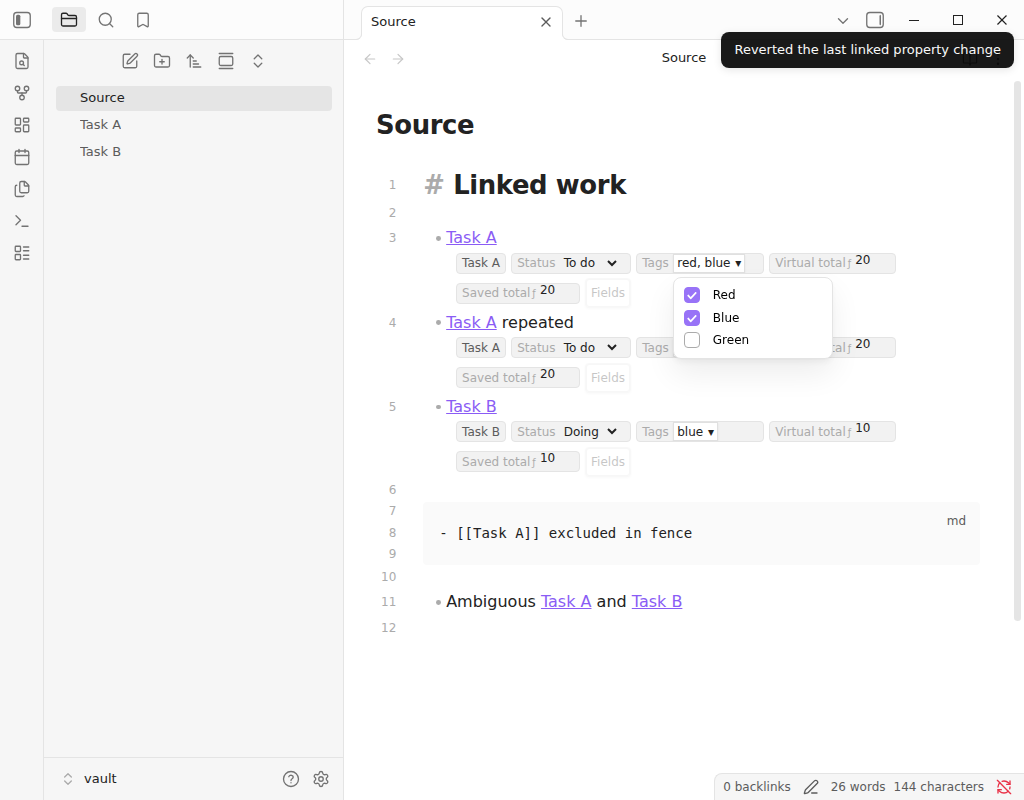


Edit properties from linked notes beside the list items that reference them, or collect them into editable grouped dashboards, without replacing Obsidian's Markdown editor. Plugin id tree-editor-linked-properties, version 0.7.0, Obsidian 1.13.1+.
# Manual drop-in (no community curl installer)
# Download main.js, manifest.json, styles.css from the latest GitHub release
# into <vault>/.obsidian/plugins/tree-editor-linked-properties/
TL;DR
The Problem: Task lists that wikilink out to notes hide status/priority/due inside each file's YAML. Switching notes to tick a dropdown breaks flow.
The Solution: Decorate Live Preview list rows that contain exactly one internal link with typed controls that read/write the linked note's frontmatter via FileManager.processFrontMatter().
Why Use this plugin?
| Feature | What it does |
|---|---|
| Native editor | CodeMirror 6 decorations; Vim, Outliner, drag still work |
| In-note Fields chooser | Visibility, order, alignment apply on click |
| Typed controls | text, number, boolean, date, select, multi-select |
| Calculated fields | Small evaluator; virtual or saved back to YAML |
| Task dashboards | Group, sort, and edit task notes from a Markdown code block |
| Per-note layout | Each source note remembers fields and alignment |
| Offline | No network, telemetry, or account |
Quick Example
- [[Replace porch light]]
- [[Book the campsite]]
Controls can show status, priority, due. A change writes:
---
status: in-progress
priority: high
due: 2026-08-20
---
Nothing is sent outside the vault. The plugin has no account, network requests, telemetry, or external service.
Features
| Feature | What it means in practice |
|---|---|
| Native editor integration | Adds controls to Obsidian's existing Live Preview editor instead of implementing another Markdown editor. |
| In-note field chooser | Click Fields, use the command palette, or use the editor context menu. No trip to Obsidian Settings is required. |
| Immediate configuration | Field visibility, order, and alignment change on click; the chooser has no Apply or Cancel step. |
| Typed controls | Edit text, numbers, booleans, dates, single-select fields, and multi-select YAML arrays. |
| Immediate multi-select | Each option click writes immediately; there is no Apply or Cancel step. |
| Two layouts | Keep fields directly after the text or align them in spreadsheet-like columns at the right edge of the editor. |
| Horizontal overflow | Aligned columns share their scroll position and remain reachable with a scrollbar or Shift+wheel. |
| Calculated fields | Display a value derived from real frontmatter, either virtually or synchronized back into frontmatter. |
| Safe writes | Uses Obsidian's FileManager.processFrontMatter(), serializes writes per file, refreshes every visible reference, and provides one-step undo. |
| Note-specific views | Each source note remembers its own visible fields, field order, and layout. |
| Editable dashboards | A tree-dashboard block groups and sorts task notes while keeping every visible field editable. |
| Third Space week | A built-in operations preset reproduces Monday–Sunday checklist phases, inheritance, hierarchy, and configured or live employee order. |
Installation
Community Plugins
Once the plugin is listed in Obsidian's community directory:
- Open Settings → Community plugins.
- Select Browse and search for Tree Editor Linked Properties.
- Select Install, then Enable.
BRAT
To try the current release before community-directory approval, install the BRAT plugin, choose Add Beta plugin, and enter:
https://github.com/siraht/ObsidianTreeEditor
Manual installation
Download main.js, manifest.json, and styles.css from the latest release. Put all three files in:
<vault>/.obsidian/plugins/tree-editor-linked-properties/
Restart Obsidian, then enable Tree Editor Linked Properties under Settings → Community plugins.
Use
Task dashboards
Run Tree Editor Linked Properties: Insert task dashboard in any Markdown note. The inserted block renders the complete Third Space week with Monday through Sunday and the applicable opening, 7–9am, cleaning, reopen, midday, and closing phases.
Select Configure on the dashboard to change order, empty-phase visibility, and visible fields. Every click rewrites that dashboard block immediately; there is no Apply or Cancel step. Field edits also save immediately and refresh every occurrence of the same task.
For a normal frontmatter dashboard, use a folder-scoped block:
```tree-dashboard
preset: generic
source: Tasks
groupBy: category
groupOrder:
  - General Set Up
  - Saunas
sort:
  - field: priority
    direction: asc
  - field: order_key
    direction: asc
fields:
  - priority
  - hands_on_minutes
  - category
```
Generic dashboards support equals, notEquals, contains, and exists filters, array-valued groups, explicit group order, and any number of ascending or descending sort keys. Real and calculated fields use the same schemas as linked rows, including enum and multi-select controls. Dataview is not required.
The Third Space preset has two deliberately distinct views:
- Configuration preview follows canonical checklist membership, inheritance, hierarchy, and configured order.
- Live run applies the employee-app comparator to a versioned local
.third-space/current-run.jsonsnapshot. The plugin reads that explicitly configured vault-relative file but never calls the Ops service or stores credentials.
Inherited rows show Override day before earlier/later controls appear. This prevents a day-specific reorder from silently changing an aggregate weekday or weekend profile.
Third Space Task Canvas
Open Task Canvas from the ribbon or command palette. The canvas reads canonical task and checklist frontmatter directly from the vault and offers four compatible arrangements:
- Dependency map uses the guarded task and occurrence prerequisites.
- Mind map follows parent/subtask identity.
- Timeline places work by checklist target or availability time.
- Manual canvas preserves freeform positions.
Each node has a blue input port on the left and orange prerequisite port on the right. Drag from a prerequisite's right port to a dependent task's left port to write the edge to Markdown. Deleting a selected edge removes that exact frontmatter reference. Cycles, self-links, and duplicates are rejected. Dragging a task pins its position; Indicators controls which operational fields appear on every node. Checklist and text filters constrain the surface without changing the underlying vault.
The built-in status, priority, due, estimate, and done definitions cover common task
frontmatter. Additional existing keys are discovered and conservatively typed from cached
frontmatter. Definitions created in the in-note editor are persisted in data.json; configured
types and enum options always take precedence over inference.
Choose the fields for a note
On a list row with one resolvable wikilink or internal Markdown link, select Fields. The chooser lists properties found in that source note's linked notes.
- Select or clear a field to show or hide it immediately.
- Use the arrow buttons to change field order immediately.
- Select Edit to change the label, control type, unset behavior, or dropdown options.
- Choose After text for compact inline controls or Aligned columns for a table-like layout.
Visibility, order, and layout are saved as soon as you click them. Close the chooser whenever you are finished; there is no Apply or Cancel step.
The same chooser is available through Tree Editor Linked Properties: Choose linked fields for this note in the command palette and Choose linked fields for this note in the editor context menu. The alignment can also be switched with Toggle linked fields alignment for this note.
Configure a dropdown or multi-select
- Open Fields and select Edit beside the property.
- Choose Select or Multi-select.
- Enter one stored value per line. To show a friendlier label, use
stored-value | Visible label. - Save the definition.
For a multi-select control, every checkbox click saves the YAML array immediately while the picker remains open. Existing values that are absent from the configured options remain visible until you remove them.
Add a calculated field
Open Fields, then select New calculation. A calculation can be:
- Virtual — display only: recalculated from the linked note's frontmatter without creating a property.
- Saved — keep output in frontmatter: recalculated live and synchronized to the chosen output property.
Simple property names can be used directly, as in hours * hourly_rate. Put names containing spaces in braces: {hours worked} * rate.
Supported operations and functions:
| Kind | Available syntax |
|---|---|
| Arithmetic | +, -, *, /, % |
| Comparison | =, !=, <, <=, >, >= |
| Logic | and, or, not |
| Conditional and fallback | if, coalesce |
| Numbers | round, min, max, sum, average, abs, ceil, floor |
| Text and lists | length, concat, lower, upper |
Formulas run in a small purpose-built evaluator. They cannot execute JavaScript or access arbitrary object properties. Invalid results appear as errors and are not written, and dependency cycles are rejected when the calculation is saved.
Undo the last property edit
Run Tree Editor Linked Properties: Undo last linked property change from the command palette. This undo history is separate from the Markdown editor's normal undo history and stores the most recent plugin edit only.
How it fits into Obsidian
flowchart LR
    A["List row in the source note"] --> B["One linked note"]
    B --> C["Cached frontmatter"]
    C --> D["Typed row controls"]
    D -->|"edit"| E["Obsidian FileManager"]
    E --> B
    C --> F["Safe formula evaluator"]
    F --> D
    F -->|"saved calculation"| E
The implementation uses published Obsidian APIs and CodeMirror 6 extension points. It contains no extracted or decompiled Obsidian code.
Privacy and permissions
- Reads links and cached frontmatter from Markdown files in the open vault.
- Generic dashboards read Markdown only below their declared source folder. The Third Space dashboard reads
Tasks,Checklists, and its explicitly configured local run-state path. - Writes only the linked note properties that you edit or configure as saved calculations.
- Stores field definitions, per-note selections, layouts, and the last reversible change in the plugin's local
data.json. - Makes no network requests and includes no telemetry, advertising, or analytics.
- Does not access files outside the vault.
Compatibility
The current release targets Obsidian 1.13.1 or later and uses no Node.js or Electron-only APIs. It has been exercised on Obsidian desktop 1.13.7 with split panes, Vim mode, Outliner, Meta Bind, drag-and-drop, IME composition, touch emulation, dark mode, and right-to-left layout. Mobile compatibility is intended and the manifest permits mobile installation, but the current automated release checks do not replace broader testing on physical phones and tablets.
Limitations
- A row must be a bulleted or numbered list item containing exactly one resolvable internal link. Rows with zero or multiple links do not receive controls.
- The plugin edits YAML frontmatter properties, not values embedded in a note body.
- Property types discovered from existing data are inferred conservatively. Use Edit in the field chooser when you need a specific control or option list.
- Virtual calculations are display-only. Saved calculations intentionally write their output property whenever an input changes.
- Formula syntax is deliberately smaller than JavaScript and does not fetch external data.
- The plugin has no full settings tab; its configuration is kept near the rows where it is used.
- Third Space live ordering requires a valid local execution-state snapshot; without one, the dashboard clearly falls back to configuration preview.
Troubleshooting
No fields appear beside a row
Make sure the editor is in Live Preview, the row is a list item, and it contains exactly one link to an existing Markdown note. Then select Fields and enable at least one property. Links in YAML frontmatter and fenced code blocks are ignored.
A property has the wrong control type
Open Fields, select Edit beside the property, and choose its type explicitly. Saved field definitions take precedence over automatic inference.
A dropdown shows an unknown value
The linked note contains a value that is not in the configured option list. Add it to the field definition or select a known value. The plugin keeps unknown values visible so it does not silently discard data.
A calculation shows an error
Check the property names and operand types. Use braces around names with spaces. Division by zero, invalid operations, non-finite numbers, and cyclic calculation dependencies are rejected rather than written to frontmatter.
Manual installation does not load
Confirm that the plugin directory contains main.js, manifest.json, and styles.css directly, with no extra release-folder level. Restart Obsidian after copying the files.
Development
Requirements: Bun and a current Node.js-compatible development environment.
# Development
cd /data/projects/thirdspace/ObsidianTreeEditor
bun install
bun run typecheck
bun run lint
bun run test
bun run build
# bundle → dist/main.js (+ root manifest.json, styles.css)
Design Philosophy
- Do not replace the editor. Decorate eligible rows only.
- Immediate writes. No Apply/Cancel on field visibility or multi-select.
- Safe formulas. No JavaScript, no network, cycles rejected.
- One undo slot for the last plugin property edit (separate from editor undo).
- Published APIs only. No decompiled Obsidian code.
How it Compares
| Feature | This plugin | Dataview | Meta Bind | Full Tree Editor app |
|---|---|---|---|---|
| Edits linked YAML from a list | ✅ | ⚠️ query | ⚠️ in-note | different product |
| Replaces Markdown editor | ❌ | ❌ | ❌ | n/a |
| Vault-local | ✅ | ✅ | ✅ | server app |
| Spreadsheet publication | ❌ | ❌ | ❌ | Tree Editor/ |
When to use this: Obsidian lists of [[notes]] with frontmatter fields.
When not to: you need the Third Space publication server — that is Tree Editor/.
Sibling folders ObsidianTreeEditor-gauntlet-* are experiment variants, not releases.
Quick Start
- Enable the plugin.
- Open a note with list items that each contain one wikilink.
- Live Preview → click Fields (or command palette).
- Enable properties; pick After text vs Aligned columns.
Commands
Obsidian command palette:
- Choose linked fields for this note
- Toggle linked fields alignment for this note
- Undo last linked property change
Context menu: Choose linked fields for this note.
Dev:
bun run build
bun run lint
bun run test
bun run typecheck
Configuration
No settings tab. State is per note in the plugin data.json (field defs, order, layout, last undo).
Formulas: hours * hourly_rate, {hours worked} * rate. Ops: + - * / %, comparisons, and/or/not, if, coalesce, round/min/max/sum/average/abs/ceil/floor, length/concat/lower/upper.
Architecture
List row (exactly one link)
        → cached frontmatter
        → typed controls / formula evaluator
        → FileManager.processFrontMatter()
        → refresh every visible reference
FAQ
Does this replace Obsidian's editor?
No.
Does choosing fields modify the source note?
No. Editing a control writes the linked note. Saved calculations write their output property.
Can two source notes show different fields?
Yes.
Can the same linked note appear twice?
Yes; edits refresh all visible references.
Can formulas hit the network?
No.
Why no settings page?
Choices are note-specific and live next to the rows.
About Contributions
About Contributions: Please don't take this the wrong way, but I do not accept outside contributions for any of my projects. I simply don't have the mental bandwidth to review anything, and it's my name on the thing, so I'm responsible for any problems it causes; thus, the risk-reward is highly asymmetric from my perspective. I'd also have to worry about other "stakeholders," which seems unwise for tools I mostly make for myself for free. Feel free to submit issues, and even PRs if you want to illustrate a proposed fix, but know I won't merge them directly. Instead, I'll have Claude or Codex review submissions via
ghand independently decide whether and how to address them. Bug reports in particular are welcome. Sorry if this offends, but I want to avoid wasted time and hurt feelings. I understand this isn't in sync with the prevailing open-source ethos that seeks community contributions, but it's the only way I can move at this velocity and keep my sanity.
License
MIT © 2026 siraht. Not affiliated with or endorsed by Obsidian.
For plugin developers
Search results and similarity scores are powered by semantic analysis of your plugin's README. If your plugin isn't appearing for searches you'd expect, try updating your README to clearly describe your plugin's purpose, features, and use cases.