Termy
unlistedby ZyphrZero
Terminal emulator with split panes, reusable workflows, AI CLI context handoff, and zero setup. Powered by xterm.js and a bundled Rust PTY backend.
Scoria
A secure, persistent, cross-platform terminal that lives inside Obsidian.





Why Scoria · Status · Install · Features · Architecture · Roadmap
Why Scoria
A terminal inside Obsidian should be boring in the best way: it should be there when you open the vault, survive a reload without losing your shell, and not open a hole in your machine while doing it.
Scoria started as a fork of Termy, which already had the right shape - xterm.js in the renderer, a real PTY running out of process in a Rust backend. Two things stopped it from being something I would hand to other people:
- The backend was open. The PTY server listened on an unauthenticated local WebSocket (
127.0.0.1:<port>). Any local process could connect and drive a shell with your permissions. - Sessions did not survive. Reloading Obsidian, or a transient transport drop, killed the running shell. Long jobs died with the window.
Scoria rebuilds that foundation:
- Authenticated transport. On Windows the PTY runs over a named pipe locked to your user with a DACL; on macOS and Linux over a Unix domain socket with
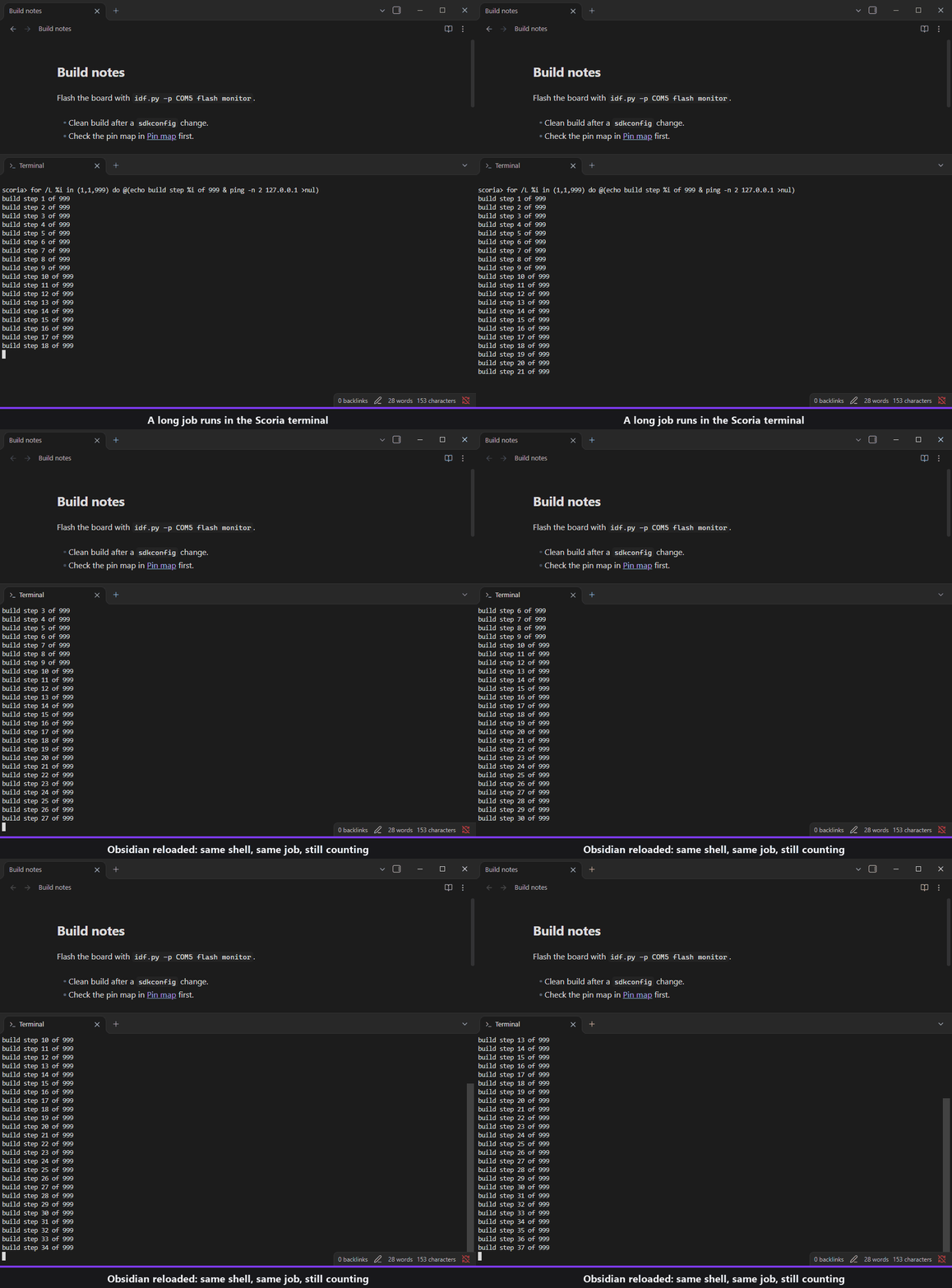
0600permissions in an owner-only directory; the WebSocket fallback now requires a capability token. The pipe and the socket need no secret: the OS checks who connects. The WebSocket fallback sends its 256-bit token in the first message, and only over loopback. - A persistent daemon. The PTY backend outlives the plugin. Reload Obsidian and your shells reattach, with the output you missed replayed back into the same terminal.
- Cross-platform from one codebase. The same transport story works on Windows, macOS, and Linux, picking the right primitive per OS.
- Its own binary. Scoria downloads its PTY backend from this project's own GitHub Releases - the authenticated build from this repo - and never from a third-party host.
The inherited Termy surface (multiple shells, splits, workflows, AI CLI launchers, drag-and-drop, clickable output) is still here. Scoria's contribution is the layer underneath it.
Where this is
Public beta. The security, persistence, and cross-platform work is merged and reviewed. What remains before a 1.0 is hardening in real use and the polish that only early users surface.
- Not yet in the Obsidian community directory. Install with BRAT or manually for now (see Install). Listing is a planned post-beta step, not a blocker.
- Desktop only. The native PTY backend rules out mobile.
- macOS: the binary is built in CI, and the socket checks (owner-only socket and directory, per-user temp dir, path length) pass on the CI macOS runner. Nobody has run it on Mac hardware yet, and the binary is not code-signed or notarized.
Honest scope: today Scoria is a secure, persistent, cross-platform Obsidian terminal. Deeper vault-native features - semantic command tracking, sending command output straight into a note - are the next milestone, not a current claim. See Roadmap.
Install
BRAT (recommended for the beta)
- Install BRAT from the community plugins.
- In BRAT settings choose Add beta plugin.
- Enter
VaibhavAher100/scoria. - Enable Scoria in Settings → Community plugins.
Manual
- Download the latest release from GitHub Releases.
- Extract
main.js,manifest.json, andstyles.cssinto.obsidian/plugins/scoria/in your vault. - Reload Obsidian and enable Scoria in Settings → Community plugins.
On first launch Scoria fetches the matching PTY backend for your platform from this repo's releases. No local Rust toolchain is needed to use it.
Requirements
- Obsidian Desktop (Windows, macOS, or Linux)
Quick start
- Open Scoria from the ribbon, command palette, or status bar.
- Pick your shell and where new terminals open in settings.
- Open a terminal in the current note's folder with Open terminal here (right-click a file) or the matching command.
- Run a long job, reload Obsidian, and watch the shell reattach.
- Send a selection, the current note, or its path into the terminal.
- Click a
[[wikilink]],obsidian://URL, or file path printed in the output to jump to it.
Features
![Scoria in an Obsidian vault: a note above, a terminal below with the [[ note picker open](https://raw.githubusercontent.com/vaibhavaher100/scoria/HEAD/assets/scoria-screenshot.png)
The foundation (what Scoria adds)
- Authenticated PTY transport per OS: user-scoped named pipe (Windows),
0600Unix domain socket (macOS/Linux), token-gated WebSocket fallback. - Reload-surviving sessions through a persistent daemon, with bounded replay of missed output on reattach.
- Own-host binary provenance - the backend comes only from this project's GitHub Releases and is checked against a SHA-256 hash pinned inside the plugin. A download that does not match is deleted and never runs; at startup, a backend that does not match the pin is downloaded again. Offline mode skips this check (see Privacy).
- Vault-aware terminals - launch in a note's folder,
[[wikilink autocomplete at the prompt (opt-in in settings), clickable[[wikilinks]]andobsidian://links in output, copy-on-select.
Inherited from Termy
- Local shells on Windows, macOS, and Linux:
cmd, PowerShell, PowerShell Core, WSL, Git Bash,bash,zsh, or a custom path. - Splits, tab groups, new-window placement, search, prompt navigation, font resize, copy/paste.
- Reusable workflows mixing terminal commands, Obsidian commands, and external links, launched from the status bar or palette.
- Send the editor selection, full note, or note path into the active terminal; drag files and folders in to paste resolved paths.
- AI CLI launchers (Claude Code, Codex CLI, OpenCode, Gemini CLI) started inside the current vault context.
- Theme sync, Canvas/WebGL rendering, background images and blur, localized UI.
Architecture
graph LR
  A[Obsidian Plugin - TypeScript] --> B[xterm.js Terminal]
  A --> T{Transport}
  T -->|Windows| P[Named Pipe + DACL]
  T -->|macOS/Linux| U[Unix Socket 0600]
  T -->|fallback| W[Token-gated WebSocket]
  P --> D[Rust PTY Daemon]
  U --> D
  W --> D
  D --> S[portable-pty shells]
The renderer never owns the PTY. xterm.js draws the terminal; the actual shell runs in a separate Rust process and talks to the plugin over an OS-authenticated transport. That process is a daemon - it stays alive across plugin reloads so sessions persist, and it is reachable only by your own user.
- Frontend: TypeScript, Obsidian plugin APIs, xterm.js.
- Backend: Rust PTY daemon on
portable-pty, framed binary protocol ([len:u32 LE][type:u8][payload]). - Transport: named pipe / Unix domain socket / authenticated WebSocket, chosen per platform.
Roadmap
- Now (beta): stabilize in real use, confirm macOS on real hardware, gather early-user feedback.
- Next (M5): semantic shell integration (full OSC 133/633 command lifecycle - per-command status, navigation) and vault capture - send command output straight into a note.
- Later: broader feature parity (per-tab colour, tab hotkeys, startup commands), then submission to the Obsidian community directory.
Development
pnpm install
pnpm build         # tsc check, production bundle, smoke check
pnpm build:rust    # build the native PTY backend
pnpm install:dev <vault-path>   # build everything and install into a dev vault
| Script | Purpose |
|---|---|
pnpm dev | Frontend build/watch. |
pnpm build | TypeScript check, production bundle, bundle smoke check. |
pnpm build:rust | Build native PTY backend binaries. |
pnpm install:dev <vault> | Build and install into a local dev vault (--no-rust to skip the native rebuild). |
pnpm test:terminal | Compile and run the terminal-layer Node tests. |
Privacy and network access
- No telemetry, no analytics.
- On first use Scoria downloads the matching PTY backend from this project's own GitHub Releases (
VaibhavAher100/scoria) and verifies it against a SHA-256 hash pinned in the plugin bundle. It never downloads from a third-party host. - Offline mode turns off downloads and update checks. It also skips the hash check: Scoria runs whatever backend is in the plugin's
binaries/folder. - Terminal sessions run local shell commands. Those commands can read files, write files, or reach the network according to what you run - the same as any terminal.
- The PTY transport is local and authenticated to your user (named pipe /
0600socket / token-gated WebSocket). Only the WebSocket fallback sends a secret, and it sends its token over loopback. - AI CLI launchers can pass the active note path, selection, and vault root to local CLI tools you start. The Codex integration writes a vault-local helper skill under
.agents/skills/.
License and attribution
Scoria is licensed under GPL-3.0.
Scoria is a modified fork of Termy by ZyphrZero, also GPL-3.0. The original is © ZyphrZero and the Termy contributors; Scoria's modifications are © Vaibhav Aher. The full attribution and a dated list of significant changes are in NOTICE.
Credits
- Termy - the fork this is built on.
- xterm.js
- portable-pty
For plugin developers
Search results and similarity scores are powered by semantic analysis of your plugin's README. If your plugin isn't appearing for searches you'd expect, try updating your README to clearly describe your plugin's purpose, features, and use cases.