AI Agent Panel
unlistedby Yoav Aharoni
Chat with Claude Code inside your vault: a native panel with a permission card for every sensitive action, and vault tools for links, properties and backlink-safe renames. Unofficial; uses the Claude Code CLI you install and log in to yourself.
AI Agent Panel for Obsidian


An AI agent in a side panel that reads, edits and reorganizes your notes, asking before each change. It runs Claude Code, Anthropic's command-line coding agent, which you install and log in to separately; the plugin is free, adds no account of its own and makes no network requests. Anything Claude reads goes to Anthropic through Claude Code, on your plan or API key, and reading needs no approval, so do not point it at a vault whose contents you may not send there.
Why this plugin
Most agent plugins hand the agent your vault as a folder of text files, so a rename breaks every link to the note. This one was built for a vault used as a second brain:
- The agent works on the vault, not on a folder. Six tools run inside Obsidian through its API: rename or move a note with links kept, list links and backlinks, search by tag, property, heading or folder, read and set properties, read the active note and selection, open a note. Nothing to set up; each call shows a card naming the note before it runs.
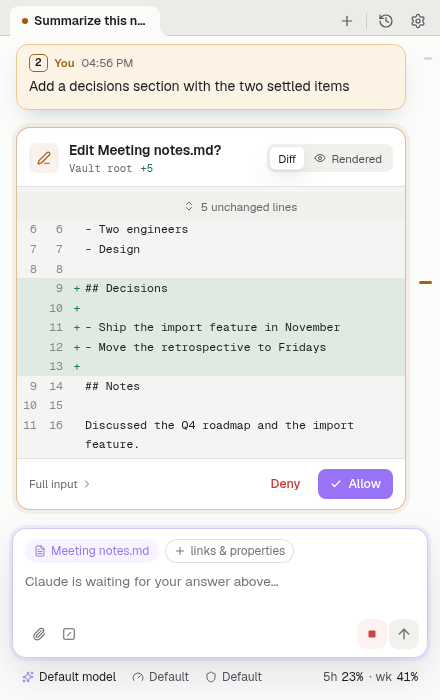
- Edits and commands are cards you answer. What Claude Code would ask about in a terminal is a card here: edits show a diff before they happen, commands show what will run, and the permission mode is one click away. Reading notes needs no card.
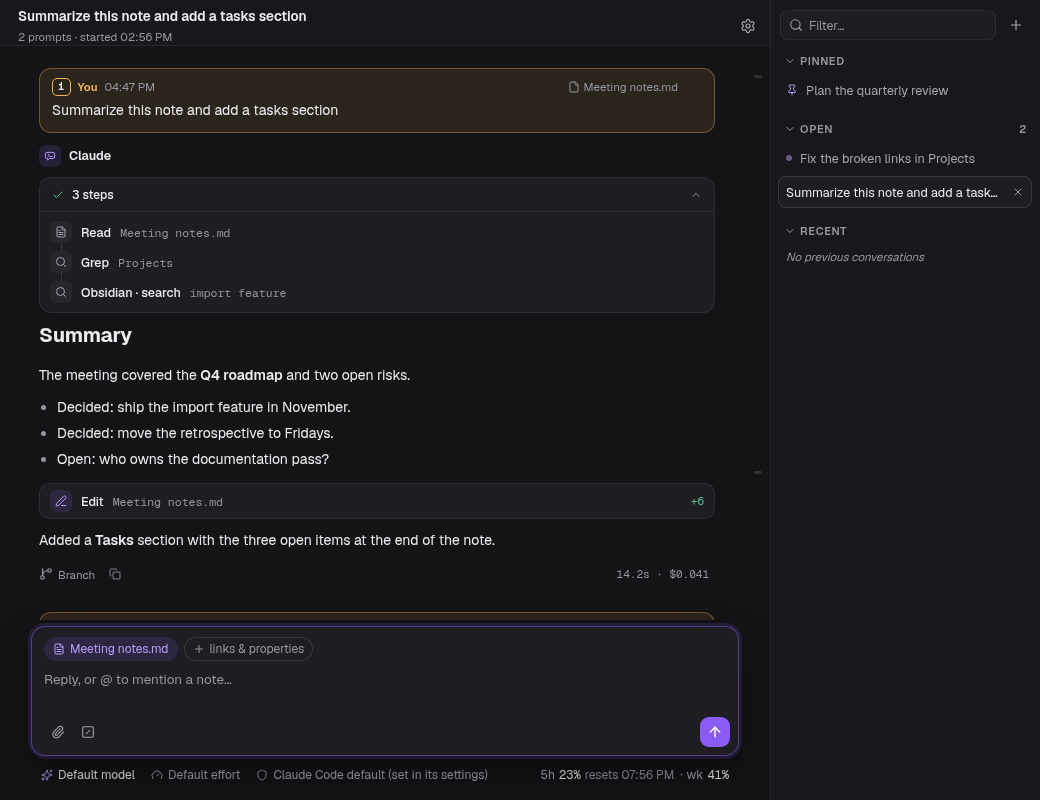
- A conversation you can read later. Prompts are numbered and stay pinned while you scroll, turns show their steps, duration and cost,
/clearkeeps the conversation on screen while it clears Claude's context, and every conversation is saved in the vault's plugin folder. - The plugin itself sends nothing. No network requests, no credentials, no telemetry. Claude Code does the talking, with your account and your plan; what it sends is under Disclosures.
It is one of a dozen such plugins. COMPARISON.md says where it sits among them, with dates, and when you should install another.
Unofficial: not affiliated with, endorsed by, or sponsored by Anthropic, OpenAI or Obsidian. "Claude" and "Claude Code" are trademarks of Anthropic, PBC; "Codex" and "ChatGPT" of OpenAI; "Obsidian" of Dynalist Inc. They appear only to say what the panel works with. Claude Code is the only agent today; Codex is planned for a later release.
What's new in 1.0
1.0.0 is the first release after the panel's redesign: its own light and dark palettes, /clear that keeps the conversation on screen, Claude Code's status commands answered as cards, one status line for model, effort, permissions, context and plan usage, settings on one page, and a round of security hardening. Everything since 0.4.0, with upgrade notes and known issues, is in RELEASE_NOTES.md.
Requirements
- Obsidian desktop 1.8.7 or later. Mobile is not supported.
- Claude Code installed and logged in;
claudemust work in your terminal. The vault tools need 2.1.210 or later; on an older Claude Code they are silently unavailable. - A vault on the local file system.
Sessions run the CLI in its non-interactive stream-JSON mode on your Claude plan or API key; the plugin adds no charge, and the cost shown on a turn is the CLI's own figure. Anthropic may count such sessions differently from terminal use; see its sign-in article for your plan. If ANTHROPIC_API_KEY is set when Obsidian starts, the CLI bills that key instead of your plan.
Install
Community plugins: Settings > Community plugins > Browse, search AI Agent Panel, install, enable.
BRAT: add yoava/obsidian-ai-agent-panel in BRAT.
From source:
git clone https://github.com/yoava/obsidian-ai-agent-panel.git
cd obsidian-ai-agent-panel
npm ci
npm run build
Copy manifest.json, main.js and styles.css to <vault>/.obsidian/plugins/ai-agent-panel/ and enable the plugin.
Verifying a release
main.js, manifest.json and styles.css each carry a build-provenance attestation: gh attestation verify main.js --repo yoava/obsidian-ai-agent-panel (same for the other two files).
Use
- Open the panel from the ribbon icon or AI Agent Panel: Open chat.
- Type a message. The active note is attached as context; click its chip to leave it out.
@mentions files and folders;/lists commands. - Approve or deny the cards that appear.
Other commands: New conversation, Previous conversations, Add selection to chat, Export conversation to Markdown, Focus prompt box, Stop Claude's turn, Next conversation tab, Previous conversation tab. None has a default hotkey; set one under Settings > Hotkeys.
Windows: a native claude.exe or claude.cmd install works as is, except that a claude.cmd path containing &, ^, %, ! or a quote is refused (use the native build). For a WSL install, Detect in settings switches on Run via WSL. Add CLI profile keeps one launch configuration per install.
Features
Conversation
- Streamed replies rendered as Obsidian Markdown; a working line at the end of the conversation while Claude works; thinking behind a toggle; a divider where Claude Code compacts the conversation (summarizes it to free context), with the summary; consecutive tool calls grouped into one card of steps; subagents (helpers Claude starts) as rows that open to their replies; background tasks with Stop.
- A finished turn shows its duration and cost (the CLI's own figure), a copy button, and Restore files and Branch where they apply. Cost and context come from the CLI at no token cost.
- Tabs drawn as Obsidian tabs on top, a side column (Pinned, Open, Recent) or, by default, automatic by panel width. Drag to reorder, pin, rename, filter, resume; a list of every open conversation when they no longer fit.
- Messages sent mid-turn queue or steer the running turn. Esc or Stop interrupts.
- Status line under the composer: model, effort (how long Claude thinks), permissions, CLI profile (one launch configuration per Claude Code install), context window (how much of the conversation Claude still sees) with the prompt cache's estimated time left, and plan usage (your plan's 5-hour and weekly limits).
- Context: active note, selection,
@files and folders, pasted images (8 per message, 4 MB each), optional links and properties, optional active folder. !command, the shell escape, runs a shell command yourself; Claude does not see it unless you add its output to the chat./context,/mcp,/status,/memory,/hooks,/permissions,/skills,/chrome,/sandbox,/cost,/usageand/helprender as report cards at no token cost./clearclears Claude's context in the same conversation: a divider marks the point, the messages above stay, and the next message starts a new Claude Code session. "Undo" on the divider takes the latest clear back until you send another message.- Per-profile Claude in Chrome, Sandbox and extra CLI arguments.
Prompts
- Prompt style: Card (default) or Bubble, in a prompt color: Clear, Sand (default), Stone, Sage, Sea, Mist, Lavender, Rose, Accent or a Custom CSS color. The current turn's prompt stays pinned while you scroll. In Card, prompts are numbered and a jump rail has one tick per prompt.
- A new conversation offers starters: with a note open, Summarize and Find notes that should link here; with text selected, Draft a follow-up from the selection.
- Vault instructions: per-vault system-prompt additions, or a
CLAUDE.mdin the vault root.
Permissions
- In the default mode, every request Claude Code sends for approval shows a card: Allow, Always allow or Deny. Your Claude Code allow rules, and sandboxed commands under
sandbox.autoAllowBashIfSandboxed, run without one. - Edit cards show a word-level diff and a rendered-Markdown view.
- Modes: Claude Code default (your Claude Code settings decide), Ask before acting, Accept edits, Plan (read-only), Auto-approve everything. Bypass permissions is off and hidden until enabled in settings.
AskUserQuestionrenders as a form.
Vault tools
Six tools that run inside Obsidian; they can be switched off:
- Rename or move a note; Obsidian updates links as your link-update setting directs.
- List outgoing links, embeds, backlinks and broken links.
- Search by tag, property, heading or folder.
- Read and set frontmatter properties.
- Read the active note, cursor and selection.
- Open a note.
Each call asks for permission first. Design: DES-006.
History and export
- Every conversation is saved locally and resumes its Claude Code session on a device that ran it, with the same CLI profile. Anywhere else it keeps its messages and starts a fresh session.
- Restore files rewinds the files Claude edited, after listing them, using Claude Code's checkpoints; it also deletes files created since that turn, outright rather than to trash. Branch continues from before a turn.
- Optional Markdown export: folder, note-name pattern and date format are configurable.
Settings
- One page in six sections under a bar of section links, with a search field and a Modified filter; reset one setting, a section or all, with Undo.
- Appearance: theme (Auto, Light or Dark), conversation tabs, tooltips, prompt style and color, pinned prompt, jump rail.
- Default permission mode, plan-usage thresholds, export, CLI profiles stacked under one heading each, with a banner and alert icons when a profile's Claude Code is not found.
- Each setting syncs or stays on this device. CLI paths and profiles, default permission mode, bypass, vault instructions, the shell escape and vault tools are device-only by default.
What runs on your machine
| Capability | Why |
|---|---|
Starts a program (child_process) | Launches your claude CLI over stdin/stdout, and runs the ! commands you type. shell: false with array arguments wherever the platform allows. |
Reads files outside the vault (fs) | Only to find the CLI: standard install locations under your home directory, plus which or where. |
Lists vault files (getFiles, getMarkdownFiles) | @ completion, the transcript-folder suggester, and the vault tools' tag and property search. Reads Obsidian's index, not note bodies. |
| Writes the clipboard | Copy buttons. The plugin never reads the clipboard. |
Disclosures
- Network. The plugin makes no network requests and holds no credentials. The Claude Code process it starts sends your prompts, attached context, anything Claude reads, pasted images and plan-usage lookups to Anthropic. Claude Code's read-only tools run in the vault without a card by default. With your approval Claude Code can also reach other hosts: web fetch, shell commands, and Claude in Chrome with your browser sessions. Remote images and embeds in replies are shown as their address and not fetched. What Anthropic does with the data is governed by your account settings and its terms.
- Account. A Claude Code installation logged in to your own Anthropic account, on a plan that includes Claude Code, or configured with your own API key. The plugin stores no keys or tokens.
- Telemetry. None.
- Files outside the vault. The plugin writes nothing outside the vault. The CLI keeps its settings, sessions and login in
~/.claude. The panel turns on Claude Code's file checkpoints: before an edit the CLI copies the file, files outside the vault included, to~/.claude/file-history/, where Restore files reads it. The copies stay until Claude Code's own cleanup, not until you delete the conversation; settingCLAUDE_CODE_DISABLE_FILE_CHECKPOINTINGturns them off, and Restore files with them. Commands you run with!, and tools Claude runs with your approval, can read and write anywhere your user account can. - Fonts. The panel is set in Geist and Geist Mono, © 2024 The Geist Project Authors, bundled in
main.jsunder the SIL Open Font License 1.1 (notice). Nothing is fetched. - External CLI. The plugin starts your installed
claudeas a child process. It does not bundle, download or patch it. - Data on disk. History (tool inputs in full, results cut to 1500 characters) is stored in
.obsidian/plugins/ai-agent-panel/; exports go in your vault. Both can hold anything said in the chat. Obsidian Sync does not copy the history folder; tools that mirror the whole vault folder do. This device also keeps, in Obsidian's local storage, a record of the Claude Code sessions it ran for each conversation, plus a marker file in the history folder; a conversation that arrives from another device starts a fresh Claude Code session. Uninstalling the plugin deletes its folder. - Defaults. The shell escape and the vault tools are on; the default permission mode is Claude Code default (your Claude Code settings decide).
- Risk. With your approval the agent can rewrite and delete notes and run shell commands. Keep backups. Auto-approve answers requests without a card, except those Claude Code escalates, and Bypass turns the CLI's checks off; both show in red.
More
- Threat model, permission modes and what each skips: docs/current/SECURITY.md. Report a vulnerability as SECURITY.md describes.
- Other agent plugins, dated: docs/current/COMPARISON.md.
- Licensing and trademarks: docs/current/LEGAL.md.
- Contributing: CONTRIBUTING.md; build and test: docs/current/DEVELOPMENT.md. Release history: RELEASE_NOTES.md.
License
MIT.
Optional support: GitHub Sponsors, Buy Me a Coffee. No feature is gated behind it.
For plugin developers
Search results and similarity scores are powered by semantic analysis of your plugin's README. If your plugin isn't appearing for searches you'd expect, try updating your README to clearly describe your plugin's purpose, features, and use cases.