URL Namer
approvedby zfei
Retrieve the HTML title of web pages to name external links.
Obsidian URL Namer
An Obsidian plugin that converts plain URLs in selected text into Markdown links using each page's title.
What's New in v1.1.0
Thanks to mvexel for contributing these improvements:
- Modernized TypeScript code
- Added option to auto-name URLs on paste (enable in Settings -> URL Namer)
- Added offline detection with graceful fallback
- Improved title extraction (supports
og:title,twitter:title) - Updated build tooling
Usage
- Select text that contains one or more plain URLs.
- Run the command
Name the URL links in the selected text.
Notes:
- Process a small batch of URLs at a time for best reliability.
- While the command is running, do not edit or reselect the text.
- URLs that are already inside Markdown links (for example
[label](https://example.com)) are skipped. - Optional: enable Settings -> URL Namer -> Auto-name links on paste to convert pasted plain-text URLs automatically.
- If Obsidian is offline, the plugin keeps links unchanged and shows a single notice.
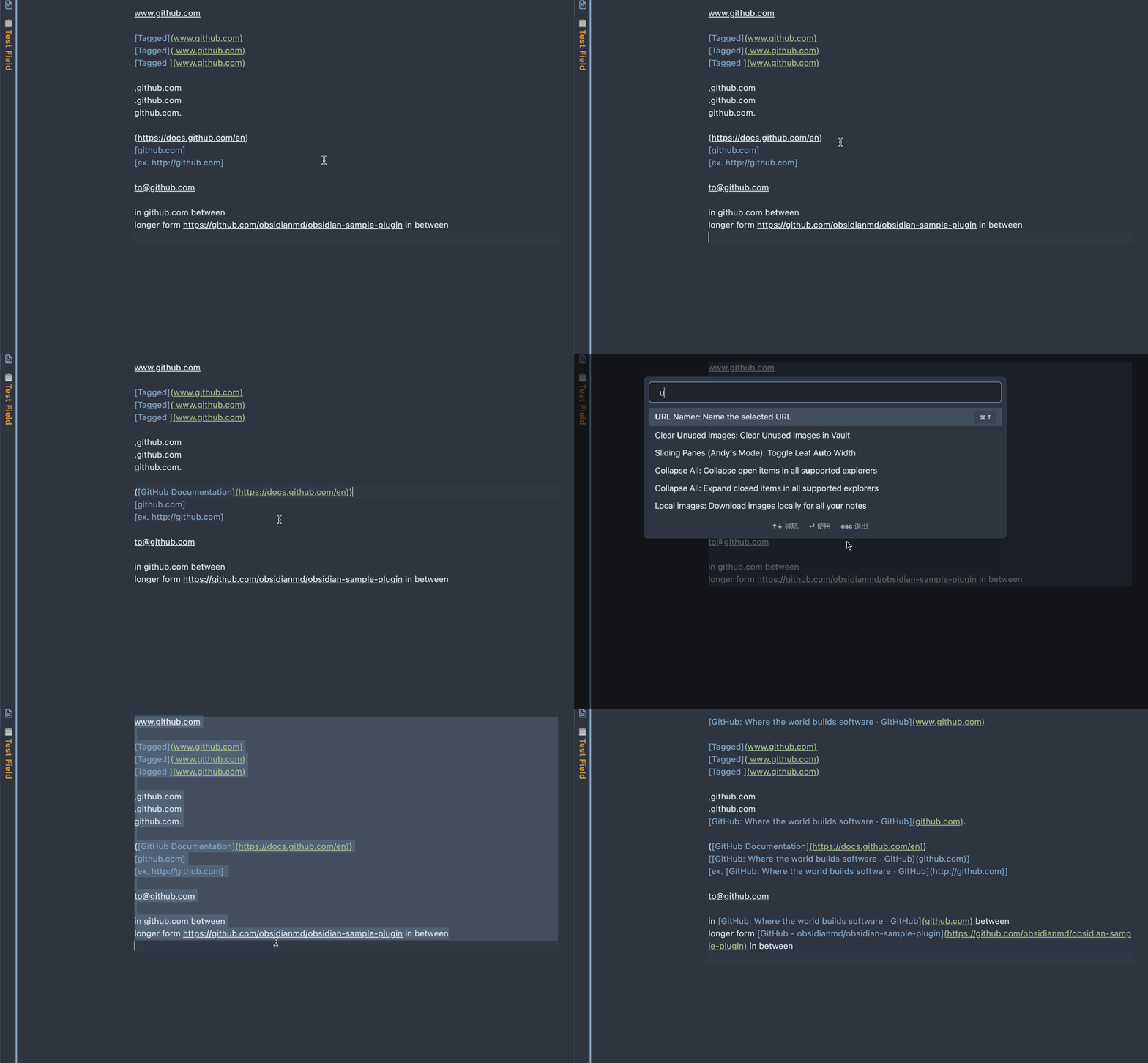
Development
npm install: install dependencies.npm run dev: build in watch mode.npm run build: run TypeScript checks and create a production bundle (main.js).npm run lint: run ESLint.npm run smoke:title -- https://example.com: quickly test title extraction for a URL.
Installation
From source (manual)
- Build the plugin with
npm run build. - Create (or open) your vault plugin folder:
VaultFolder/.obsidian/plugins/url-namer/
Use Vault switcher -> Manage vaults to see the exact local vault path.
- Copy these files into that folder:
main.jsmanifest.jsonstyles.css(if present)
- In Obsidian, open Settings -> Community plugins, refresh, and enable URL Namer.
Customization
The URL-matching regex is currently hard-coded in main.ts as UrlTagger.rawUrlPattern.
Title extraction defaults to the HTML <title> tag. For sites that rely on custom metadata, site-specific parsing may be required (for example the existing WeChat og:title handling).
Known Limitations
- Some websites block requests or return non-HTML content.
- JavaScript-rendered pages may not expose a useful title in the initial response.
- The plugin currently has no user settings for regex or per-site parsing rules.
Future Development
- Move URL regex configuration into plugin settings.
- Add configurable site-specific title extraction rules.
For plugin developers
Search results and similarity scores are powered by semantic analysis of your plugin's README. If your plugin isn't appearing for searches you'd expect, try updating your README to clearly describe your plugin's purpose, features, and use cases.