Time tracker for Wakatime or Wakapi
approvedby kovah
Connect to Wakatime or Wakapi to track the time spent while browsing or writing notes.
Wakatime / Wakapi Plugin for Obsidian
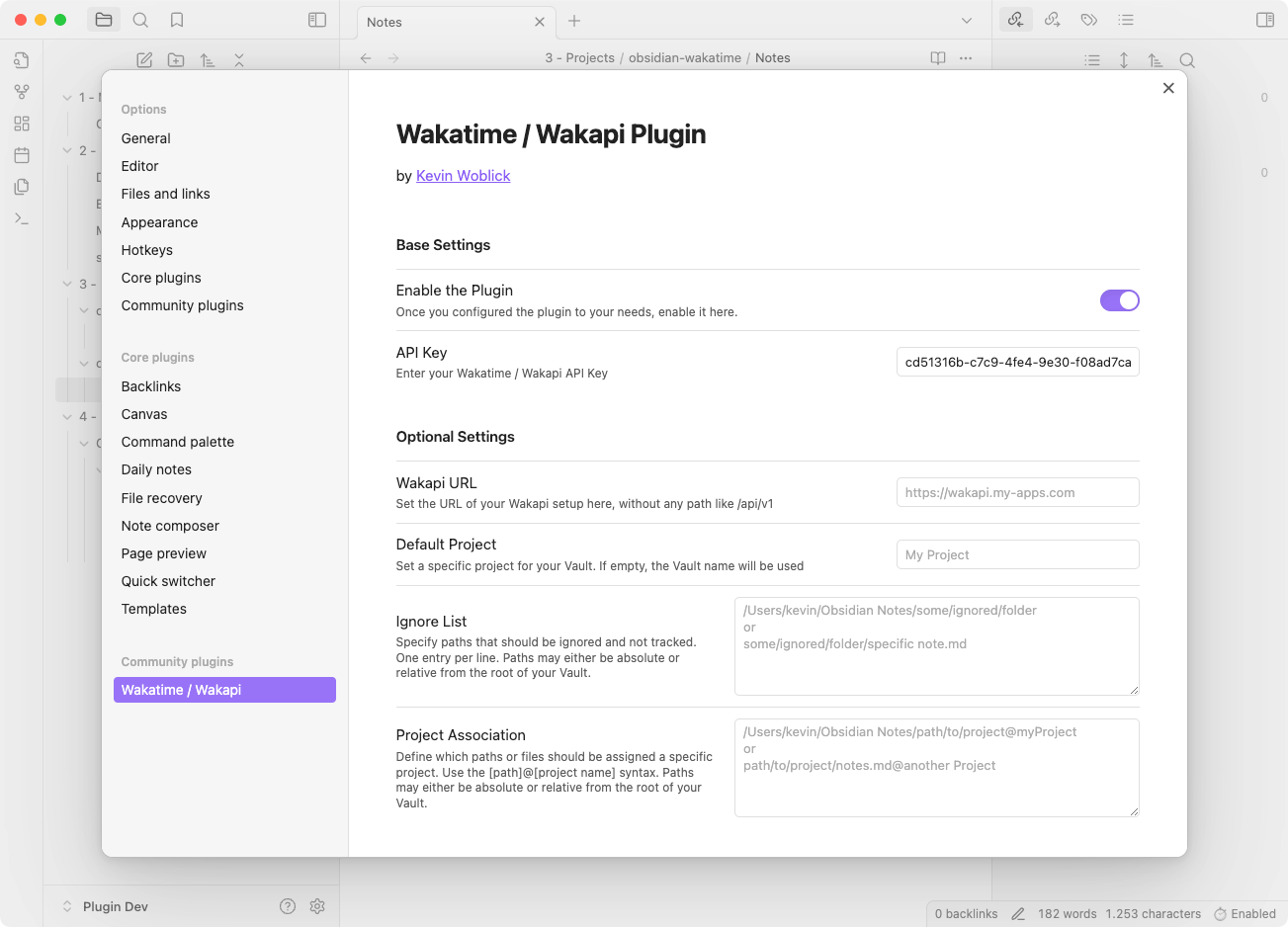
This Obsidian plugin allows you to track your time spent working on notes in Obsidian using WakaTime or Wakapi. This plugin sends heartbeats to the Wakatime API, recording your activity and providing insights into your productivity.
I built this plugin, as the official WakaTime plugin misses some features and makes it easier to set a custom URL within Obsidian, e.g. to your own Wakapi instance.
Features
- Either connect with Wakatime or set a custom URL to your Wakapi instance.
- Set a default project or associate folders or files with different projects.
- Ignore specific files or folders from being tracked with a custom ignore list.
- Not only Markdown files, but also PDFs or images are tracked.
- Markdown is correctly set as a language for corresponding files.
- Lightweight installation without usage of the wakatime-cli client.
Installation
From Community Plugins
- Open Obsidian or the Plugin Marketplace.
- Go to
Settings>Community plugins. - Click on
Browseand search forWakatime / Wakapi. - Click
Installand thenEnable.
From Release Download
- Download the latest release from the GitHub releases page.
- Extract the downloaded zip file.
- Copy the extracted folder to your Obsidian plugins directory:
/.obsidian/plugins/. - Open Obsidian and go to
Settings>Community plugins. Click the reload icon. - Find
Wakatime / Wakapiand clickEnable.
Configuration
- Open Obsidian.
- Go to
Settings>Wakatime / Wakapi.
Base Settings
- Enable the Plugin: Toggle to enable or disable the plugin.
- API Key: Enter your Wakatime or Wakapi API key.
Optional Settings
- Wakapi URL: Set the URL of your Wakapi setup.
- Default Project: Set a specific project for your Vault. If empty, the Vault name will be used.
- Ignore List: Specify paths that should be ignored and not tracked. One entry per line.
- Project Association: Define which paths or files should be assigned a specific project using the
[path]@[project name]syntax.
This project is inspired and in small parts based on the official Wakatime plugin and user contributions.
❤️ Support my work via Patreon, Github Sponsors or Liberapay.
For plugin developers
Search results and similarity scores are powered by semantic analysis of your plugin's README. If your plugin isn't appearing for searches you'd expect, try updating your README to clearly describe your plugin's purpose, features, and use cases.