by khabaroff
Receive webhooks from external services and create notes in your vault via a self-hosted server with real-time delivery.
Obsidian Webhooks Server
Turn any external event into notes in your Obsidian vault — self-hosted, real-time, encrypted.
Receive webhooks from Zapier, Make, n8n, AI agents, or any HTTP client. Events are delivered to the Obsidian plugin instantly via SSE (with polling fallback) and guaranteed exactly-once via ACK system.
Features
- Real-time delivery — Server-Sent Events (SSE) with polling fallback
- Exactly-once guarantee — ACK system prevents duplicates
- Encryption at rest — AES-256-GCM for all event data
- Passwordless auth — email magic links, no passwords
- Self-hosted — full control over your data, no third parties
- Production-ready — rate limiting, auto-cleanup, health checks, CI/CD
Quick Start
git clone https://github.com/khabaroff-studio/obsidian-webhooks-server.git
cd obsidian-webhooks-server

cp .env.example .env
# Edit .env: DATABASE_URL, JWT_SECRET, MAILGUN credentials

docker compose up -d
Verify: curl http://localhost:8081/health
Register & Connect
- Open
http://localhost:8081— enter your email - Click the magic link in your inbox
- Install the Obsidian plugin from your dashboard (or build:
cd plugin && bun install && bun run build) - Enter Client Key and Server URL in plugin settings
Send Your First Webhook
curl -X POST "http://localhost:8081/webhook/wh_YOUR_KEY?path=inbox/test.md" \
  -H "Content-Type: application/json" \
  -d '{"title": "Hello!", "content": "It works.", "tags": ["test"]}'
Check your vault — inbox/test.md should appear.
How It Works
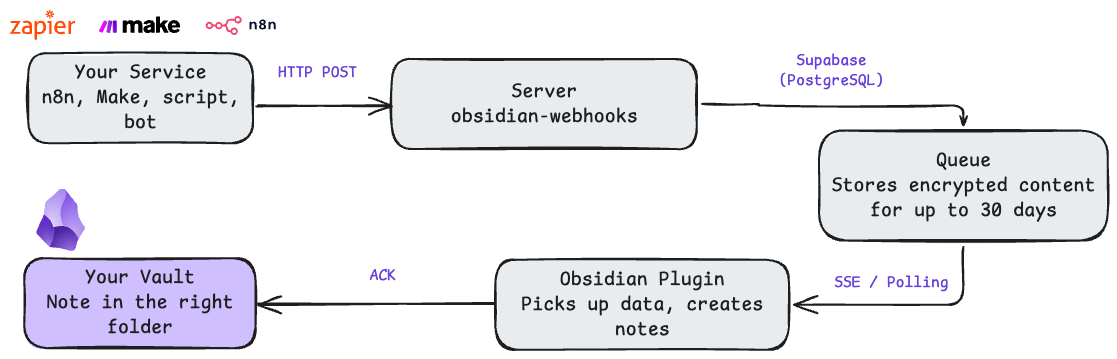
API
| Method | Path | Description |
|---|---|---|
POST | /webhook/{key}?path=file.md | Send event (body: JSON or plain text) |
GET | /events/{client_key} | SSE event stream |
POST | /ack/{client_key}/{event_id} | Acknowledge event |
POST | /auth/register | Register (sends magic link) |
GET | /auth/verify?token=xxx | Verify magic link |
GET | /dashboard | User dashboard |
GET | /health | Health check |
Webhook Body Format
JSON fields are converted to Markdown with YAML frontmatter:
{"title": "Meeting", "tags": ["work"], "source": "n8n", "content": "# Notes\n\n- Item 1"}
---
title: Meeting
tags: ["work"]
source: n8n
---

# Notes

- Item 1
Non-JSON body is written as-is. Max payload: 10 MB.
Use Cases
Email to Notes (Zapier/Make):
POST /webhook/wh_xxx?path=inbox/emails/{{date}}.md
{"title": "{{subject}}", "content": "From: {{sender}}\n\n{{body}}"}
GitHub Issues:
POST /webhook/wh_xxx?path=projects/github-issues.md
{"title": "{{issue.title}}", "content": "{{issue.body}}", "tags": ["github"]}
Custom API:
requests.post(
    "https://your-server/webhook/wh_xxx?path=logs/api.md",
    json={"content": f"Result: {data}", "source": "api"}
)
Tech Stack
| Layer | Technology |
|---|---|
| Server | Go 1.24, Gin |
| Database | PostgreSQL (Supabase) |
| Plugin | TypeScript, Obsidian API |
| Auth | Mailgun (magic links), JWT |
| Encryption | AES-256-GCM |
| Frontend | Tailwind CSS (pre-built) |
| Deploy | Docker, Nginx |
| CI/CD | GitHub Actions |
Configuration
Required
DATABASE_URL=postgres://user:pass@host:5432/db
JWT_SECRET=your-random-secret           # openssl rand -base64 32
ENCRYPTION_KEY=64-char-hex-string       # openssl rand -hex 32
MAILGUN_DOMAIN=mail.yourdomain.com
MAILGUN_API_KEY=your-mailgun-key
MAILGUN_FROM_EMAIL=noreply@yourdomain.com
Admin (first run only)
ADMIN_USERNAME=admin
ADMIN_PASSWORD=your-secure-password
Admin is auto-created on first start. Password can be removed from .env after.
Optional
EVENT_TTL_DAYS=30              # Event retention (default: 30)
ENABLE_AUTO_CLEANUP=true       # Auto-delete expired events
POSTHOG_ENABLED=false          # Analytics (disabled by default)
MAILERLITE_API_KEY=            # Marketing automation (optional)
See .env.example for full reference.
Development
# Run locally
go run main.go

# Tests (72 tests)
make test

# Lint
make lint

# Rebuild Tailwind CSS (after changing HTML templates)
npm install        # first time only
make css

# Test database
docker compose -f docker-compose.test.yml up -d   # port 5433

# Build
make build
Project Structure
main.go                      # Entry point & routes
schema.sql                   # Database schema
tailwind.config.js           # Tailwind CSS config
package.json                 # Node.js deps (Tailwind build only)
src/
├── handlers/                # HTTP handlers (webhook, SSE, ACK, auth, admin)
├── services/                # Business logic (keys, events, auth, email, crypto)
├── middleware/               # Auth, rate limiting, validation, logging
├── models/                  # Data models & constants
├── database/                # Connection pool & test helpers
├── repositories/            # Interfaces & mocks
└── templates/               # HTML pages & email templates
    └── assets/              # CSS, fonts, images
plugin/                      # Obsidian plugin (TypeScript)
├── main.ts                  # Plugin entry point
├── handlers/                # SSE, polling, ACK, file handlers
└── settings_tab.ts          # Settings UI
Security
- Passwordless auth — crypto-secure magic links (32 bytes, one-time, 60-min expiry)
- AES-256-GCM encryption for event data at rest
- Rate limiting — per IP (auth: 3/min) and per webhook key
- JWT sessions with
crypto/randsecret generation - Request body limits via
io.LimitReader(10 MB) - Mutex protection for SSE client map
Acknowledgments
Inspired by obsidian-webhooks by @trashhalo — the original proof of concept for webhook-driven Obsidian workflows.
License
MIT
For plugin developers
Search results and similarity scores are powered by semantic analysis of your plugin's README. If your plugin isn't appearing for searches you'd expect, try updating your README to clearly describe your plugin's purpose, features, and use cases.