WeChat Obsync
approvedby Obsync
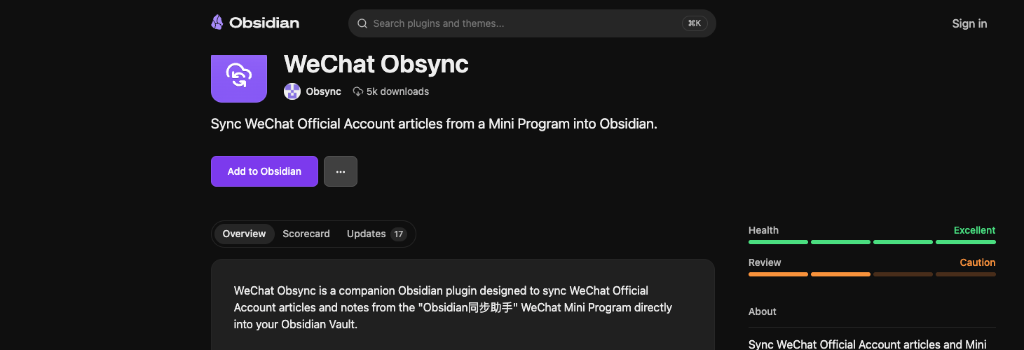
Sync WeChat Official Account articles from a Mini Program into Obsidian. - This plugin has not been manually reviewed by Obsidian staff.
Obsync (WeChat & Web to Obsidian Sync Engine)






English Documentation
Obsync is an open-source, serverless content capture and cross-platform synchronization engine built specifically for the Obsidian knowledge base ecosystem. Officially listed in the Obsidian Community Plugins Directory with 5k+ downloads and an Excellent community health rating.
It empowers knowledge workers, researchers, and writers to seamlessly capture WeChat Official Account articles, web pages, and instant memos on mobile devices, transform them into clean structured Markdown via an edge AST parser, and automatically synchronize them to local Obsidian vaults.
🌟 Key Features
- ⚡ One-Tap Edge Capture: Save WeChat articles, web links, or quick memos directly from mobile devices without keeping Obsidian constantly running.
- 📝 Intelligent AST to Markdown Conversion: Powered by Readability and custom Turndown AST rules to extract pure Markdown with clean frontmatter metadata (title, author, source URL, publish date, tags).
- ☁️ Serverless Edge Architecture: Deployed globally on Cloudflare Workers and Cloudflare D1 (SQLite) with sub-10ms response times, zero server maintenance, and automated cron data pruning.
- 🔄 Multi-Device Synchronization: Robust device acknowledgment protocol supporting multiple Obsidian clients (Desktop, Mobile, iPad) concurrently without duplication or data loss.
- 🛡️ Privacy-First & Local-First: Notes are directly synced into your local Obsidian vault files. Cloud storage functions strictly as a temporary transient sync buffer.
📸 Live Workflow & End-to-End Previews
1. Mobile Content Capture & Sync Queue
The mobile WeChat Mini Program allows users to capture articles via native share menus or clipboard detection, while tracking queue status and sync history in real time.
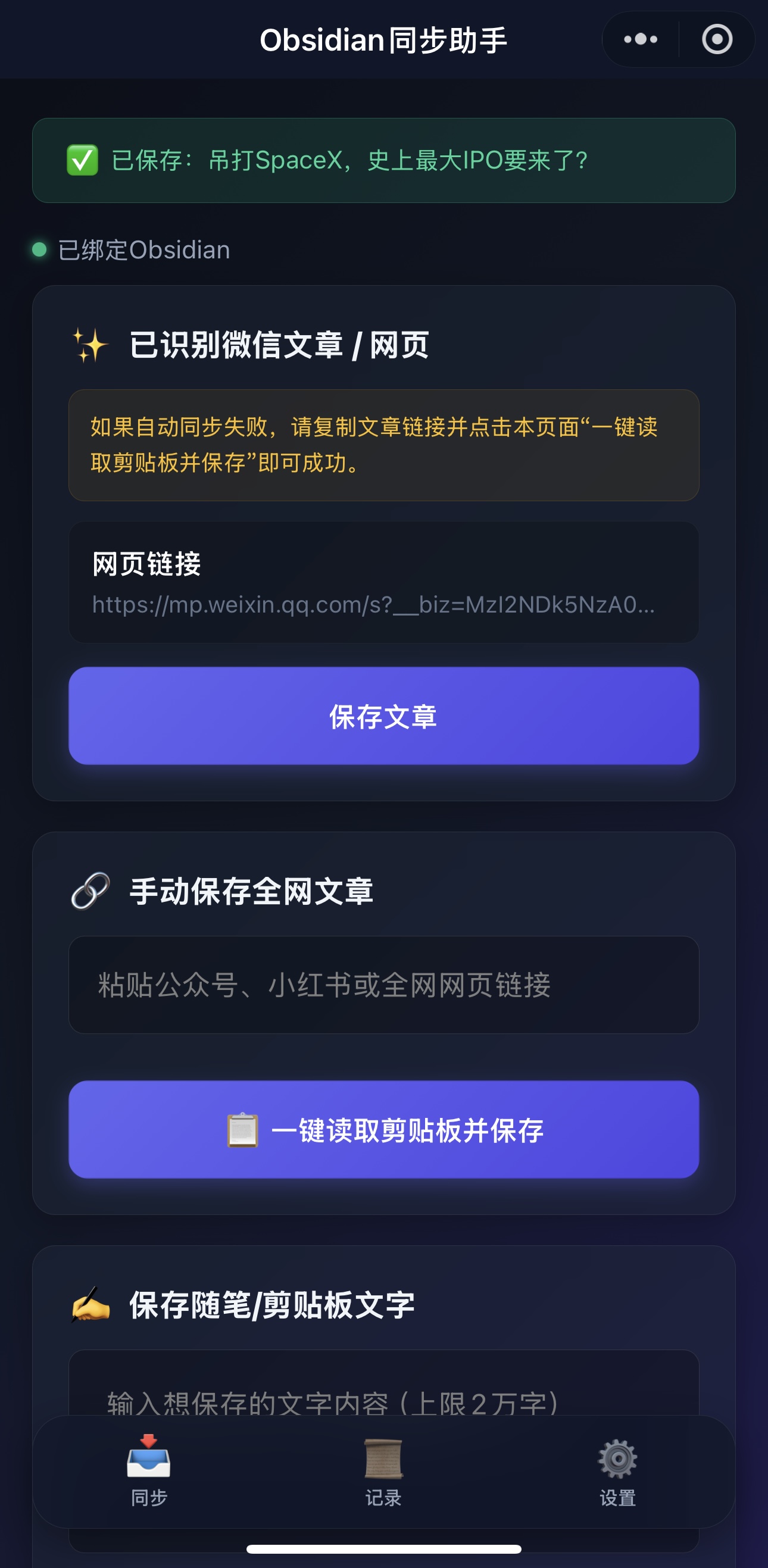
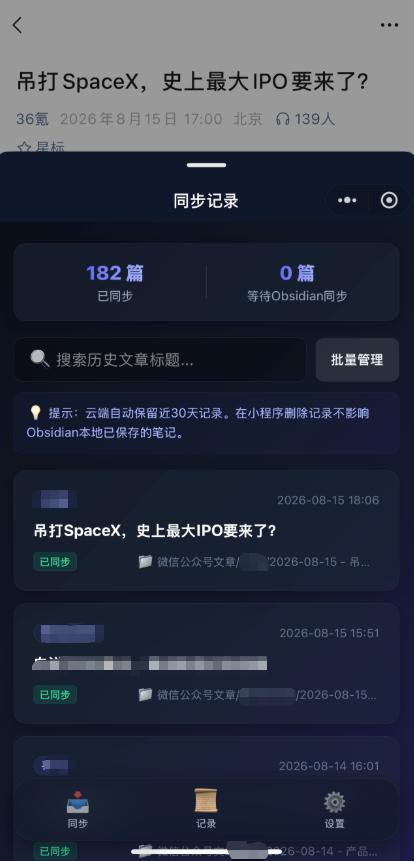
Left: Mobile capture interface recognizing and saving a WeChat article. Right: Sync history showing synced and pending articles.
2. Plugin Settings & Vault Configuration
The desktop Obsidian plugin provides rich configuration options including device binding status, custom target folders, localized image downloading toggles, Frontmatter customization, and manual sync triggers.
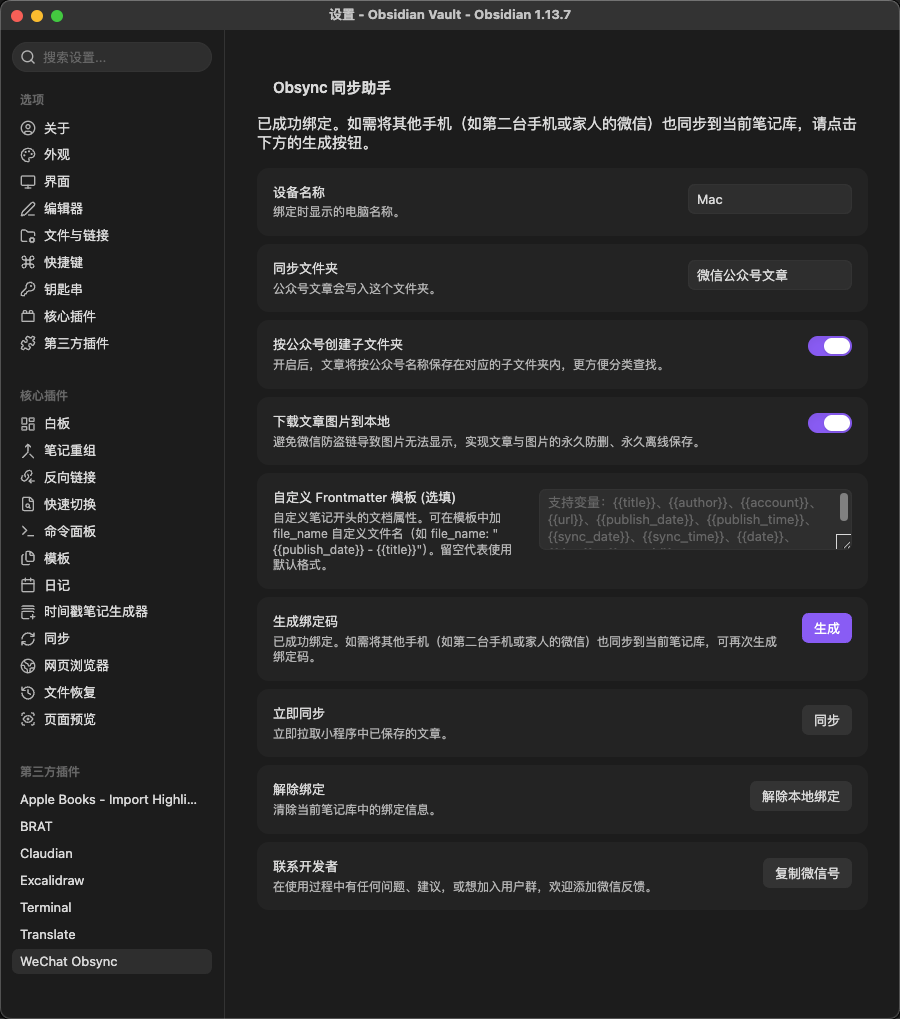
Obsidian settings tab showing active device connection, custom sync folder, attachment options, and sync controls.
3. Synchronized Markdown Result in Obsidian
Captured articles are delivered directly into your local vault as formatted Markdown files, complete with standardized frontmatter metadata and parse_status: ok.
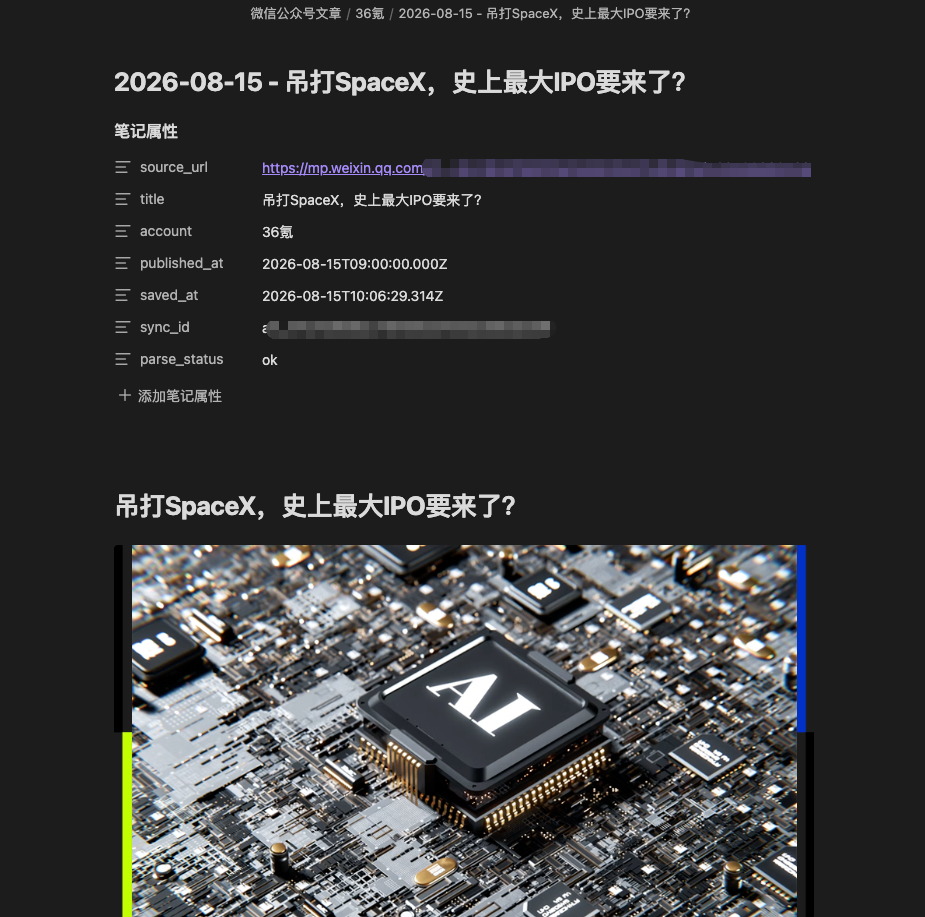
Local Obsidian note view showing synchronized article with clean YAML frontmatter metadata (parse_status: ok, author, source URL, date) and formatted content.
📐 System Architecture
graph TD
    A[📱 Mobile / WeChat Mini Program] -->|1. Submit Article / Memo| B(🌐 Cloudflare Worker Edge API)
    B -->|2. Extract & Parse DOM to Markdown| C[📄 Readability & Turndown Parser]
    C -->|3. Store Structured Markdown| D[(🗄️ Cloudflare D1 Database)]
    E[💻 Obsidian Client / Plugin] -->|4. Pull Pending Articles /v2/sync| B
    B -->|5. Deliver Clean Markdown| E
    E -->|6. Save to Local Vault & Send Ack| B
    F[⏰ Cloudflare Cron Triggers] -->|Daily Auto-Prune Synced Data| D
📂 Project Structure
obsync/
├── main.ts             # Obsidian plugin core lifecycle & sync commands
├── main.js             # Compiled distribution bundle
├── manifest.json       # Obsidian plugin manifest & metadata (v0.4.10)
├── styles.css          # Plugin UI styling & status indicators
├── src/
│   ├── markdown.ts     # Markdown processing, frontmatter & asset handling
│   └── types.ts        # TypeScript data models and API schemas
├── tsconfig.json       # TypeScript compiler configuration
└── package.json        # Plugin dependencies & build scripts
🚀 Installation & Getting Started
Option 1: From Obsidian Community Plugins (Recommended)
- Open Obsidian -> Settings -> Community plugins -> Browse.
- Search for
WeChat Obsync. - Click Install, then Enable.
Option 2: Manual Installation from Release
- Download
main.js,manifest.json, andstyles.cssfrom the Latest Release (v0.4.10). - Inside your Obsidian Vault, navigate to
.obsidian/plugins/and create a folder namedobsync. - Place
main.js,manifest.json, andstyles.cssinto.obsidian/plugins/obsync/. - Reload Obsidian and enable WeChat Obsync in settings.
Option 3: Local Development & Build
- Clone the repository:
git clone https://github.com/less1001/obsync.git cd obsync - Install dependencies:
npm install - Build the plugin:
npm run build
🇨🇳 WeChat Obsync 微信小程序同步助手(中文使用指南)
WeChat Obsync 是一个专门为 Obsidian 设计的微信公众号文章与手机灵感速记同步插件。配合微信小程序 「Obsidian同步助手」,它可以将你在手机微信上浏览到的优质长文、精选动态或突发灵感,一键无缝同步到本地 Obsidian 知识库中。
✨ 核心功能亮点
- 🚀 微信文章一键同步:支持将微信公众号的长图文、视频动态一键同步到你的笔记库,自动转化为排版精美的结构化 Markdown 文件。
- 💡 灵感速记秒级直达:在微信小程序中直接输入文字随笔或速记,自动同步保存到 Obsidian。
- 🖼️ 图片本地化防防盗链:支持自动将文章中的远程图片下载到本地附件文件夹中,彻底告别微信图片防盗链导致的“图裂”问题。
- 📑 智能元数据 Frontmatter:自动提取文章标题、原作者、公众号名称、发布日期、原文链接等元数据,并支持自定义 YAML 模板。
- 🔄 自动防重与多端同步:内置内容哈希防重机制,支持电脑端、手机端、平板等多台设备同时绑定使用。
- 📊 状态栏实时看板:在 Obsidian 底部状态栏实时显示同步状态与最新同步时间。
📥 安装方法
方法一:从 Obsidian 官方社区插件市场安装(推荐)
- 打开 Obsidian,进入 设置 -> 第三方插件 -> 社区插件市场(浏览)。
- 在搜索框输入
WeChat Obsync。 - 点击 安装,安装完成后点击 启用。
方法二:手动离线安装
- 从 GitHub Releases 页面 下载最新的
main.js、manifest.json和styles.css。 - 打开你的 Obsidian 笔记仓库,进入
.obsidian/plugins/目录,新建一个名为obsync的文件夹。 - 将下载的 3 个文件放入该文件夹中。
- 重启 Obsidian,在「第三方插件」中启用
WeChat Obsync。
📖 详细使用教程(如何连接微信小程序)
第一步:在 Obsidian 中获取 6 位绑定码 & 配置插件
- 在 Obsidian 中点击左下角 设置 -> 在左侧找到 WeChat Obsync 插件设置页。
- 在「绑定设备」区域,点击 生成绑定码 按钮,获得 6 位数字绑定码(有效时间为 10 分钟)。
- 可在此页面配置文章保存目录、是否自动下载图片以及自定义 Frontmatter 模板:
插件设置面板:展示绑定状态、保存目录选择、图片本地化下载与即时同步选项。
第二步:在手机微信中确认绑定
- 打开手机微信,搜索并打开小程序 「Obsidian同步助手」。
- 点击小程序底部的 「设置」 标签页。
- 在输入框中填入刚才在电脑上看到的 6 位绑定码,点击 立即绑定。提示绑定成功后即可开始同步。
第三步:手机端保存微信文章与查看记录
- 方式 A(用小程序打开,最便捷):在微信中阅读公众号文章时,点击右上角 「···」 ➔ 选择 「用小程序打开」 ➔ 点击 「Obsidian同步助手」 即可一键保存!
- 方式 B(复制链接保存):复制文章链接,打开小程序首页,点击 「一键读取剪贴板并保存」。
- 方式 C(灵感速记):打开小程序首页的「随笔速记」卡片输入文字保存。
左图:手机端一键识别并成功保存公众号文章。右图:同步历史记录列表与状态查看。
第四步:在 Obsidian 中查看最终生成的笔记
- 打开 Obsidian,插件会自动拉取待同步文章并写入本地仓库。
- 每篇文章均带有完整的 Frontmatter YAML 元数据(包含
parse_status: ok、作者、原链接、发布日期)以及排版优美的 Markdown 正文:
Obsidian 本地笔记效果:清晰规范的 YAML 属性头与排版完备的 Markdown 笔记正文。
☕ 赞助与支持
如果你觉得这个开源插件对你的知识管理工作流有所帮助,欢迎支持作者持续维护与优化:
📄 开源协议 (License)
本项目基于 MIT License 开源协议分发与使用。
For plugin developers
Search results and similarity scores are powered by semantic analysis of your plugin's README. If your plugin isn't appearing for searches you'd expect, try updating your README to clearly describe your plugin's purpose, features, and use cases.