YOLO
approvedby lapis0x0
Smart, snappy, and multilingual AI assistant for your vault.
YOLO
Agent-native AI assistant for Obsidian — chat, write, knowledge base, and orchestration, all in one place.




English | 简体中文 | Italiano | Español
Documentation | Getting started | FAQ

Sponsors

|
Thanks to Sidrune AI for sponsoring this project! Sidrune AI is an API relay that helps individual developers and businesses access and manage the world's leading AI models through one unified API. Multi-route dynamic scheduling keeps requests available, and model performance, response times, and costs are all transparent. With Fable 5.1, Sidrune AI can save you up to about 90% compared with Claude's official API pricing. Sign up through this link to get $3 in free API credit.
Sign up for Sidrune AI → |
What's New
-
1.6- On-device local embedding models and multiple knowledge bases: index without any API key, split and manage knowledge bases independently, and let the Agent auto-pick the right one by name.
- CLI chat: on desktop, drive the Claude Code, Codex, Hermes, Pi, or Grok CLI you're already signed into from the same chat surface.
- The new Learning Mode: turn any topic and reference material into a personalized learning project with structured outlines, knowledge points, flashcards, and an interactive knowledge map, backed by FSRS spaced repetition and Anki
.apkgimport for sustainable long-term review.
-
1.5: Introduces a new Agent runtime that turns AI from Q&A into active collaboration—with full tool calling, MCP, Skills, desktop Bash, subagents, and web search—plus smarter long-session context and memory, refreshed hybrid RAG, focus/PDF awareness, and multi-window chat with background Agents.
Highlights
| A Complete Agent Experience | Use Codex / Claude Code Inside Obsidian | Turn Vault Knowledge into Lasting Mastery |
 | 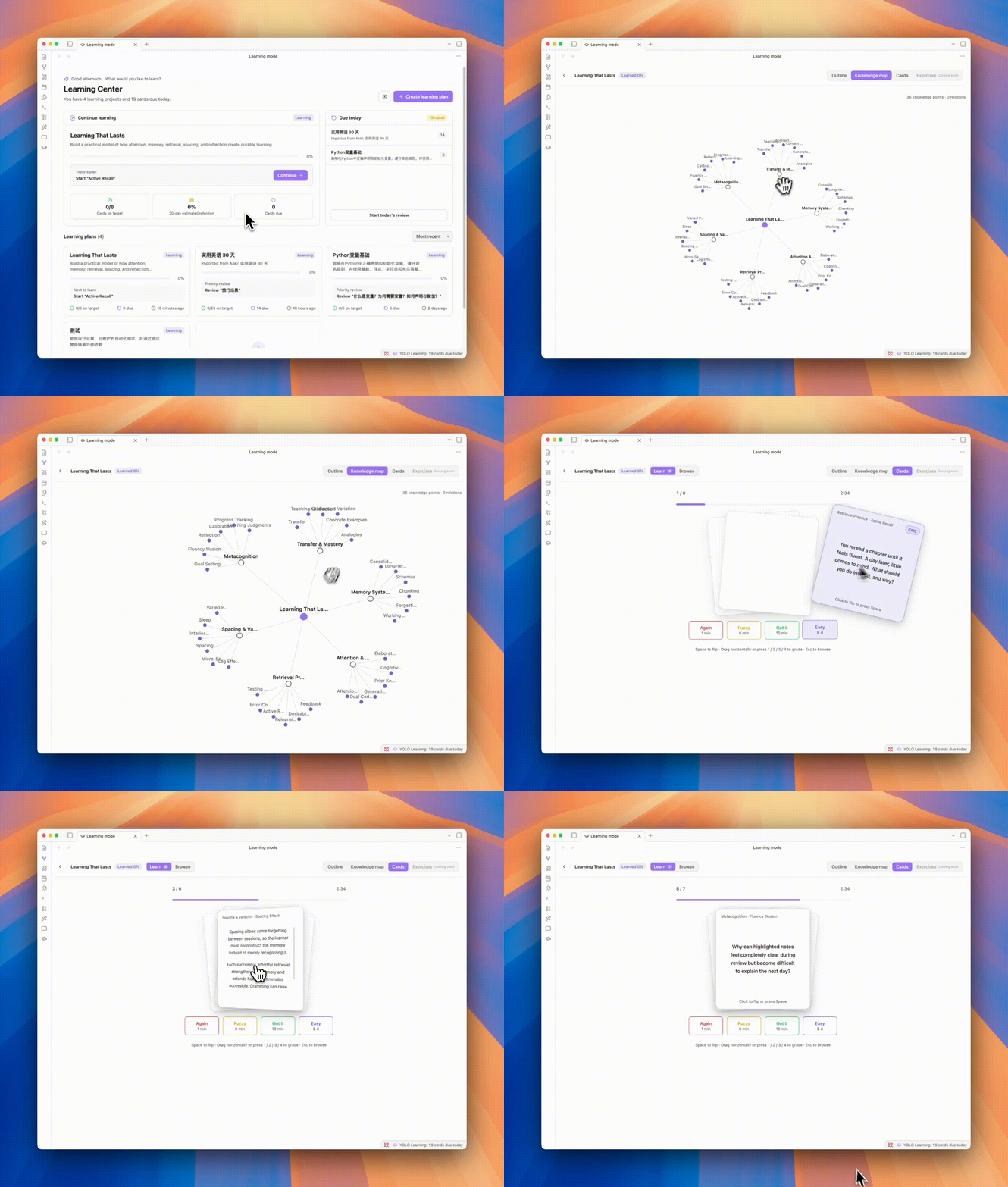 |
| Go beyond answers. YOLO understands and works directly with your Vault, calls tools and MCP servers, and uses Skills to get real work done your way. On desktop, switch in one click to a supported CLI agent you are already signed in to and let it work directly in your Vault. | Turn topics and source material into a personal learning system, then use flashcards and FSRS-powered review to move from saved notes to lasting knowledge. |
| YOLO Whiteboard | A High-Performance Obsidian Canvas | |
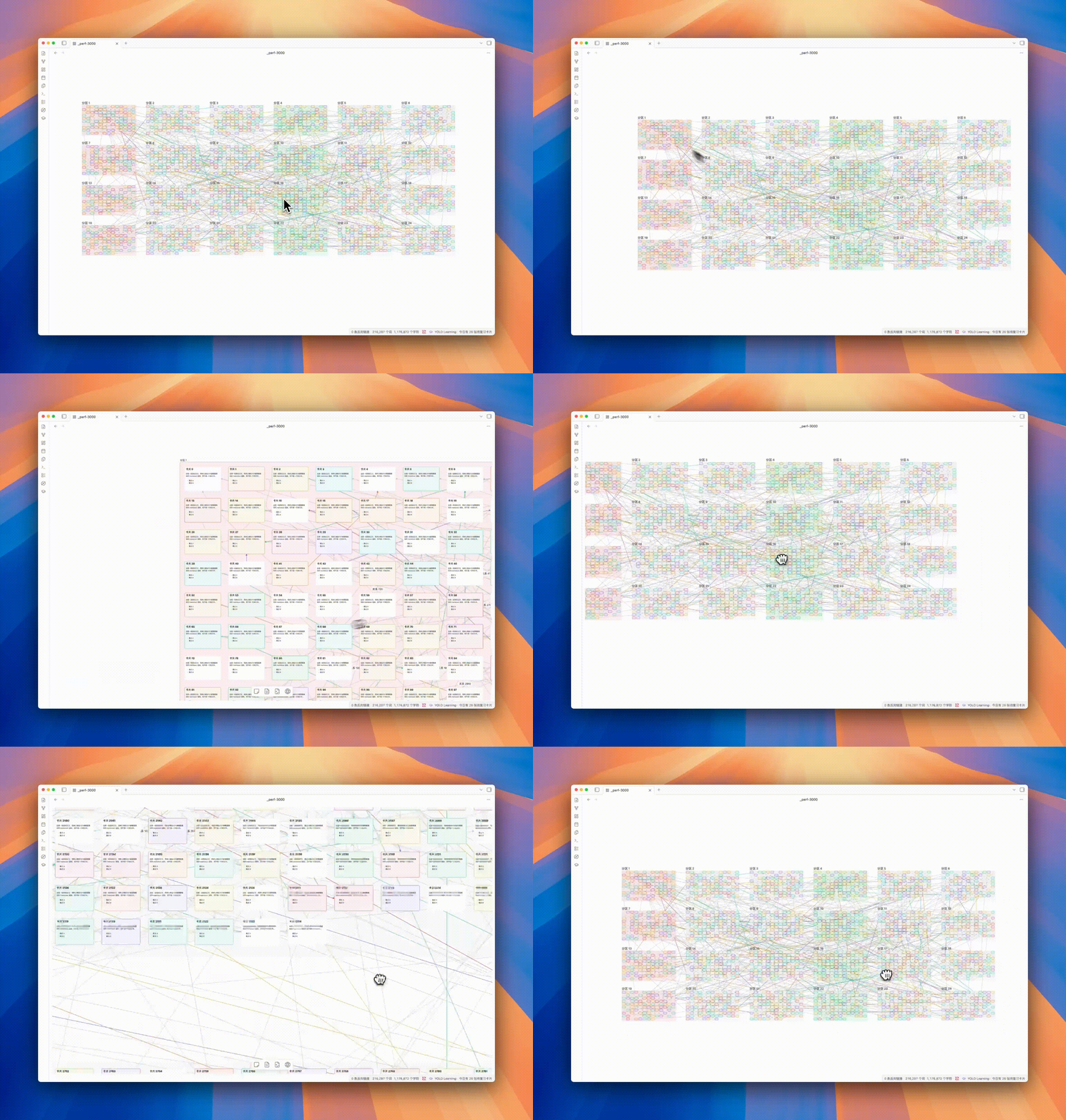 | |
| For now, think of it as an Obsidian Canvas several to dozens of times faster. More features that push the boundaries of AI and human thinking are on the way. | |
Features
Beyond the core capabilities above, YOLO also provides:
| Feature | Description |
|---|---|
| 🖥️ CLI Agent (Desktop) | Reuse a supported locally signed-in CLI agent, including Claude Code, Codex, Hermes, Pi, and Grok, right inside Obsidian |
| 🔌 External Agent Support | Connect MCP clients such as Hermes and OpenClaw to YOLO's Vault search, or delegate tasks to a configured YOLO Agent |
| ⚡ Quick Ask | Ask, edit, and continue writing without leaving the editor |
| 🔎 Vault RAG | Retrieve across your Vault for answers grounded in your own notes |
| 🪟 Multi-Window Chat | Run different tasks and contexts in parallel across independent chat windows |
| 🧠 Memory System | Lets YOLO remember preferences, habits, and long-term context for more consistent conversations |
| 🪡 Cursor Chat | One-click context addition, conversation at your fingertips |
| ⌨️ Tab Completion | Real-time AI-powered completion for smoother, more natural writing |
| 🎛️ Multi-Model Support | OpenAI, Claude, Gemini, DeepSeek and other mainstream models, freely switch |
| 🌍 i18n | Native multi-language support |
Quick Start
- Open Obsidian Settings → Community Plugins → Browse → Search "YOLO"
- Install and enable
- Configure your API key in plugin settings, or use your own ChatGPT OAuth / Gemini OAuth:
- Open the sidebar to start chatting — or try Quick Ask by typing
@in the editor
Installation
Community Plugin Store (Recommended)
See Quick Start above.
Manual Installation
- Go to Releases and download the latest
main.js,manifest.json,styles.css - Create folder:
<vault>/.obsidian/plugins/obsidian-yolo/ - Copy files to that folder, then enable the plugin in Obsidian Settings
[!WARNING] YOLO cannot coexist with Smart Composer. Please disable or uninstall Smart Composer before using YOLO.
Roadmap
- Better and stronger Vault AI search
- Background Agent (long-running task automation)
- Multi-Agent orchestration (via subagents)
- Learning Mode — a dedicated study view
- Annotation Mode — real-time AI annotations and suggestions on notes
- Built-in assistant — a corner-pinned helper for config/agents, with auto-compaction and scheduled tasks
- Better AI whiteboard
- Voice input & meeting notes
Documentation
Full user documentation lives in documentation/en:
| Getting started | Install, configure a working model, run your first chat |
| Models & providers | Connect providers, OAuth sign-in, model parameters |
| Chat | Referencing notes, the three modes, tool approvals, applying edits |
| Sparkle | Quick Ask, Tab completion, selection rewrite |
| Knowledge base | Indexing, multiple knowledge bases, local embedding models |
| Tools & permissions | What it can touch, and how to rein it in |
| Memory · Skills · Agents | Tailoring it to you |
| MCP · CLI agents · Modules | Going further |
| Settings reference · FAQ | Look things up |
Also available in 简体中文 and Italiano.
Feedback & Issues
Hit a bug, something confusing, or have an idea? Open an issue:
🐛 Report a bug · ✨ Request a feature
What helps:
- Bug reports with a clear reproduction (Obsidian version, OS, plugin version, what you did, what happened)
- "I tried X and got Y" reports — UX papercuts, confusing wording, broken docs, outdated translations
- Concrete feature ideas tied to a real use case ("when I do A, I want B because C")
Please search existing issues first to avoid duplicates.
Contributing
All forms of contribution are welcome — bug reports, documentation improvements, feature enhancements.
Please open an issue first to discuss feasibility and implementation for major features.
See CONTRIBUTING.md for the full guide: what we welcome, AI-assisted PR policy, size guidelines, and dev setup.
Acknowledgments
Thanks to Smart Composer for the original work — without them, there would be no YOLO.
Special thanks to Kilo Code for their sponsorship. Kilo is an open-source AI coding assistant platform with 500+ AI models, helping developers build and iterate faster.

Support
If you find YOLO valuable, consider supporting the project:



Development logs are regularly updated on the blog.
License
Star History
For plugin developers
Search results and similarity scores are powered by semantic analysis of your plugin's README. If your plugin isn't appearing for searches you'd expect, try updating your README to clearly describe your plugin's purpose, features, and use cases.