by yunmin
Count with traditional five-stroke Zheng tallies inline in Obsidian and resume them later.
Zheng Tally
A native-feeling 正 tally counter for Obsidian. Count stroke by stroke, keep it inline, and resume anytime.





Press Alt+Z, tap Space to count, Enter to commit. The tally renders as a
real inline 正 built from canonical stroke vectors, and it stays that way:
committed tallies remain vector chips you can click to resume.
Why Zheng Tally
Counting with 正 tallies in Markdown usually means typing characters by hand and losing count halfway. Zheng Tally turns it into a tight loop: start anywhere in a note, watch each stroke appear, commit a portable plain-text tally, and pick it back up later without retyping. The editor shows vectors; the file stays readable text.
How it works
Alt+Zdrops an inline counter at the cursor.- Each
Spaceadds one canonical stroke (一→ … →正), grouped in fives. Enterwrites正正正·3<!--zt:18-->— visible text plus a count marker.- The note keeps showing a vector chip, derived from that text on every load.
- Click the chip (or caret +
Alt+Z) to resume from 18.Escnever writes.
Features
- Canonical 5-stroke
正vectors at every step — never a substituted character - True inline widget with font-matched size and baseline
- Persistent, resumable tally objects with restart-safe recovery
- Readable storage: notes stay meaningful with the plugin off
- Compact large-count preview that never drops the in-progress group
- Conservative hover/count badge for legacy tallies, zero layout shift
Installation
From a release:
- Download
main.jsandmanifest.jsonfrom Releases. - Place both in
<vault>/.obsidian/plugins/zheng-tally/. - Enable the plugin under Settings → Community plugins.
From source:
git clone https://github.com/yunmin311/zheng-tally-obsidian.git
cd zheng-tally-obsidian
npm install
npm run build
Copy dist/main.js, manifest.json, and styles.css into your vault's
plugin folder. (styles.css carries the chip and hover-badge styling.)
Usage
- Open a Markdown note (Obsidian desktop).
Alt+Zto start tally mode at the cursor.Space/+to count up,Backspace/-to count down.Enterto commit a persistent vector chip.- Click the chip (or caret +
Alt+Z) to resume;Esccancels cleanly.
One session at a time; switching leaves ends it without writing.
Keyboard shortcuts
| Key | Action |
|---|---|
Alt+Z | Start, or resume the tally under the caret |
Space / + / NumpadAdd / Shift+= | +1 |
Backspace / - / _ / NumpadSubtract | −1 (floors at 0) |
Enter | Commit (single edit) |
Esc | Cancel, zero document changes |
Ctrl/Alt/Meta chords pass through untouched.
Persistent & resumable tallies
Committed tallies keep rendering as vector chips — same strokes, same metrics,
quieter chrome — across note reopens, plugin reloads, and restarts, derived
purely from the note text. This holds in reading view too (src/reading-tally.ts):
a registerMarkdownPostProcessor pass renders the chip there, because the
editor's CodeMirror decorations never reach Obsidian's MarkdownRenderer.
Reading-view chips are read-only; counting stays an editor action.
Reading rendering verifies ownership against the current Markdown section,
including tallies in the middle of a paragraph. Ordinary unmarked 正 text
and code are left untouched. If another renderer changes the section so its
source cannot be safely matched, the tally remains readable plain text.
Reading rendering never rewrites the note or your settings.
阅读模式按当前区块的源码核对计数归属,也支持段落中间的计数。 没有标记的普通「正」字和代码不受影响。若其他渲染器改变了内容、无法安全核对, 则保留可读的原文字,不猜测计数归属,也不改写笔记或设置。
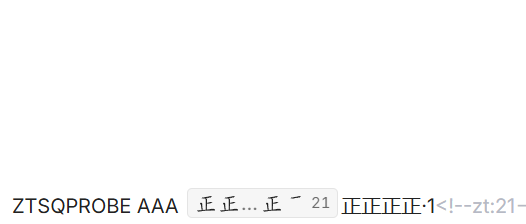
- Resume from the stored total (18 → 19), never from zero.
- Resume +
Enterrewrites text + marker in one edit (正正正正·3<!--zt:23-->). - Resume +
Escchanges nothing; the original chip returns. - Resume to 0 +
Enterremoves the tally and its marker. - Ambiguous caret between two adjacent tallies resumes neither.
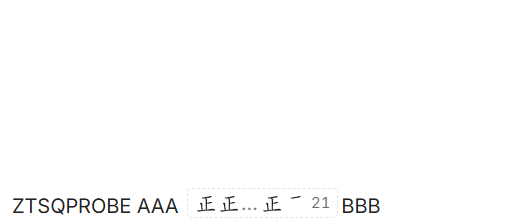
- The persisted total stays hidden until hover or caret reaches the chip, reserving its space so nothing shifts.
Storage format
| Count | Stored |
|---|---|
| 1 | ·1<!--zt:1--> |
| 5 | 正<!--zt:5--> |
| 18 | 正正正·3<!--zt:18--> |
The <!--zt:N--> comment is the integer source of truth and ownership marker.
A marker counts only when it re-serializes to exactly the visible text;
mismatches fail closed. Unmarked legacy tallies (正正正·3) still get a
conservative hover badge and can be resumed once, upgrading on next Enter.
A lone 正 never auto-resumes.
Large-count behavior
Up to four group slots render in full; beyond that the preview compacts while always keeping the most-recent finished group and the live partial slot:
18 -> 正 正 正 [state3]
20 -> 正 正 正 正
21 -> 正 正 … 正 [state1]
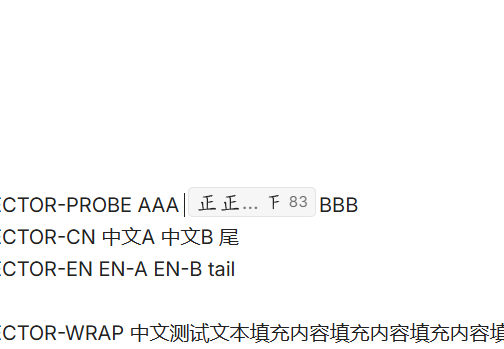
83 -> 正 正 … 正 [state3]
The right-hand total is always exact. Active and persisted chips share one grouping algorithm, so committing never jumps visually.

Architecture
src/zheng-strokes.ts— vendored canonical 5-stroke vectors (Arphic data)src/renderer.ts— native-measured glyph cells + tally chipssrc/cm6-widget.ts— live inlineDecoration.widgetsrc/persistent-tally.ts— marker replace decorations + resume lookupsrc/editor-session.ts— keyboard capture, lifecycle, single-edit commitssrc/tally-hover.ts— legacy parser + transient count badgesrc/tally-state.ts— counts plus stable/marked serializationsrc/editor-host.ts— the single CodeMirror access point
Compatibility / limitations
- Obsidian desktop only; no mobile support.
- One active session at a time; no history or statistics.
- Detection stays conservative by design: in-word matches and lone
正never badge or resume.
Development
npm install       # install dependencies
npm run dev       # watch mode build
npm run build     # production build (dist/main.js + dist/manifest.json)
npm test          # 143 passing
npm run lint      # eslint
npm run typecheck # tsc --noEmit
License & data attribution
- Plugin source code: MIT — see LICENSE.
- Canonical
正stroke vectors: Arphic Public License, not MIT — via Hanzi Writer Data / Make Me a Hanzi, extracted from Arphic Technology fonts. Full text: vendor/ARPHICPL.txt, notes: vendor/README.md.
For plugin developers
Search results and similarity scores are powered by semantic analysis of your plugin's README. If your plugin isn't appearing for searches you'd expect, try updating your README to clearly describe your plugin's purpose, features, and use cases.