Zotero Vault Sync
approvedby Kerekes Stefan
Mirror your Zotero library into a git-versioned folder in the vault — one JSON file per item plus per-PDF annotations — synced incrementally via Zotero's local HTTP API, with regenerable notes and Dataview views that work with Zotero closed. - This plugin has not been manually reviewed by Obsidian staff.
Zotero Vault Sync
A different kind of Zotero plugin for Obsidian.
Instead of "importing" templated markdown snapshots on demand (static, template bound, pull-on-demand — like other Zotero plugins), Zotero Vault Sync syncs a database: it keeps a hidden folder inside your vault that is a live, complete, git-versionable mirror of your Zotero library. Every other feature — search, generated "note views", annotations, metadata — reads from that mirror, so everything is instant and keeps working with Zotero closed.
This is the difference between an import plugin and a Zotero client inside Obsidian.
Screenshots
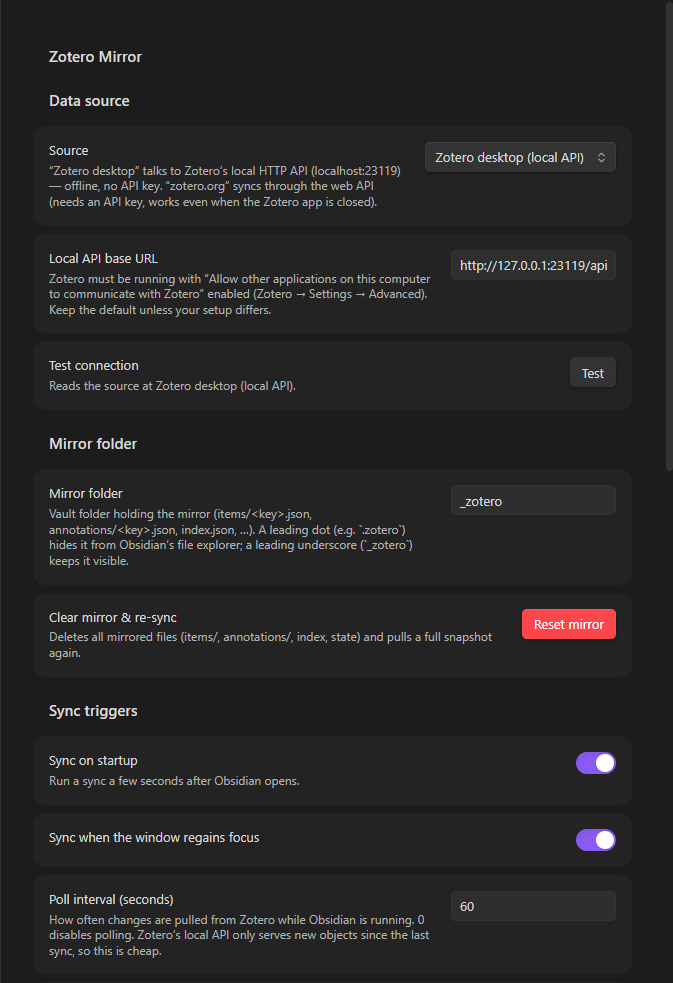
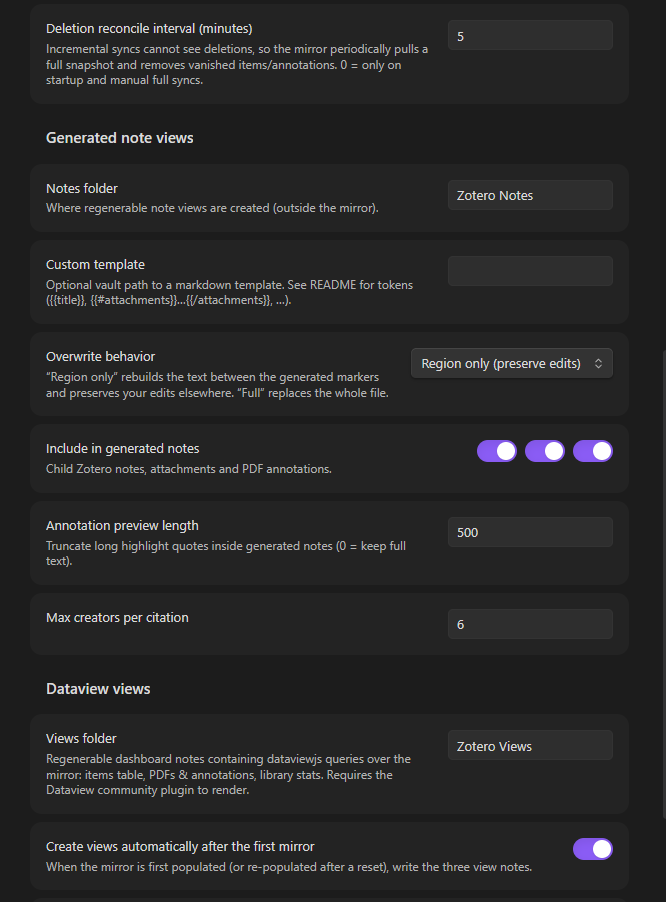
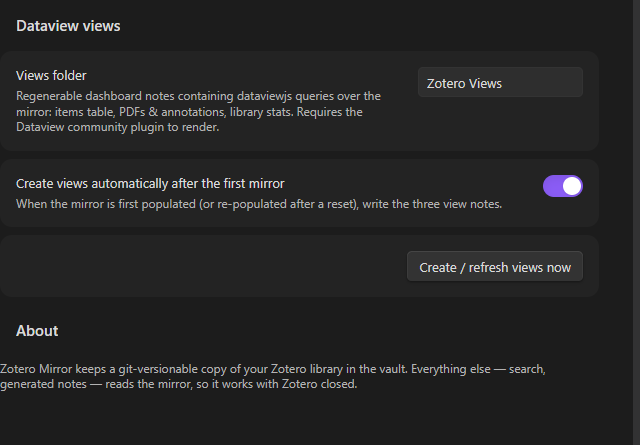
Everything — connection to Zotero, mirror folder, sync triggers, generated notes and Dataview dashboards — is configured from this single settings tab.
Why a mirror?
| Import plugins (template snapshots) | Zotero Vault Sync | |
|---|---|---|
| Data model | One markdown note per item, created on demand | Full library DB: one JSON file per Zotero item + per-PDF annotation files |
| Sync | Pull when you ask | Incremental, automatic whenever Zotero changes |
| Zotero closed | New snapshots impossible | Mirror already in the vault — everything else reads it offline |
| Git | Duplicated, drifted copies | The mirror is the source of truth; every change is a small, clean diff |
| "Notes" | Static snapshots that age | Generated views over the mirror, regenerable any time |
How it works
Zotero ships a local HTTP API (Settings → Advanced → "Allow other
applications on this computer to communicate with Zotero") that serves your
local database over http://localhost:23119/api/ — offline, no API key. Zotero
Mirror talks to it using the same incremental protocol Zotero's own clients use:
- Every poll fetches only objects newer than the last seen library version
(
?since=<version>, cheap), then updates exactly the changed item files. - Deletion reconcile (on a cadence, at startup, and on full syncs) pulls a complete snapshot and removes mirrored files whose items vanished upstream — deletions are invisible to incremental syncs.
- PDF annotations are normal Zotero items (type
annotation, children of attachment items), so they arrive through the same incremental path and are aggregated into one file per PDF.
The plugin needs Zotero 7+ and only runs while Obsidian is open (like every Obsidian plugin): edits you make in Zotero are picked up on the next poll (default every 60 s), on window focus, and on Obsidian startup. Close Obsidian while changing Zotero → changes sync the next time Obsidian opens. A web-API source (zotero.org, needs an API key) is also available for syncing while the Zotero app is closed.
The mirror folder
Everything lives in one folder (default _zotero/, configurable — use a
leading dot such as .zotero if you want Obsidian's file explorer to hide it):
_zotero/
├── README.md                 # created once, explains the folder
├── .state.json               # sync cursor (library version, timestamps) — only written on changes
├── collections.json          # collections (key, name, parent)
├── index.json                # regenerable search index: one lightweight summary per item
├── notes.json                # registry of generated note views (key → note path)
├── items/<itemKey>.json      # ONE FILE PER ITEM — the core of the mirror
│                             # (bibliographic items, notes, attachments AND annotations)
└── annotations/<attachmentKey>.json   # per-PDF aggregated annotation files
items/<key>.json stores the raw Zotero API record (key, version, meta,
data with creators/tags/collections/relations, …). annotations/<key>.json
is derived (one entry per highlight with color, page label, text, comment,
position) and regenerated whenever the PDF or its highlights change. index.json
and notes.json are derived too — you can delete them and they get rebuilt.
Version the folder with git and you get full history of your Zotero library (metadata, notes, highlights) in your vault, diffable and greppable, no Zotero needed.
Reading the mirror from other tools
Everything is plain JSON, versioned and readable with Zotero closed:
_zotero/index.json— regenerable index: one lightweight summary per item (key,version,itemType,title,creators(string),year,date,parentItem,collections(keys),tags)._zotero/items/<key>.json— full API record of one item:dataholds creators/title/abstractNote/tags/collections/relations/DOI/url/…,metathe Zotero-side summary (e.g.creatorSummary), plus the objectversion._zotero/annotations/<attachmentKey>.json— one per PDF attachment:filename,contentType,annotations[]withpageLabel,pageIndex,color/colorName,text,comment,position._zotero/collections.json—[{key, name, parentCollection, version}].
Dataview, Templater, scripts or your own plugins can load any of these files and render the data as tables, cards, counts, graphs, … — that is what "a Zotero client inside Obsidian" means: your vault data, queryable like any other.
Folder-name note: keep the underscore spelling (
_zotero, the default) for Dataview/tooling queries. Obsidian treats folders starting with a dot as hidden and does not index their files, so a leading-dot folder is only for people who never query the mirror and just want it out of the way.
Dataview API note (verified against Dataview's source): dataviewjs has no
dv.io.loadJson, anddv.io.loadonly reads files Obsidian has indexed — unreliable for mirror files. Dataview does exposedv.app, so read mirror JSON straight from disk:async function readJson(p) { try { return JSON.parse(await dv.app.vault.adapter.read(p)); } catch { return null; } } const idx = await readJson("_zotero/index.json"); // works for any file
Ready-made Dataview views (generated dashboards)
The easiest way to "build views with Dataview": let the plugin write them. After the first completed mirror (or after a reset) it creates three dashboard notes — or run "Zotero Vault Sync: Create/refresh Dataview views" any time:
View note (in Zotero Views/) | Renders |
|---|---|
Zotero Items.md | every top-level item: clickable title (opens its generated note), creators, year, type, collections, mirror-JSON link |
Zotero PDFs & Annotations.md | every PDF with each highlight: page, color, text, comment |
Zotero Library Stats.md | mirror snapshot, items by type, most-used tags |
The notes contain dataviewjs queries that read the mirror JSON live (they use
dv.app.vault.adapter.read, so they work even though Dataview itself doesn't
index the mirror files). They are regenerable: refreshes overwrite a file only
while it still carries its <!-- zotero-views:generated --> marker — delete the
marker to protect a customized copy. You can embed a dashboard anywhere with
![[Zotero Items]]. The generated queries also link each item to its note view
via the notes.json registry, so the views double as an index of your Zotero
notes.
If you prefer hand-rolled blocks, here are equivalent minimal recipes (all use
the readJson helper above, which also works for old Dataview builds — no
loadJson needed; index.json, collections.json and annotations/*.json
are regenerable, so experiments are safe):
Items overview (one file read)
const MIRROR = "_zotero"; // ← your mirror folder from the settings
async function readJson(p) { try { return JSON.parse(await dv.app.vault.adapter.read(p)); } catch { return null; } }
const idx = await readJson(MIRROR + "/index.json");
if (!idx) dv.paragraph("Mirror not synced yet — run “Zotero Vault Sync: Sync now”.");
else {
  const coll = {};
  for (const c of (await readJson(MIRROR + "/collections.json")) ?? []) coll[c.key] = c.name;
  const tops = idx.items.filter(i => !i.parentItem && i.itemType !== "attachment");
  dv.table(["Title", "Creators", "Year", "Type", "Collections"],
    tops.map(i => [i.title ?? "(untitled)", i.creators ?? "", i.year ?? "",
                   i.itemType, i.collections.map(k => coll[k] ?? k).join(", ")]));
}
PDFs and their annotations (one read per attachment)
const MIRROR = "_zotero";
async function readJson(p) { try { return JSON.parse(await dv.app.vault.adapter.read(p)); } catch { return null; } }
const idx = await readJson(MIRROR + "/index.json");
const rows = [];
for (const pdf of (idx?.items ?? []).filter(i => i.itemType === "attachment")) {
  const list = (await readJson(MIRROR + "/annotations/" + pdf.key + ".json"))?.annotations ?? [];
  if (!list.length) rows.push([pdf.title ?? pdf.key, "", "", "— no highlights —", ""]);
  for (const a of list) rows.push([pdf.title ?? pdf.key, a.pageLabel ?? "", a.colorName ?? a.color ?? "", a.text, a.comment ?? ""]);
}
dv.table(["PDF", "Page", "Color", "Highlight", "Comment"], rows);
Full detail for one item, from the current note's frontmatter
const MIRROR = "_zotero";
async function readJson(p) { try { return JSON.parse(await dv.app.vault.adapter.read(p)); } catch { return null; } }
const key = dv.current().zotero-key;
if (!key) dv.paragraph("This note has no `zotero-key`.");
else {
  const rec = await readJson(MIRROR + "/items/" + key + ".json");
  dv.header(3, rec.data.title ?? key);
  dv.list([
    (rec.data.creators ?? []).map(c => c.name ?? ((c.firstName ?? "") + " " + (c.lastName ?? "")).trim()).filter(Boolean).join("; "),
    "Type: " + rec.data.itemType + " · Year: " + (rec.data.date ?? ""),
    rec.data.abstractNote ? "**Abstract:** " + rec.data.abstractNote.replace(/<[^>]+>/g, "") : null,
    "Tags: " + (rec.data.tags ?? []).map(t => t.tag ?? t).join(", "),
  ].filter(Boolean));
}
Need the data as prose, not a table? Use the plugin's generated note views: "Open generated note for a Zotero item" renders any item (metadata + child notes + per-PDF highlights) from the same mirror files, and "Open a Zotero item's mirror JSON file" opens the raw record in the editor.
Commands
| Command | What it does |
|---|---|
| Sync now | Incremental pull of everything changed since last sync |
| Full sync & reconcile mirror | Re-pulls everything and removes mirrored files deleted in Zotero |
| Search Zotero items and insert reference card | Fuzzy search over the mirror → inserts a reference blockquote into the active note |
| Open generated note for a Zotero item | Picks an item → opens its note view, generating it first if needed |
| Open a Zotero item in the Zotero app | Picks an item → zotero:// URI |
| Open a Zotero item's mirror JSON file | Browse the raw mirrored record |
| Refresh note for the Zotero item in the active document | Rebuilds the generated view for the note you're reading (zotero-key in frontmatter) |
| Refresh all generated Zotero notes from the mirror | Rebuilds every generated note that still has its markers |
| Create generated notes for every top-level item | One note view per bibliographic item (existing ones refreshed) |
| Create/refresh Dataview views | Writes the three Dataview dashboard notes (Items, PDFs & annotations, Stats) into the views folder |
The ribbon button and the status bar item ("Zotero: synced … (N)") trigger a sync; right-click the status bar for a menu. The status bar shows mirror size and the last sync time, and turns red/grey when Zotero is unreachable or misconfigured.
Syncs always confirm completion. Anything you trigger (command, ribbon, status bar) shows a notice even when nothing changed — e.g. "Up to date. Mirror: 98 items (45 PDFs, 0 annotations)." Automatic syncs (startup, poll, window focus) are quieter: they announce the first completed mirror, applied changes, and errors, so you never wonder whether the database was mirrored.
Generated note views
Notes are pure views over the mirror: rendering reads only _zotero/items,
never Zotero, so regeneration works offline and after any sync. A generated
note looks like:
---
zotero-key: ABC123DE
zotero-vault-sync: true
zotero-item-type: journalArticle
title: "…"
updated: "2026-…"
tags:
  - "methods"
---

[ your own preamble — survives regeneration ]

<!-- zotero-vault-sync:start -->
# Title
> [!info]- Item
> **Author, A.** · journalArticle, *Journal*…
…
<!-- zotero-vault-sync:end -->

[ your own notes after the block — also survives ]
Default behavior (Overwrite: region only) rebuilds only the text between
the markers and updates only the frontmatter keys the plugin manages
(zotero-key, zotero-vault-sync, zotero-item-type, title, updated, tags).
Everything else is yours. "Full" overwrite mode exists for people who treat the
notes as 100% generated.
Custom templates
Set Settings → Generated note views → Custom template to any markdown file in the vault. The template renders the body only (frontmatter is managed).
| Token | Meaning |
|---|---|
{{key}}, {{title}}, {{year}}, {{date}} | item key, title, year, date |
{{creators}}, {{creatorList}}, {{creatorsShort}} | creators (Last, First / First Last / truncated) |
{{itemTypeLabel}}, {{publicationTitle}}, {{abstract}} | type, venue, abstract (HTML stripped) |
{{doi}}, {{url}}, {{collections}}, {{tags}}, {{citation}} | fields, collection names, tags, offline citation |
{{zoteroLink}}, {{mirrorLink}} | "Open in Zotero" and mirror-JSON links |
{{#metaRows}}| {{field}} | {{value}} |{{/metaRows}} | metadata table rows |
{{#childNotes}}…{{/childNotes}} | child Zotero notes ({{content}}) |
{{#attachments}}…{{/attachments}} | per attachment ({{filename}}, {{contentType}}, {{attachmentLink}}) |
{{#annotations}}…{{/annotations}} | inside attachments: highlights ({{colorName}}, {{colorEmoji}}, {{pageLabel}}, {{text}}, {{comment}}) |
{{?list}}…{{/list}} | render the block once if the list is non-empty |
Settings
- Source — Zotero desktop (local API) or zotero.org (Web API); local base URL / user id / API key, plus a Test connection button.
- Mirror folder — where the mirror lives; Reset mirror wipes it and does a full re-sync (generated notes are never touched).
- Sync triggers — on startup, on window focus, poll interval (0 = off), deletion-reconcile interval.
- Generated note views — notes folder, custom template, overwrite mode, what to include (child notes / attachments / annotations), annotation preview length, creators per citation.
- Dataview views — folder for the generated dashboard notes, auto-create them after the first mirror, and a Create/refresh views now button (requires the Dataview community plugin).
Install (development build)
npm install && npm run buildin this folder.- Copy the folder (or symlink it) into
<vault>/.obsidian/plugins/zotero-vault-sync/and enable Zotero Vault Sync in Settings → Community plugins. - In Zotero: Settings → Advanced → tick "Allow other applications on this computer to communicate with Zotero" (Zotero 7+), then run Zotero Vault Sync: Sync now.
Troubleshooting
- "Test connection" fails with ERR_EMPTY_RESPONSE / "requestUrl failed" —
Zotero's local server is a minimal HTTP/1.0 server that closes connections
carrying browser-style headers (e.g.
Accept-Encoding: gzip, deflate, br, browserUser-Agent,Origin,Sec-Fetch-*), which is exactly what Obsidian'srequestUrl(Electron/Chromium) sends. Zotero Vault Sync therefore talks to the local API with a plain Nodehttprequest and a minimal header set, and only falls back torequestUrl(used for the HTTPS web API). If the test still fails: Zotero silently switches to a different port when 23119 is occupied, or the Allow other applications… preference is off. - "Zotero refused the request (403)" — enable the Allow other applications… preference in Zotero, then Test connection.
- Status bar shows "Zotero: offline" — Zotero isn't running or the local API preference is off. The mirror still serves search/notes.
- Changes only appear while Obsidian is open — that's inherent to Obsidian plugins; edits sync on the next poll/focus/startup.
- Items in the Zotero Trash aren't mirrored — the API excludes trashed items; this mirrors your library.
- Never-synced/offline-only Zotero items (version 0) — full snapshots and reconciles cover these (version maps list every key).
- The mirror folder looks stale in the file explorer — mirror files are written straight to disk (fast, no note indexing). Restart Obsidian or collapse/reopen the folder if needed; git and other tools always see the current files. A leading-dot folder avoids explorer clutter entirely.
- Generated note has no markers / won't refresh — marker-based refresh is intentionally conservative: it never silently deletes your edits. Switch overwrite to full to replace such a file.
Roadmap
- Group libraries, better-bibtex citekeys, live citation rendering (CSL via Zotero's formatter, cached in the mirror), watch-the-Zotero-log event sync, mobile web-API sync, YAML storage option, mirror browser pane.
License
MIT © 2026 Kerekes Stefan
For plugin developers
Search results and similarity scores are powered by semantic analysis of your plugin's README. If your plugin isn't appearing for searches you'd expect, try updating your README to clearly describe your plugin's purpose, features, and use cases.