by Kaz Namba
Run Claude Code, Codex, and OpenCode sessions as terminal tabs, with a session list, usage analytics, and a daemon that keeps sessions running.
English | 日本語
Agent Sessions
An Obsidian plugin that runs Claude Code, Codex and OpenCode in terminal tabs next to your notes. One list shows every session's state and cost, plus each agent's usage limits.
Desktop only: macOS, Linux, and Windows.
Features
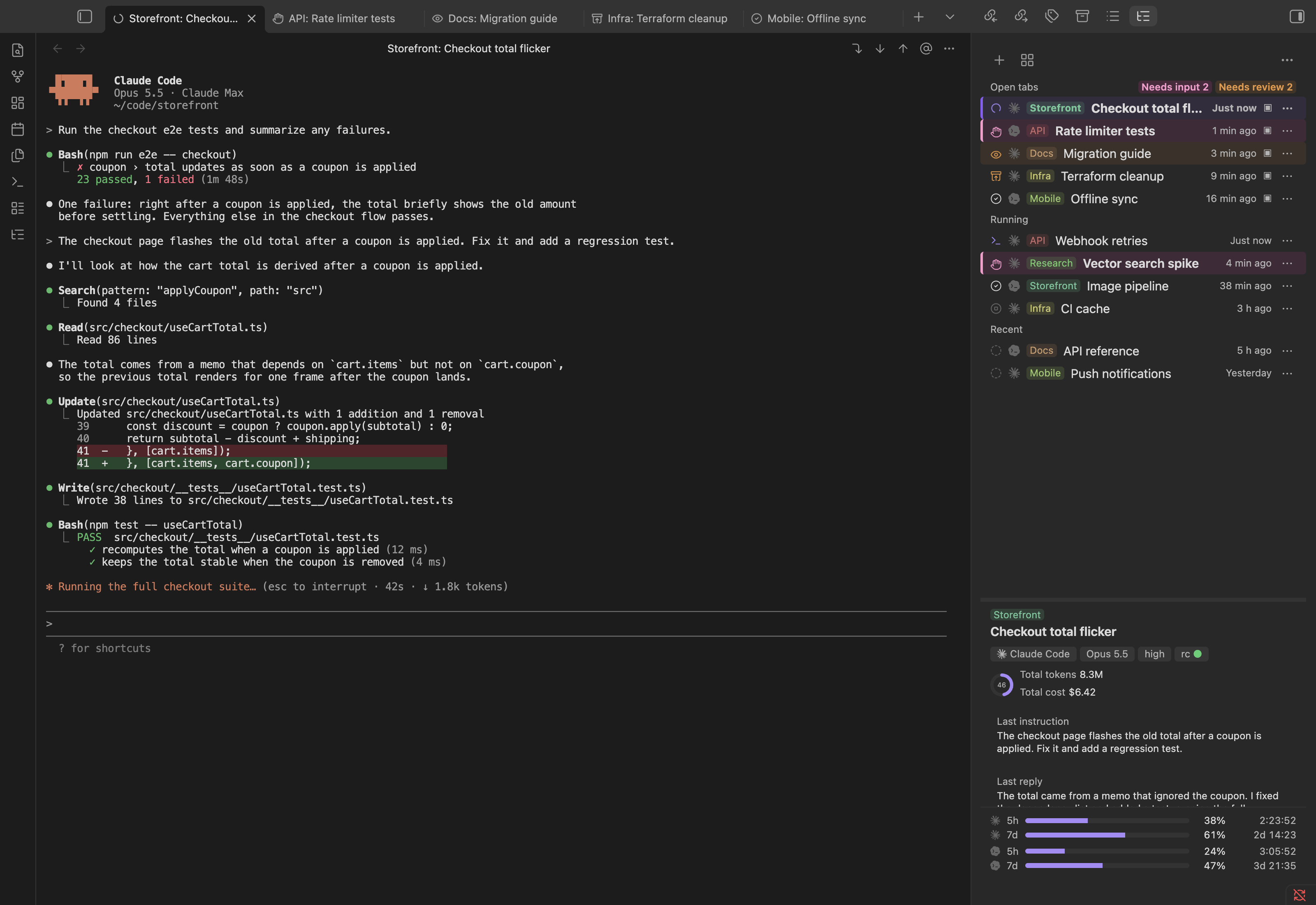
Sessions by category, with usage and cost
The Session manager groups sessions named Category: Name and shows their cost per 5-hour and 7-day window. Below, each agent's usage windows show the time to reset and whether you will reach the limit at your current pace. Costs are estimates, calculated on your machine from the agents' local files. More
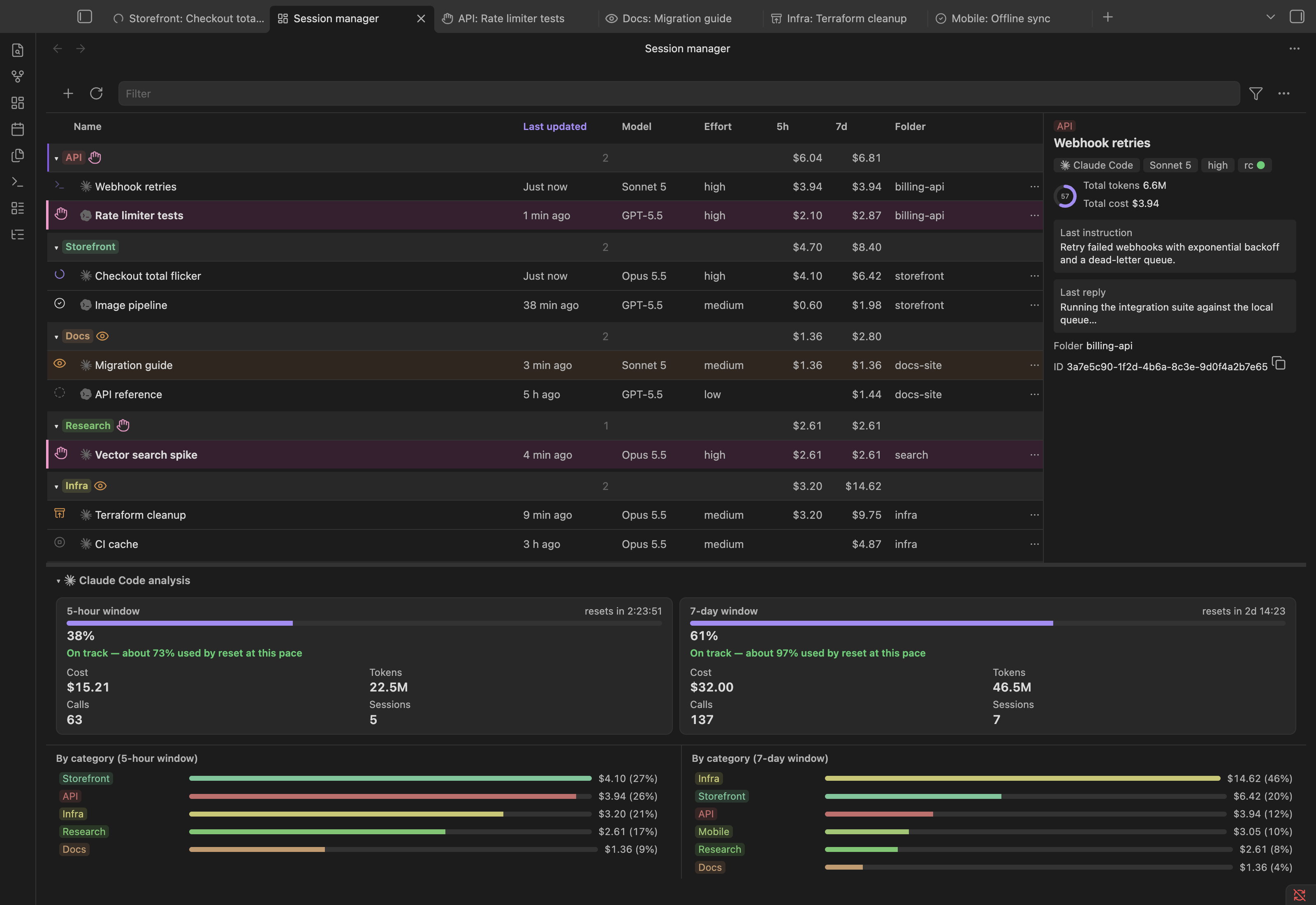
Start a session with any agent
New session asks for a name, and which agent when more than one is on. Claude Code, Codex and OpenCode sessions share the same lists. More
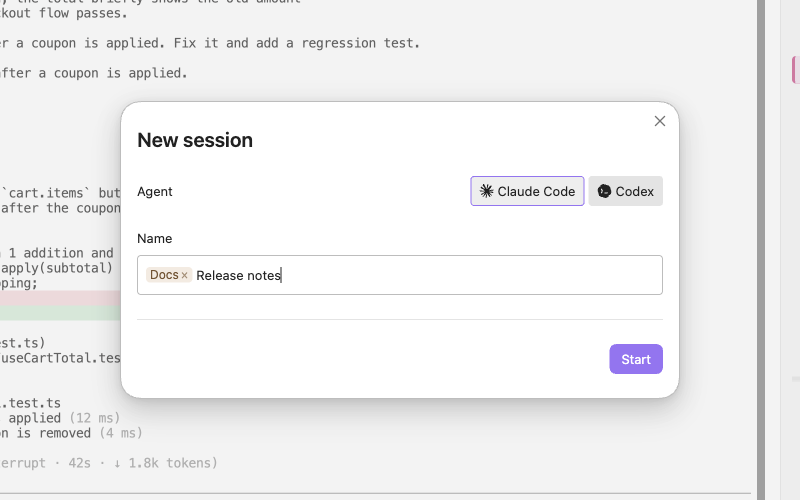
The agent's own CLI in a tab
Each session is the agent's command-line program in an Obsidian tab, with your settings, login, slash commands, hooks, skills and MCP servers. Vault paths in the output open as links. More
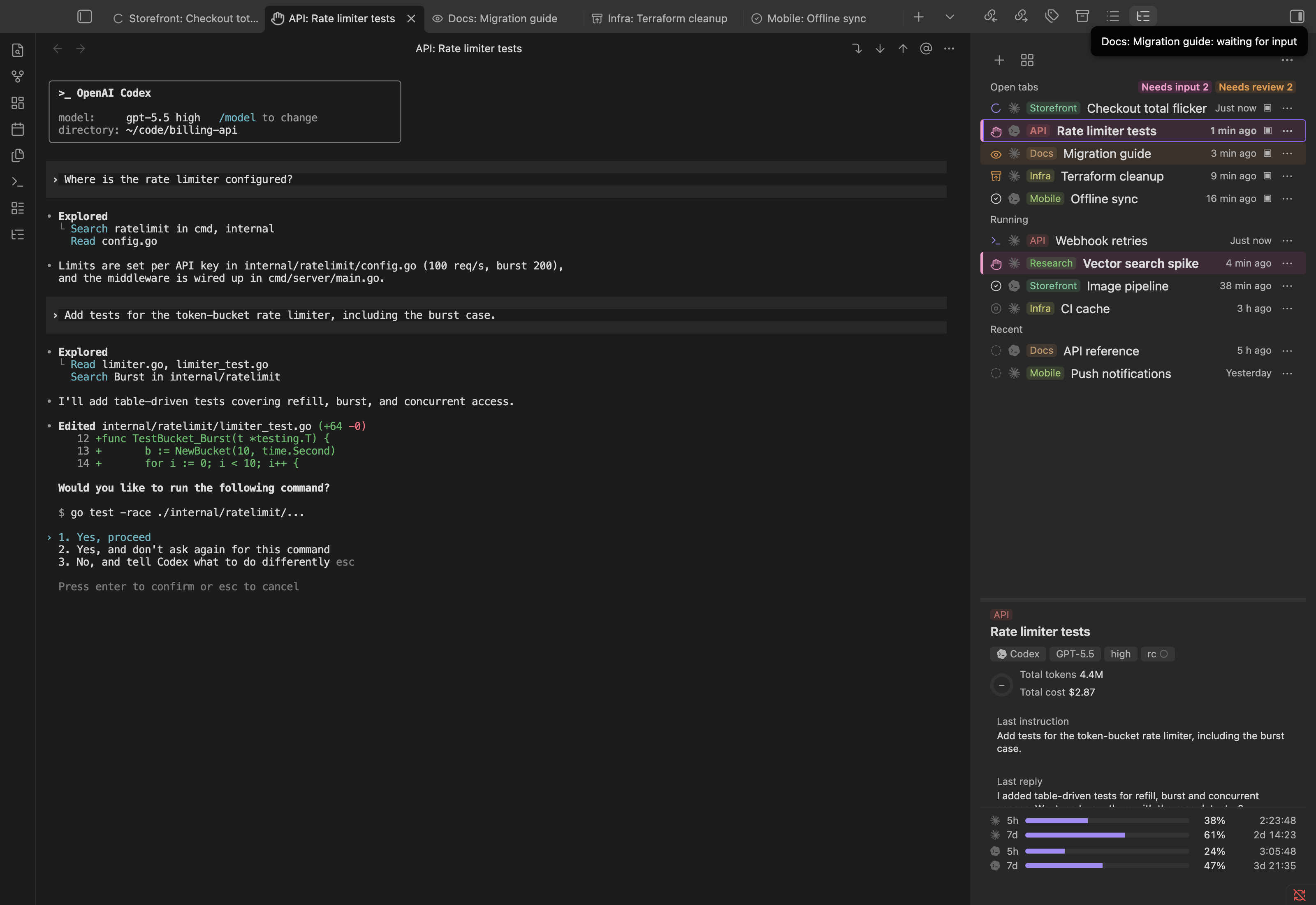
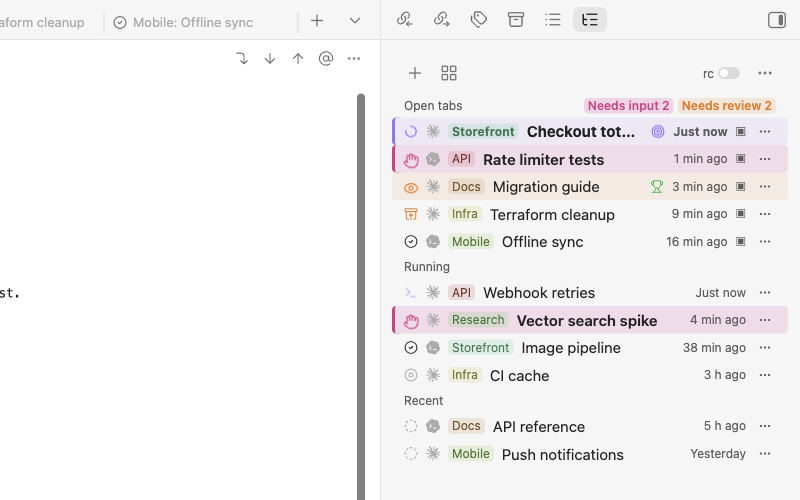
Switch between sessions in the side panel
Open tabs, running sessions without a tab, and recent ones, each with an icon for its state. Click one to bring its tab to the front or open it again; an ended session resumes its conversation. Sessions keep running when you close the tab or quit Obsidian. More
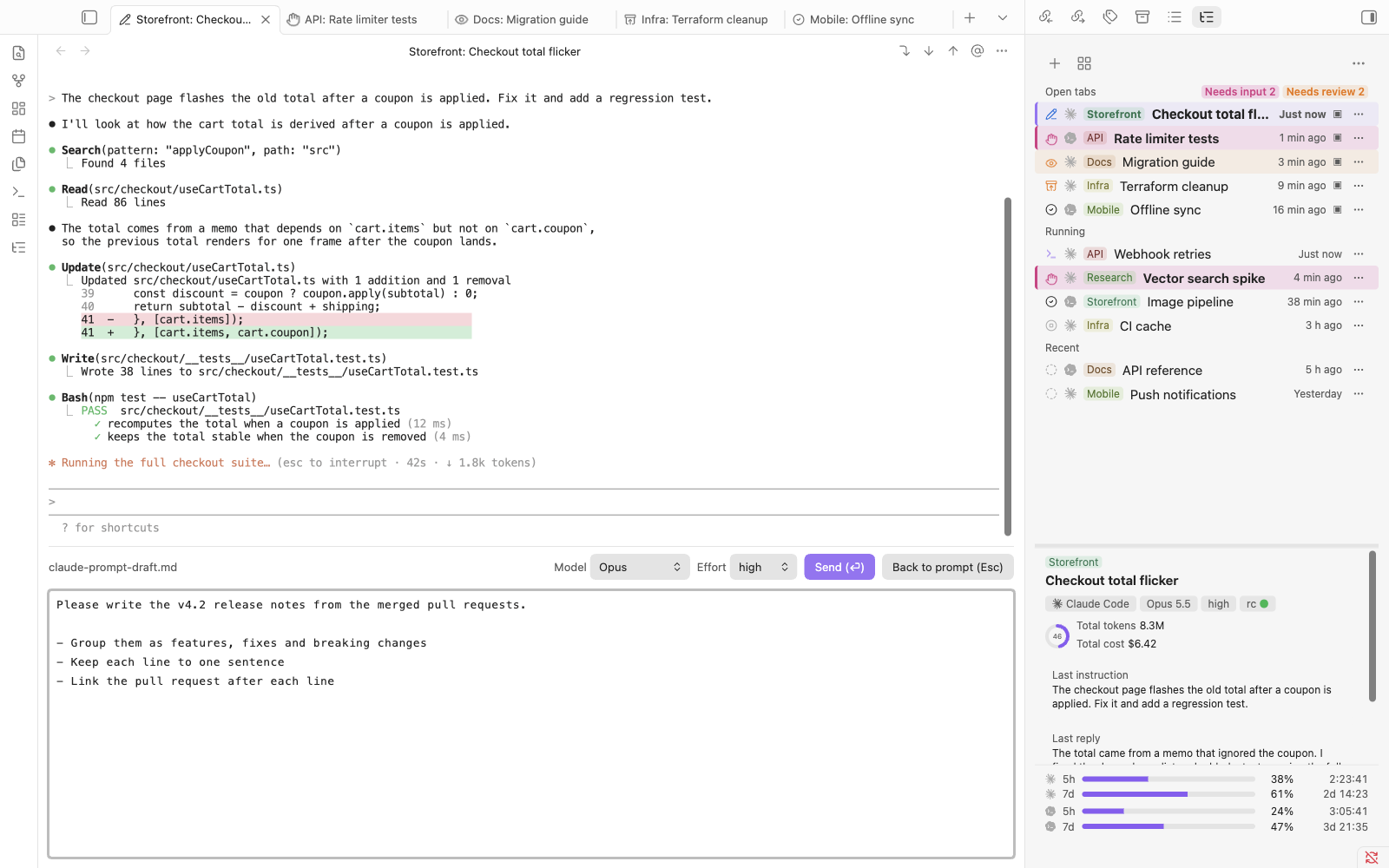
A built-in editor for prompts
Press Ctrl+G to write the prompt in a pane under the terminal, with @ file completion, normal paste, undo and IME, while the output stays visible. For Claude Code, the bar also sets model and effort. More
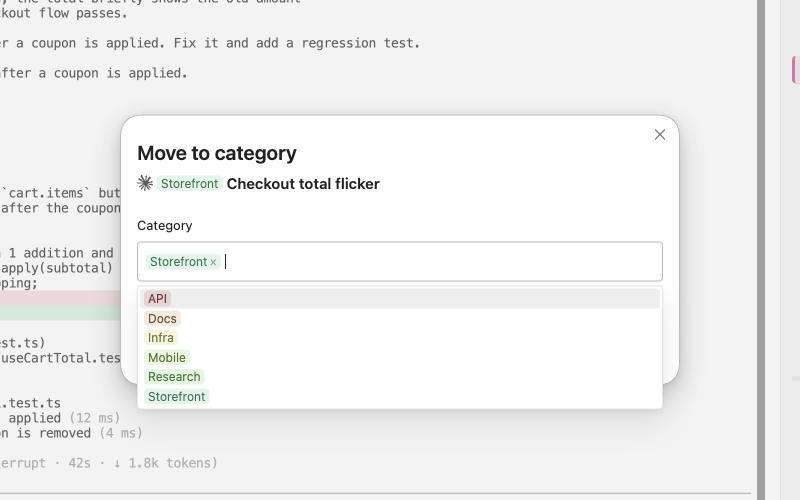
Rename and sort into categories
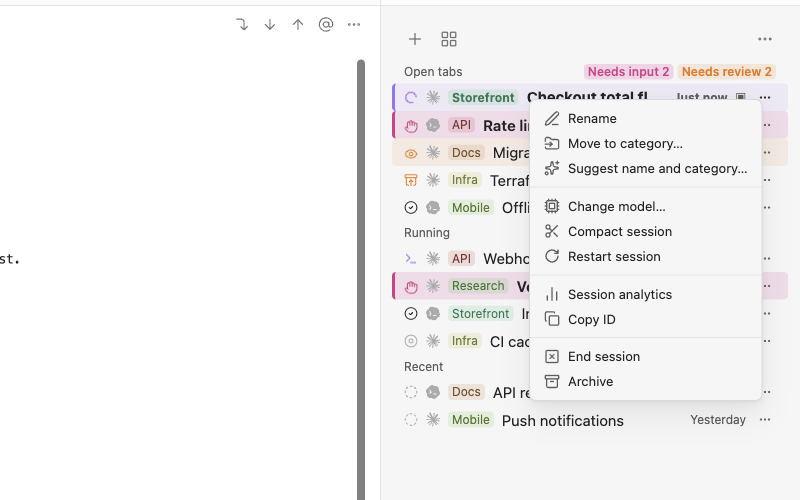
Each session has a ⋯ menu, which a right-click also opens. Its Rename gives the session a name; a name like Docs: Release notes puts it in the Docs category, with its own color and group. Move to category… changes only the category. More
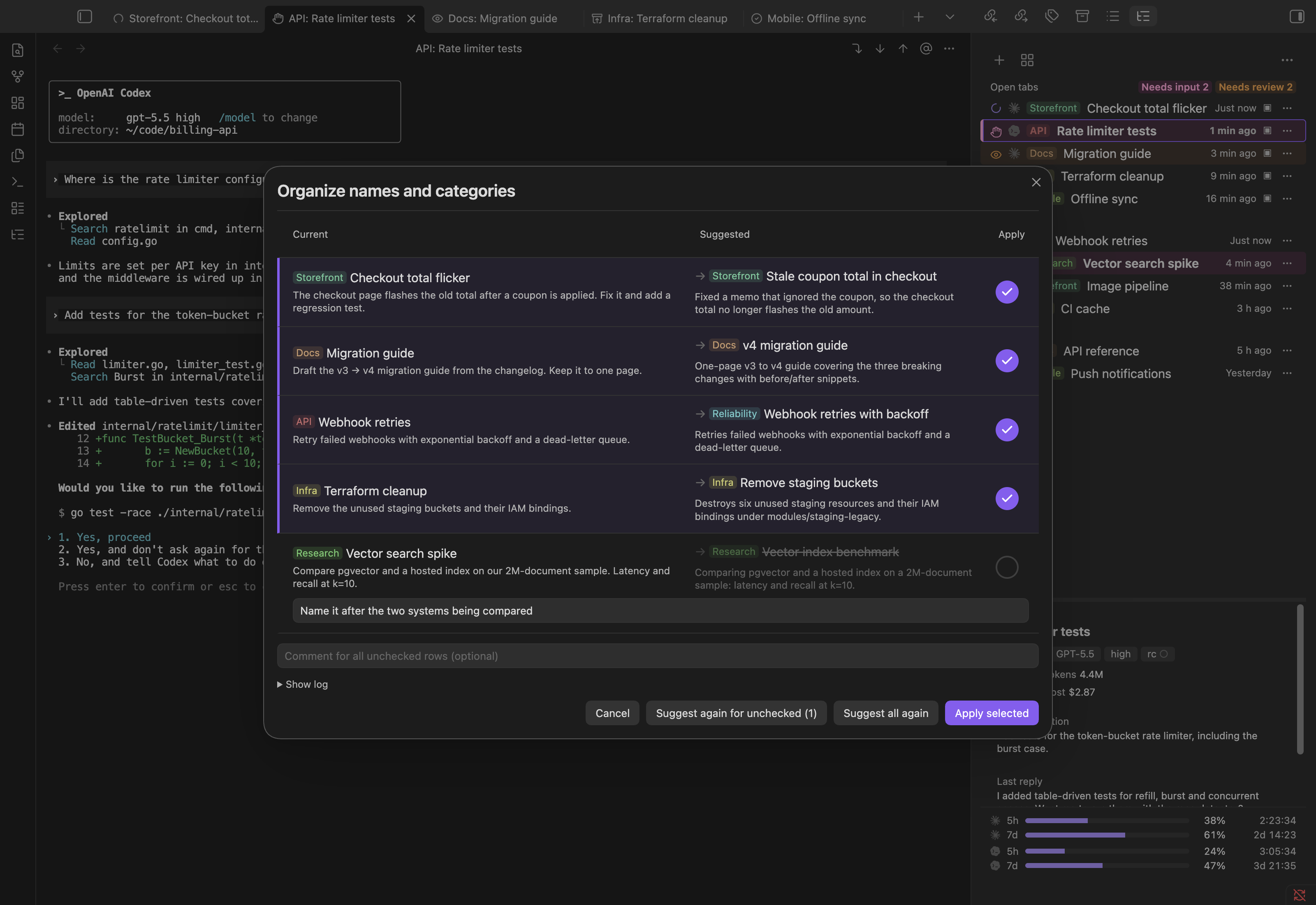
Names and categories suggested by an agent
Organize names and categories has one of your agents suggest a name and category for recent sessions. Nothing is renamed until you press Apply selected. It sends session excerpts to that agent; see What Organize sends. More
Compact, restart or change model from the session menu
In the same menu, Compact session sends /compact, and Restart session picks up changed settings or skills and keeps the conversation. For Claude Code, Change model… switches model and effort. More
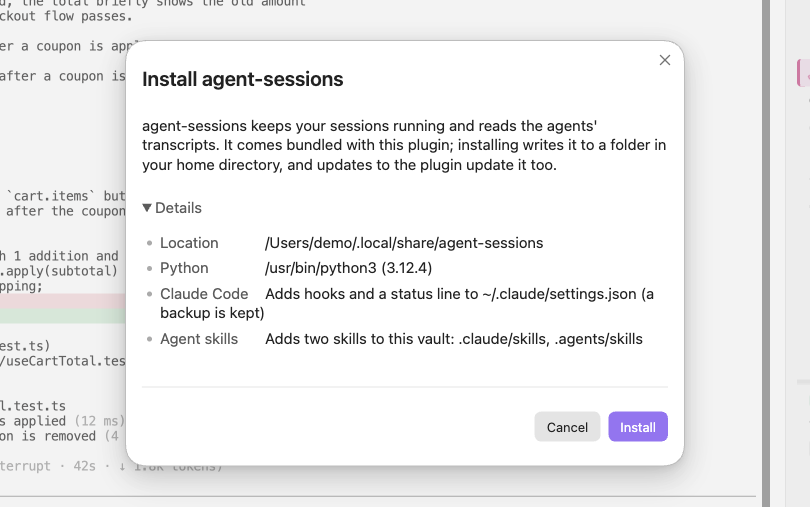
Setup with the welcome guide
On first install, the welcome guide checks Python and your agents, shows what the helper program will write before installing it, and walks you through your first session. More
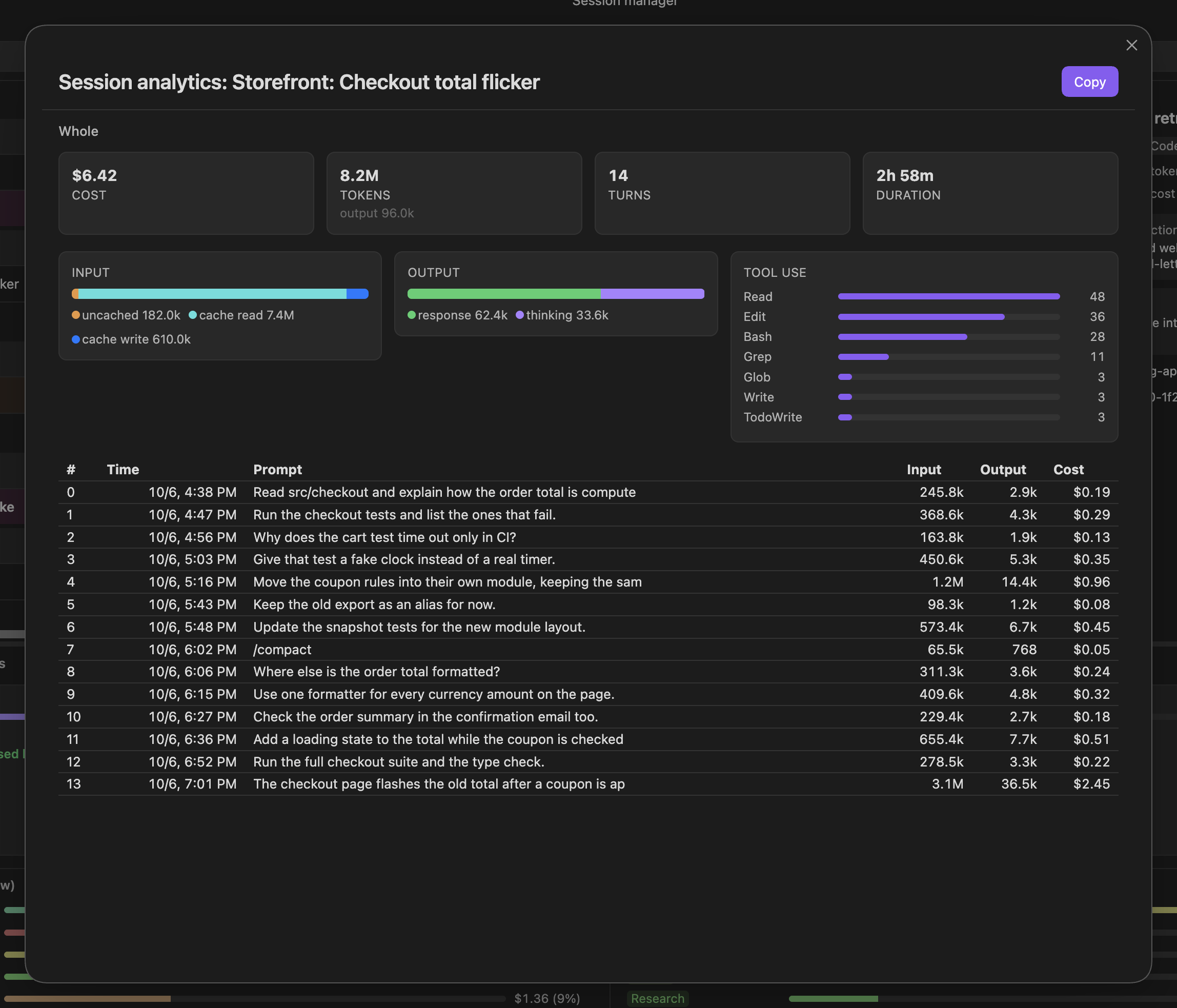
What a session cost, turn by turn
Session analytics shows one session's cost, tokens, turns and duration, the tools it called, and each prompt with its own input, output and cost. Click the first and last row of a stretch of turns to count only those, and copy the result as Markdown. More
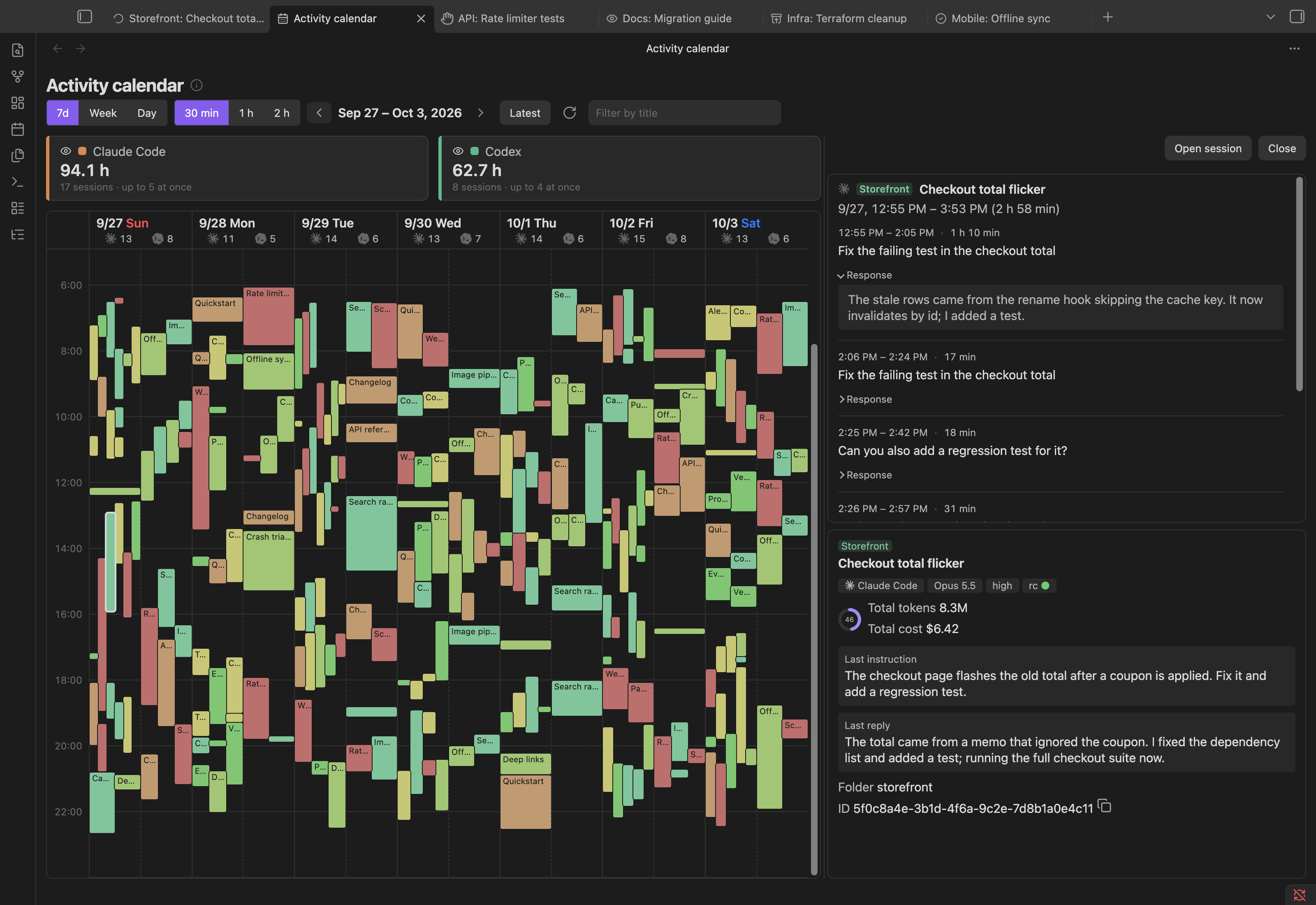
When each agent was working
The Activity calendar shows working time as blocks, by 7-day window, week or day. Click a block to see its prompts and open the session. More
Two agent skills also let you ask an agent about your usage, your other sessions, or how to use the plugin. All features: docs/usage.md.
Not included: a chat panel, inline editing of notes, and Obsidian mobile. OpenCode has no usage windows, and its sub-agent sessions and opencode run sessions are not listed.
Requirements
- Obsidian 1.8.7 or later, desktop.
- Python 3.9 or later, no extra packages. It runs the helper program that keeps sessions alive.
- Claude Code, Codex or OpenCode, installed.
Supported environments
| Obsidian runs on | Agent runs on | Supported |
|---|---|---|
| macOS | macOS | Yes |
| Linux | Linux | Yes |
| Windows 10 (1809+) or 11 | Windows | Yes |
| Windows | WSL | No |
| WSL2 through WSLg | the same WSL distribution | Yes |
Obsidian and the agent must run in the same operating system, because the plugin starts and follows the agent's processes and files. If your agents run in WSL, run Obsidian in WSL through WSLg, and keep the vault in the WSL file system rather than under /mnt/c.
Install
- In Obsidian, open Settings → Community plugins → Browse, search for Agent Sessions, install and enable it.
- Follow the welcome guide that opens. It installs the
agent-sessionshelper program and starts your first session. To come back to it later, run Continue the welcome guide from the command palette.
Where the program goes, and installing from source: docs/installation.md.
Troubleshooting
- "agent-sessions was not found": click Install agent-sessions in the side panel, or set the program's location in the plugin's settings.
- "Install agent-sessions yourself (see the README)": install it from a clone (
docs/installation.md), then set its location in the plugin's settings. - An agent shows "Not found.": set its path in the plugin's settings, or click Detect again in the welcome guide.
- A session ignores changed settings, hooks or skills: choose Restart session in the session's ⋯ menu.
- Windows: the install dialog says Python or Claude Code is missing: click Install Python with WinGet or Install Claude Code with WinGet (per user, no administrator prompt).
- Windows on ARM: an OpenCode tab stops at
bun:ffi dlopen() is not available in this build (TinyCC is disabled): OpenCode's ARM64 build (the one WinGet installs there) cannot start its terminal UI. Install OpenCode's x64 build instead; Windows runs it under emulation. - A hook fails with
node: not found, and other cases:docs/usage.md.
Uninstall
- Settings → agent-sessions program → Remove. This ends running sessions, removes the program, its entries in the agents' settings, and the skills in the vault, and restores your previous OpenCode
tui.jsonvalues. - Disable and remove Agent Sessions under Community plugins.
- If you want nothing left, delete
~/.agents/sessions/,<vault>/.agents/sessions/, and the backups~/.claude/settings.json.bak-*and~/.codex/config.toml.bak-*.
Source installs: docs/installation.md.
Disclosures
No telemetry and no account. The agents have the same permissions as in your terminal and connect to their own services under your accounts.
Network
- The plugin and its program make no network connections for their own work. The plugin talks to the program's background process on this machine: a Unix socket (mode 0600), or on Windows
127.0.0.1on a random port with a secret token. - While the welcome guide is open, it loads its pictures from
raw.githubusercontent.com. No data of yours is sent; GitHub sees your IP address and which picture is requested. Turn this off with Load the guide's pictures from GitHub in the settings.
Programs it starts
agent-sessions, with the Python found on your machine. It is written out from the plugin when you click Install; nothing is downloaded.- The Claude Code, Codex and OpenCode CLIs you installed, or
ollama launch opencodeif you choose it. The settings runollama listto offer your Ollama models. - Your shell, as a login shell and as an interactive shell (which reads
.zshrcor.bashrc), to get the samePATHas a terminal. - On Windows:
reg.exe(to readPATH),py.exe(to find Python), andwinget.exeonly when you click an install button.
Files it reads outside the vault
To list sessions and calculate usage:
~/.claude/projects/,~/.claude/sessions/,~/.claude/settings.json~/.codex/(or$CODEX_HOME)~/.local/share/opencode/opencode.db, opened read-only
A database that cannot be opened read-only is copied to a temporary folder, read, and deleted.
Files it writes
| Path | Contents | When |
|---|---|---|
~/.agents/sessions/ | socket, logs, status files, caches | always |
~/.local/share/agent-sessions (Windows: %LOCALAPPDATA%\agent-sessions) | the program | on Install |
~/.claude/settings.json | four hooks, statusLine | on Install |
~/.claude/keybindings.json | submit key, editor key | if changed from the default |
~/.codex/config.toml | submit and editor keys if changed, status line if unset | Codex enabled |
~/.config/opencode/plugins/agent-sessions.js | status plugin | OpenCode enabled |
~/.config/opencode/agent-sessions-tui.jsx | status line | OpenCode enabled |
~/.config/opencode/tui.json | editor key, submit keys, status line entry | OpenCode enabled |
| a temporary file | the prompt being edited | built-in editor open |
<vault>/.agents/sessions/sessions.json | sessions started here (folder, agent), archive, category colors, folded groups | always |
<vault>/.claude/skills/ | the agent-sessions and agent-sessions-help skills | Claude Code enabled |
<vault>/.agents/skills/ | the same skills | Codex enabled |
<vault>/.opencode/skills/ | the same skills | OpenCode alone |
~/.claude/settings.jsonand~/.codex/config.tomlare backed up before they are changed. The previoustui.jsonvalues are kept in~/.agents/sessions/opencode-tui-backup.json.- Its entries are marked (Codex, OpenCode, skill files) or recognized by their command (Claude Code); nothing else is changed.
sessions.jsontravels with the vault if you sync it.- Other folders the program may be installed in:
docs/installation.md.
What Organize sends
Nothing is sent until you press Suggest in Organize names and categories. Then the plugin runs one of your agents once, and the dialog names which:
- Claude Code:
claude -pwith Sonnet (or Haiku, in the settings), without tools, nothing saved. Else - Codex:
codex execin a read-only sandbox. Else - OpenCode:
opencode run, its stored session deleted afterwards.
For up to 30 sessions, or the one you chose, it sends the current name, the folder, the first prompt, your last three prompts and a short excerpt of the last reply; your existing category names with their session counts and up to three example session names each; and, if you ask again, the previous suggestion and your comments. This goes to that agent's service under your account and counts toward its usage limits.
Other access
- The vault's file list: only to complete
@paths in the built-in editor. - The clipboard: only when you copy a session ID or an analysis table, or press Ctrl+Shift+C / Ctrl+Shift+V in a terminal tab (not on macOS).
Development
Build, test, release and design: docs/development.md.
License
MIT, see LICENSE. plugin/main.js bundles xterm.js and its addons (also MIT); their notices are in THIRD_PARTY_NOTICES.md.
For plugin developers
Search results and similarity scores are powered by semantic analysis of your plugin's README. If your plugin isn't appearing for searches you'd expect, try updating your README to clearly describe your plugin's purpose, features, and use cases.