AI Rewrite
approvedby masaki39
Forked from Leoyishou/obsidian-ai-autocomplete
Local-first, line-level AI rewriting: proofread, translate, or your own custom modes. Shows a ghost preview below the line; Tab to apply. - This plugin has not been manually reviewed by Obsidian staff.
AI Rewrite
Line-level AI rewriting for Obsidian — proofread, translate, or run your own modes. Tuned to run well on small, local models (Ollama by default), so it stays fast, private, and easy on your machine. ✨
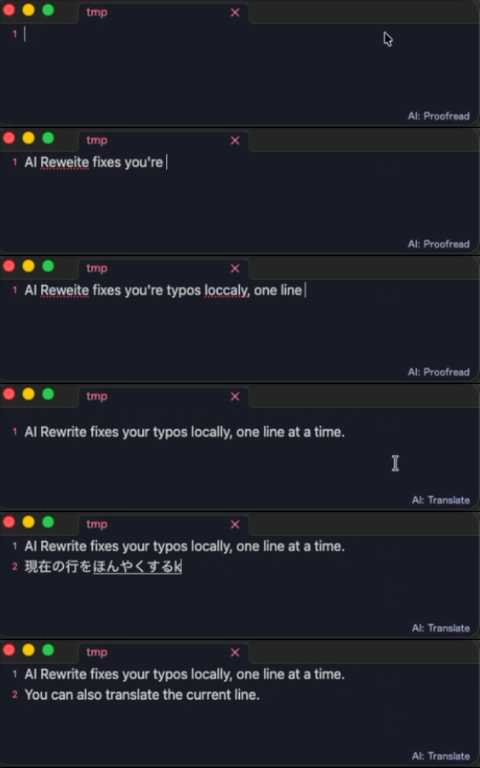
- ✍️ Rewrites the current line or selection on demand — not next-word autocomplete.
- 👻 Shows the result as a ghost preview below the line. Tab applies, Esc dismisses.
- 🎛️ Ships with Proofread and Translate modes — add your own.
- 🔌 Works with any OpenAI-compatible server: Ollama, LM Studio, OpenAI, OpenRouter…
[!TIP] Why line-level? Correcting one line is easy work for a small model like
gemma3, and triggering on demand keeps your machine cool — that's the whole design.
🚀 Quick start
- Install Ollama and pull a model:
ollama pull gemma3 - Make sure Ollama is running (
ollama serve— usually automatic). - Install and enable AI Rewrite. It defaults to
http://localhost:11434/v1with modelgemma3. - Put the cursor on a line, run Correct current line or selection from the command palette, and press Tab to accept.
[!NOTE] Using a different model? Set it under Settings → AI Rewrite → Model.
⚙️ How it works
i beleive their going too the meeting     ← your line (typos)
        ↓  trigger (hotkey · on leave · while typing)
I believe they're going to the meeting    ← ghost preview  ·  Tab applies  ·  Esc dismisses
- Reads the current line (or your selection) and shows the model's reply as a ghost preview.
- Markdown prefixes are preserved — indentation,
-,>,#,1.,- [ ]— so the model only sees the prose. - Blank lines are skipped. With a selection, the whole selection (multiple lines) is rewritten and replaced on accept.
🎛️ Modes
A mode is just an editable instruction sent to the model. Two ship by default:
| Mode | What it does |
|---|---|
| Proofread | Fix spelling, grammar, punctuation and typos — same language, same meaning |
| Translate | Translate into your target language |
Switch modes
- Click the active mode in the status bar and pick from the menu.
- Run Cycle mode to jump to the next one (bind it to a hotkey).
- Each mode also gets an Apply … command — bind it in Settings → Hotkeys to switch mode and rewrite in one press.
Add your own
Create modes under Settings → Modes (name + prompt). Put {targetLang} in a prompt to fill in the Target language setting. Adding or removing a mode takes effect after a reload.
⚡ Triggers
Set under Settings → Trigger:
| Trigger | When it fires | Best for |
|---|---|---|
| On demand (default) | Only when you run a command/hotkey | Least noise, lowest CPU |
| When leaving a line | After you move off a line | Hands-off proofreading |
| While typing | After a short pause | Most eager |
🔗 Auto-link existing notes
Off by default. When enabled, the plugin wraps text matching an existing note title or alias in [[wiki links]] after a rewrite.
- Case-insensitive; links the first occurrence per note.
- Skips code, URLs, and existing links.
- Leaves ambiguous names (claimed by more than one note) alone.
Turn it on under Settings → Auto-link existing notes.
⌨️ Keys
| Key | Action |
|---|---|
| Tab / → | Apply the suggestion |
| Esc | Dismiss |
Keys only intercept while a preview is showing; otherwise they behave normally. Change them under Settings → Accept keys / Dismiss keys (space-separated CodeMirror key names).
🌐 Other servers
AI Rewrite talks to any OpenAI-compatible endpoint — set the Base URL under Settings → Connection.
| Setup | What to set | Privacy |
|---|---|---|
| Local, no auth — Ollama, LM Studio, vLLM | Base URL | Stays fully local |
| Remote, authenticated — OpenAI, OpenRouter | Base URL + API key | Note content leaves your machine |
[!WARNING] Pointing the Base URL at a remote service sends your note content to that service — it's no longer local-only. The API key is sent as a
Bearertoken.
[!NOTE] A
⟳shows in the status bar while a request runs. Each request gives up after the Request timeout (default 30s) so a stalled model can't jam later suggestions — raise it if a slow model's first response gets cut off.
📋 Commands
Run from the command palette or bind a hotkey:
- Correct current line or selection — rewrite with the active mode
- Apply <mode> to current line or selection — switch to that mode, then rewrite
- Cycle mode — switch to the next mode
- Toggle suggestions — turn the plugin on or off
- Test connection — send a short request with the current settings
💾 Manual install
Copy main.js, manifest.json (and styles.css if present) into your vault:
<Vault>/.obsidian/plugins/ai-rewrite/
Then reload Obsidian and enable the plugin in Settings → Community plugins.
Key name reference
Accept/dismiss keys use CodeMirror key names:
- Key name = the value of
event.keyfor that key — look it up by pressing the key on keycode.info (e.g.Tab,Enter,Escape,ArrowRight,a,1). The space bar is writtenSpace. - Modifiers prefix the key, joined with
-:Mod-(Cmd on macOS, Ctrl elsewhere — best for cross-platform),Ctrl-,Shift-,Alt-,Cmd-/Meta-. - Multiple bindings are separated by spaces.
Examples: Tab ArrowRight · Escape · Ctrl-Space · Mod-Enter · Shift-Tab
[!NOTE] Full format: CodeMirror key bindings.
🛠️ Development
This project uses pnpm.
pnpm install   # install dependencies
pnpm dev       # development build (non-minified, inline sourcemaps)
pnpm build     # production build -> main.js (minified)
📄 License
MIT
For plugin developers
Search results and similarity scores are powered by semantic analysis of your plugin's README. If your plugin isn't appearing for searches you'd expect, try updating your README to clearly describe your plugin's purpose, features, and use cases.