AI Summarize
approvedby ravenwits
Summarize your notes using AI
Obsidian AI Summarize Plugin
An intelligent Obsidian plugin that uses OpenAI models to summarize notes, extract review material, surface open loops, and create folder-level digests. It keeps summarization at the center while adding practical Obsidian workflows such as frontmatter summaries, daily-note output, linked-note context, and project digests.
Features
Core Functionality
- AI-powered summarization: Generate summaries from selected text or the full active note.
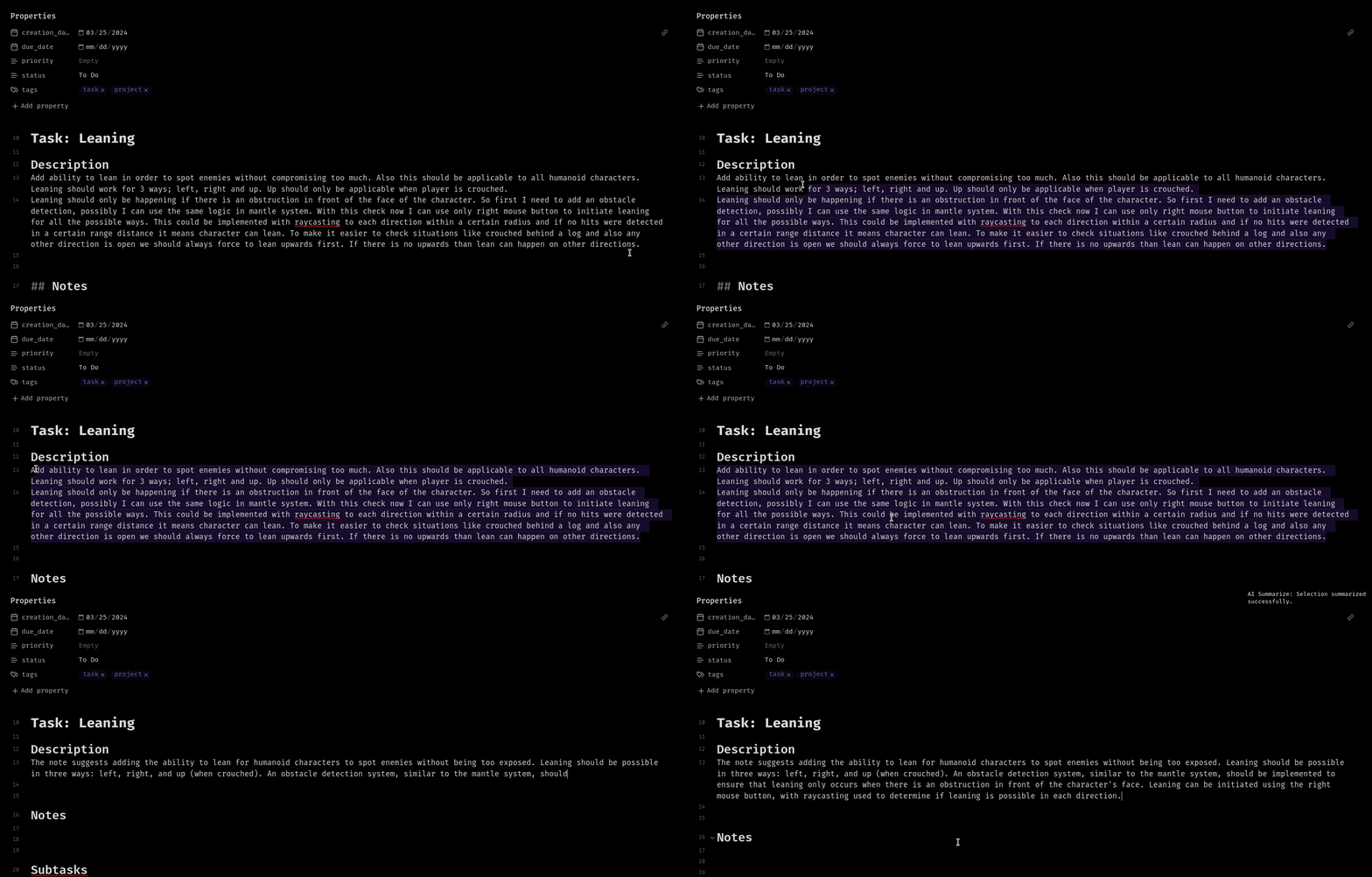
- Streaming responses: See selection summaries appear in the editor as they generate.
- Smart chunking: Large selections are split into chunks and combined into a final summary.
- Progress and cancellation: Long-running operations show progress and can be cancelled.
- Manual model refresh: Refresh available OpenAI models only when you need to.
Summary Presets
Use the right-click context menu to run one-off presets without changing your saved profile:
- Summary: Concise summary, detailed summary, bullet points, action items, study notes, meeting notes.
- Review: Review questions, flashcards, explain simply, what to remember.
- Open loops: Open loops, open questions, unresolved decisions, missing context.
Flexible Output Destinations
- Replace selection: Replace selected text with the generated summary.
- Insert below: Add output below the selected text.
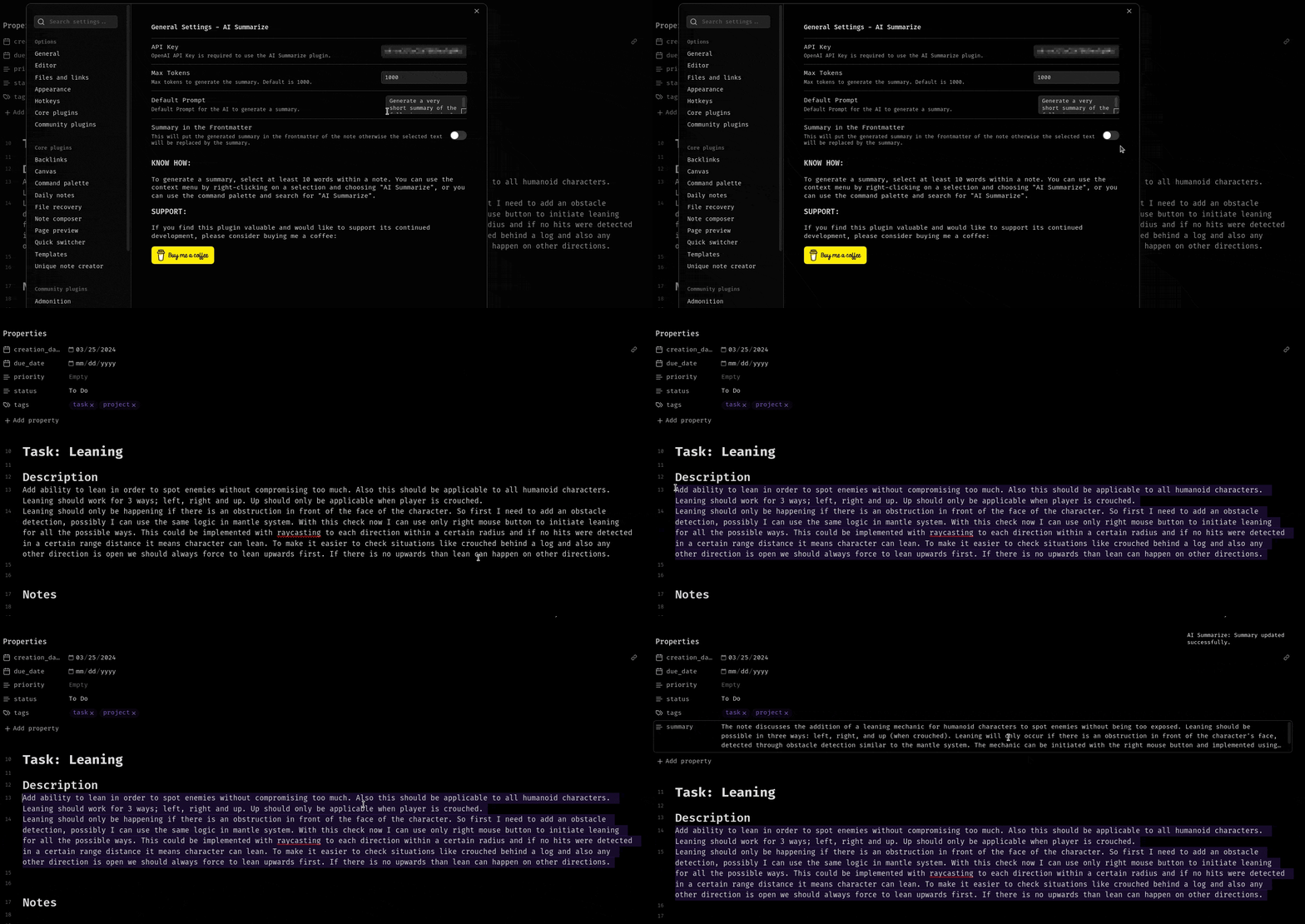
- Frontmatter: Add output to the note's YAML frontmatter under
summary. - Append to current note: Add the result to the active note.
- Create new note: Save generated output as a new note.
- Append to daily note: Send output to today's daily note.
Folder Digests
Create digests from an entire folder of notes:
- Project status: Current state, progress, risks, blockers, and next steps.
- Weekly digest: Themes, updates, completed work, and open loops.
- Research digest: Findings, evidence, contradictions, and open questions.
- Meeting digest: Decisions, action items, owners, deadlines, and follow-ups.
- Open loops digest: Folder-level questions, blockers, missing context, and unresolved decisions.
You can launch a digest from the command palette or by right-clicking a folder in the file explorer.
Link-Aware Full Note Summaries
When enabled, full-note summaries can include lightweight context from directly linked notes. The plugin prefers linked notes' summary frontmatter when available and falls back to short excerpts when needed.
Advanced Configuration
- Multiple profiles: Save different combinations of model, prompt, max tokens, system instructions, output destination, and link-aware behavior.
- Model selection: Use GPT-4o, GPT-4.1, GPT-5, reasoning models, or another available OpenAI model.
- Custom prompts: Tailor summary behavior for different note types.
- System instructions: Define tone, style, language, or output format.
- Token management: Set custom output limits with model-aware input budgeting.
Inline summarization from menu:
Frontmatter summarization:
Installation
From Obsidian Community Plugins
- Open Obsidian and navigate to Settings -> Community plugins.
- Click Browse and search for AI Summarize.
- Click Install and then Enable.
- Configure your OpenAI API key in the plugin settings.
Manual Installation
- Download the latest release from the GitHub releases page.
- Extract
main.js,manifest.json, andstyles.cssto your vault's.obsidian/plugins/ai-summarize/directory. - Reload Obsidian.
- Enable the plugin in Settings -> Community plugins.
Usage
Initial Setup
- Get an API key: Sign up at OpenAI and generate an API key.
- Configure the plugin:
- Go to Settings -> AI Summarize.
- Enter your OpenAI API key.
- Choose your preferred model or refresh the model list.
- Customize settings:
- Choose max tokens.
- Customize the default prompt and system instructions.
- Select the default output destination.
- Create profiles for different workflows.
Generating Summaries
Method 1: Context menu
- Select text in your note, at least 30 words.
- Right-click to open the context menu.
- Click AI summarize.
- Choose Active profile summary or one of the presets.
Method 2: Command palette
- Select text in your note, at least 30 words.
- Open the command palette with
Ctrl/Cmd + P. - Run AI Summarize: Summarize selection.
Method 3: Full note summary
- Open the note you want to summarize.
- Run AI Summarize: Summarize current note from the command palette.
- The result is written to your selected output destination.
Creating Folder Digests
From the command palette
- Run AI Summarize: Create digest from folder.
- Choose a folder, digest type, date filter, max files, subfolder behavior, and destination.
- Click Create digest.
From the file explorer
- Right-click a folder.
- Choose Create AI digest.
- Confirm the digest options and destination.
Cancelling Operations
Long-running AI operations show a progress notice with a Cancel button. You can also run AI Summarize: Cancel current operation from the command palette.
Starting a new AI operation cancels the previous in-progress run.
Configuration
Profile Management
Create multiple profiles for different summarization scenarios:
- Meeting notes: Bullet summaries, action items, and daily-note output.
- Research notes: Detailed summaries, review questions, and linked-note context.
- Project notes: Open loops, decisions, blockers, and folder digests.
- Study notes: Flashcards, review questions, and what-to-remember outputs.
Creating a profile:
- Go to plugin settings.
- Click New profile.
- Configure model, max tokens, prompt, system instructions, destination, and link-aware behavior.
- Name your profile.
- Switch between profiles using the dropdown.
Tips for Best Results
Prompt engineering
Good: Summarize the following in 3-4 sentences focusing on key decisions and action items.
Better: Create a concise summary highlighting: 1) main decisions made, 2) action items with owners, 3) open questions.
System instructions
- Specify language:
Always respond in English. - Define format:
Use concise markdown bullet points. - Set tone:
Use professional, academic language. - Add constraints:
Do not invent owners, deadlines, or decisions.
Notes on Large Inputs
When content is too large for the selected model:
- Selection summaries are chunked and synthesized into a final result.
- Folder digests summarize source notes first, then create a final digest.
- Link-aware summaries limit linked-note context so the active note remains the priority.
Development
npm ci
npm run build
npm run lint
For watch mode during local testing:
npm run dev
main.js is generated by esbuild and ignored by git.
Release Checklist
- Run
npm run build. - Run
npm run lint. - Confirm
package.json,manifest.json,versions.json, and the release tag use the same version. - Attach
main.js,manifest.json, andstyles.cssto the GitHub release.
Contributing
Contributions are welcome. Please test changes in a local Obsidian vault before opening a pull request.
Issues and Support
Encountered a bug or have a feature request?
- Check existing issues.
- If not found, create a new issue.
- Include your Obsidian version, plugin version, model used, steps to reproduce, and any error messages.
License
This project is licensed under the GPL-3.0 License.
Support the Project
If you find this plugin valuable and want to support continued development:
Other ways to support:
- Star the repository.
- Report bugs and suggest features.
- Improve documentation.
- Contribute code.
- Share the plugin with others.
Author
Alp Sariyer
- Website: alpsariyer.dev
- GitHub: @ravenwits
Acknowledgments
- Built with the Obsidian API.
- Powered by OpenAI.
- Inspired by the Obsidian community's need for practical AI-assisted note workflows.
Happy summarizing.
Made for the Obsidian community.
For plugin developers
Search results and similarity scores are powered by semantic analysis of your plugin's README. If your plugin isn't appearing for searches you'd expect, try updating your README to clearly describe your plugin's purpose, features, and use cases.