AI Tag Curator
approvedby edge
AI tag management and governance for Obsidian vaults. - This plugin has not been manually reviewed by Obsidian staff.
Obsidian AI Tag Curator
简体中文 | English
AI tag management and governance for Obsidian vaults.
AI Tag Curator is not a generic "generate tags for this note" plugin. It helps you keep an existing Obsidian tag taxonomy coherent by reusing known tags, explaining recommendations, and surfacing vault-level tag problems before any risky cleanup work.
Current MVP Capabilities
Vault tag index
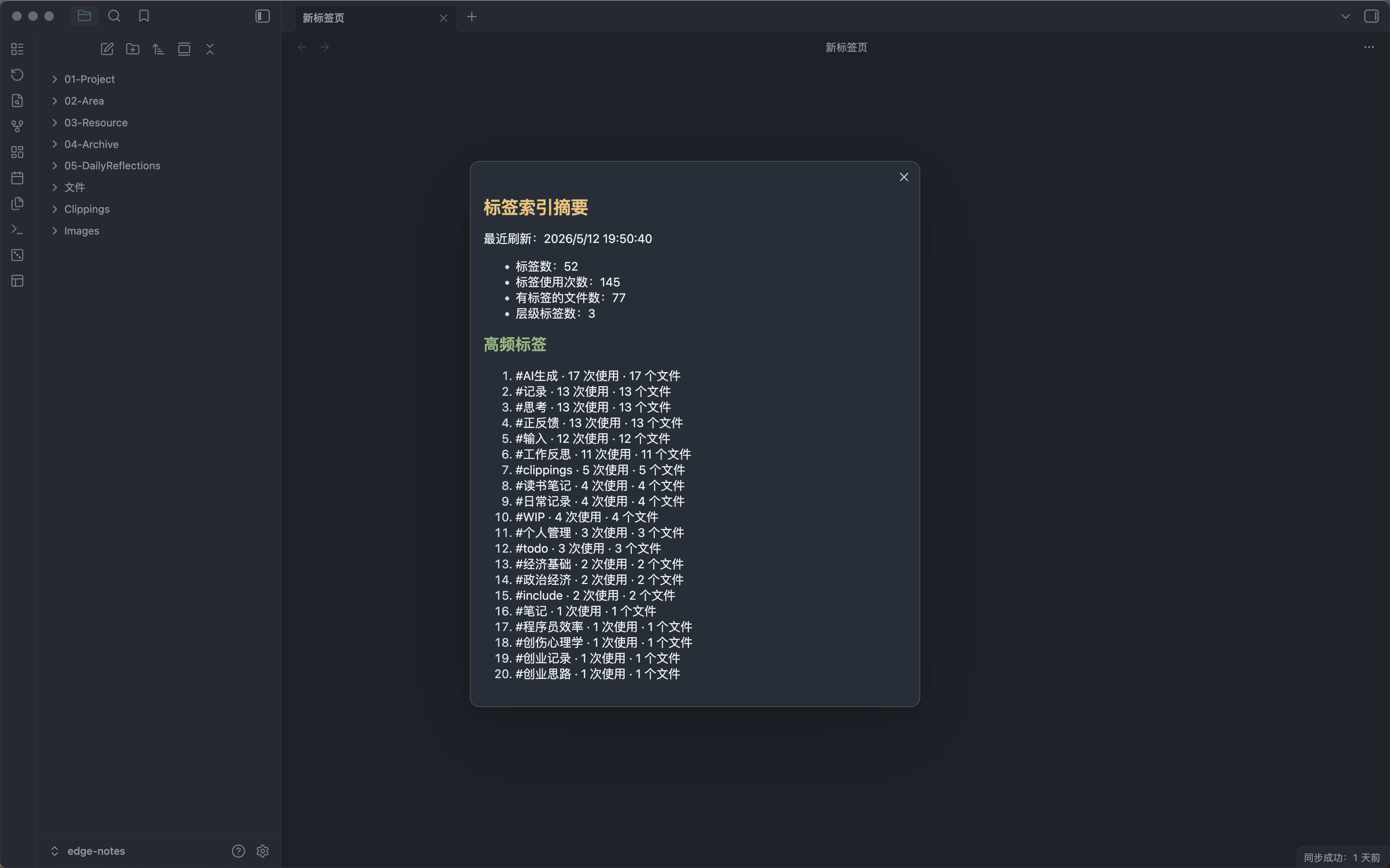
- Build a tag index from Obsidian metadata, frontmatter tags, and optional inline tags.
- Show a tag index summary with tag counts, usage counts, file counts, and top tags.
- Reuse the cached index for recommendations and health reports instead of scanning the whole vault every time.
Current note recommendations
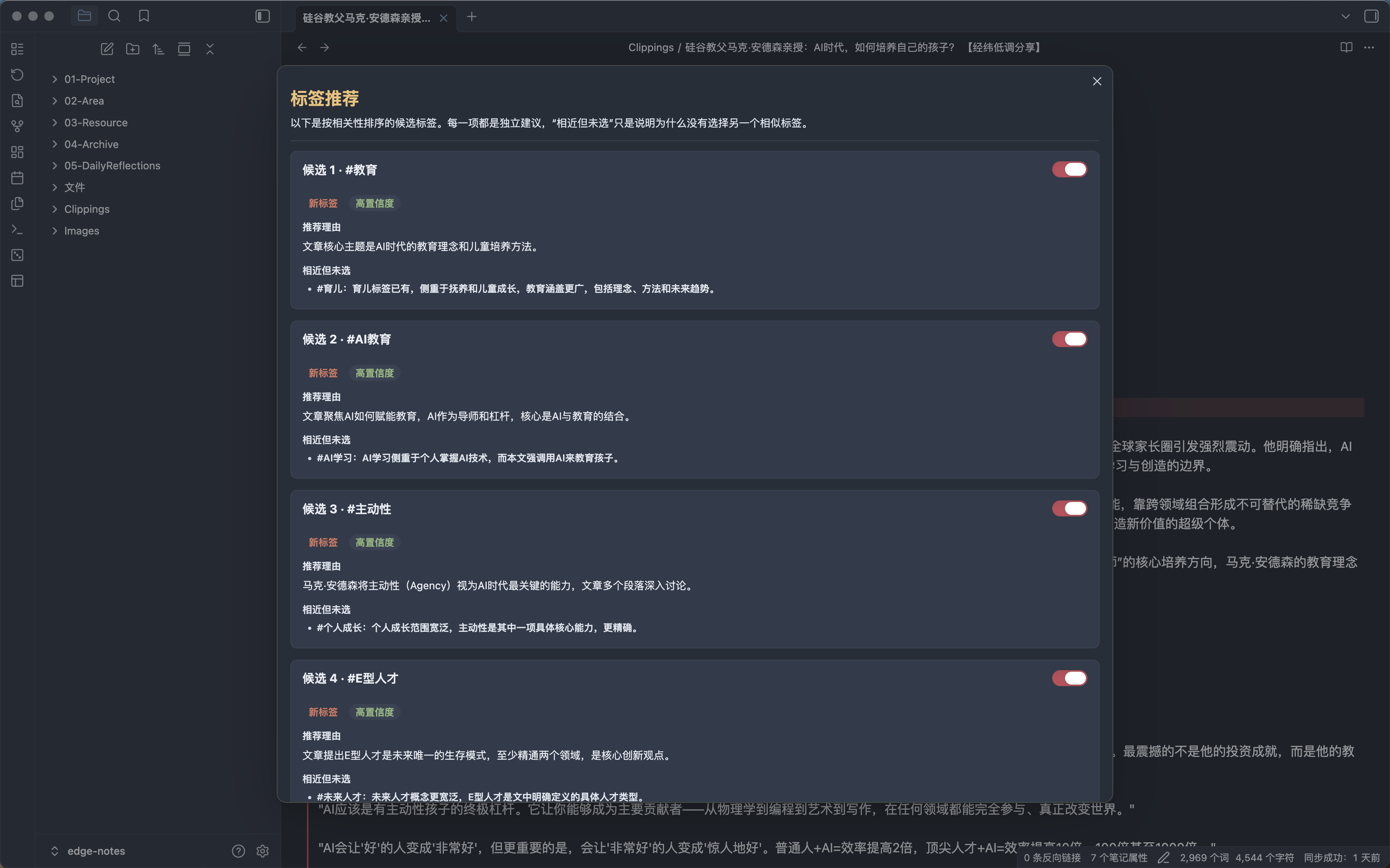
- Suggest tags for the current Markdown note.
- Prefer existing vault tags, even when new tags are allowed.
- Treat frontmatter and inline body tags as one source-aware note inventory, and filter both from AI suggestions.
- Default-select inline tags that are missing from frontmatter so the formatter-facing frontmatter can represent all reviewed note tags; each item can be deselected.
- Explain each recommendation with confidence and close alternatives not selected.
- Apply selected recommendations only after user confirmation.
- Undo the latest tag change made by this plugin for the current note.
- Bind previews to a SHA-256 snapshot of the full Markdown and reject stale content before writing.
- Run slow AI requests in the background and show results when ready.
Safe folder batch preview
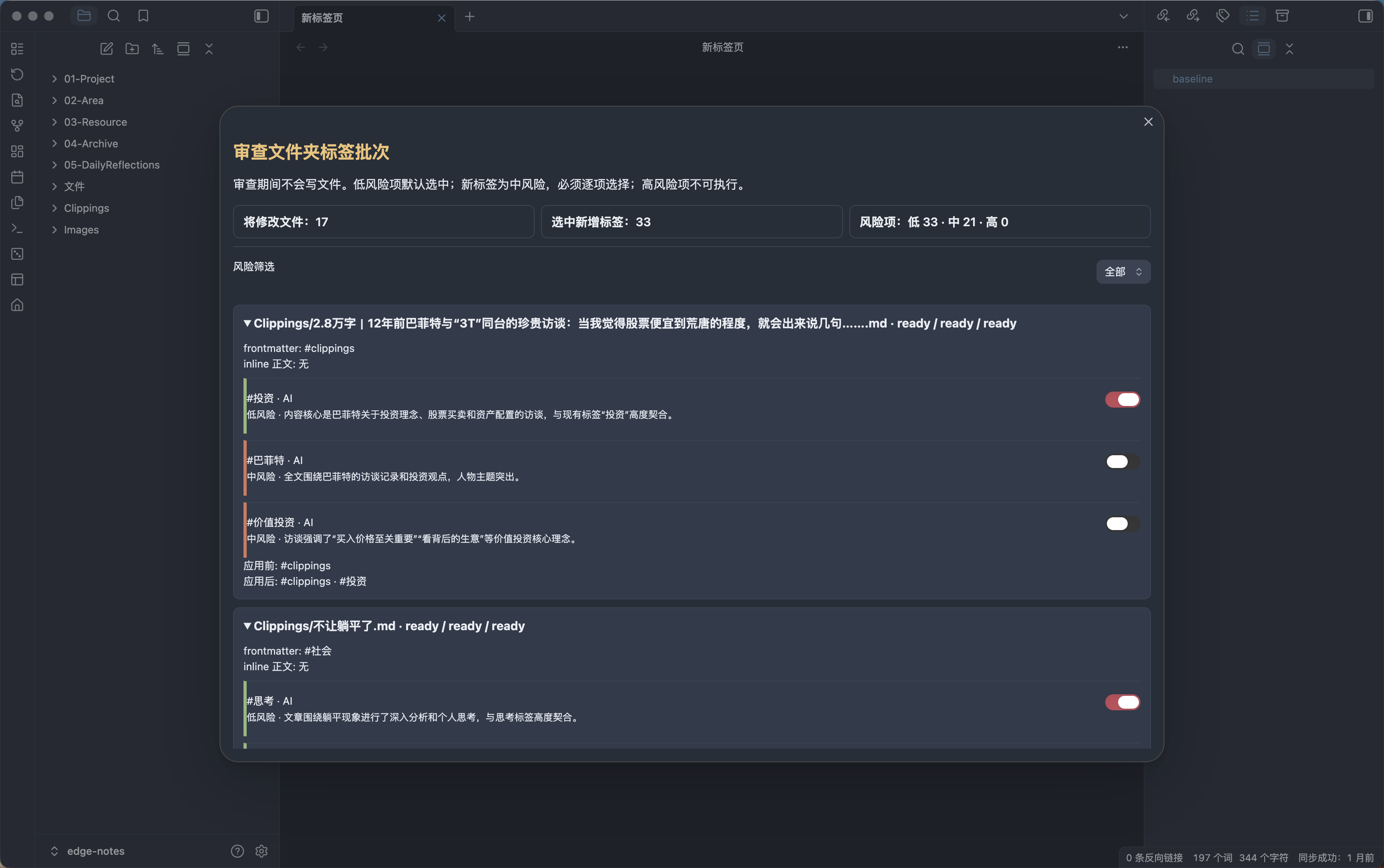
- Start from the active note's parent folder, choose any other vault folder or the vault root, and include subfolders by default.
- Confirm the full Markdown file count and estimated one-request-per-note cost before any content read, index build, or provider request.
- Enforce a configurable complete-batch limit of 1-200 files (default 50) without silently truncating the scope.
- Generate source-aware candidates with at most two concurrent AI requests; cancellation immediately stops new work, discards late results, and warns that in-flight provider requests may still be billed.
- Keep locally derived inline-to-frontmatter sync items available when AI fails, and retry only failed read/AI items.
- Review frontmatter, inline, and AI sources per file; low-risk inline/existing-tag additions start selected, new tags are medium risk and require individual selection, and destructive actions are not executable.
- Apply only after a second whole-batch confirmation, using full preflight, per-file snapshot checks, reverse compensation, and a persisted fixed recovery target if compensation is incomplete.
- Undo the latest applied folder batch as one operation, including after an Obsidian/plugin reload.
- Never rewrite note bodies or remove inline tags.
Vault-level tag health report
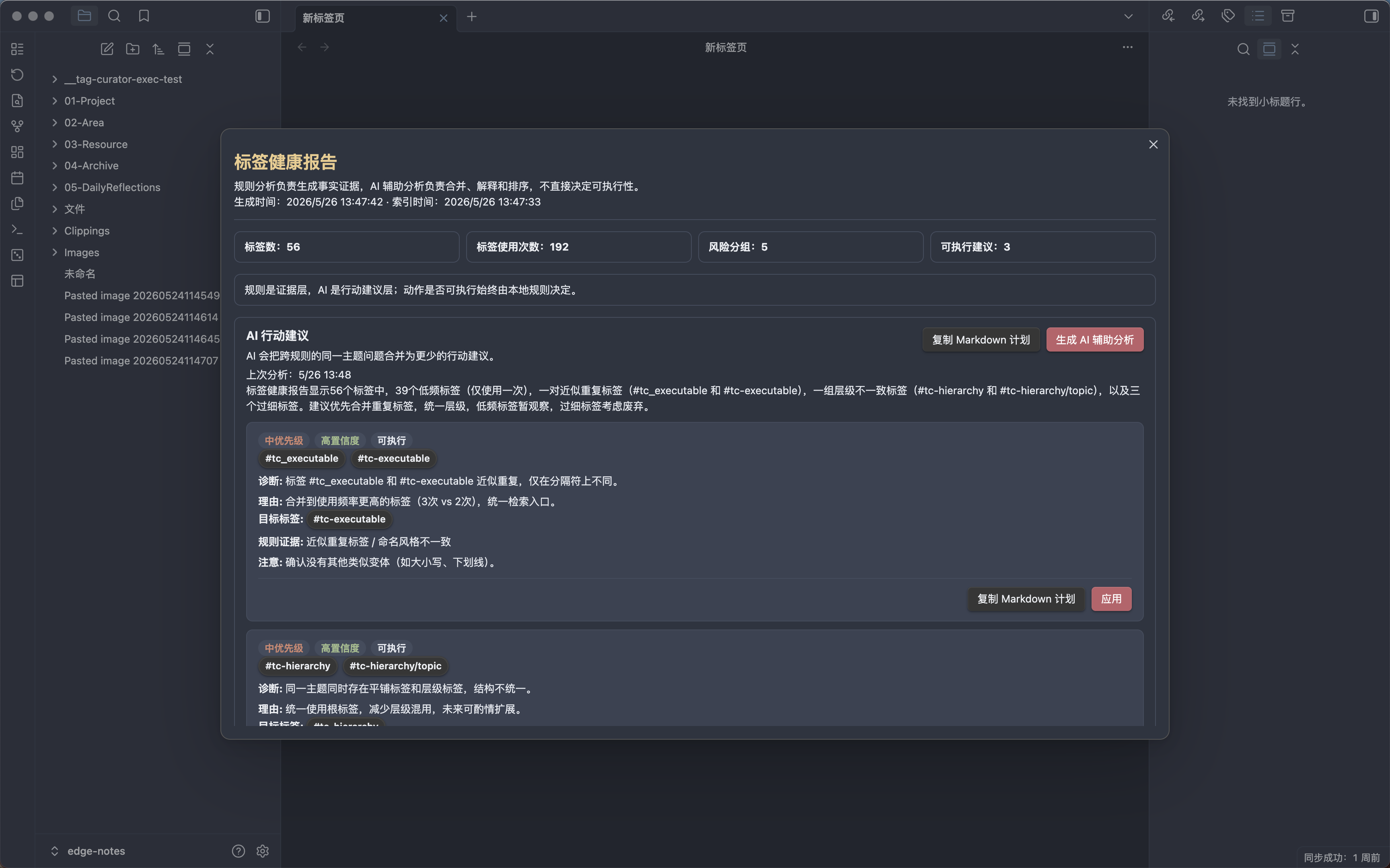
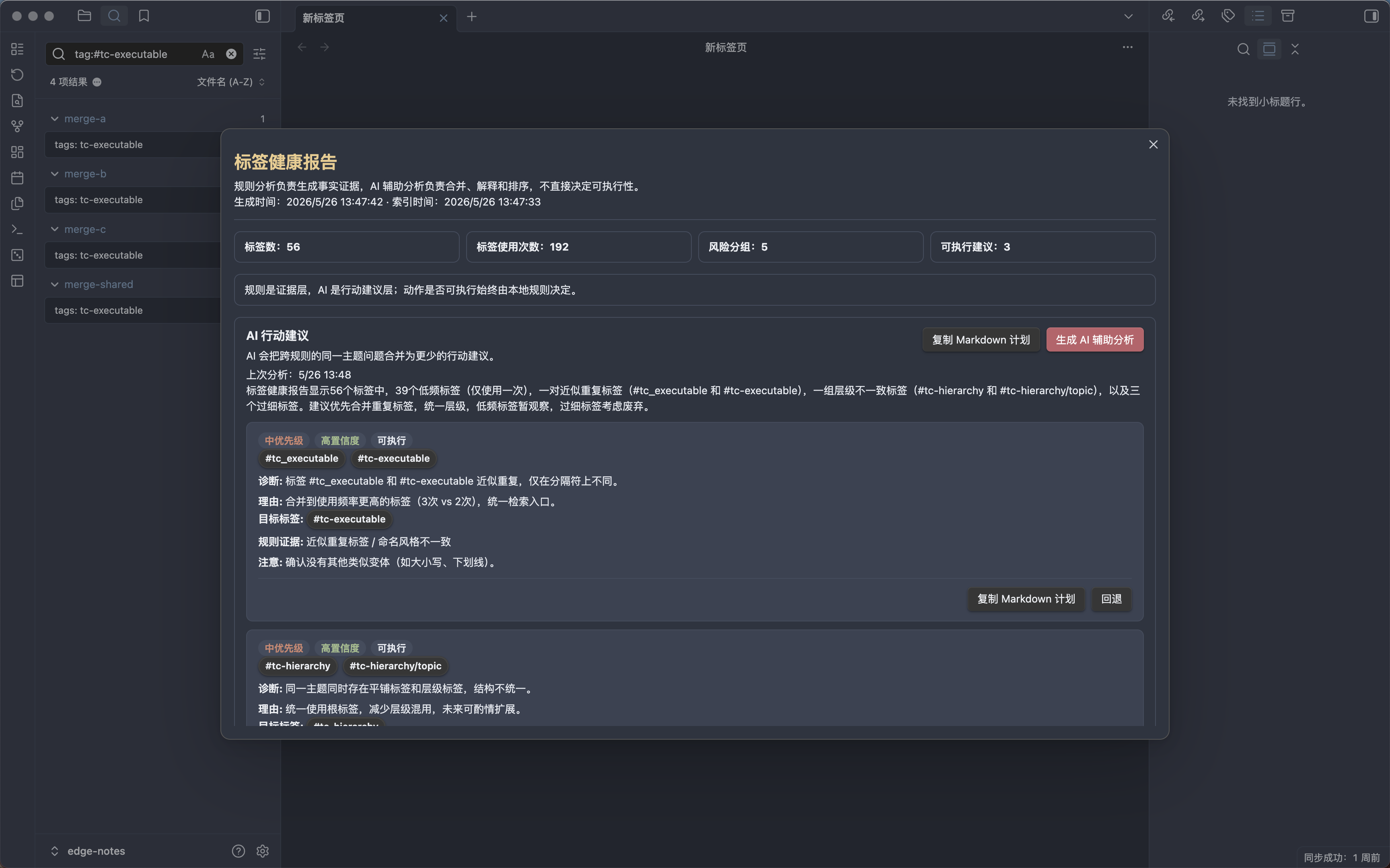
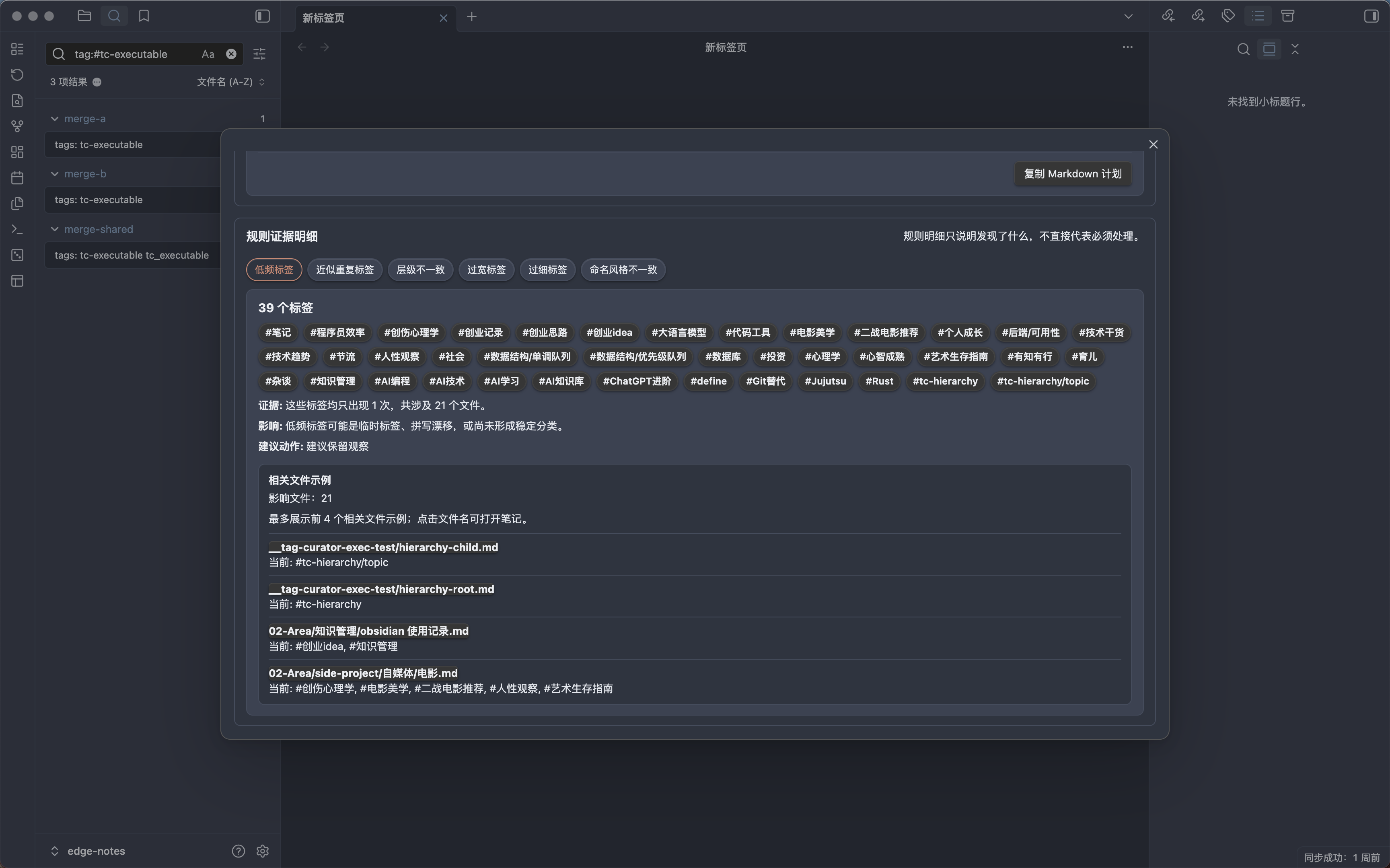
- Organize vault-level tag health into overview, AI priority actions, and rule evidence details.
- Group health issues such as low-frequency tags, near duplicates, hierarchy inconsistencies, over-broad tags, over-narrow tags, and naming drift.
- Use rule analysis for factual evidence and action safety boundaries; use AI assistance for merging related issues, explaining rationale, ranking priorities, and adding risk notes.
- Show user-facing AI action cards with priority, confidence, actionability, diagnosis, rationale, target tags, rule evidence, and caution notes.
- Cache AI-enhanced analysis for the current tag index and show the last analysis time when reopening the report.
- Executable merge/rename suggestions can show file previews, be applied manually, and be undone. Observation, broad split, deprecation, and removal suggestions stay read-only or manual-review.
- Copy AI action and cleanup suggestions as Markdown for external review.
- Click health report tags to copy and search them in Obsidian.
- Keep long reports scrollable inside a stable modal layout.
Settings
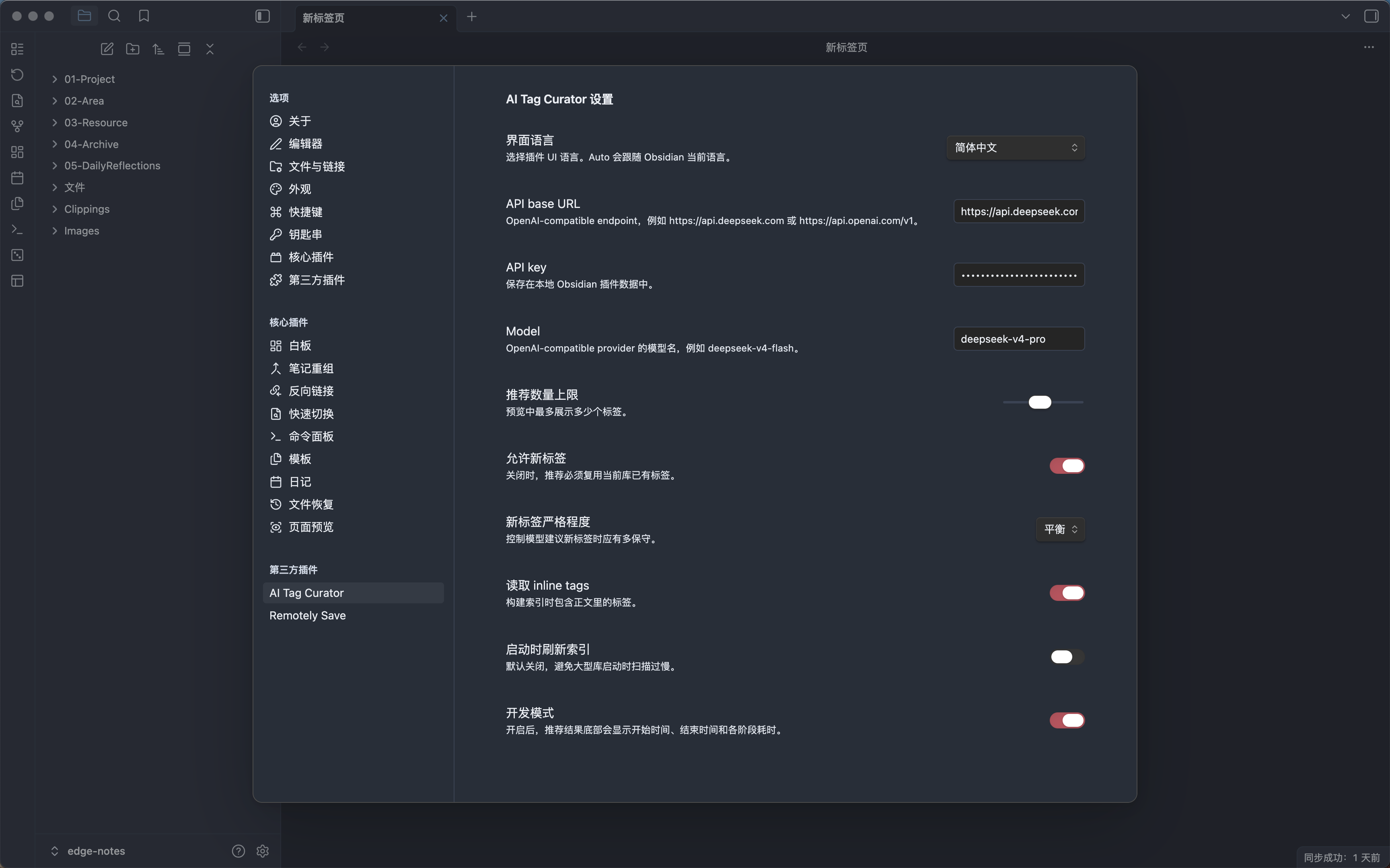
- Support remote OpenAI-compatible providers such as DeepSeek and OpenAI, plus local OpenAI-compatible endpoints such as Ollama, LM Studio, and LiteRT-LM CLI.
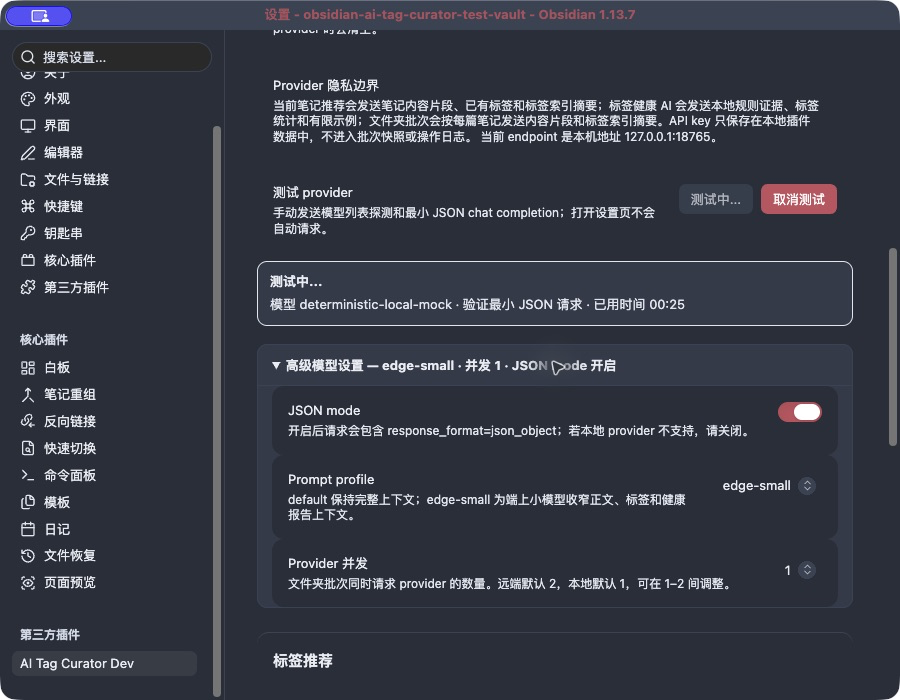
- Local providers may leave the API key blank, disable JSON mode, and default to the smaller
edge-smallprompt profile with one concurrent folder-batch request. - Group settings into General, AI service connection, Advanced model settings, Tag recommendations, Indexing and batch, and Diagnostics and feedback; advanced model settings are collapsed by default.
- Provide an explicit provider test with persistent stage and elapsed-time feedback, cancellation, late-result isolation, and a disclosure of which content the current endpoint receives.
- Show dev-mode timing for tag recommendations and AI-enhanced health analysis.
- Support Chinese, English, and
Autolanguage mode following Obsidian. - Configure the maximum complete folder batch size from 1 to 200 files.
Provider Configuration
Choose a Provider preset first, then configure as needed:
Provider type(shown only for theCustompreset)API base URL(read-only for standard presets and editable forCustom)API key(required for remote providers, optional for local providers)ModelJSON modePrompt profileProvider concurrency
Example OpenAI-compatible settings:
| Provider | Type | API base URL | API key | Model example |
|---|---|---|---|---|
| OpenAI | Remote | https://api.openai.com/v1 | Required | gpt-4o-mini |
| DeepSeek | Remote | https://api.deepseek.com | Required | deepseek-chat |
| Ollama | Local | http://127.0.0.1:11434/v1 | Optional | qwen3.8:27b |
| LM Studio | Local | http://127.0.0.1:1234/v1 | Optional | The locally loaded model name |
| LiteRT-LM CLI | Local | http://127.0.0.1:9379/v1 | Optional | The model exposed by litert-lm serve |
The API key is stored locally in Obsidian plugin data and is not written into folder-batch snapshots or operation logs. The plugin does not install, start, download, or manage local models. If a local endpoint is not 127.0.0.1 / localhost, settings and folder-scope confirmation warn that content is sent to that address.
Apple Foundation Models, Android Gemini Nano/AICore, Chrome Prompt API, and LiteRT-LM JS are not bundled directly into the Obsidian plugin runtime. This stage only connects through an explicit local OpenAI-compatible endpoint. See the Chinese on-device model support research.
Ollama + Qwen3.8 quick start
This path was validated on an Apple M2 Pro with 32GB unified memory using Ollama 0.32.15 and the approximately 17GB qwen3.8:27b model. Choose a smaller model on machines with less available memory.
- Install and start Ollama:
brew install --cask ollama-app
ollama --version
Launch the Ollama app. When you need to run the service manually, use ollama serve.
- Download and confirm the model:
ollama pull qwen3.8:27b
ollama list
- Verify the native and OpenAI-compatible APIs:
curl -fsS http://127.0.0.1:11434/api/version
curl -fsS http://127.0.0.1:11434/v1/models
curl -fsS http://127.0.0.1:11434/v1/chat/completions \
  -H 'Content-Type: application/json' \
  -d '{"model":"qwen3.8:27b","messages":[{"role":"user","content":"Return exactly {\"ok\":true} as JSON."}],"stream":false}'
- In the plugin's AI service connection group, select:
- Provider preset:
Ollama - API base URL:
http://127.0.0.1:11434/v1(managed by the preset) - Model:
qwen3.8:27b - API key: blank
- Advanced model settings:
edge-small, concurrency1; JSON mode starts off and can be enabled after a successful compatibility test - Click Test connection and keep the settings page open for the persistent stage, elapsed time, and final result
Switching providers clears the previous API key and applies safe destination defaults. Local model tests and recommendations may take several minutes. Cancelling discards late UI results, but a request already sent to Ollama may continue inference until it settles.
Capability boundary
The plugin currently uses text chat/completions and requires parseable structured JSON. Even when Ollama, LocalAI, or another runtime supports more, the plugin does not currently call vision, image generation, speech, embeddings, tools/agents, streaming, or native Apple/Google on-device SDKs.
Troubleshooting
- Endpoint unreachable: confirm Ollama is running, then check
lsof -nP -iTCP:11434 -sTCP:LISTENand/api/version. - Model 404: run
ollama listand use the exact model name in plugin settings. - JSON mode /
response_formatincompatibility: expand Advanced model settings, turn JSON mode off, and test again. - Non-JSON response: keep
edge-small, confirm the model follows structured-output instructions, or choose a model with stronger instruction following. - Slow inference: run
ollama ps, avoid keeping multiple large models resident, reduce batch concurrency, or use a smaller model.
Local Installation
- Install dependencies:
npm install
- Build the plugin:
npm run build
- Create a plugin directory in your target Obsidian vault:
mkdir -p /path/to/your-vault/.obsidian/plugins/ai-tag-curator
- Copy the generated files:
cp main.js manifest.json styles.css .hotreload /path/to/your-vault/.obsidian/plugins/ai-tag-curator/
- Open Obsidian, go to
Settings -> Community plugins, and enableAI Tag Curator.
Generated plugin files:
main.jsmanifest.jsonstyles.css.hotreloadfor local development with the Hot Reload plugin
For local development, you can install directly into an Obsidian vault:
OBSIDIAN_VAULT_PATH=/path/to/your-vault npm run local:install
To install a side-by-side development copy without replacing the Marketplace plugin:
OBSIDIAN_VAULT_PATH=/path/to/your-vault npm run local:install-dev
The install script requires an explicit OBSIDIAN_VAULT_PATH so it cannot silently write to the wrong or unregistered Obsidian vault.
Release screenshot vault
Prepare or reset the dedicated synthetic vault used for real Obsidian smoke tests and release screenshots:
OBSIDIAN_RELEASE_VAULT_PATH=/path/to/test-vault npm run release:vault:prepare
OBSIDIAN_RELEASE_VAULT_PATH is required because the command resets the synthetic release notes. It installs the development plugin and disables Obsidian Sync. The default Obsidian appearance is used unless an optional theme-source vault is provided:
OBSIDIAN_RELEASE_VAULT_PATH=/path/to/test-vault \
OBSIDIAN_THEME_SOURCE_VAULT=/path/to/theme-source \
npm run release:vault:prepare
Only the active appearance configuration, its theme directory, and the core-plugin configuration are copied from the optional theme source. Personal notes and credentials are never copied.
Start the deterministic local provider before exercising AI-backed release flows:
npm run release:mock
The mock listens on 127.0.0.1:18765, keeps external APIs and real credentials out of the screenshot workflow, and adds a short response delay so progress and cancellation states can be verified.
After building a release candidate, verify version metadata and print the size and SHA-256 digest of every required release asset:
npm run build
npm run release:verify
Usage
- Configure provider type, preset, API base URL, API key (blank is allowed for local providers), and model.
- Run
Refresh vault tag index. - Open a Markdown note.
- Run
Suggest tags for current note. - Review the recommendation modal and apply only the tags you want.
- Run
Generate tag suggestions for folderto confirm a folder scope, generate candidates, and review a whole batch before writing. - Run
Undo latest folder batch tag operationto revert the latest applied folder batch as one unit. - Run
Analyze tag healthto inspect vault-level tag problems. - Optionally run
AI-enhanced analysisinside the health report. - Run
Undo last tag curator changeif you need to revert the latest tag write for the current note.
Commands
The plugin UI defaults to Auto, which follows the current Obsidian language. In English, the commands are:
Refresh vault tag indexShow tag index summaryAnalyze tag healthSuggest tags for current noteGenerate tag suggestions for folderUndo last tag curator changeUndo latest folder batch tag operation
Development
Run tests:
npm test
Build:
npm run build
OpenSpec workflow:
npm run spec:list
npm run spec:status -- --change <change-name>
npm run spec:validate -- <change-name>
For new product work, start with an OpenSpec change proposal before implementation.
Current Limitations
- Current-note and folder workflows write only the frontmatter
tagsfield. Reviewed inline tags can be copied into frontmatter, but their original body text and position are never rewritten or removed. - Remote providers still require an API key. Local OpenAI-compatible providers may leave it blank, but still require a base URL and model.
- The plugin only calls the explicitly configured provider endpoint. It does not install, start, or download models, and it does not silently fall back to a cloud provider.
- A folder batch must contain 1-200 Markdown files within the configured limit; an oversized scope is blocked rather than truncated.
- Cancellation cannot revoke provider requests already sent, so those in-flight requests may still be billed even though late results are discarded.
- Only additive tag plans are executable in folder batches. Delete, replace, merge, and body-edit actions remain outside the 0.3 write boundary.
- Rule evidence in tag health reports is read-only. Executable cleanup items require file previews and explicit manual confirmation.
- AI-enhanced health analysis provides summary and action guidance only; it cannot change local action capability or execute changes.
- Cleanup plans label action capabilities. Executable merge/rename items can be applied manually and undone; other items remain preview-only, observe-only, or manual-review.
- AI responses must be valid structured JSON. If parsing fails, no file is modified.
Documentation
For plugin developers
Search results and similarity scores are powered by semantic analysis of your plugin's README. If your plugin isn't appearing for searches you'd expect, try updating your README to clearly describe your plugin's purpose, features, and use cases.