Metadata Auto Classifier
approvedby goberomsu
Automatically classifies and applies metadata to your notes.
★ 57 stars↓ 7,680 downloadsUpdated 4mo agoMIT
Metadata Auto Classifier
AI-powered metadata classification for Obsidian. Analyzes your notes and automatically generates context-aware tags and frontmatter using configurable AI providers.
The more context you give, the more accurate the classification.
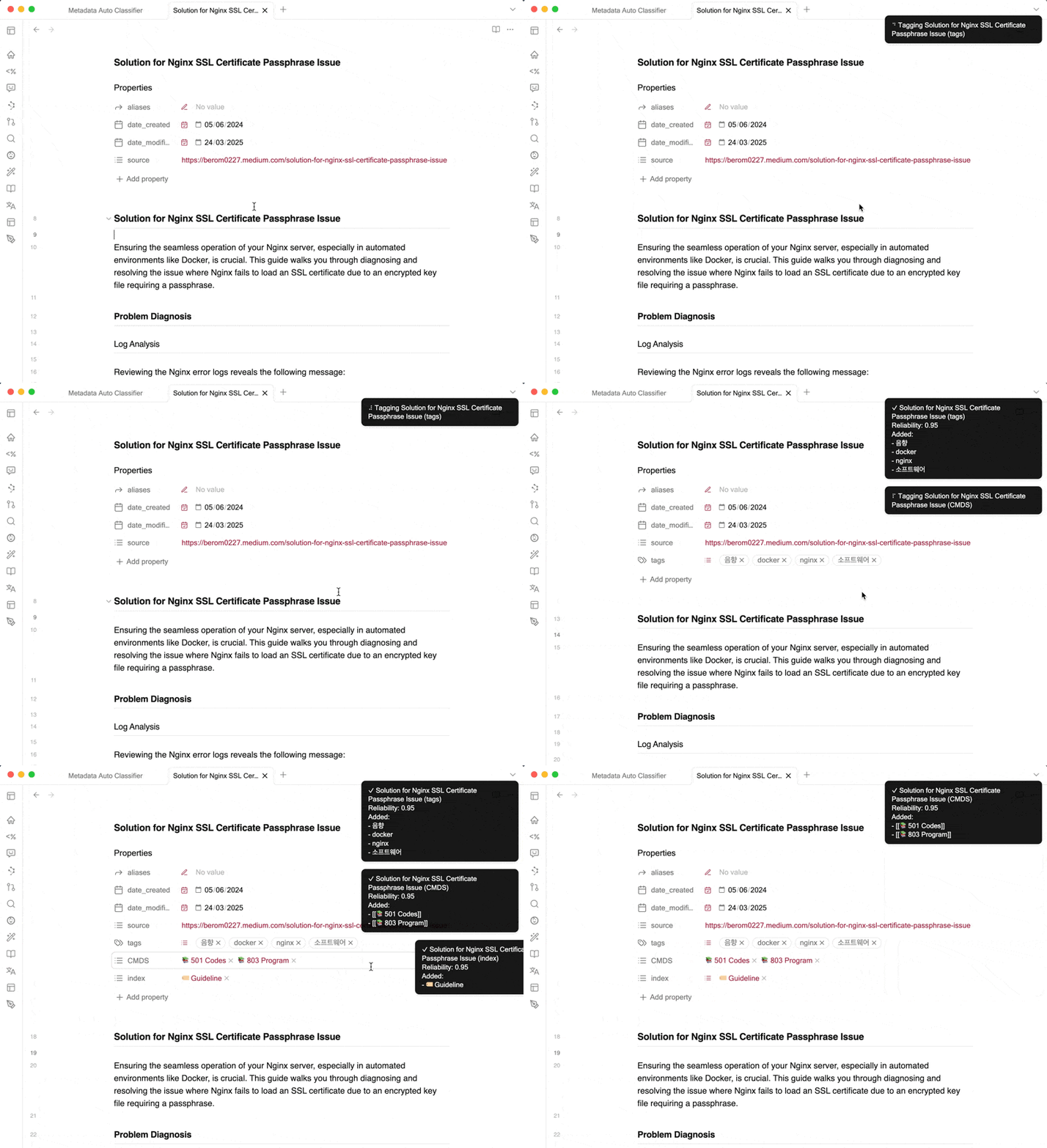
Example
Features
- Automatic tag generation -- AI analyzes note content and generates contextually relevant tags
- Custom frontmatter fields -- define any frontmatter fields and let AI populate them automatically
- Classification rules -- set custom rules, tag categories, and field-specific guidelines for accurate metadata
- Per-field context prompts -- provide additional context per metadata field to guide AI classification
- Test and preview -- built-in testing tools with preview mode and quality assessment before applying changes
- Multi-provider support -- works with OpenAI, Gemini, Ollama, and other AI providers via a unified interface
- Custom model configuration -- add and configure custom AI providers and models freely
Installation
Community Plugin (Recommended)
- Open Obsidian and navigate to Settings > Community Plugins
- Disable Safe Mode if currently enabled
- Click Browse and search for "Metadata Auto Classifier"
- Click Install, then Enable to activate the plugin
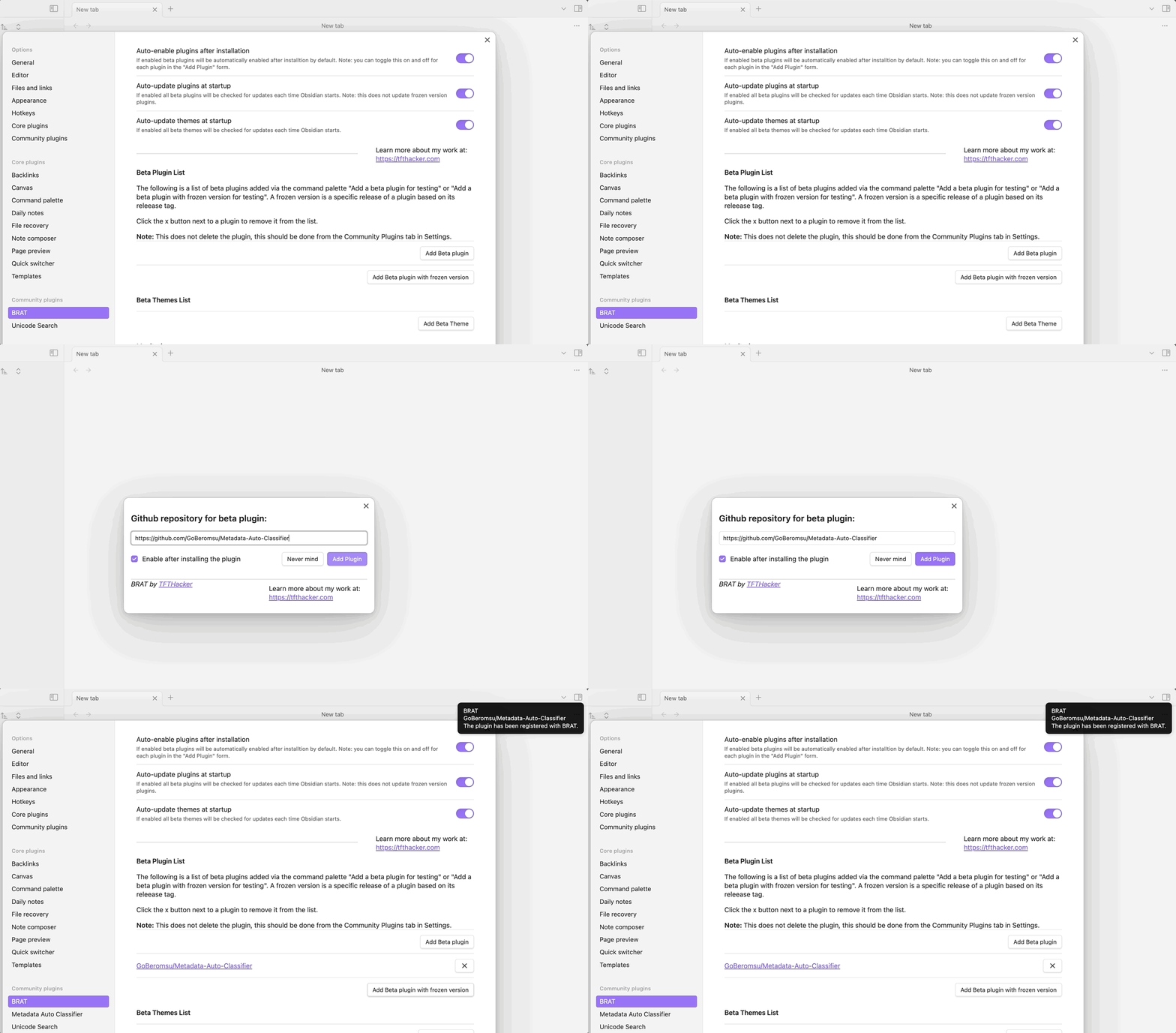
Manual Installation (Beta)
Using BRAT:
- Install BRAT from the Obsidian Community Plugins browser
- In BRAT settings, click Add Beta plugin
- Enter the repository URL:
https://github.com/GoBeromsu/Metadata-Auto-Classifier - Click Add Plugin to install
Usage
- Open any note you want to classify
- Access commands via the Command Palette (Cmd/Ctrl + P):
- Fetch tags using current provider -- generate relevant tags
- Fetch all frontmatter using current provider -- populate all custom frontmatter fields
- Individual field commands -- update specific frontmatter fields one at a time
- Review and refine AI-generated suggestions as needed
Commands
| Command | Description |
|---|---|
| Fetch tags using current provider | Generate tags for the active note |
| Fetch all frontmatter using current provider | Populate all configured frontmatter fields |
| Fetch [field] using current provider | Update a specific frontmatter field |
Settings
| Setting | Description |
|---|---|
| AI Provider | Select from OpenAI, Gemini, Ollama, or custom providers |
| Model | Choose or configure the model used for classification |
| Custom frontmatter fields | Define which frontmatter fields AI should generate |
| Classification rules | Set rules and categories for how tags/fields are generated |
| Field-specific prompts | Provide per-field context to guide AI output |
Tech Stack
| Category | Technology |
|---|---|
| Platform | Obsidian Plugin API |
| Language | TypeScript 5 |
| Bundler | esbuild |
| AI | OpenAI, Gemini, Ollama, custom providers |
| Testing | Vitest (with coverage) |
| Linting | ESLint 9 (flat config) + Prettier + eslint-plugin-boundaries |
Project Structure
Metadata-Auto-Classifier/
├── src/
│   ├── main.ts           # Plugin entry point (AutoClassifierPlugin)
│   ├── provider/          # AI provider layer (HTTP, OAuth, prompt generation)
│   ├── classifier/        # Business logic (ClassificationService, CommandService)
│   ├── settings/          # Settings UI (tabs, modals, components)
│   └── lib/               # Pure utilities (frontmatter, sanitizer, ErrorHandler)
├── __tests__/             # Vitest tests (mirrors src/ structure)
├── __mocks__/             # Obsidian API mock
├── scripts/               # dev.mjs, version.mjs, release.mjs
├── boiler.config.mjs      # Per-repo config
└── manifest.json          # Obsidian plugin manifest
Development
pnpm install
pnpm dev              # vault selection + esbuild watch + hot reload
pnpm build            # tsc type-check + production build
pnpm test             # Vitest unit tests
pnpm test:coverage    # Vitest with coverage report
pnpm lint             # ESLint
pnpm run ci           # build + lint + test
Inspiration
- UI design inspired by Obsidian Web Clipper
- Codex API integration inspired by Smart Composer
Support
For questions, issues, or feature requests, please visit the GitHub repository.
License
This project is licensed under the MIT License.
For plugin developers
Search results and similarity scores are powered by semantic analysis of your plugin's README. If your plugin isn't appearing for searches you'd expect, try updating your README to clearly describe your plugin's purpose, features, and use cases.