Annotate Audio
approvedby 12-vide
Listen to an audio and add comments to it.
What is it?
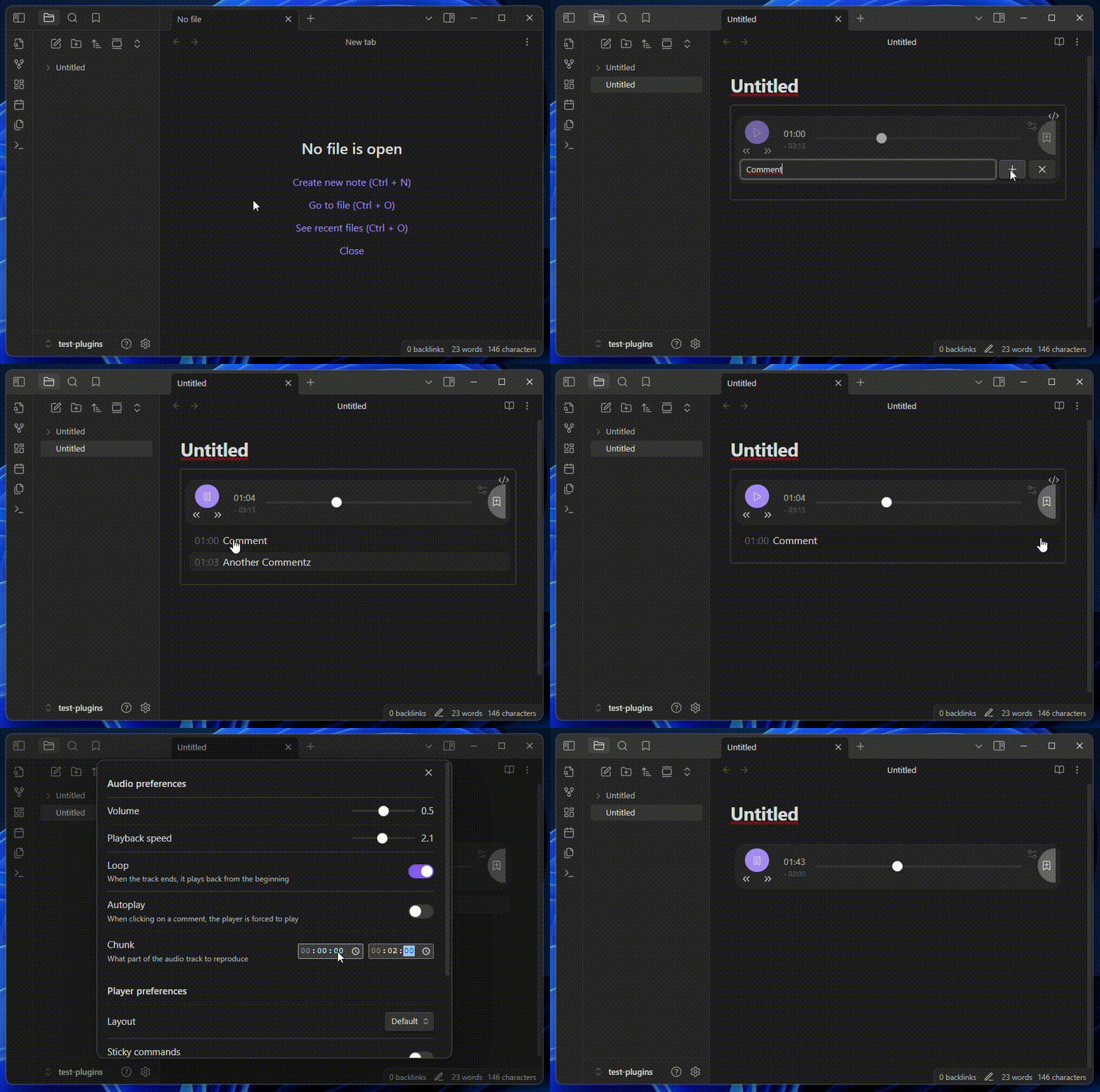
- Reproduce an audio file
- Tweak listening experience by changing: volume, playback speed, looping...
- Add comments to desired timestamps. They are formatted as LRC
- Quickly jump to a specific timestamp by left-clicking on the related comment
- Modify/Delete a comment by right-clicking on it (dedicated button for mobile)
- Inuitive keyboard shortcuts
- Mobile compatible
- Controllabe with Obsdian commands
- Localized interface:
en,it,zh-cn,es,pt-br(Want to add your language?) - Precision down to the millisecond
``` annotate-audio
#32a9143a94c3700d
source: [[My Audio.mp3]]
chunk: 00:00.00-02:52.10
volume: 0.5
speed: 1
loop: false
layout: 0
sticky: false
autoplay: false

[00:37.07]Section 1
[12:45.34]Section 2
[14:01.90]Section 3
```
The first line is the ID. You are free to personalize it (# + 16 characters hexadecimal) but don't move it around
Options
Each audio-box has its owns. They can be tweaked manually or, more easily, using the dedicated modal. (Their order is not important but they need to be placed before the comments)
| Name | Default | Values | Description |
|---|---|---|---|
source | WikiLink to the audio file to reproduce | ||
volume | 0.5 | 0.0 → 1.0 | Player base volume |
speed | 1 | 0.0 → 1.0 | Player playback speed |
loop | false | true/false | Loop-back to beginning after getting to the end of the audio |
sticky | false | true/false | Main controls become sticky, following you as you scroll down |
layout | 0 | 0,1,2 | What player layout to display (feel free to make your own) |
chunk | undefined | MM:SS.ss-MM:SS.ss | Section of audio to play |
autoplay | false | true/false | When clicking on a comment, the player starts playing from there instead of simply moving there |
unstoppable | false | true/false | When creating/modifing a comment, the player doesn't stop |
decimals | 0 | 0,1,2,3 | How many decimals are displayed when showing time |
There are also some options only available in specific layouts
| Layout | Name | Default | Values | Description |
|---|---|---|---|---|
| 1, 2 | title | undefined | Title of the player. If not present: not shown. If not set: name of audio file (or its alias, if present) |
Obsidian Commands
| Name | Action |
|---|---|
Add audiobox | Insert an already-configured audio-box inside the note |
Insert comment | Insert a comment in the last interacted audiobox |
Pause audiobox | Pause player in the last interact audiobox |
Play audiobox | Play player in the last interact audiobox |
Toggle audiobox | Toggle player in the last interact audiobox |
Move forward | Move player forward in the last interact audiobox |
Move backward | Move player backward in the last interact audiobox |
Development
For all the changes, check CHANGELOG.md
Road-Map
- Allow hotkeys inside input text box
- Follow native folder exclusion in the audio file search
- Render markdown even when modifying a comment. "Live-Preview" (https://github.com/nothingislost/obsidian-cm6-attributes)
Known Issues
titleoption inside modal is not displayed correctly on mobile- Layout-unique options are visible inside other layouts
- Audiobox in "reading" and "editing" mode are not in sync
- Checking when to use cache - by looking at the options hashing - is not efficiently done
Biglayout's wavegraph cannot handle file bigger than 2GiB
Credits
These are the sources on which I've initially developed this plugin:
- Original Repo: "obsidian-audio-player" by noonesimg
- Other Fork: "obsidian-enhanced-audio-player" by Yidaotus
- Other Fork: "obsidian-audio-player" by dtkav
For plugin developers
Search results and similarity scores are powered by semantic analysis of your plugin's README. If your plugin isn't appearing for searches you'd expect, try updating your README to clearly describe your plugin's purpose, features, and use cases.