Sounders
approvedby Razzdol
Minimalistic audio player in the sidebar: playlists, musics, tracks, sounds, shuffle, repeat, and volume. - This plugin has not been manually reviewed by Obsidian staff.
★ 2 stars↓ 424 downloadsUpdated 1mo agoMIT
Sounders
Quick start
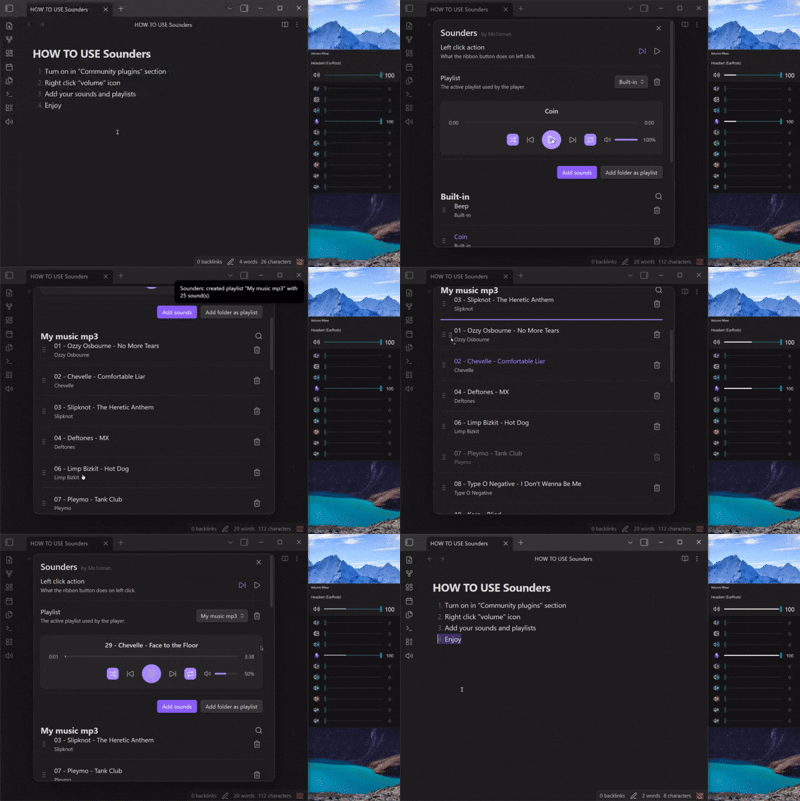
- Left-click the volume icon in the sidebar to play the next track (default).
- Right-click the sidebar icon to open the player and settings.
- Add audio files individually or import an entire folder as a playlist.
Features
- Sidebar button with configurable left-click action: play/pause or next track
- Shows what is currently playing

- Optional right-sidebar player (
Show player in sidebar) with sticky playback controls while scrolling tracks Minimalisticmode for a more compact right-sidebar player- Custom track order (drag and drop)
- Double-click a track name, artist, or playlist title to rename
- Shuffle and repeat modes (off / one / auto)
- Playback speed control (0.5x-2.0x), with double-click reset to 1.0x
- Seek bar for file tracks
- Search tracks in the active playlist
- Reuse existing audio files when importing the same folder into another playlist
- Command Palette commands: Play next sound, Play/pause, Open settings(player)
Settings
-
Open via right-click the Sidebar icon, or Settings → Community plugins → Sounders.
-
All tracks and playlists are automatically added to:
.obsidian\plugins\sounders\sounds
- Track order and playlist references are stored at
.obsidian\plugins\sounders\data.json
See CHANGELOG.md for version history.
Found a bug? Open an issue
version 1.3.0
For plugin developers
Search results and similarity scores are powered by semantic analysis of your plugin's README. If your plugin isn't appearing for searches you'd expect, try updating your README to clearly describe your plugin's purpose, features, and use cases.