AQL Syntax Highlighting
approvedby Poorvi Acharya
ANNIS Query Language (AQL) syntax highlighting for code blocks. - This plugin has not been manually reviewed by Obsidian staff.
AQL Syntax Highlighting
ANNIS Query Language (AQL) syntax highlighting for Obsidian code blocks.
Current release: v1.0.0
What Is ANNIS?
ANNIS (ANNotation of Information Structure) is an open-source search and visualization platform for richly annotated linguistic corpora.
- Official ANNIS repository: https://github.com/korpling/ANNIS
- ANNIS documentation homepage: http://corpus-tools.org/annis/
Features
- Registers an AQL CodeMirror mode for fenced code blocks.
- Supports token highlighting for strings, operators, metadata, node references, and node classes.
- Ships styling in
styles.css, so highlighting works out of the box after install.
Install
Community plugins (easiest)
- Open Settings -> Community plugins.
- Turn off Safe mode (if needed).
- Search for AQL Syntax Highlighting.
- Install and enable.
Manual install
- Download the latest GitHub release (
v1.0.0). - Copy
manifest.json,main.js, andstyles.cssinto:<your-vault>/.obsidian/plugins/aql-syntax-highlighting/
- In Obsidian, open Settings -> Community plugins and enable AQL Syntax Highlighting.
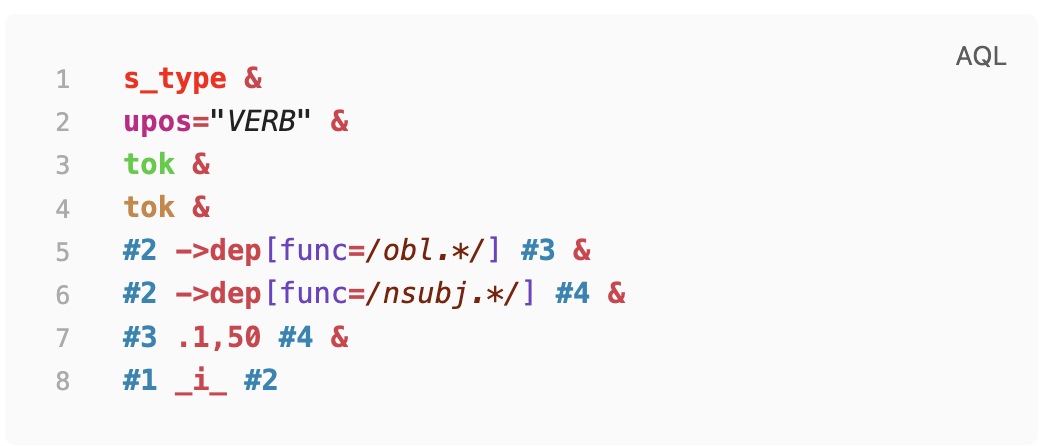
Screenshot
Highlighted AQL example in an Obsidian code block:
Usage
Use fenced code blocks with the language tag aql:
```aql
cat="PP" & cat="NP" & #1 > #2
```
Another example:
```aql
tok="learning" & pos="NN" & #1 . #2
```
Update
Community plugins
- Use Settings -> Community plugins -> Check for updates.
Manual install
- Replace
manifest.json,main.js, andstyles.csswith files from the latest GitHub release (v1.0.0for now). - Reload Obsidian (or disable and re-enable the plugin).
Development
Requirements:
- Node.js 16+
- npm
Install and build:
npm ci
npm run build
Watch mode during development:
npm run dev
Visual validation screenshots (before/after):
npm run test:visual
If Playwright is missing, install it once:
npm install --save-dev playwright
Artifacts are written to:
tests/artifacts/validation-before.pngtests/artifacts/validation-after.png
Optional Customization
If you want to override the default colors:
- Create a file in your vault at
.obsidian/snippets/aql-highlighting-custom.css. - Paste your CSS overrides (example below).
- In Obsidian, go to Settings -> Appearance -> CSS snippets.
- Enable
aql-highlighting-custom. - Reload Obsidian if changes do not appear immediately.
Example snippet:
/* AQL token overrides */
.cm-s-obsidian .cm-string {
   color: #2aa198;
   font-style: italic;
}

.cm-s-obsidian .cm-operator {
   color: #dc322f;
   font-weight: 700;
}

.cm-s-obsidian .cm-node_1 {
   color: #268bd2;
   font-weight: 700;
}
Release Checklist
- Update
manifest.jsonversion. - Update
versions.jsonwith the new version to minAppVersion mapping. - Build with
npm run build. - Create a GitHub release tagged with the same version as
manifest.json. - Upload release assets:
manifest.jsonmain.jsstyles.css
License
MIT. See LICENSE.
For plugin developers
Search results and similarity scores are powered by semantic analysis of your plugin's README. If your plugin isn't appearing for searches you'd expect, try updating your README to clearly describe your plugin's purpose, features, and use cases.