Arroweds Adversary Bank
approvedby arrowedisgaming
Manage and run Daggerheart TTRPG encounters with searchable adversary stat blocks, condition tracking, and instance management. - This plugin has not been manually reviewed by Obsidian staff.
Arroweds Adversary Bank
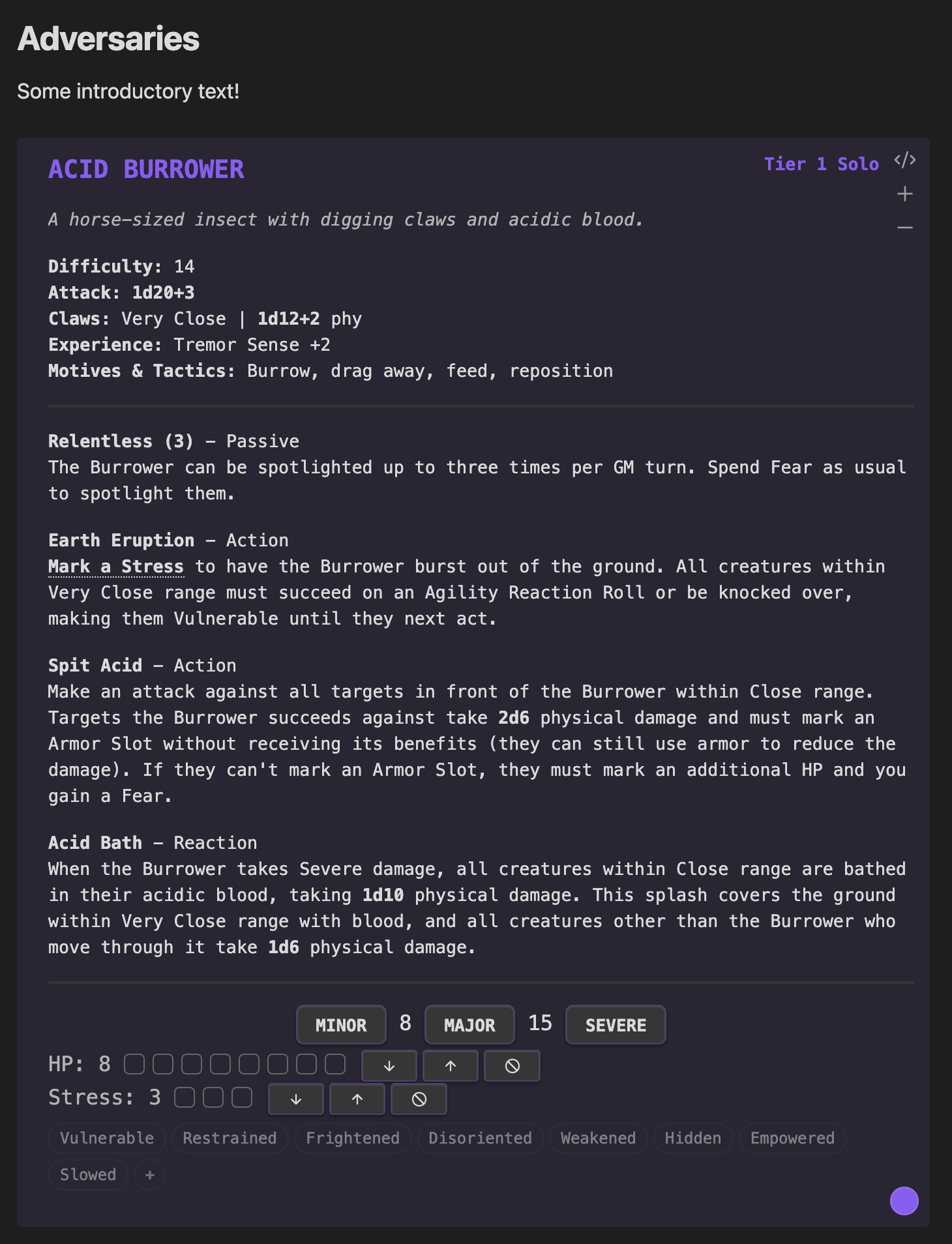
An Obsidian.md plugin that turns your campaign notes into a live Daggerheart encounter table. Search the SRD or your homebrew library, drop adversaries and environments straight into the page you're already writing in, then run the fight from the same note — HP, stress, conditions, and all.

Features
The whole SRD, ready to drop in
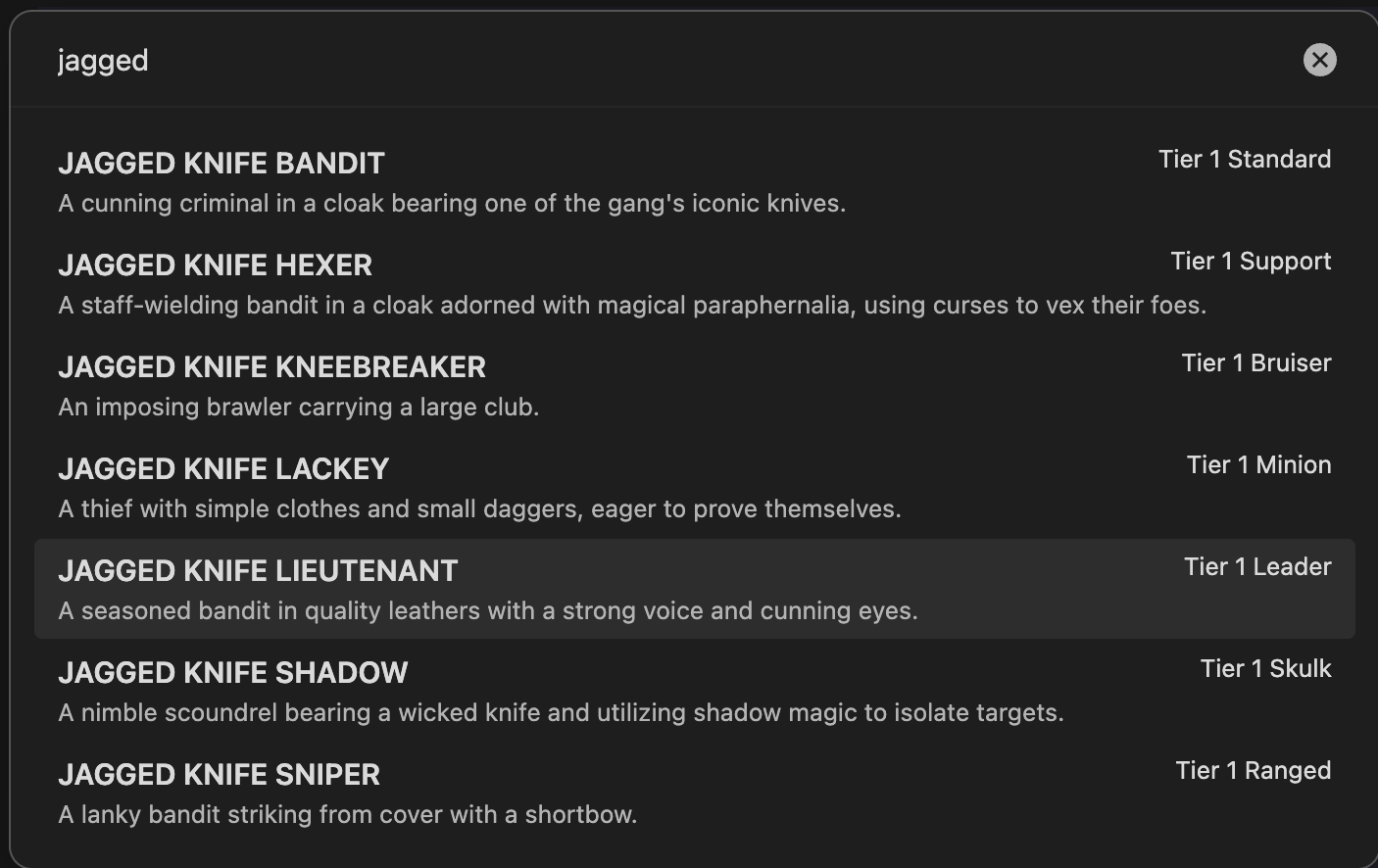
Every adversary and every environment from the Daggerheart SRD, one command away. Hit Ctrl+P, type a name, and the stat block lands in the note you're already in. Drop your own homebrew folder in and it shows up in the same picker — no separate workflow for your custom stuff. Works in Obsidian Canvas too, so you can lay out an encounter visually and run it from the canvas.
Track everything live, per instance
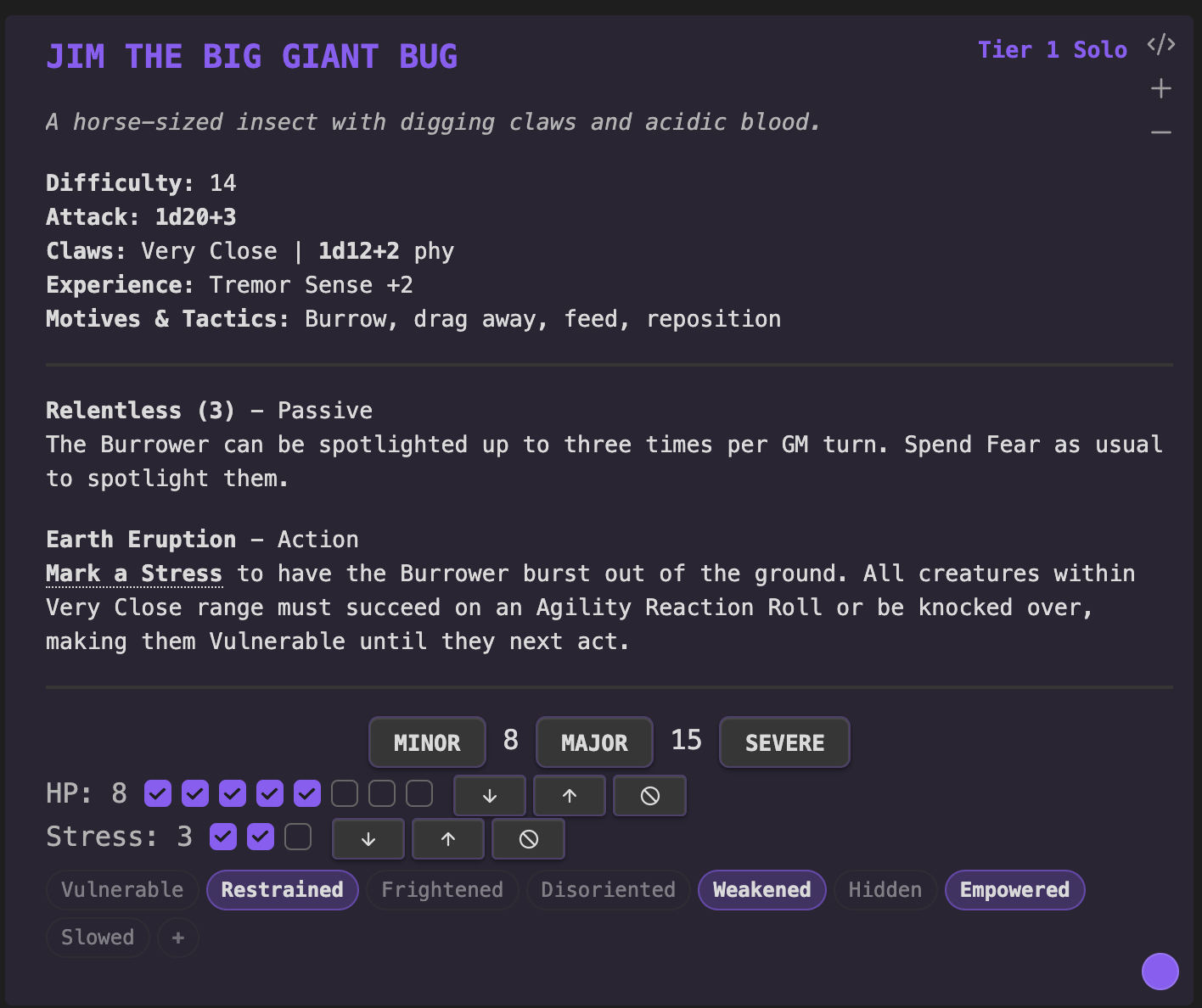
HP, stress, conditions, feature uses, countdowns — all tracked right on the stat block. Mark a threshold with a click, clear it with Alt-click. Running two Bladed Guards or six skeletons from a single block? Each instance keeps its own state and its own name. Toggle the eight standard Daggerheart conditions on any instance, or define your own — "Burning," "Marked by the Hunter," whatever the table needs.
Stat blocks that work like tools
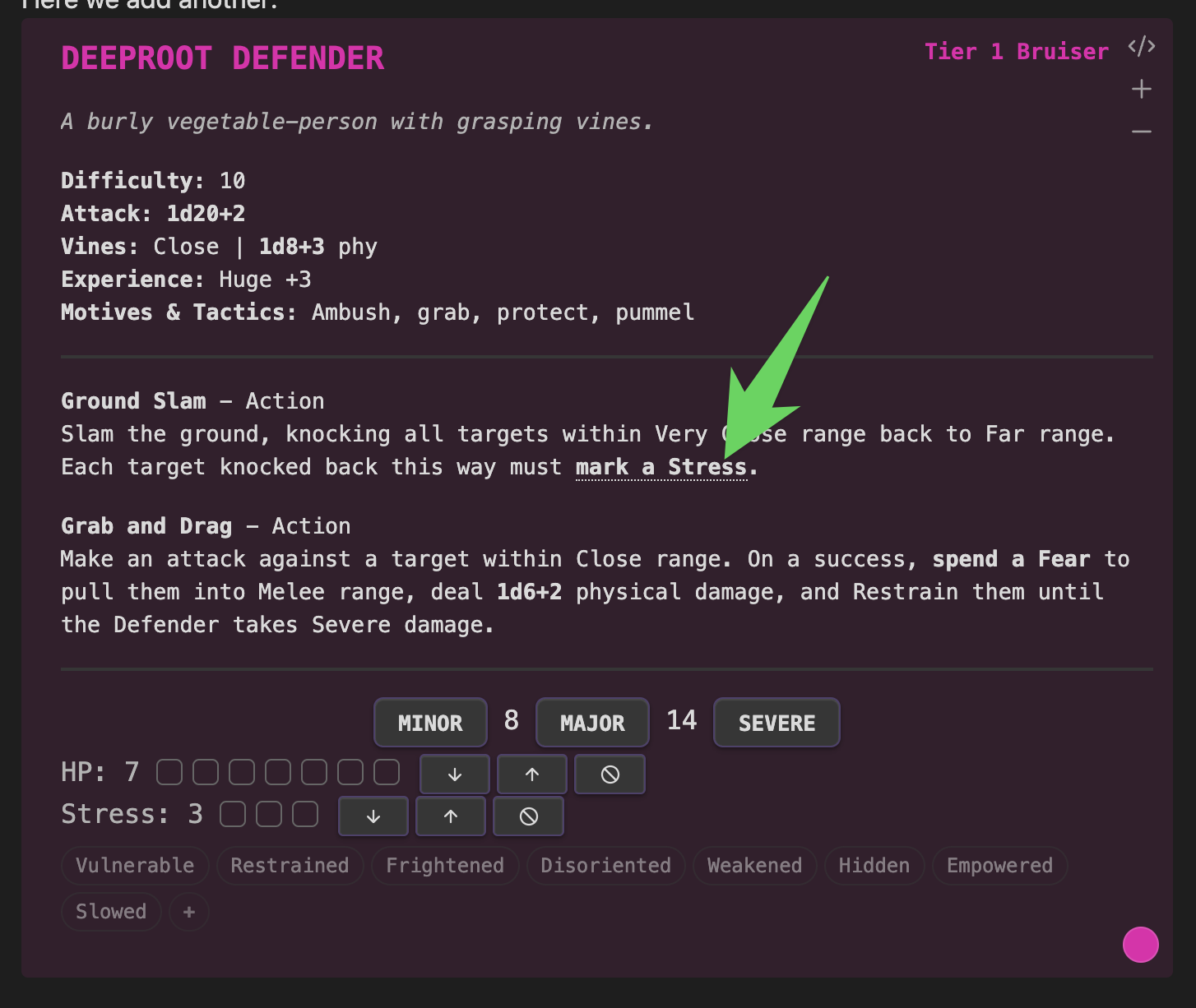
Click an attack bonus to roll it. Click "Mark a Stress" inside a feature description and it actually marks one — and if there are several copies in play, a picker asks which one takes it. A feature that summons reinforcements gets a button that drops the named adversary into the note. The battle points counter in the status bar keeps a running total so you know exactly what the encounter costs. Less flipping between pages, more time running the scene.
Installation
Open Obsidian, go to Settings > Community plugins, click Browse, and search for Arroweds Adversary Bank. Or install it directly from the Obsidian plugin directory.
Usage
Insert from Library
Insert an adversary via a command: Ctrl+P > Insert adversary from library, or use the side ribbon menu (crossed-swords icon).
[!TIP] Bind plugin commands to hotkeys from the Hotkeys settings tab. For example,
Alt+Afor adversaries andAlt+Efor environments.
[!TIP]
Clickthreshold buttons to mark the corresponding amount of HP. UseAlt+Clickto clear it instead.
Renaming
- Auto-suffix: Inserting the same adversary twice auto-names them "Bladed Guard" and "Bladed Guard 2"
- Inline rename: Double-click the adversary name on a rendered card to edit it. Press Enter to save, Escape to cancel.
- Instance names: When you have 2+ copies (via the +/- buttons), each instance's stat bar shows a clickable name label. Click to customize it.
Conditions
Below each instance's HP and Stress slots, you'll see condition badges for the 8 standard Daggerheart conditions. Click to toggle.
Custom conditions can be added two ways:
- In the YAML: add a
conditionsfield with a list of custom condition names - At runtime: click the
+button on the condition bar, type a name, press Enter
name: Chimera
hp: 9
stress: 5
conditions:
  - Poisoned
  - Burning
Summon Buttons
Add a summon field to any feature to get a button that inserts the named adversary:
features:
- name: Raise Dead
  type: Action
  desc: The Necromancer raises skeletal warriors.
  summon:
    - Skeleton Warrior
    - Skeleton Archer
HP/Stress Controls
Each HP and Stress row has inline buttons:
- - removes one mark
- + adds one mark
- x clears all marks
Reference
The daggerheart code block parses the adversary or environment as YAML with the following properties:
| Property | Definition | Example |
|---|---|---|
name | Name of the adversary | Bear |
tier | Adversary tier | 1 |
type | Type of the adversary | Bruiser |
desc | Adversary description | A large bear with thick fur and powerful claws. |
difficulty | Adversary difficulty | 14 |
weapon | Name of the adversary's weapon | Claws |
range | Range of the adversary's weapon | Close |
damage | Amount and type of adversary's weapon damage | 1d8+3 phy |
hp | Total adversary hitpoint slots | 6 |
stress | Total adversary stress slots | 3 |
thresholds | Adversary thresholds, separated by a /; leave blank for minions with 1 HP | 9/17 |
attack | Adversary attack bonus; click to roll for attack | +1 |
xp | Adversary experiences | Ambusher +2, Keen Senses +3 |
motives | Adversary's motives and tactics | Climb, defend territory, pummel, track |
conditions | Custom condition names for this adversary | Poisoned, Burning |
features | List of feature objects, see table below | |
id | Stat block id for state tracking; auto-generated, can be any random string | a2sd4vsf |
features properties:
| Property | Definition | Example |
|---|---|---|
name | Name of the feature | Relentless (2) |
type | Feature type | Passive |
desc | Feature description | Make a standard attack. On a success, the target is *Vulnerable* until they next act. |
uses | Uses per scene | 2 |
countdown | Size of the countdown | 6 |
flavor | Hints for GM/PCs | Have any of the PCs forded rivers like this before? |
summon | Adversary name(s) to summon | Skeleton Warrior or a YAML list |
For environments, weapon, damage, range, hp, stress, thresholds, attack, xp, motives are not set.
Instead, additional properties are available:
| Property | Definition | Example |
|---|---|---|
impulses | Environment impulses | Bar crossing, carry away the unready, divide the land |
adversaries | Potential adversaries in an environment | Guards, Masked Thief, Merchant |
tone | Tone and feel of the environment | Musty and mournful, serene yet slightly wrong |
All properties are optional and simply won't render if skipped.
Every text property supports markdown — name, desc, weapon, range, damage,
difficulty, xp, motives, tone, impulses, adversaries, and a feature's
name, type, desc, and flavor. Use **bold**, *italic*, ==highlight==,
`code`, ~~strikethrough~~, [[wikilinks]], #tags, and inline HTML. Quote any
value that starts with a markdown character so YAML doesn't choke on it —
name: "**Bear**", not name: **Bear**. (Renaming a card from the UI quotes the
value for you.)
Markdown in damage may wrap dice notation — damage: "*2d6 magic*" renders as one
emphasised phrase with a working roller inside it.
Bear in mind name already renders bold, so **bold** there changes nothing
visible; italic, highlight, and code do show.
[!IMPORTANT] Do not use
TABin stat blocks. The indents for features must be manually indented with spaces.
Alt install method
Manual install
- Go to the latest release
- Download
main.js,manifest.jsonandstyles.css - Inside your Obsidian vault, create folder
.obsidian/plugins/arroweds-adversary-bank - Copy the downloaded files to this folder
- If Obsidian was open, restart it
- Navigate to
Settings>Community pluginsand enable Arroweds Adversary Bank
Release provenance
Release assets are built by GitHub Actions and published with GitHub artifact attestations. To verify a downloaded asset, install the GitHub CLI and run:
gh attestation verify main.js -R arrowedisgaming/arroweds-adversary-bank
gh attestation verify styles.css -R arrowedisgaming/arroweds-adversary-bank
Local development
pnpm install
pnpm dev     # rebuild on change
pnpm check   # typecheck, lint, production build
To test against a real vault, point the build at that vault's plugin folder — every
build then writes main.js, manifest.json, and styles.css straight into it:
echo "/path/to/vault/.obsidian/plugins/arroweds-adversary-bank" > .dev-vault
.dev-vault is gitignored; $OBSIDIAN_PLUGIN_DIR overrides it for a single run.
pnpm dev also watches styles.css and manifest.json, which esbuild doesn't
rebuild on its own. pnpm sync copies the current build without rebuilding. The
path must end in .obsidian/plugins/arroweds-adversary-bank or the sync refuses to
run, so a typo can't scatter build output through a vault.
If two folders under .obsidian/plugins/ declare the same id in their
manifest.json, Obsidian loads only one of them — and it may not be the one you're
syncing to. Check for stale copies of this plugin under an old folder name if edits
don't seem to take effect.
Obsidian caches plugin code, so reload it to pick up a rebuild (Ctrl+P >
Reload app without saving). Hot Reload does
this automatically if you add an empty .hotreload file to the plugin folder.
Attributions
Arroweds Adversary Bank began as a fork of BeastVault by Lyova Potyomkin, licensed under the MIT License. The original BeastVault was inspired by FreshCutGrass and DaggerForge.
Copyright Notice
This plugin includes materials from the Daggerheart System Reference Document 1.0, (c) Critical Role, LLC. All rights reserved.
Public Game Content created and owned by Darrington Press, LLC. Available at https://www.daggerheart.com.
Licensed under the Darrington Press Community Gaming License: https://darringtonpress.com/license/.
Stat blocks may have minor edits to correct obvious errors.
For plugin developers
Search results and similarity scores are powered by semantic analysis of your plugin's README. If your plugin isn't appearing for searches you'd expect, try updating your README to clearly describe your plugin's purpose, features, and use cases.