Archivist
unlistedby Shinoobi
D&D 5e toolkit: AI agent for monsters, spells, items, and NPCs; parchment stat blocks; inline dice tags; full SRD compendium.
Archivist - Obsidian Plugin
A D&D 5e/2024 toolkit for Obsidian. Write YAML code blocks to render parchment-styled stat blocks for monsters, spells, and magic items; drop inline dice tags into any note; browse a full SRD compendium; build your own homebrew compendiums; and manage player characters with a sheet and builder.
Screenshots
| Monster stat block | Spell block | Magic item |
|---|---|---|
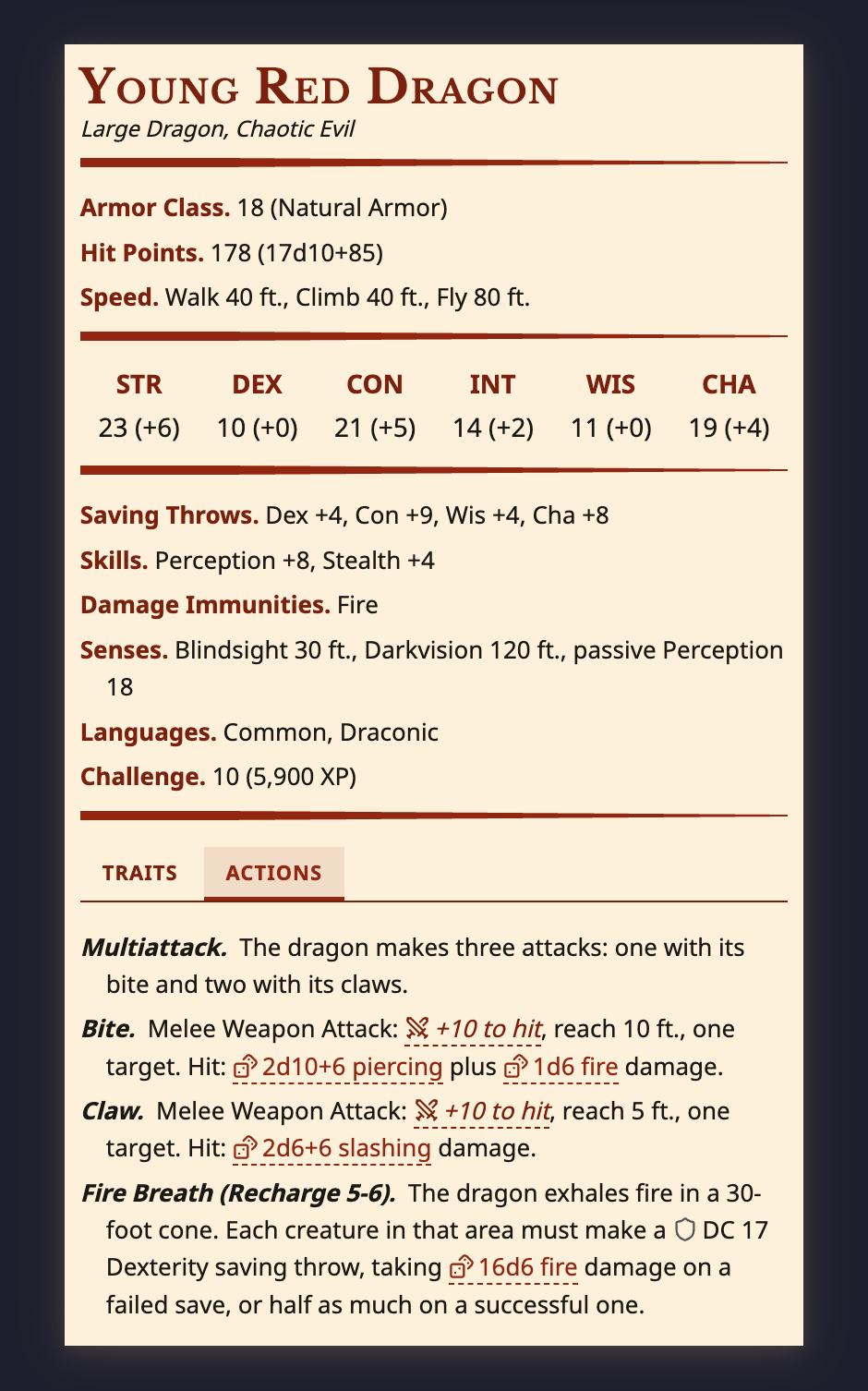 | 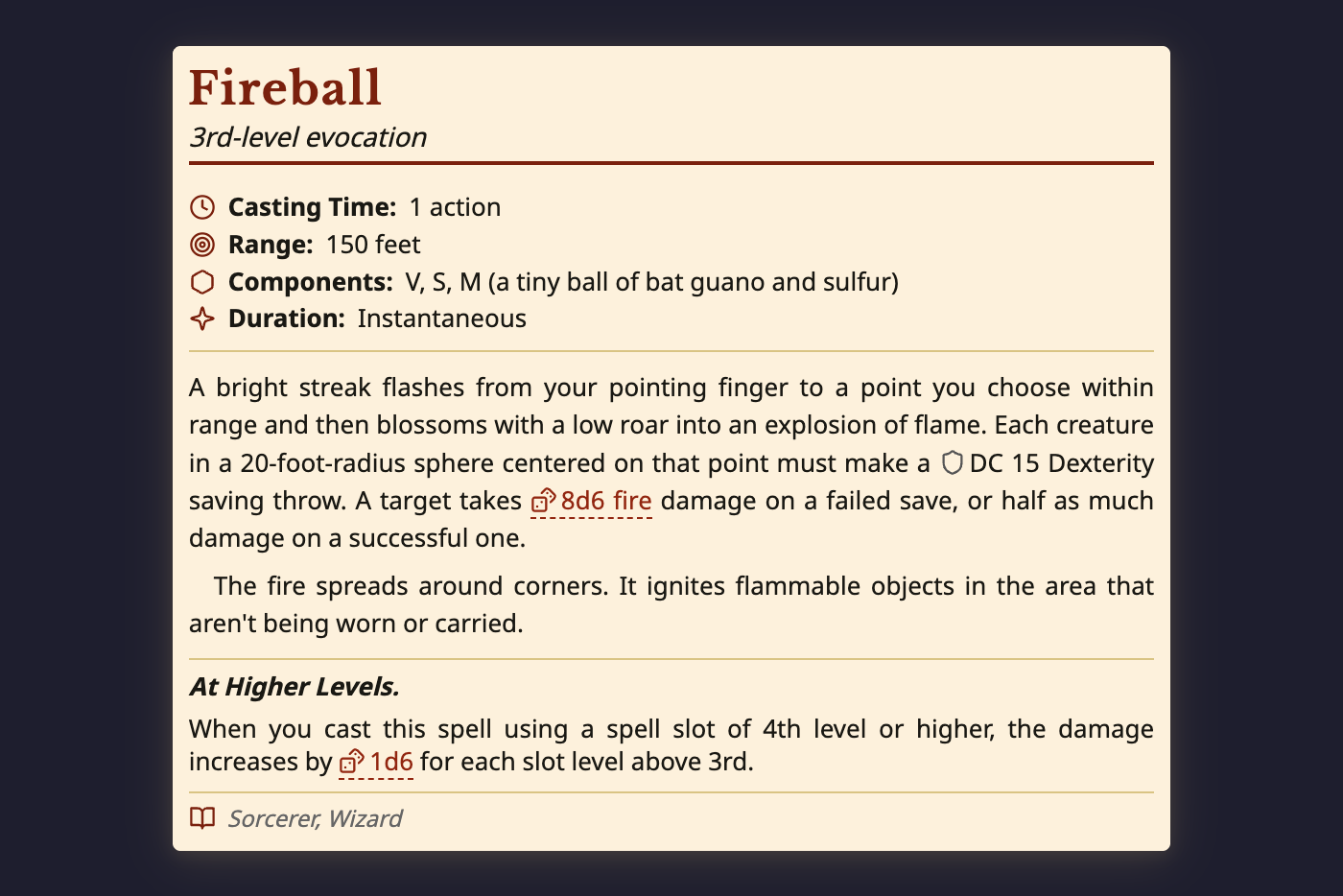 | 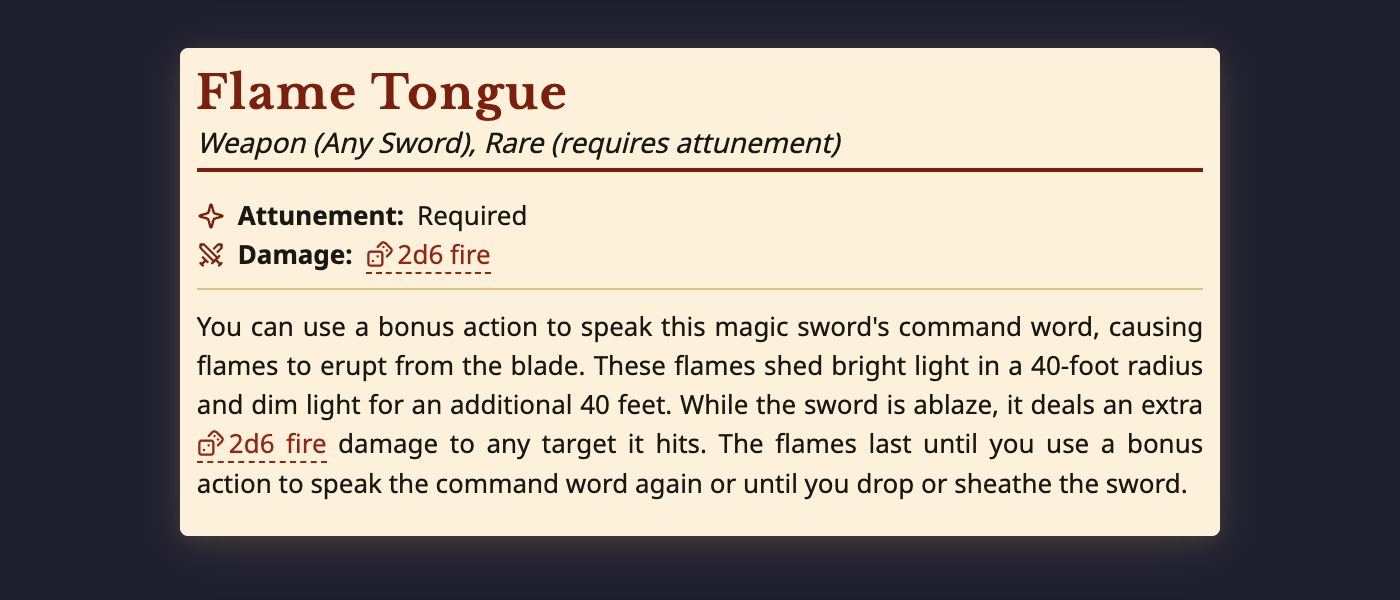 |
Features
Content Blocks
- Monster Stat Blocks -- Full stat blocks with abilities, skills, saves, senses, and feature sections (traits, actions, reactions, legendary/lair/mythic actions). Single and two-column layouts.
- Spell Blocks -- Spell cards with level, school, casting time, range, components, duration, and description.
- Magic Item Blocks -- Item entries with rarity, attunement, type, and description.
- Edit Mode -- Click-to-edit UI for all block types with auto-calculated values (HP, AC, saves, skills, passive perception) and manual override support.
Inline Tags
- Dice rolls:
`dice:2d6+3` - Attack rolls:
`atk:DEX` - Damage:
`damage:1d8+STR` - DC checks:
`dc:WIS`
D&D 5e Math Engine
Auto-calculates proficiency bonus, ability modifiers, saving throws, skill bonuses, HP, and AC from ability scores. Supports manual overrides with auto-recalculation.
Entity Compendium
Bundled SRD with 300+ monsters, spells, and items. Supports custom user-created entities stored as vault notes with frontmatter. Reference entities inline with {{monster:goblin}} or {{item:flame-tongue}}.
Usage
Create a fenced code block with the appropriate language tag:
Monster
```monster
name: Young Red Dragon
size: large
type: dragon
alignment: chaotic evil
ac: 18 (natural armor)
hp: 178 (17d10+85)
speed: 40 ft., climb 40 ft., fly 80 ft.
abilities: [23, 10, 21, 14, 11, 19]
```
Spell
```spell
name: Fireball
level: 3
school: Evocation
casting_time: 1 action
range: 150 feet
components: V, S, M (a tiny ball of bat guano and sulfur)
duration: Instantaneous
description:
  - A bright streak flashes from your pointing finger...
```
Magic Item
```item
name: Flame Tongue
type: Weapon (any sword)
rarity: rare
attunement: true
entries:
  - You can use a bonus action to speak this magic sword's command word...
```
Or use the slash commands: /Monster Block, /Spell Block, /Item Block to insert templates.
Commands
Available via the command palette (Cmd/Ctrl+P):
| Command | Description |
|---|---|
| Archivist: Insert monster block | Insert a monster YAML template at the cursor |
| Archivist: Insert spell block | Insert a spell YAML template at the cursor |
| Archivist: Insert magic item block | Insert a magic item YAML template at the cursor |
Requirements
- Obsidian 1.5.8 or newer, desktop only.
Installation
Community Plugins (coming soon): Search "Archivist" in Settings > Community Plugins > Browse.
Beta via BRAT:
- Install BRAT from the Obsidian community plugins
- Open BRAT settings and click "Add Beta Plugin"
- Enter:
archivist-gg/archivist-obsidian-plugin - Enable the plugin in Settings > Community Plugins
Manual:
Download main.js, styles.css, and manifest.json from the latest release, place them in .obsidian/plugins/archivist-gg/, and enable the plugin.
Building from Source
npm install
npm run build
Copy main.js, styles.css, and manifest.json to your vault's .obsidian/plugins/archivist-gg/ directory.
Attribution
This plugin bundles a compendium built from the Dungeons & Dragons System Reference Document, both the 5.1 (2014) and the 5.2 (2024) editions, published by Wizards of the Coast LLC under the Creative Commons Attribution 4.0 International License.
This work includes material from the System Reference Document 5.1 ("SRD 5.1") by Wizards of the Coast LLC and available at https://dnd.wizards.com/resources/systems-reference-document, and from the System Reference Document 5.2 ("SRD 5.2") by Wizards of the Coast LLC and available at https://www.dndbeyond.com/srd. Both are licensed under the Creative Commons Attribution 4.0 International License, available at https://creativecommons.org/licenses/by/4.0/legalcode. This material has been modified from its original form.
Copyright (C) Wizards of the Coast LLC. "Dungeons & Dragons" and "D&D" are trademarks of Wizards of the Coast LLC. This project is unofficial and is neither affiliated with nor endorsed by Wizards of the Coast.
The full notices, including what is bundled where and exactly what was changed, are in LICENSES/SRD-5.1.md and LICENSES/SRD-5.2.md. The SRD text reaches this project through the Open5e v2 API, itself a CC-BY-4.0 redistribution. Bundled icon assets are credited in CREDITS.md.
License
The plugin's own code is AGPL-3.0. The bundled SRD compendium is CC-BY-4.0, not AGPL, and carries the attribution above.
For plugin developers
Search results and similarity scores are powered by semantic analysis of your plugin's README. If your plugin isn't appearing for searches you'd expect, try updating your README to clearly describe your plugin's purpose, features, and use cases.