Audio Inbox
approvedby Andsea
One-click voice recording → Speech-to-Text → AI summarization. Works on desktop & mobile. - This plugin has not been manually reviewed by Obsidian staff.
🎤 Audio Inbox — Obsidian Voice Note Plugin
One-click voice recording → Speech-to-Text → AI summarization Desktop & Mobile, minimal setup, Chinese-first.


⭐ 如果这个插件对你有帮助,请给个 Star 支持一下!
✨ Features
🆚 Why Audio Inbox?
| Audio Inbox | Other voice plugins | |
|---|---|---|
| 🌐 No VPN needed | ✅ SiliconFlow + DeepSeek (国内) | ❌ OpenAI / Google |
| 💰 Free STT | ✅ SiliconFlow 免费额度 | ❌ 需付费 API |
| 📱 Mobile recording | ✅ 可拖动悬浮按钮 | ❌ 仅命令面板 |
| 🍎 Reminders sync | ✅ iOS 快捷指令联动 | ❌ 不支持 |
| 💭 Memo Mode | ✅ AI 自动区分提醒/备忘 | ❌ 仅待办 |
| 🎯 One-click flow | ✅ 录音→转写→总结 一条龙 | ⚠️ 多步操作 |
📋 All Features
| Feature | Description |
|---|---|
| 🎙️ One-click Recording | Click the mic icon → speak → stop → done. No extra steps. |
| 🧠 Smart Transcription | Powered by SiliconFlow SenseVoiceSmall (free tier, works in China without VPN) |
| 🤖 AI Summarization | DeepSeek automatically generates structured notes with summary & to-do list |
| 📱 Mobile Support | Draggable floating action button on iOS/Android, fully functional |
| 💭 Memo Mode | AI intelligently classifies recordings as reminders or memos. Memos are saved by date (备忘录-2026-07-01.md) with both AI summary and original transcript — easy to browse, never too long. |
| ✅ Todo Extraction | Auto-extracts - [ ] items from AI summary into a dedicated todo file |
| 🍎 Apple Reminders Sync | Exports clean todo list for iOS Shortcuts integration |
| 📂 Batch Processing | Process pre-recorded audio files in your inbox folder |
| 🌐 China-Friendly | No Google APIs, no VPN required. SiliconFlow + DeepSeek, both domestic services |
📸 Screenshots
| 录音界面 | 移动端悬浮按钮 | 生成的笔记 |
|---|---|---|
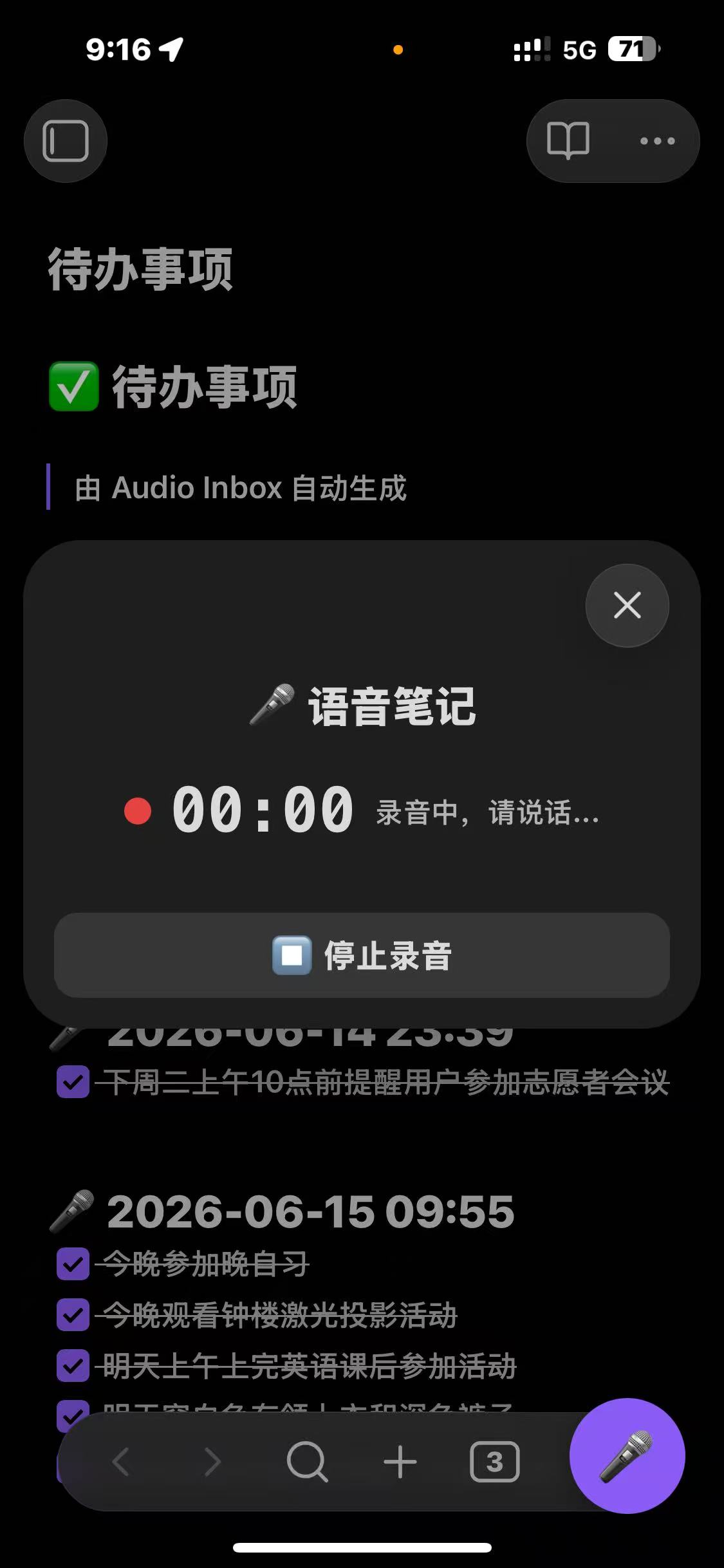 | 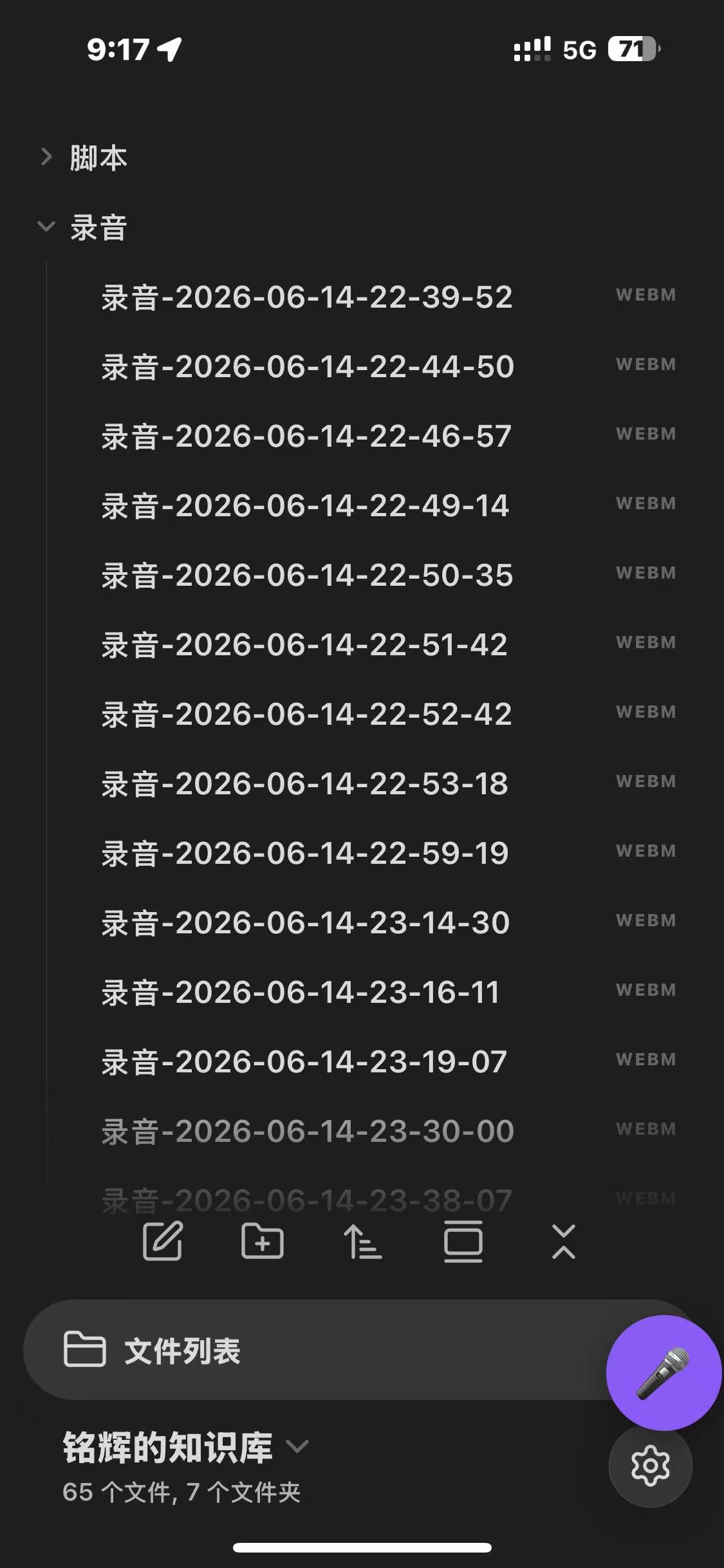 | 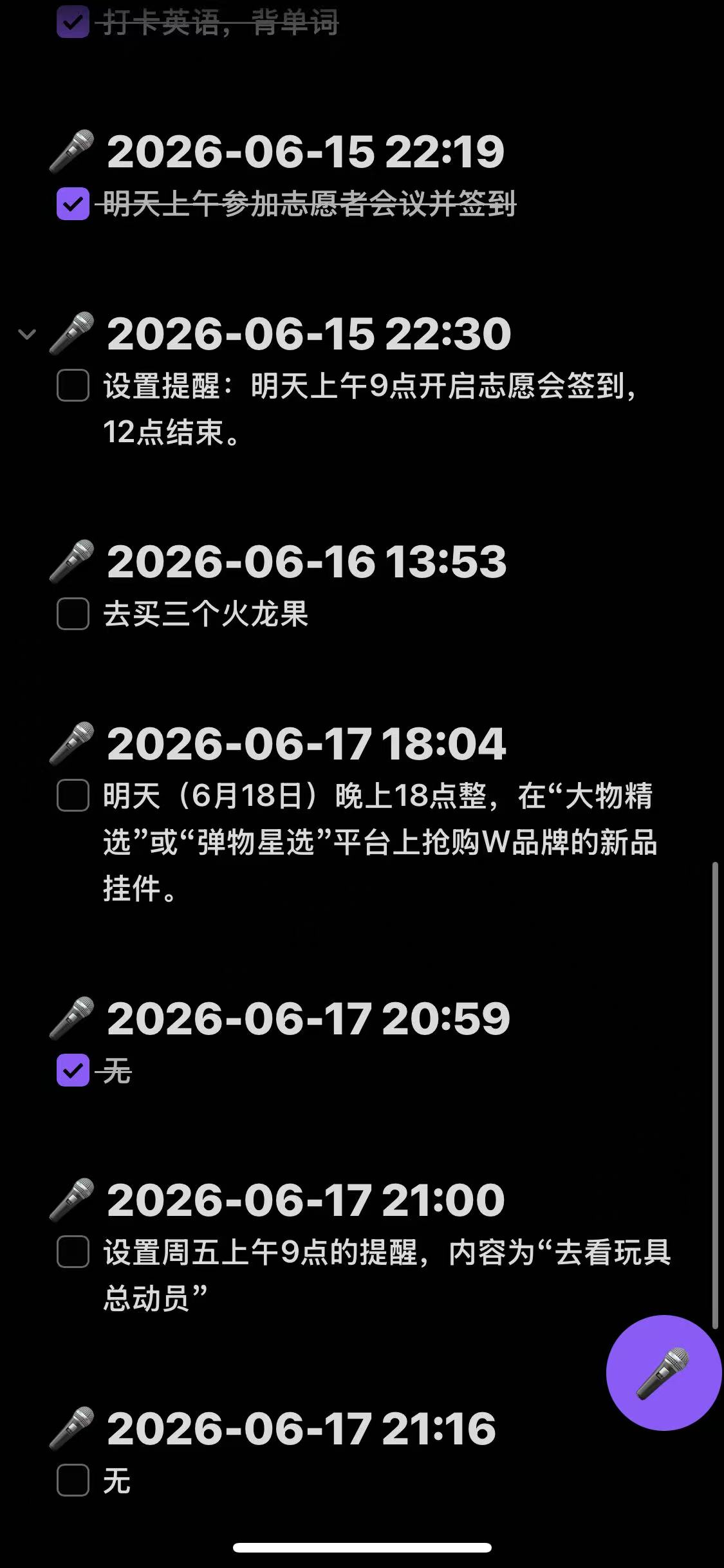 |
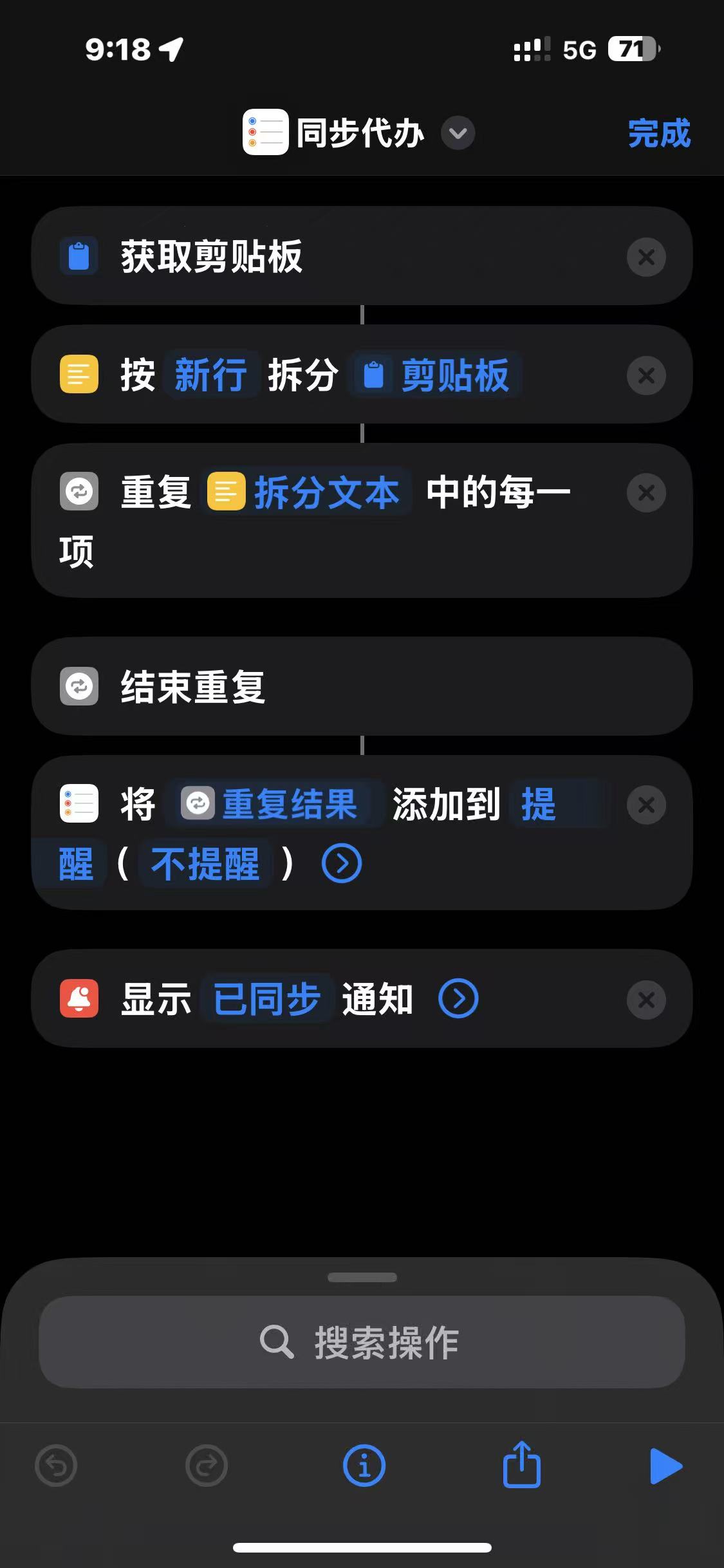
| 插件设置面板 | iOS 快捷指令联动 |
|---|
| 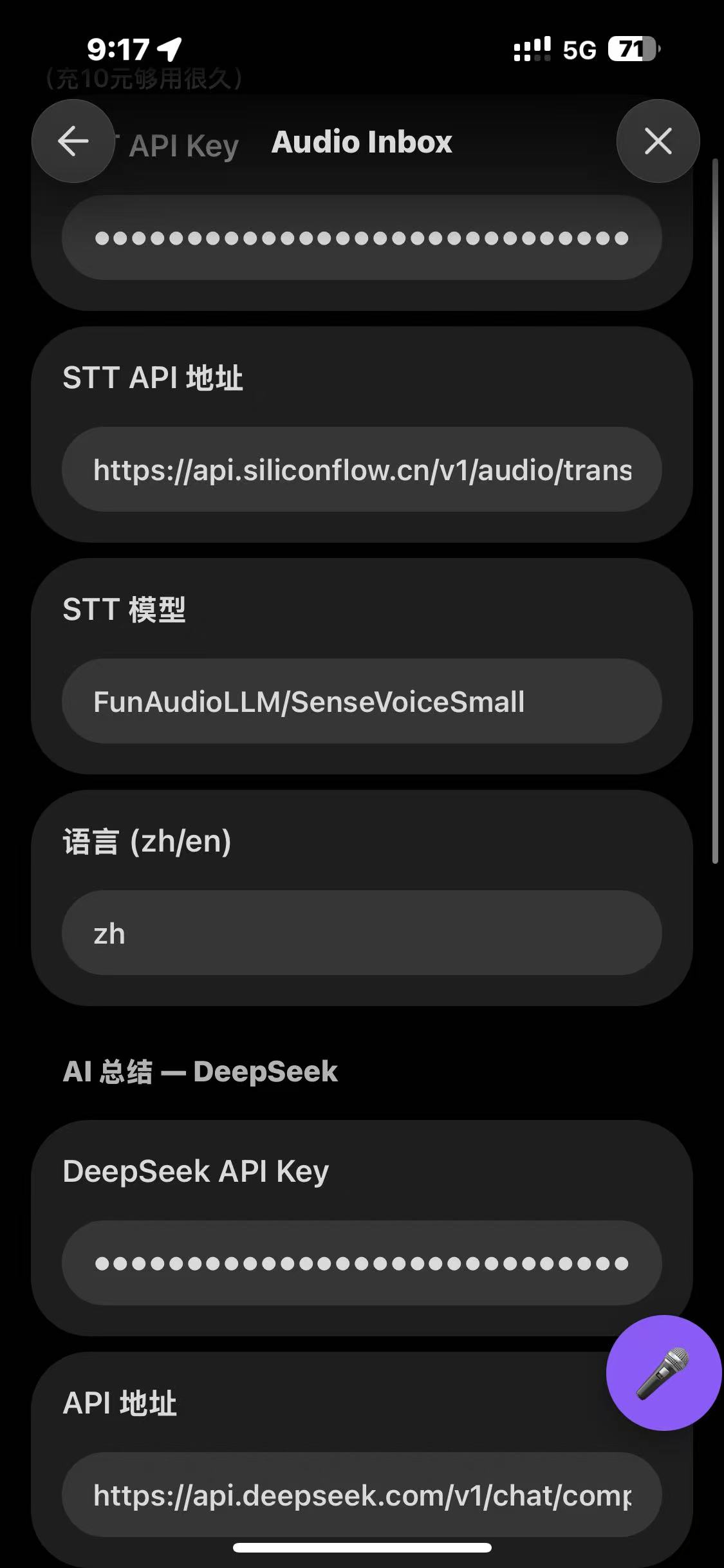 |
|  |
|
📸 如何截图? 在电脑上打开 Obsidian → 录音/查看笔记 → 用
Win+Shift+S截取 → 保存为 PNG → 放到screenshots/文件夹 → 推送到 GitHub。手机上可以用音量键+电源键截图。
🚀 Quick Start
Prerequisites
You need two API keys (both are domestic China services, no VPN needed):
- SiliconFlow API Key (for Speech-to-Text) — Free tier available, sign up here
- DeepSeek API Key (for AI Summarization) — Very affordable, sign up here
Installation
Option A: Manual Install (Recommended for now)
- Download the latest release from GitHub Releases
- Extract into your vault:
<vault>/.obsidian/plugins/audio-inbox/ - Restart Obsidian → Settings → Community Plugins → Enable "Audio Inbox"
Option B: BRAT Plugin
- Install BRAT
- BRAT Settings → Add Beta Plugin →
andsea007/obsidian-audio-inbox
Configuration
- Open Obsidian Settings → Audio Inbox
- Paste your SiliconFlow API Key in the STT section
- Paste your DeepSeek API Key in the AI section
- You're ready to go! 🎉
📖 Usage
Recording a Voice Note
- Desktop: Click the mic icon in the left ribbon
- Mobile: Tap the floating red button (drag it to reposition)
- Command Palette:
Ctrl/Cmd + P→ "开始语音笔记(录音)"
⏱️ 建议单条录音不超过 4 分钟:语音识别模型 SenseVoiceSmall 对短语音最稳定,实测超过 5 分钟容易出现转写/总结失败。插件会在到达上限前 1 分钟提醒,并默认自动结束录音(可在设置中调整上限或关闭自动结束)。
Workflow
🎤 Click Record → 🗣️ Speak → ⏹ Stop → 🎧 STT → 🤖 AI Summarize → 📝 Note Saved
The generated note includes:
# 🎤 语音笔记 — 2026-06-15 21:30

---

## 📋 总结
- Key points from your voice...

## ✅ 待办事项
- [ ] Task 1
- [ ] Task 2

---
*Audio Inbox 生成*
Processing Pre-recorded Audio
If you have audio files (.m4a, .mp3, .wav, .ogg, .webm) in your inbox folder:
Ctrl/Cmd + P→ "处理录音文件夹"- The plugin will batch-process all audio files
iOS Shortcuts Integration
After each voice recording, the plugin copies your clean todo list to the clipboard. Create this iOS Shortcut to sync them to Apple Reminders:
| Step | Action | Setting |
|---|---|---|
| 1 | Get Clipboard | — |
| 2 | Split Text | By New Lines |
| 3 | Repeat with Each | — |
| ↳ | Add New Reminder | Title = Repeat Item |
| 4 | Show Notification | "✅ Synced" |
💡 Works on both desktop and mobile. After recording, run the Shortcut to import todos into Apple Reminders.
⚙️ Settings
| Setting | Default | Description |
|---|---|---|
| STT API Key | — | SiliconFlow API Key |
| STT API URL | https://api.siliconflow.cn/v1/audio/transcriptions | STT endpoint |
| STT Model | FunAudioLLM/SenseVoiceSmall | Speech recognition model |
| Language | zh | Language code (zh/en/ja/ko) |
| DeepSeek API Key | — | DeepSeek API Key |
| API URL | https://api.deepseek.com/v1/chat/completions | AI endpoint |
| Model | deepseek-chat | AI model |
| Max Recording Duration | 4 | Minutes; safe limit for SenseVoiceSmall (5+ min can fail to transcribe). 0 = unlimited |
| Auto-stop on limit | true | End recording automatically at the limit; disable to only warn |
| Summary Prompt | (built-in) | Customizable AI prompt — edits persist across restarts, previous versions saved to history |
| Recording Folder | 录音 | Where audio files are saved |
| Output Folder | VoiceNotes | Where notes are saved |
| Show Transcript | false | Include raw transcript in note |
| Delete After Process | true | Remove audio file after successful transcription |
🔧 Development
# Clone
git clone https://github.com/andsea007/obsidian-audio-inbox.git
cd obsidian-audio-inbox

# Install dependencies
npm install

# Dev mode (watch)
npm run dev

# Production build
npm run build
🤝 Contributing
Issues and Pull Requests are welcome!
- Fork the repo
- Create your feature branch:
git checkout -b feature/my-feature - Commit:
git commit -m 'Add my feature' - Push:
git push origin feature/my-feature - Open a Pull Request
📄 License
Made with ❤️ by Andsea
For plugin developers
Search results and similarity scores are powered by semantic analysis of your plugin's README. If your plugin isn't appearing for searches you'd expect, try updating your README to clearly describe your plugin's purpose, features, and use cases.