by flowing-abyss
Interactive board view for bases, use as Kanban or Gallery, with grouping for rows and columns.
Bases Board



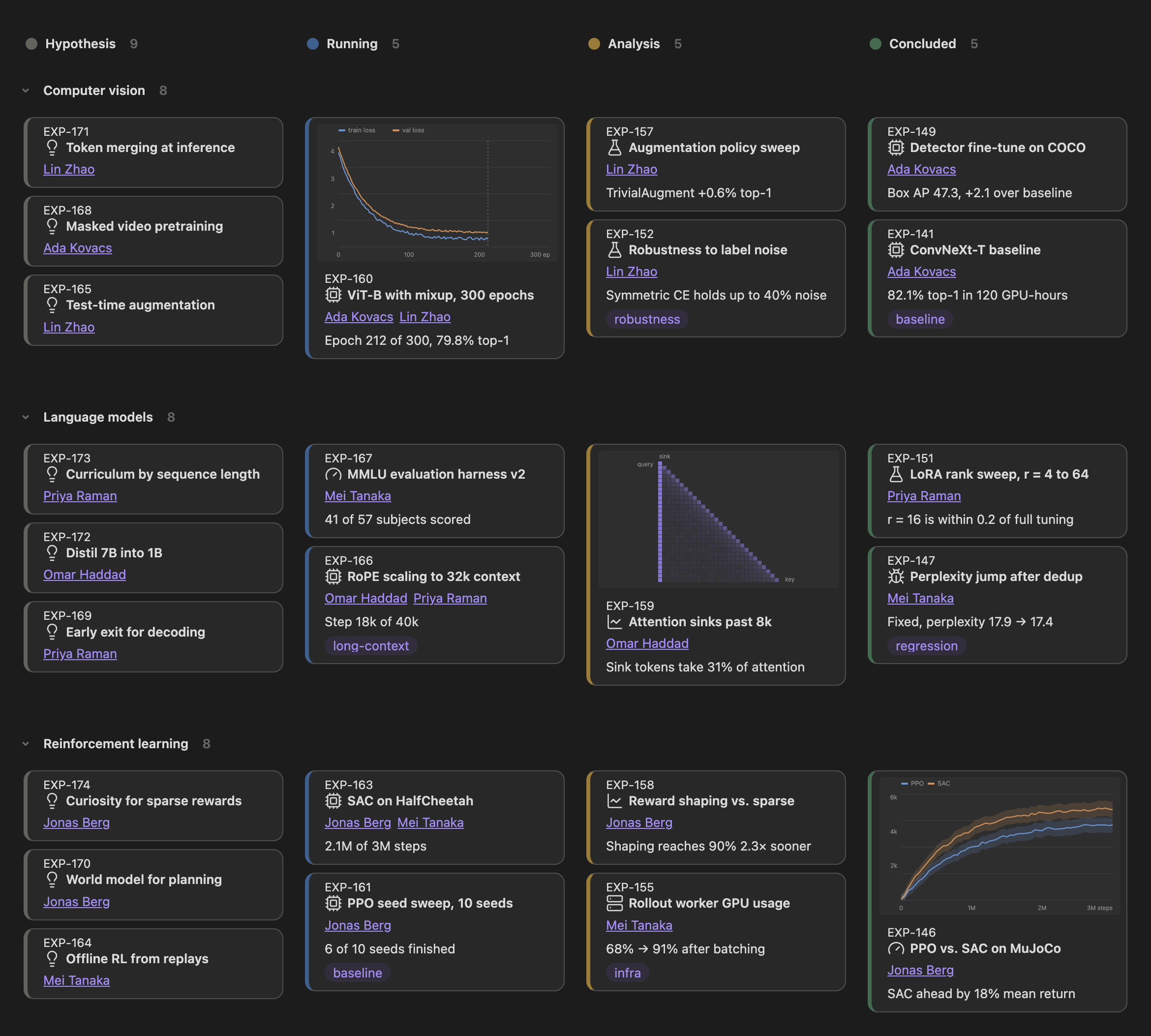
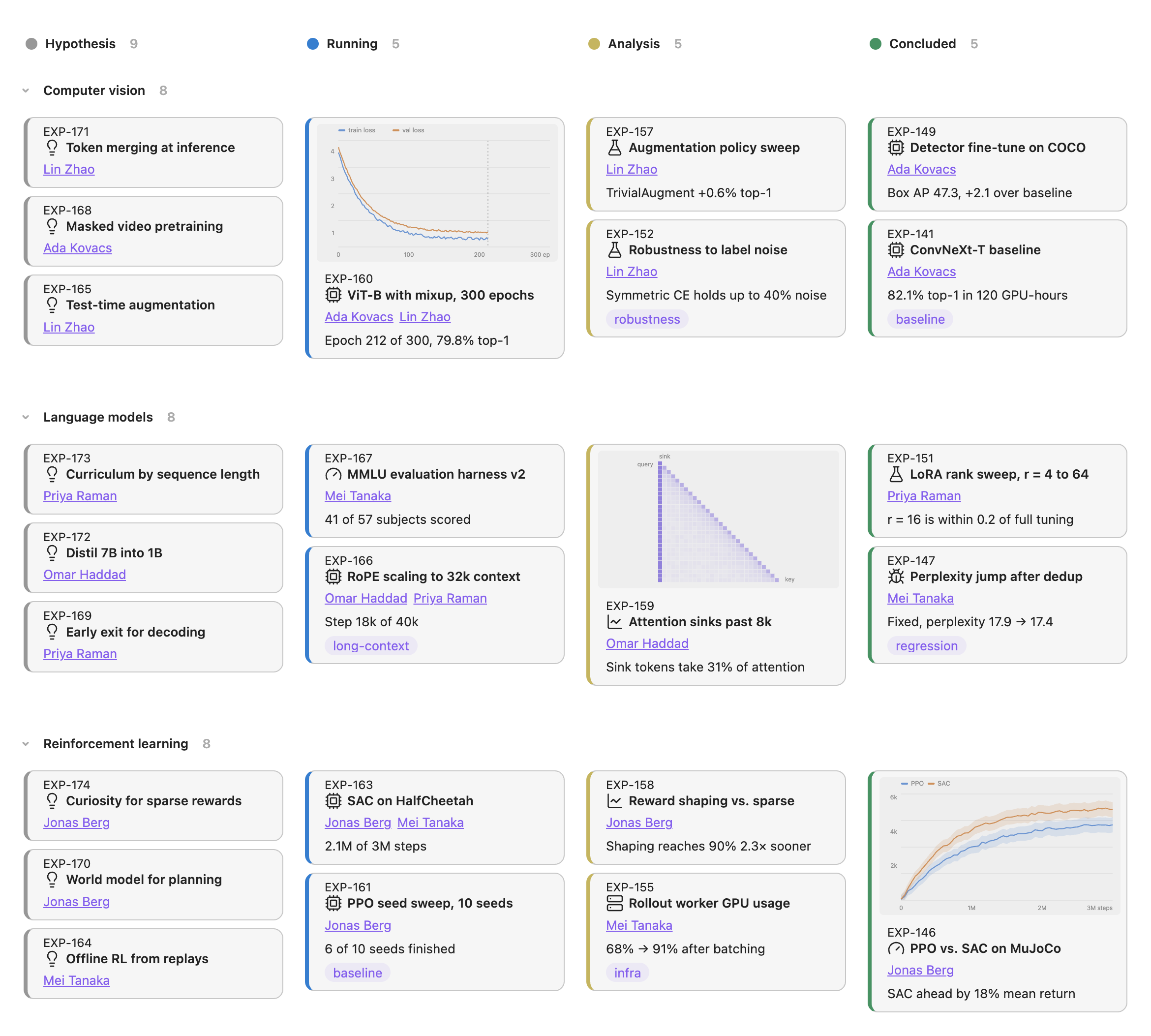
Bases Board adds a board view to Obsidian Bases. Your notes become cards laid out in columns and rows, and moving a card updates the note's properties. Use it as a Kanban board or as a gallery.
Building a board
- Open a base, add a view and choose Board.
- Pick a Group property to sort notes into columns.
- Add a Sub-group property if you want each column split into rows.
With only a sub-group property set, the cards form a gallery instead.
Cards
You can edit properties right on the card, and links keep their Supercharged Links styling.
- Image property adds a cover image or video from a URL, a link or a file in your vault.
- Icon property puts a Lucide icon before the title.
- ID property shows an ID above the title that copies on click.
- Hide empty properties keeps cards short.
- Card size switches between small, medium and large cards.
Icon mapping picks an icon for each value of the icon property.
idea=lightbulb
training=cpu
bug=bug
To find icon names, run Browse icons from the command palette.
Columns and rows
- Rename a column or row without changing the property value behind it.
- Reorder, hide and color them from the header menu.
- Choose whether colors apply to headers, cells or cards.
- Fold rows to hide their cards.
- Keep empty columns on the board by listing them in Column order.
- Set Row order to arrange sub-groups.
In Board views, groupOrder is now columnOrder and subGroupOrder is rowOrder.
Existing orders are migrated automatically in .base files and embedded base
blocks, including files added later through sync.
Board hides the native Group menu unless native grouping is already configured for
that view, so existing group filters remain accessible. When a view has native
groupBy, its groupOrder stays a native filter; set Column order separately.
Manual order
Set Order property to a numeric note property, such as order, then sort the view
by that property, ascending, to arrange cards by dragging them. Further sort keys break
ties, and cards without a value come last. Group and sub-group keys may come first.
With any other sort, dragging only changes a card's column and row, as usual.
Dropping a card numbers its cell 1, 2, 3 and so on, and moving a card to another cell also renumbers the cell it left. Only notes whose number changes are written. The first drop in a cell numbers all of its cards, so a long cell can update many notes. A drop is cancelled, without changing any note, when a card in those cells holds a non-numeric value, including a number stored as text.
New notes
The New note button in each cell creates a note with that cell's column and row values already set. Choose a Folder and a Template for new notes, including Templater templates.
Installation
Open Settings → Community plugins, browse for Bases Board, then install and enable it. You can also install it straight from the plugin page. The plugin needs Obsidian 1.10.3 or later.
Contributing
Issues and pull requests are welcome. Please read Contributing before you start.
License
For plugin developers
Search results and similarity scores are powered by semantic analysis of your plugin's README. If your plugin isn't appearing for searches you'd expect, try updating your README to clearly describe your plugin's purpose, features, and use cases.