by kamacheng
Compare Markdown with Git HEAD using paired diffs, synchronized navigation, and confirmed per-hunk restoration.
Better MD Diff
Compare Markdown with Git HEAD (the latest commit) in Obsidian, highlight changed text, and restore individual changes after confirmation.
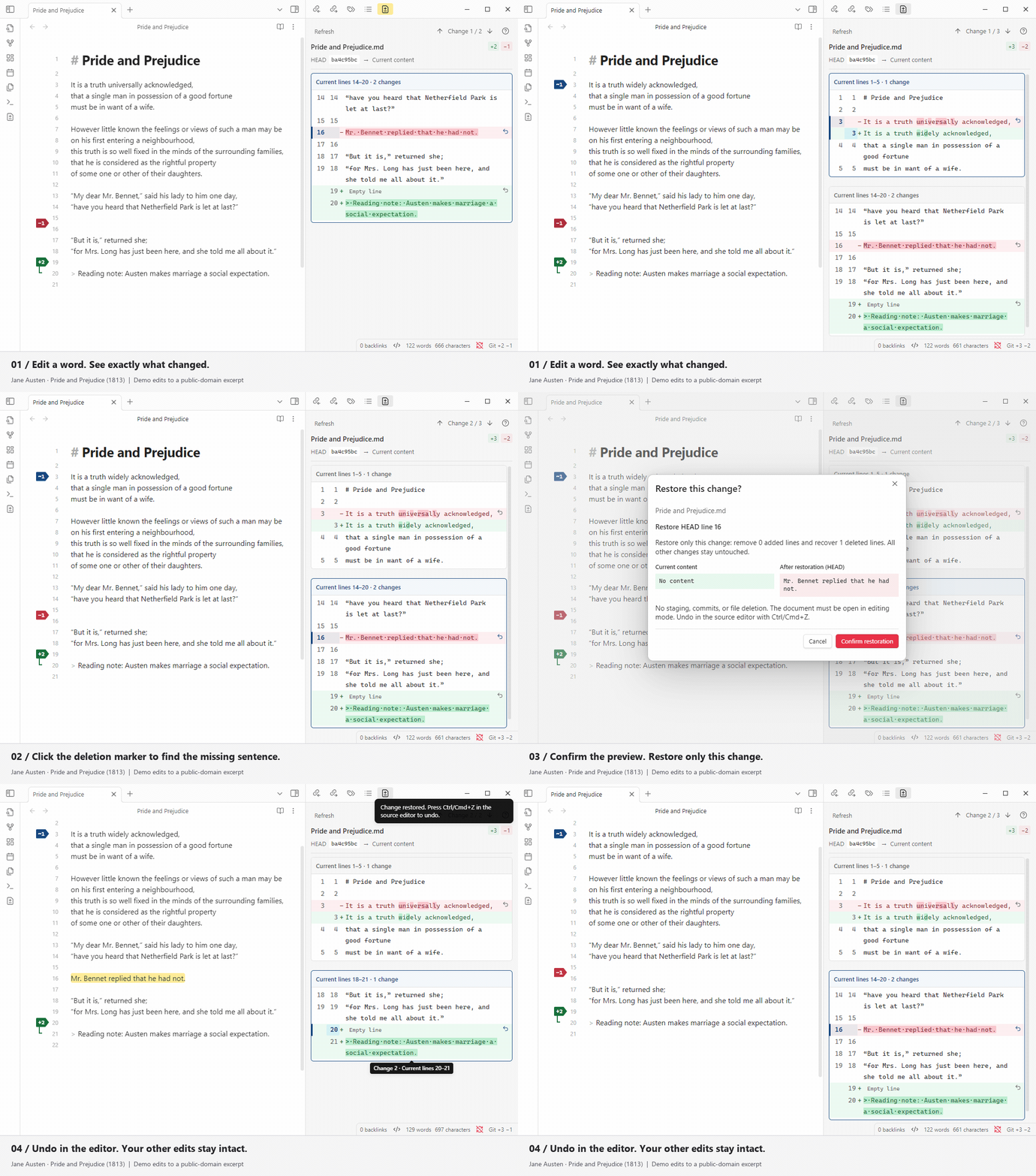
Recorded with Better MD Diff 0.4.0 in desktop Obsidian using a public-domain excerpt from Pride and Prejudice with demonstration edits. Demo details · 0.4.1 release notes.
0.4.1 fixes paragraph misalignment around repeated blank lines, including misleading deletion flags and the resulting per-change restoration scopes.
Installation
Requires desktop Obsidian 1.8.0+ and a local Git installation.
Open Settings → Community plugins → Browse, search for Better MD Diff, install it, and enable it. If already installed, check for updates under Community plugins and update Better MD Diff.
Usage
- Edit a Git-tracked Markdown note in Source mode or Live Preview.
- Click an editor flag or the Git diff ribbon icon to review changes. In the panel, red text is old content, green text is added content; stronger local backgrounds highlight changed words.
- Use ↑ / ↓ to visit individual changes. Click a group heading to select its first change, or a change's line-number button to select that item. Source navigation follows your settings.
- Click a restore arrow and confirm the preview. Press Ctrl/Cmd+Z in the source editor to undo.
Editor flags
| Flag | Meaning |
|---|---|
Green +n | n added lines in the current note |
Blue ~n | n modified lines in the current note |
Red −n | n deleted old lines, marked at their boundary—not as a deleted following line |
Added/modified ranges have one flag at their start and a thin gutter rail. Source text stays untinted, and the fixed-width gutter avoids horizontal shifts during refreshes. Large counts keep their full value in tooltips. Rendered tables and folded blocks show the first contained change flag; use the panel for exact ranges. Flags appear in Source mode and Live Preview, not Reading view.
Changes versus reading groups
Change 1 / 3 counts independent edits, not the number of boxes. Nearby edits share context: two groups may contain 2 changes and 1 change. Their headings show the line range and contained change count. A contiguous multi-line replacement is one change; grouping never enlarges its restoration scope.
Text remains selectable and copies as original Markdown, without controls or line numbers. Settings retain font size, changed-word/whitespace markers, and source-following options; the ? button explains the display.
The plugin never stages, commits, or pushes. Restoration checks the current note and Git baseline before applying one undoable edit. Back up important notes first.
Scope
This release compares against local Git HEAD. Accepted-baseline review and GitLab comparison are not yet available.
License
MIT. The jsdiff dependency uses BSD-3-Clause; its full license is included in the build.
For plugin developers
Search results and similarity scores are powered by semantic analysis of your plugin's README. If your plugin isn't appearing for searches you'd expect, try updating your README to clearly describe your plugin's purpose, features, and use cases.