Better Manager
approvedby eondrcode
Make plugin management more intuitive and efficient.
Better Add-on Manager
A more capable plugin manager for Obsidian.
Keep plugin-heavy Obsidian vaults fast and manageable with delayed startup, batch controls, groups and tags, GitHub installs, and guided conflict diagnosis.
简体中文 · 日本語 · 한국어 · Español · Français · Русский · Releases · Support












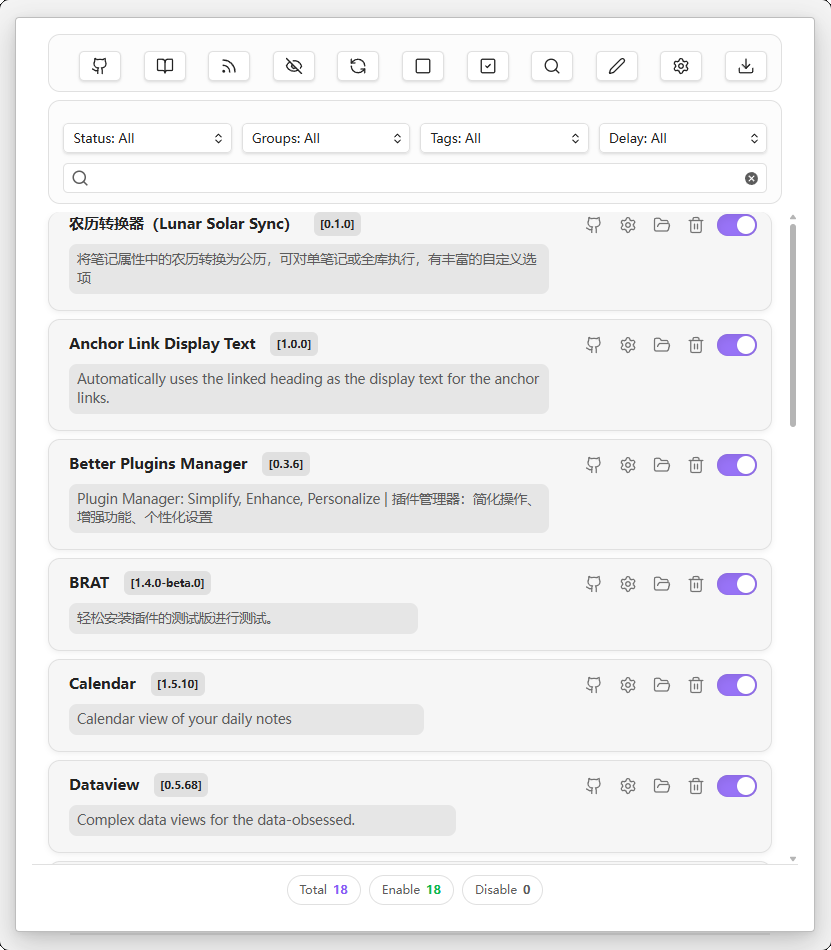
🎯 What is BPM?
Better Add-on Manager (BPM) is a control center for Obsidian community plugins, designed for vaults that rely on many plugins and need more than simple enable/disable toggles.
It helps you keep startup responsive, organize plugins by workflow, install plugins from GitHub releases, and isolate conflicts when something breaks.
| 🚀 Startup | 📦 Management | 🏷️ Organization | 📥 Installation | 🔍 Diagnosis |
|---|---|---|---|---|
| Delayed plugin startup and startup self-checks | Batch enable/disable, quick search, and status filters | Groups, tags, notes, descriptions, and custom names | Install from GitHub repositories and release versions | Guided conflict troubleshooting with report generation |
✨ Core Features
BPM is organized around five focused tabs. Each tab owns one workflow, so related controls stay together and the manager remains easy to scan across desktop and mobile.
| Tab | Workflow |
|---|---|
| 🧩 Plugin View | Manage installed plugins, metadata, filters, startup behavior, and per-plugin actions |
| 📥 Install Hub | Install plugins or themes from GitHub and manage tracked sources |
| 📦 Transfer Pack | Export, import, and restore plugin/theme packs across vaults |
| 🎛️ Ribbon Order | Control Obsidian ribbon icon order and visibility |
| 🔍 Conflict Diagnosis | Locate plugin problems and generate troubleshooting reports |
🧩 Plugin View
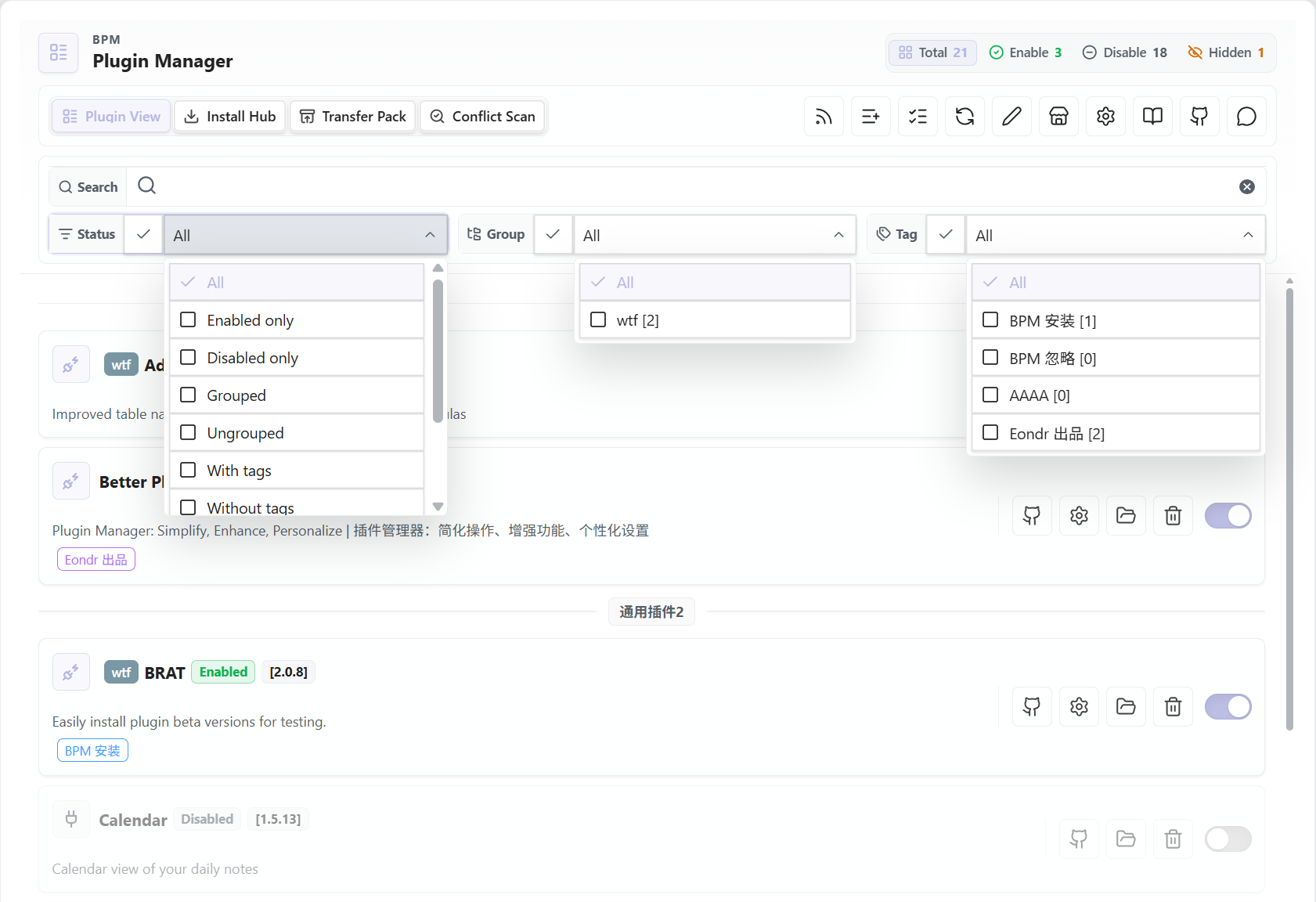
The main tab for day-to-day plugin management.
| Area | What it does |
|---|---|
| Plugin list | Browse installed community plugins in a compact, searchable management view |
| Batch actions | Enable or disable plugins in bulk, including grouped workflows |
| Filters | Filter by enabled state, group, tag, delay setting, and keyword |
| Organization | Add custom names, descriptions, notes, groups, and tags |
| Startup control | Assign delayed startup presets and keep startup behavior visible from the list |
| Plugin actions | Check updates, download updates, restart a plugin, temporarily start a plugin, open settings, open folders, copy IDs, open repositories, clear config, hide, or delete |
| BPM tags | Automatically marks BPM-installed plugins with bpm-install and supports ignored plugins with bpm-ignore |
📥 Install Hub
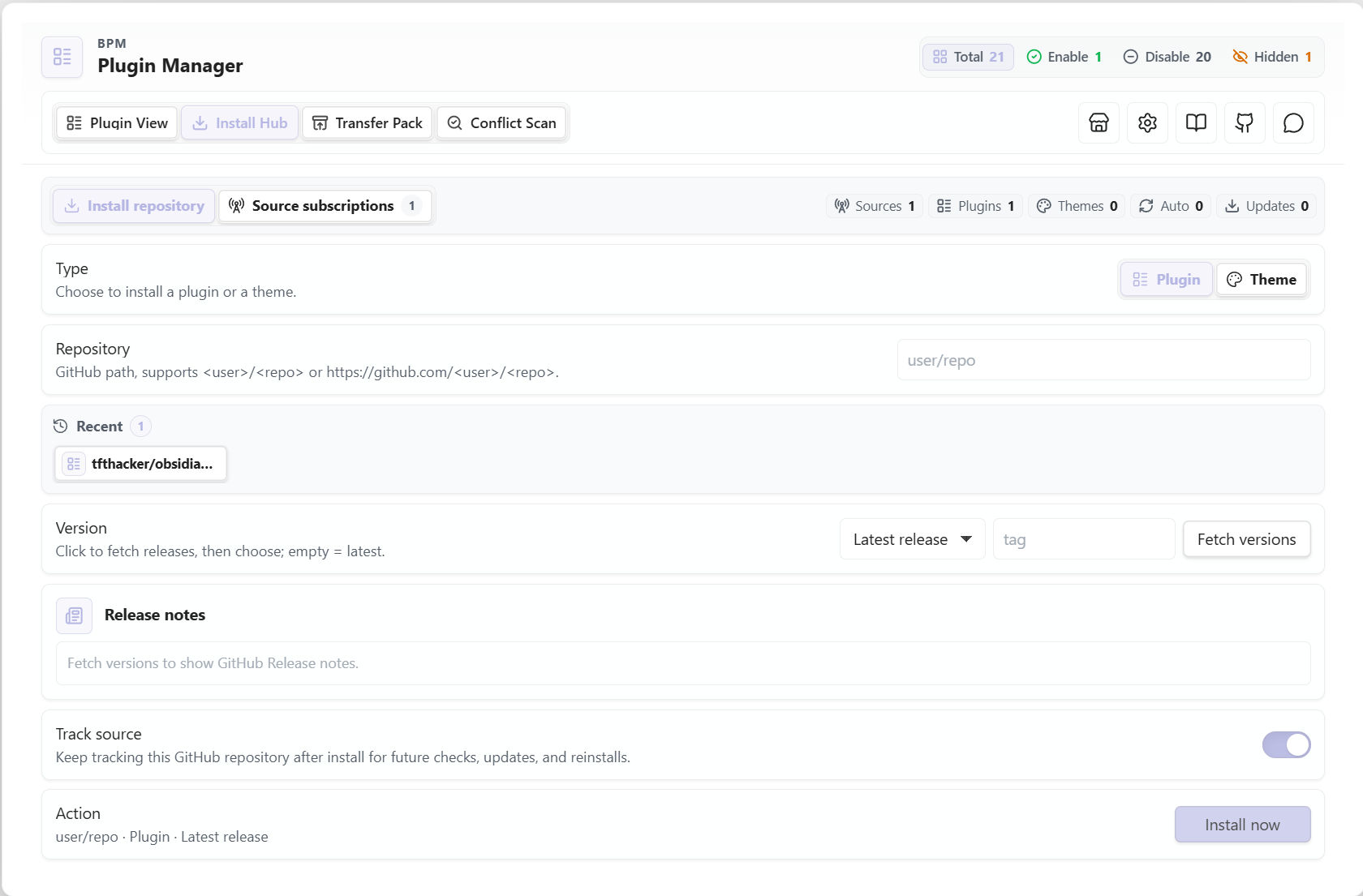
The Install Hub handles GitHub-based installation and the sources BPM can track after installation.
| Area | What it does |
|---|---|
| Install type | Switch between plugin and theme installation |
| Repository input | Accepts user/repo or full GitHub repository URLs |
| Release selection | Fetch available GitHub releases and install latest or a selected version |
| Release notes | Shows release information before installation when available |
| Recent installs | Keeps recently used repositories for faster repeated installs |
| Source tracking | Optionally tracks installed repositories for later checks, updates, and reinstalls |
| Source management | Review tracked plugin/theme sources, update targets, reinstall items, and keep source metadata current |
📦 Transfer Pack
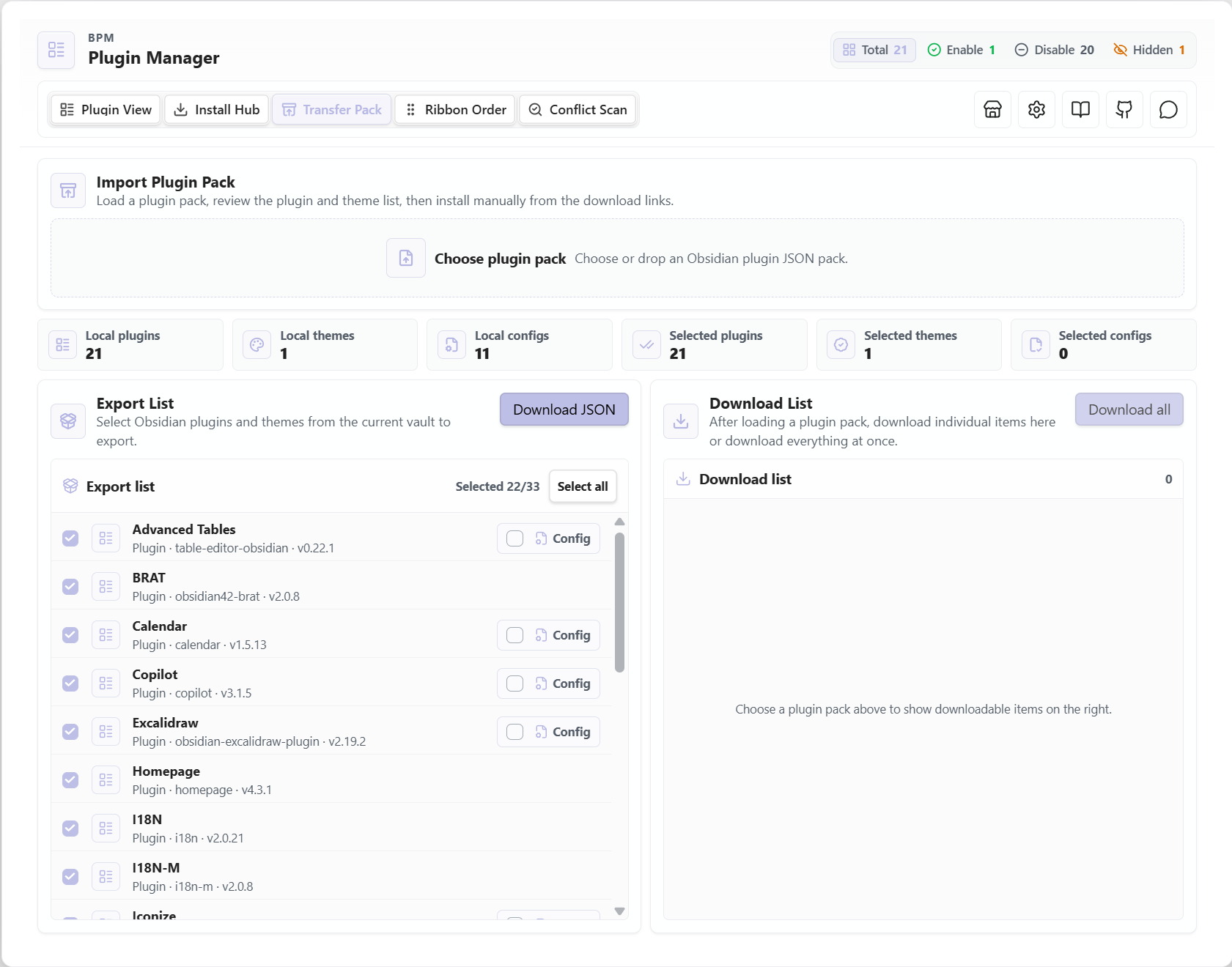
The Transfer Pack tab moves plugin setups between vaults without turning the README into a manual checklist.
| Area | What it does |
|---|---|
| Export list | Select local plugins and themes to include in a JSON transfer pack |
| Plugin configs | Export selected plugin configuration files when needed |
| Taxonomy | Export BPM groups, tags, and delay presets |
| Layout data | Export manager order, hidden items, and ribbon layout |
| Sources | Export GitHub repository maps, source subscriptions, and install history |
| Workspace preferences | Export style, delay mode, tag display, and startup-check preferences |
| Import preview | Load a pack, review bundled plugins, themes, sources, configs, and layout data before applying |
| Restore options | Install missing plugins/themes, merge plugin config, restore enabled state, apply layout, merge sources, and import themes |
🎛️ Ribbon Order
The Ribbon Order tab keeps Obsidian's left ribbon predictable, especially when delayed plugins register icons after startup.
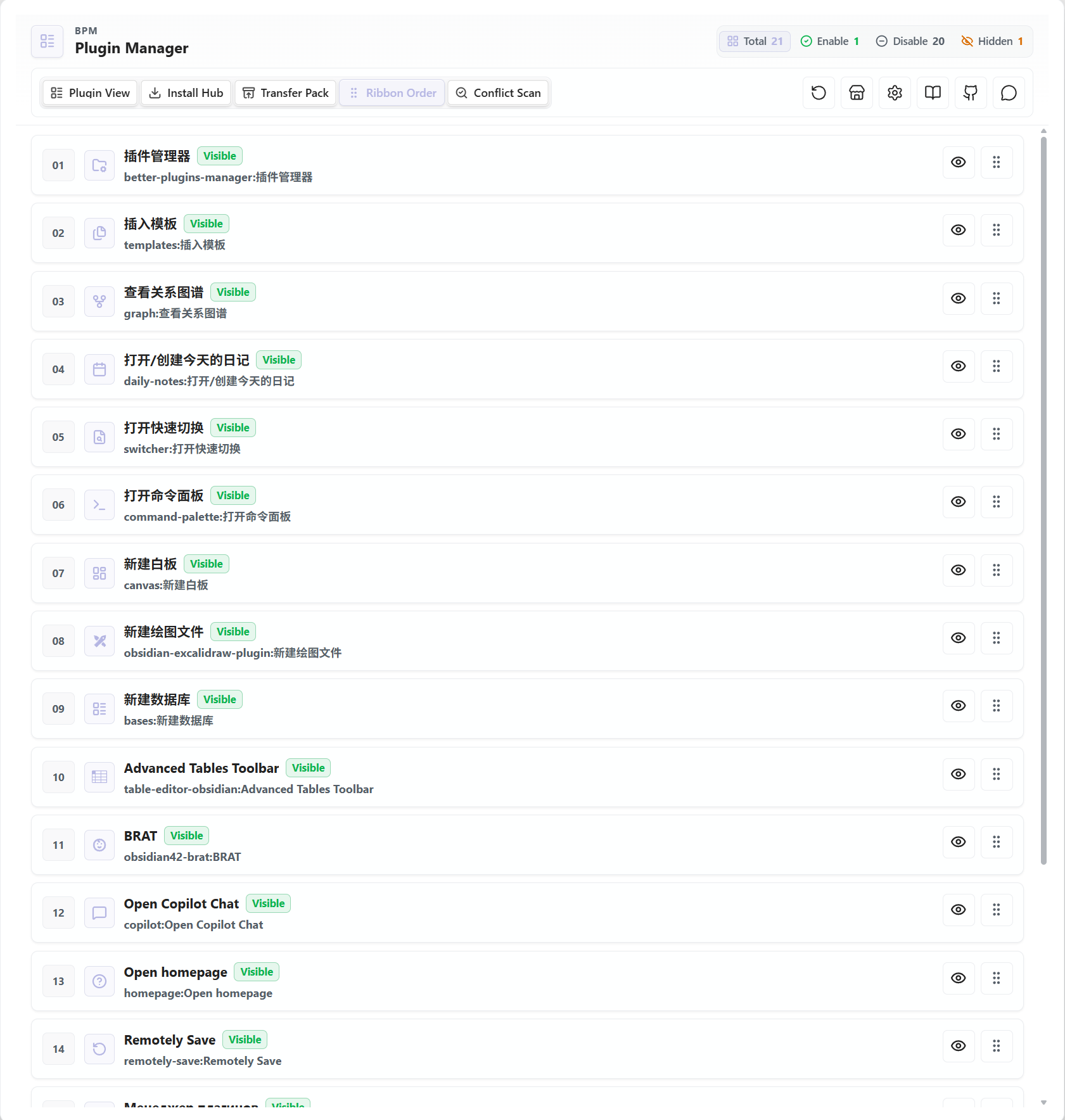
| Area | What it does |
|---|---|
| Icon ordering | Drag ribbon items into a stable order |
| Visibility control | Show or hide individual ribbon icons |
| Native sync mode | Manages ribbon layout in BPM data without relying on Obsidian workspace config |
| Reset action | Show all ribbon items and sort them by name |
| Reload guidance | Prompts for reload when hidden startup icons need Obsidian to refresh |
🔍 Conflict Diagnosis
The Conflict Diagnosis tab guides plugin conflict testing step by step, keeping the tested state and result in one place.
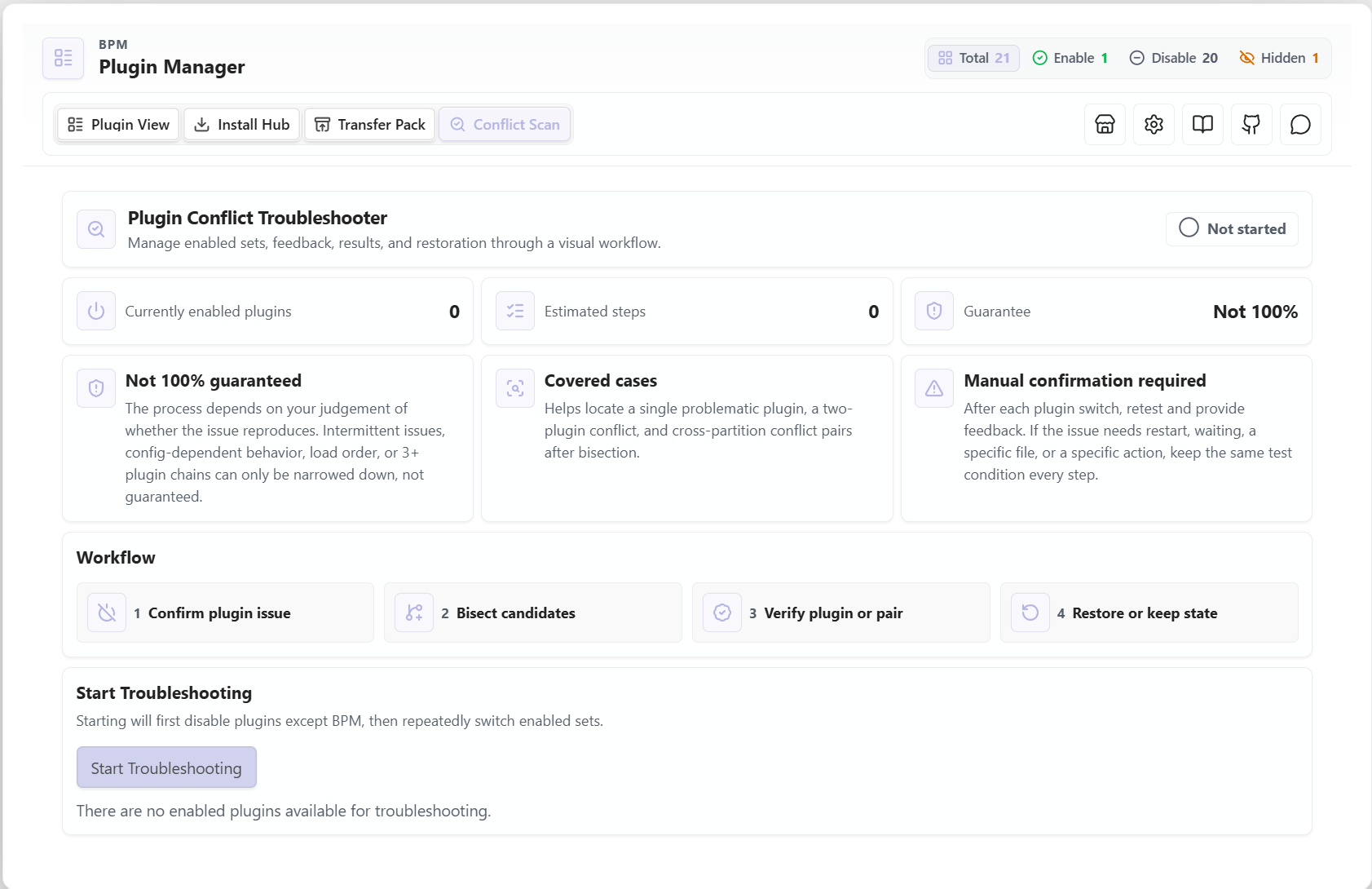
| Area | What it does |
|---|---|
| Pre-check | Confirms whether the issue still appears when other plugins are disabled |
| Binary narrowing | Uses guided split testing to reduce the suspect plugin set |
| Conflict pair search | Helps locate two-plugin conflicts, including cross-group cases |
| Manual feedback loop | Asks you to test each step and mark whether the problem still exists |
| State controls | Undo the previous step, restart Obsidian, exit troubleshooting, restore the original state, or keep the current state |
| Result report | Generates a Markdown conflict report with the detected plugins and suggested next actions |
📦 Installation
Community Plugins
Recommended for most users.
- Open Obsidian Settings → Community Plugins.
- Search for Better Add-on Manager.
- Install and enable the plugin.
Manual Install
Use this when you want to install a GitHub release directly.
- Download the latest release.
- Copy
main.js,manifest.json, andstyles.cssinto.obsidian/plugins/better-plugins-manager/. - Restart Obsidian.
- Enable Better Add-on Manager from Settings → Community Plugins.
🚦 Quick Start
Open BPM
After enabling the plugin, open BPM in either way:
- Click the BPM icon in the left ribbon.
- Run Open the plugin manager from the command palette.
First Steps
- Start in Plugin View to review installed plugins, filters, groups, tags, and delay settings.
- Use Install Hub when installing plugins or themes from GitHub.
- Use Transfer Pack when moving a plugin setup between vaults.
- Use Conflict Diagnosis when a plugin issue needs guided isolation.
Interaction Tips
- Left-click primary controls to toggle, edit, install, import, or run an action.
- Right-click a plugin item to open its context menu.
- Hover toolbar buttons to see tooltips; on touch devices, use long press where supported.
Security and Disclosure
BPM is a local Obsidian plugin manager, but some features intentionally use external services or browser APIs:
- External network requests: BPM contacts GitHub only for user-visible plugin management features such as fetching community plugin metadata, resolving repositories, checking releases, and installing or updating plugins/themes from GitHub. These requests may use
github.com,api.github.com, andraw.githubusercontent.com. BPM also opensgithub.comrepository pages and the project tutorial link onwww.bilibili.comonly when the user clicks the related buttons. - Clipboard access: BPM writes to the system clipboard only when the user clicks Copy ID for a plugin.
- Vault file access: BPM reads plugin/theme metadata, selected plugin configuration files, transfer packages, and legacy export folders for management, migration, backup, import/export, and troubleshooting features. It does not upload vault notes to a remote service.
- Base64 encoding/decoding: BPM uses runtime
btoa/atobonly to pack and restore binary/text files inside local Transfer Pack JSON data. It is not used to hide API keys, URLs, remote code, or executable payloads. - Scanning limitations: If a plugin catalog or marketplace reports that malware, obfuscation, or network scanning is unavailable, review the source code in this repository and the release assets before installing. BPM does not intentionally obfuscate its source.
🔍 Conflict Diagnosis Tutorial
Use Conflict Diagnosis when a problem appears after enabling community plugins and you need a structured way to narrow down the cause.
Workflow
- Open the Conflict Diagnosis tab, or run Troubleshoot plugin conflicts from the command palette.
- Start a diagnosis session. BPM records the current plugin state before changing anything.
- Test your vault after each step, then choose Problem Still Exists or Problem Gone.
- Continue through the guided split tests until BPM narrows the result to a plugin or plugin pair.
- Review the result, restore the original plugin state or keep the current state, then generate a Markdown report if needed.
Notes
- Diagnosis depends on your feedback at each step; use the same test action every time.
- Intermittent bugs, load-order issues, configuration-specific bugs, or conflicts involving three or more plugins may still need manual verification.
- You can undo the previous step, restart Obsidian during testing, exit the session, restore the original state, or keep the current state.
🛡️ Startup Takeover
When Delayed Startup is enabled, BPM checks .obsidian/community-plugins.json to make sure Obsidian and BPM are not trying to control the same plugins at startup.
| Case | BPM behavior |
|---|---|
| No unmanaged plugins | Starts normally |
| Unmanaged plugins detected | Shows a takeover prompt |
| Auto Takeover enabled | Moves detected plugins under BPM management automatically |
Plugin marked bpm-ignore | Leaves it in Obsidian's native startup list |
Taking over keeps delayed startup, enabled state, and BPM's plugin records consistent. After a successful takeover, restart Obsidian so the startup list is applied cleanly.
📦 Transfer & Legacy Export
For current versions, use the Transfer Pack tab to move setups between vaults. It exports and imports plugin lists, themes, selected plugin configs, groups, tags, delay presets, layout data, ribbon order, source subscriptions, install history, and workspace preferences.
The older Markdown/frontmatter export for Obsidian Base is kept only for legacy data compatibility. New setups should use Transfer Pack instead of configuring a Base export folder.
⚙️ Settings
BPM settings are split into focused pages:
| Page | What you can configure |
|---|---|
| Basic | Language, persistent filters, delayed startup, auto takeover, startup update checks, source update checks, source auto-update, BPM tag visibility, ribbon order, command registration, debug mode, and GitHub token |
| Main Page Actions | Choose which plugin actions appear directly on plugin cards and which stay in the right-click menu |
| Style | Plugin list layout, item display style, group/tag styles, and disabled-plugin fading |
| Groups | Create, rename, recolor, and delete plugin groups |
| Tags | Create, rename, recolor, and delete plugin tags |
| Delay | Create and maintain delayed-start profiles; shown only when delayed startup is enabled |
⌨️ Commands
| Command | Availability | Description |
|---|---|---|
| Open the plugin manager | Always available | Opens the BPM main interface |
| Control a plugin | Always available | Search a plugin, then enable, disable, single-start, restart, open settings, open folder, open repository, or copy ID |
| Save current plugin state as profile | Always available | Saves the current enabled/disabled state as a reusable command profile |
| Restore previous plugin state | Available after a BPM command changes plugin state | Restores the snapshot captured before the last command-driven state change |
| Troubleshoot plugin conflicts | Always available | Starts the conflict diagnosis workflow |
| Enable/Disable selected plugin | Optional setting | Registers one command per plugin for direct toggling |
| One-click Enable/Disable selected group | Optional setting | Registers group-level commands for batch toggling |
| One-click Enable/Disable selected tag | Optional setting | Registers tag-level commands for batch toggling |
| Apply selected profile | Optional setting | Registers one command per saved plugin profile |
📱 Compatibility
| Platform | Supported |
|---|---|
| Windows / macOS / Linux | ✅ |
| Android | ✅ |
| iOS / iPadOS | ✅ |
The plugin automatically switches between desktop/mobile layouts based on the platform.
🤝 Contributing
Issues and PRs are welcome!
- Bug Reports: Please include logs and reproduction steps
- Feature Requests: Consider opening a discussion or issue first
🙏 Acknowledgments
- The ribbon sorting feature is inspired by Obsidian-ribbon-sort
📄 License
For plugin developers
Search results and similarity scores are powered by semantic analysis of your plugin's README. If your plugin isn't appearing for searches you'd expect, try updating your README to clearly describe your plugin's purpose, features, and use cases.