Birthday Reminder
approvedby Lifein
Show contact's birthday reminder, support Gregorian/Lunar calendar conversion, astrological sign and zodiac sign, calendar view - This plugin has not been manually reviewed by Obsidian staff.
1 📖 Birthday Reminder
An Obsidian plugin designed to help you easily manage important birthday information for friends, family, colleagues, and clients. The plugin supports Gregorian/Lunar calendar conversion, zodiac and Chinese animal sign display, intelligent calendar view, and automatically adapts to sidebar and main window layouts.
Whether you use Obsidian for personal life management or as a CRM tool for client relationships, this plugin makes birthday reminders elegant and efficient.
(Preview below)
This plugin is fully AI-generated, so please bear with me if there are any issues.
2 ✨ Features
2.1 🎯 Core Features
| Feature | Description |
|---|---|
| Configurable Birthday Property | ✨ Customize frontmatter property name – supports any naming like birthday, date_of_birth, DOB, etc. |
| Intelligent Birthday Calculation | Automatically calculates next birthday date and days remaining, accurately determines if this year's birthday has passed |
| Automatic Age Calculation | Automatically calculates upcoming age based on birth date |
| Lunar Calendar Conversion | Uses solarlunar for precise Gregorian to Lunar conversion, supports leap months |
| Zodiac & Animal Signs | Automatically displays zodiac sign and Chinese animal sign, adding cultural interest |
| Folder Filtering | Scan specific folders to avoid scanning entire vault |
2.2 📊 Statistics
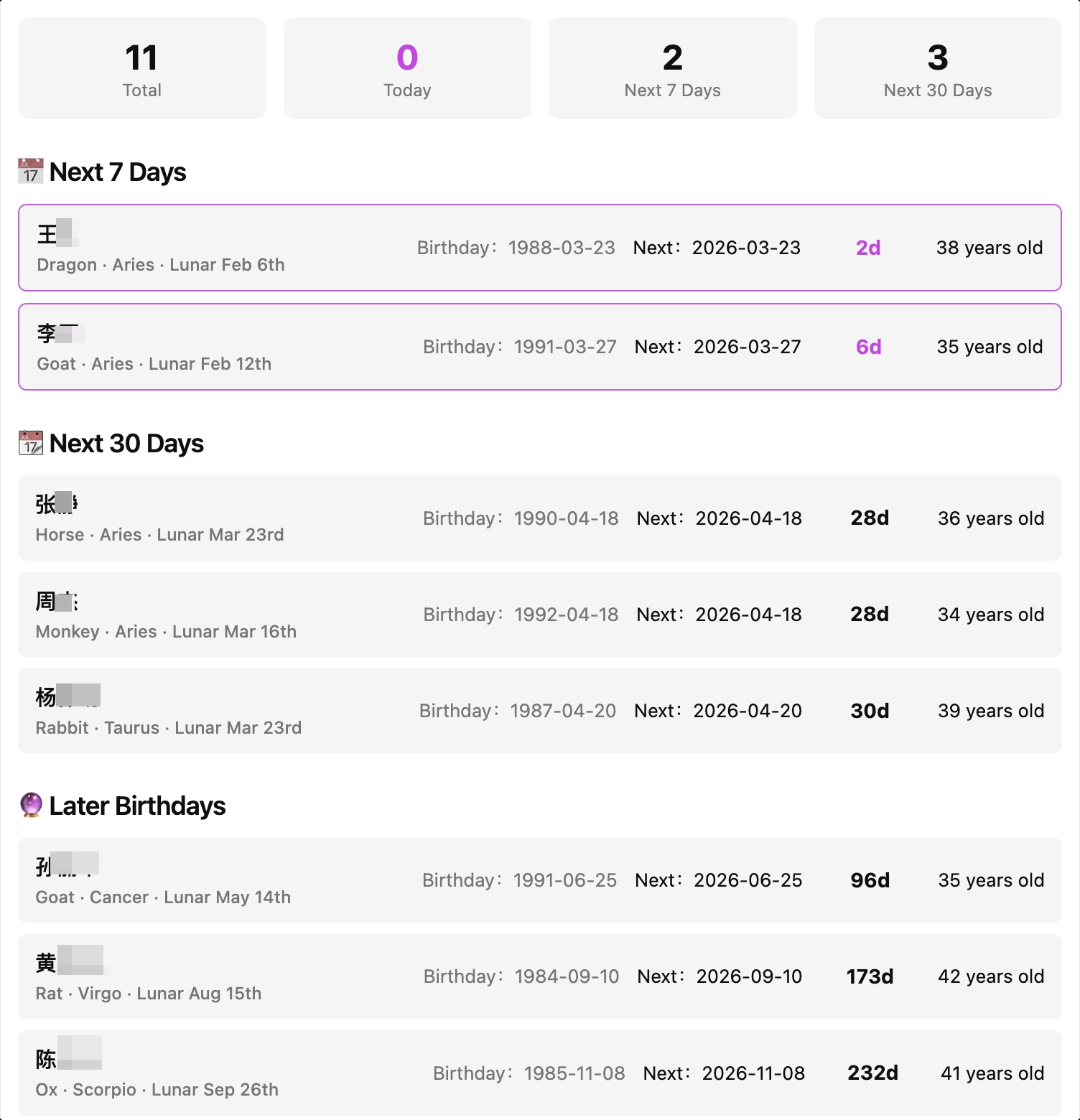
- Statistics Cards: Total count, today's birthdays, birthdays within 7 days, birthdays within 30 days at a glance
- Auto-grouping: Automatically categorized into today, next 7 days, next 30 days, and later birthdays
- Sorted Display: Automatically sorted by remaining days, upcoming birthdays appear first
2.3 📅 Calendar View
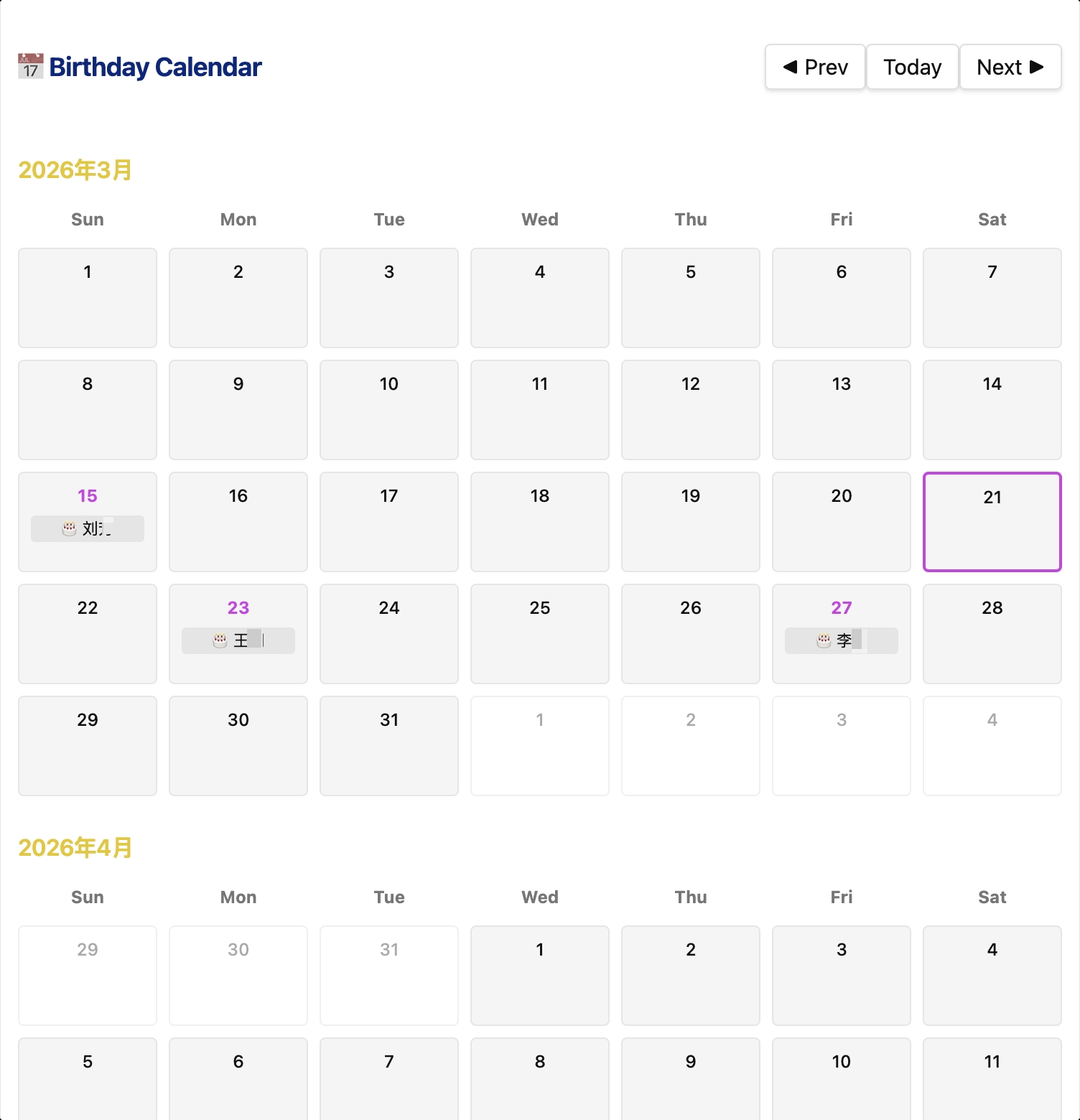
- Monthly Calendar: Displays all birthdays in calendar format, birthday dates highlighted
- Month Navigation: Supports previous/next month switching, one-click return to today
- Birthday Preview: Shows names of people with birthdays directly on calendar cells
- Click to Open: Click any birthday card or calendar cell to jump directly to the corresponding note
2.4 🎨 Interface Adaptation
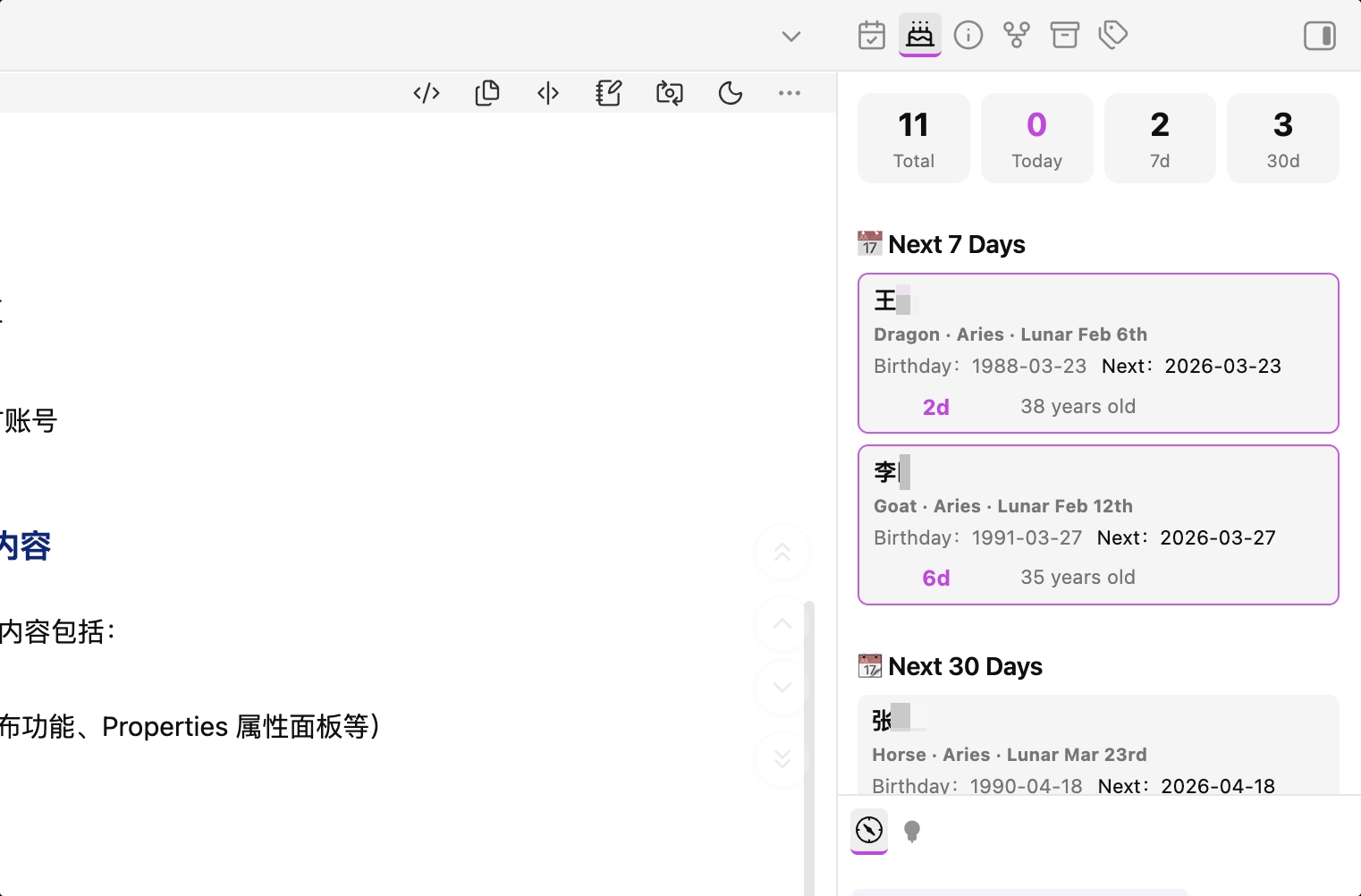
- Responsive Layout: Automatically detects window width – compact mode in sidebar, full mode in main window
- Multiple Color Schemes: 5 built-in color schemes (Default, Warm Orange, Cool Blue, Nature Green, Elegant Purple)
- Dark/Light Theme: Perfectly adapts to Obsidian's dark and light themes
2.5 🌐 Multi-language Support
- Chinese/English: Interface language switching to meet different user needs
- Full Localization: All interface text fully translated for consistent experience
2.6 ⚙️ Highly Configurable
| Setting | Description |
|---|---|
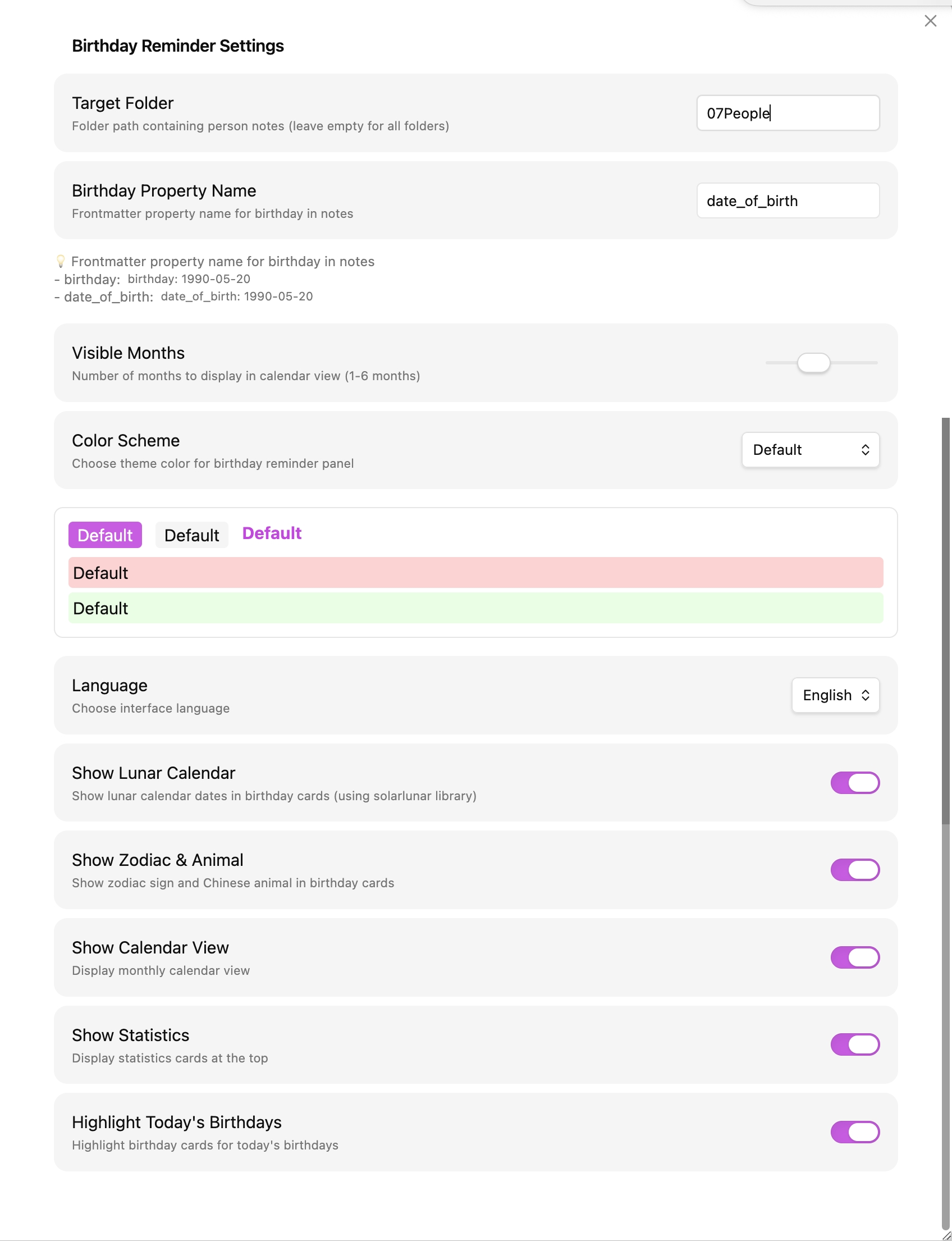
| Birthday Property Name | ✨ Customize frontmatter property name, default birthday, supports date_of_birth, DOB, etc. |
| Target Folder | Specify folder path to scan |
| Visible Months | Number of months to display in calendar view (1-6 months) |
| Color Scheme | 5 theme colors to choose from |
| Show Lunar Calendar | Toggle lunar date display |
| Show Zodiac & Animal | Toggle zodiac and animal sign display |
| Show Calendar View | Toggle monthly calendar display |
| Show Statistics | Toggle statistics cards display at top |
| Highlight Today's Birthdays | Toggle special highlighting for today's birthdays |
| Language | Chinese/English switching |
3 🌟 Highlights
3.1 Configurable Birthday Property
No longer limited to the birthday property name! You can use any property name you prefer:
Option 1: Use default property
birthday: 1990-05-20
Option 2: Customize to date_of_birth
date_of_birth: 1990-05-20
Option 3: Customize to DOB
DOB: 1990-05-20
Simply configure the corresponding property name in plugin settings, and it will be automatically recognized!
3.2 One Field, All Features
Just add the birthday property to your note's frontmatter, and all features work automatically.
3.3 Perfect Sidebar & Main Window Adaptation
- Drag to sidebar → Automatically switches to compact mode, saving space
- Drag to main window → Automatically switches to full mode, displaying more information
3.4 Precise Lunar Conversion
Uses the professional solarlunar library, supporting precise lunar conversion for years 1900-2100, correctly handling leap months.
3.5 Elegant Calendar View
- Automatically fills previous/next month dates at month boundaries
- Cross-month dates displayed semi-transparently
- Today's date highlighted with special border
- Birthday cells support hover tooltips
3.6 One-Click Note Navigation
Click any birthday card or birthday name in the calendar to immediately open the corresponding note – no manual searching required.
3.7 Performance Optimized
- Uses
ResizeObserverto monitor window changes for real-time layout adjustment - Birthday data indexed by month, O(1) complexity for calendar rendering
- Automatically refreshes data every hour
4 📸 Interface Preview
4.1 Main Window Mode (Full Layout)
4.2 Sidebar Mode (Compact Layout)
4.3 Plugin Settings
5 🚀 Quick Start
5.1 Installation
The plugin is now available in the Obsidian Community Plugin Store! 🎉
Method 1: Install from Community Plugins (Recommended)
- Open Settings → Community Plugins
- Click Browse and search for
Birthday Reminder - Click Install and then Enable
Method 2: Install via BRAT
- Open Settings → BRAT (under Community Plugins)
- Click the Add Beta Plugin button
- Enter the repository address:
https://github.com/ichris007/Obsidian-Birthday-Reminder - Click Add Plugin – BRAT will automatically download and install it
- Go to Settings → Community Plugins, find Birthday Reminder, and enable it
Method 3: Manual Installation
- Download the latest release (
main.js,manifest.json,styles.css) from the Releases page - Extract the files into:
.obsidian/plugins/birthday-reminder/ - Restart Obsidian and enable the plugin
5.2 Configuration Steps
- After enabling the plugin, click the "Settings" icon next to it
- Set Birthday Property Name (optional): If you use a custom property name like
date_of_birth, enter it here - Set Target Folder: Specify the folder containing person notes (e.g.,
07Relations/) - Adjust other options as needed (color scheme, display settings, etc.)
- Add birthday property to notes in the target folder:
For example:
birthday: 1990-05-20
5.3 Usage
- Click the cake icon 🎂 in the left sidebar to open the birthday reminder panel
- Or use the Command Palette (Ctrl/Cmd + P) and type "Birthday Reminder"
6 📝 Changelog
v1.5.2 (2026-07-16)
- 🐛 Fixed age calculation logic – Correctly handles birthdays that have already passed this year, preventing off-by-one-year age errors
- 🔧 Improved code clarity with explicit
birthMonth/birthDayvariable extraction
v1.5.1 (2026-07-16)
- 🔧 Installation fix – Lowered
minAppVersionto1.12.7to resolve "no appropriate version found" error - 🌐 Complete localization – All settings UI text fully localized; color scheme names now display in the selected language
- ✨ Slider dynamic tooltip – Shows current value (e.g., "3 months") when dragging the visible months slider
- 🎨 Color preview real-time update – Preview updates immediately when switching color schemes
- 🔄 Language switching instant – Settings panel refreshes immediately when switching languages
more details
v1.5.0 (2026-07-15)
- 🏗️ Settings API stabilization – Reverted to traditional
Settingclass +display()method for better stability - ⚙️ Complete settings implementation – All settings fully functional with proper type annotations
- 🎨 Color preview – Visual preview of selected color scheme
- 🔮 Future upgrade path – Reserved
getSettingDefinitions()for future migration
v1.4.1 (2026-07-15)
- 🛡️ Zero
anytypes – Complete type safety overhaul - 🏗️ Settings API migration – Migrated to new declarative API
- 🪟 Popout window compatibility – Full support for Obsidian popout windows
v1.4.0 (2026-07-15)
- 🔄 Auto-refresh – View updates automatically when birthday notes are created, deleted, renamed, or modified
- 📦 Updated minAppVersion to
1.13.0
v1.3.0 (2026-07-15)
- ✨ Auto-refresh on file changes – Added file watcher with 100ms debounce
- 🔧 Promise handling – All async operations properly marked with
void - 🛡️ Type safety – Added type assertions and guards
v1.2.0 (2026-07-15)
- 🎯 Code quality – All community plugin review issues resolved
- 🎨 UI overhaul – Replaced inline styles with CSS classes
- 🧹 Memory leak fixes – Removed leftover references and improved cleanup
v1.1.0 (2026-03-21)
- ✨ New Features
- Full English interface support with localized animal signs, zodiac signs, lunar dates, and age units
- Dynamic interface text based on language settings
- 🐛 Bug Fixes
- Fixed issue where animal signs and zodiac signs displayed in Chinese even in English mode
- Fixed age unit showing "岁" (Chinese) instead of "years old" in English mode
v1.0.0 (2026-03-21)
- ✨ Initial Release
- 🎯 Configurable birthday property support (
birthday,date_of_birth,DOB, etc.) - 🎯 Intelligent birthday calculation and age calculation
- 🌙 Lunar calendar conversion (using solarlunar library)
- 🐉 Zodiac and animal sign display
- 📅 Calendar view with month navigation
- 🎨 5 color schemes
- 🌐 Chinese/English bilingual support
- 📱 Responsive layout, automatically adapts to sidebar/main window
- ⚙️ Rich configuration options
7 🙏 Acknowledgments
- solarlunar- Lunar calendar calculation library
- Obsidian - Excellent note-taking software
8 📄 License
MIT License
9 🔗 Links
- GitHub Repository
- Issue Tracker
- Lifein OS - A personal productivity and life management system built with Obsidian.
10 💡 FAQ
10.1 Q: I use the date_of_birth property. Can it be supported?
A: Yes! Simply change the "Birthday Property Name" in plugin settings to date_of_birth.
10.2 Q: Can multiple different property names be supported simultaneously?
A: Currently only one property name is supported, but you can choose the one you use most frequently and unify other notes accordingly.
10.3 Q: Is the lunar date accurate?
A: The plugin uses the professional solarlunar library, supporting precise lunar conversion for years 1900-2100, including leap month handling.
10.4 Q: Does the layout automatically switch between sidebar and main window?
A: Yes! The plugin automatically detects window width – switches to compact mode when width is less than 450px, and full mode when width is 450px or greater.
For plugin developers
Search results and similarity scores are powered by semantic analysis of your plugin's README. If your plugin isn't appearing for searches you'd expect, try updating your README to clearly describe your plugin's purpose, features, and use cases.