BrainCore LifeOS
approvedby 囍樂
Obsidian 知识库的「核心呼吸机」,它由 7 大模块组成,涵盖了时间感知、极速收集、工作流转、习惯养成与知识内化。一切信息从这里输入,最终也会在这里沉淀。 - This plugin has not been manually reviewed by Obsidian staff.
BrainCore LifeOS
Paid · 48-hour trial · ¥49.9 permanent unlock
付费 · 48 小时试用 · ¥49.9 永久激活
English
Overview
BrainCore LifeOS is a paid LifeOS sidebar console for Obsidian vaults. It brings capture, tasks, weekly work, habits, Moments notes, daily quotes, weather, time progress, and vault stats into one sidebar control panel. The goal is a daily operating surface for your knowledge base: open the console, capture quickly, push tasks, and review progress without hunting through folders.
Pricing
| Item | Details |
|---|---|
| Install | Free from Community Plugins (when listed), BRAT, or GitHub Releases |
| Trial | Start a 48-hour full trial inside the plugin |
| Unlock | ¥49.9 one-time payment, permanent activation per device fingerprint |
| Purchase | After the trial, contact the author on Xiaohongshu, send your device fingerprint, then paste the activation code |
Mobile and desktop sharing the same vault need one activation per device. Obsidian does not process payments for this plugin.
Install
- Prefer Community Plugins: Settings → Community plugins → Browse → search BrainCore LifeOS → Install → Enable
- Or install with BRAT using this repository:
https://github.com/xileshuo/BrainCore-LifeOS
- Or download Latest Release and place
main.jsandmanifest.jsonin.obsidian/plugins/braincore-lifeos/ - Click the cloud ribbon icon, then start the 48-hour trial
- After the trial, unlock with an activation code from Xiaohongshu
Features
- Sidebar console: capture, tasks, weekly work, habit check-ins, and stats
- Moments: quick notes, filters, share images, and yearly reports
- Daily quotes, weather, and year / month / week / day progress
- Weekly Work templates with unfinished-task carryover
- Optional Dataview for richer statistics (DataviewJS recommended)
Quick start
- Morning: open the cloud icon → check greeting / progress / quote → scan tasks
- Daytime: capture ideas as they appear; push work from the task overview
- Evening: complete habit check-ins; archive finished items when needed
- Weekly: review the current Work note and plan the next week
Capture categories include Work, Life, Moments, essays, clippings, materials, and drafts.
Use Cmd/Ctrl + Enter to send. Empty content will not submit silently.
Moments notes are stored as yearly Markdown files under 读&写/Moments/YYYY.md.
Images go to Boxes/图片; the Moments year file only stores references.
Notes
- Dataview is optional. Capture, tasks, habits, and Moments work without it.
- Do not delete core folders such as Work, Boxes, or 读&写.
- Full documentation is also available inside the plugin under Usage Guide.
Links
- Author profile: https://github.com/xileshuo
- Repository: https://github.com/xileshuo/BrainCore-LifeOS
- Buy / support: Xiaohongshu (see the Chinese section below for the order link)
This repository hosts the community distribution build and documentation. It does not include the full private source tree.
中文
侧边栏控制台:捕捉、待办、周工作、习惯、Moments、统计与知识内化。
版本与更新见 Latest Release · 标签 Paid(含免费试用)
界面预览
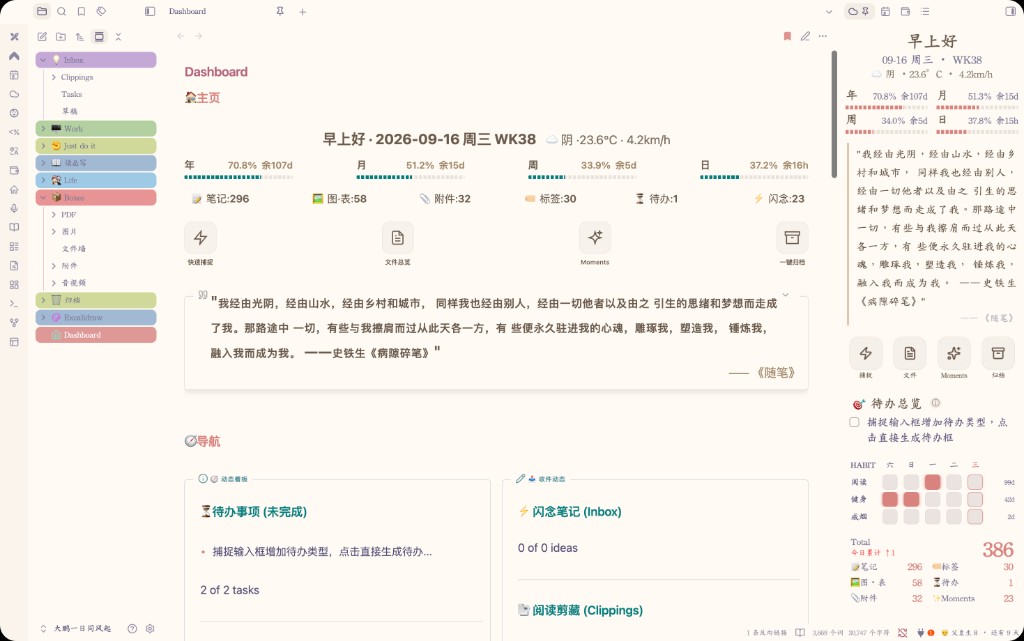
控制台 — 捕捉、待办、周工作与习惯一屏看清
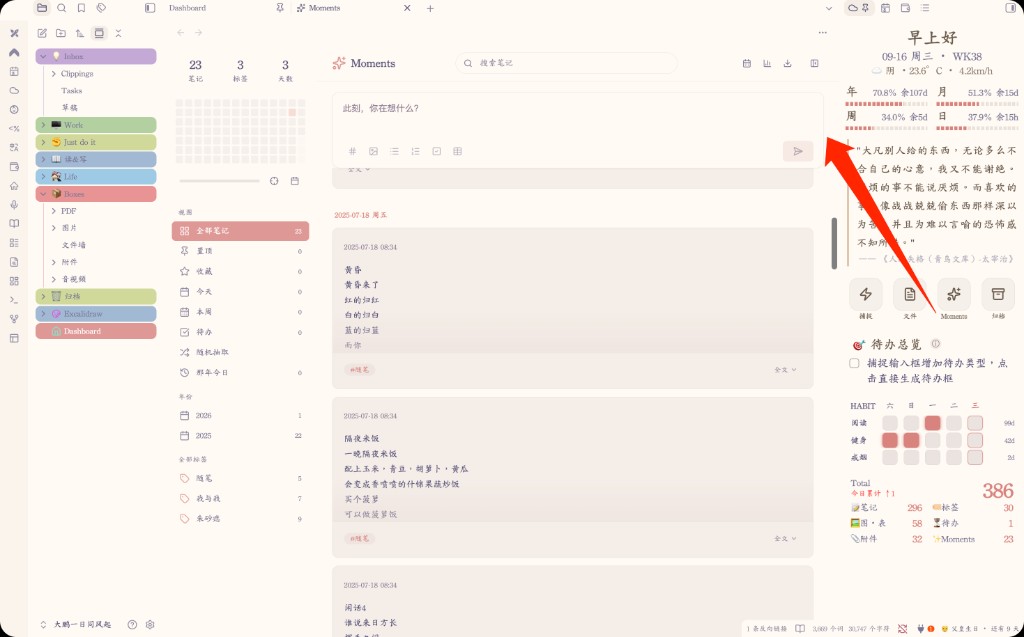
Moments — 速记、筛选与分享图
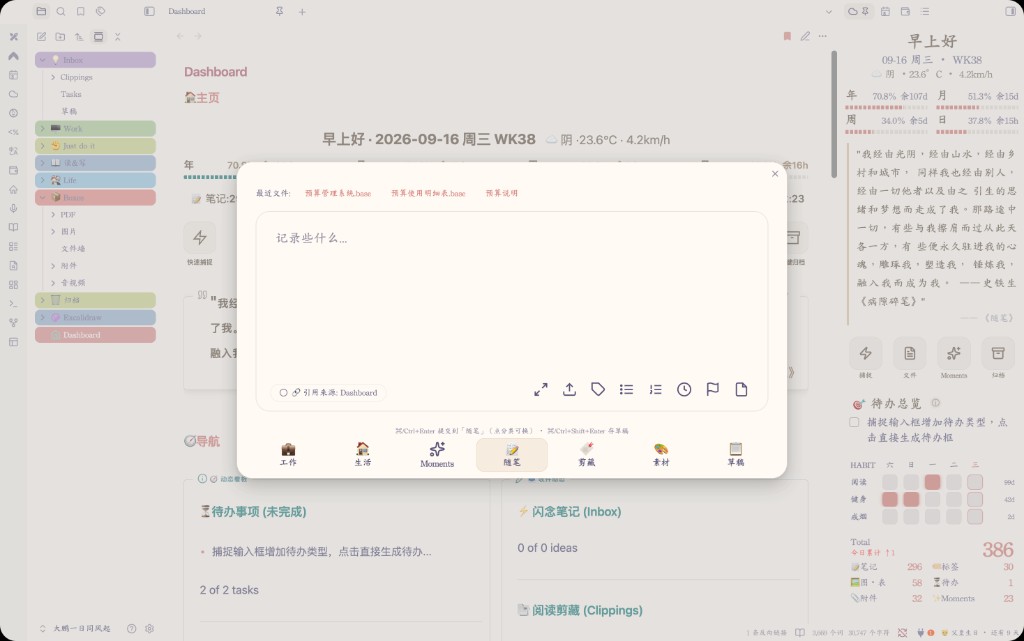
捕捉 — 快速收集想法与待办
定价与购买
| 项目 | 说明 |
|---|---|
| 试用 | 插件内开启后 48 小时全功能 |
| 付费 | ¥49.9 一次付费,按设备指纹永久激活 |
| 购买 | 小红书联系作者下单 → 复制设备指纹 → 粘贴激活码 |
作者:github.com/xileshuo · 小红书:下单入口
安装与上手
- 设置 → 第三方插件 → 浏览 → 搜索 BrainCore LifeOS → 安装并启用
- 点侧栏云图标,开启 48 小时试用
- 试用满意后:复制指纹 → 小红书下单 → 粘贴激活码
其他安装方式
BRAT:添加仓库
https://github.com/xileshuo/BrainCore-LifeOS
手动:下载 Latest Release 的 main.js、manifest.json 到 .obsidian/plugins/braincore-lifeos/
使用说明(精简)
完整说明可在启用后打开插件内「使用说明」;下面是社区页够用的上手版。
打开控制台
启用后点左侧边栏 ☁️ 云朵图标,进入 BrainCore 控制台。
七大模块
- 问候语与天气 — 日期、问候、天气
- 时间进度 — 今日 / 本周 / 本月 / 本年进度
- 快捷工具 — 捕捉 · 文件 · Moments · 归档
- 待办总览 — 聚合日常待办与本周工作事项
- 习惯打卡 — 长期坚持项(与一次性待办分开)
- 每日金句 — 从读书笔记与随笔抽取
- 数据统计 — 笔记 / 标签 / 待办 / Moments 等概览
顶部 Hero(问候 + 时间进度 + 金句)一眼看清今天;下方推进待办与习惯。模块可在设置里开关与排序。
捕捉
点「捕捉」打开面板,分类一次展开:
| 分类 | 写入 |
|---|---|
| 工作 | 本周 Work →「本周待办」 |
| 生活 | 生活待办文件 |
| Moments | 读&写/Moments 年文件 |
| 随笔 / 剪藏 / 素材 / 草稿 | 对应路径(可在设置修改) |
⌘/Ctrl + Enter 发送;空内容不会静默提交。
Moments
- 记录写入
读&写/Moments/年份.md(按年汇总) - 支持搜索、筛选、置顶、收藏、那年今日、分享图与年度报告
- 图片统一进
Boxes/图片,年文件只存引用
待办与周工作
- 待办用标准勾选语法:
- [ ] 任务 - 打开控制台时会生成本周 Work;跨周尽量迁未完成项
- 待办总览会聚合周工作与日常待办,方便当天推进
习惯打卡
适合「每天都要做」的事项。项目可在设置 → 打卡里增删、改图标,并支持导入 / 导出。
推荐日常流程
- 早上:☁️ 打开控制台 → 看 Hero → 扫待办
- 白天:有事就捕捉;该推进的从待办总览点进去
- 晚上:习惯打卡;需要时归档已完成项
- 每周:在 Work 文件里复盘本周、安排下周
建议与注意
- Dataview 可选:没有也能用捕捉 / 待办 / 习惯 / Moments;装了统计更完整(建议开 DataviewJS)
- 不要随意删核心目录(Work、读&写、Boxes 等)或改插件文件夹名
- 手机与电脑共用同一库时:两端各用本机指纹各激活一次
更新日志
4.1.4(当前)
- 文档:社区 README 改为英文说明在前、中文在后,便于目录语言检测通过
- 发布:同步 4.1.4 公开包与 Release,便于社区后台重新审核
4.1.3
- Moments:无旧 Ideas/碎碎念 可迁时静默完成,不再每次启动弹「Folder already exists」
- Moments:建目录兼容已存在文件夹;失败提示改为最多每周一次
4.1.2
- 定价更正:永久激活为 ¥49.9(试用满意后小红书联系作者下单)
- 社区介绍:补入精简使用说明;三张界面图全部展开;更新日志保留近 10 个版本(当前展开、其余折叠)
4.1.1
- 社区介绍:置顶三张界面预览图,中文排版收紧;英文说明加长以便目录检测
- 发布:同步仓库根与 Release 的 manifest,避免版本不一致警告
4.1.0
- 文档:社区介绍改为中文为主、英文为辅,去掉中英混排与重复段落
4.0.9
- 社区审核:authorUrl 改为 GitHub 个人主页(不可指向本插件仓库)
- 文档:公开 README 加强英文概览,避免中文使用说明淹没英文检测
4.0.8
- 社区审核:manifest 描述去 Obsidian 词并补句末标点;authorUrl 改为可访问的 GitHub 仓库
- 文档:README 补英文安装/使用说明;定价 ¥99.9 永久激活(试用满意后小红书联系下单)
- 许可:仓库 LICENSE 改为可识别的 MIT,并保留试用后需激活的商业说明
4.0.7
- 社区分发:公开包改为 48 小时试用,到期后需激活码(市场可免费安装)
- 文档:补充 Paid + 试用说明与 LICENSE,便于提交 Obsidian 社区目录
4.0.6
- 金句:改为 Scripts/braincore-quote-index.json 增量索引,覆盖全部读书笔记与随笔(不再限最新 80 本)
- 金句:改/删划线或随笔会同步更新池;每日新增笔记分批进池;展示尽量不重复,轮完再洗牌
- 金句:后台分批追平,避免全库硬扫造成卡顿
4.0.5
- 统计:跨日后强刷「今日累计」——Obsidian 挂后台过夜也不再沿用昨天的 ↑N;午夜定时 + 切回前台都会按日历日重算
- 统计:自愈「date 已是今天但基线滞后」——把 ctime 早于今天的文件并回基线,避免一直显示昨天的净增
- 控制台:跨日同步刷新习惯「今日」高亮与问候/日期条,不必重开插件或重启 Obsidian
For plugin developers
Search results and similarity scores are powered by semantic analysis of your plugin's README. If your plugin isn't appearing for searches you'd expect, try updating your README to clearly describe your plugin's purpose, features, and use cases.