Daily Desk
approvedby Alex
Capture daily inspiration, manage Markdown tasks, and review writing progress from a customizable local dashboard. - This plugin has not been manually reviewed by Obsidian staff.
Daily Desk
A local home for daily notes, tasks, and writing activity.
把每日笔记、待办与写作积累,收拢到一个本地主页。


English · 简体中文 · Desktop only / 仅桌面端
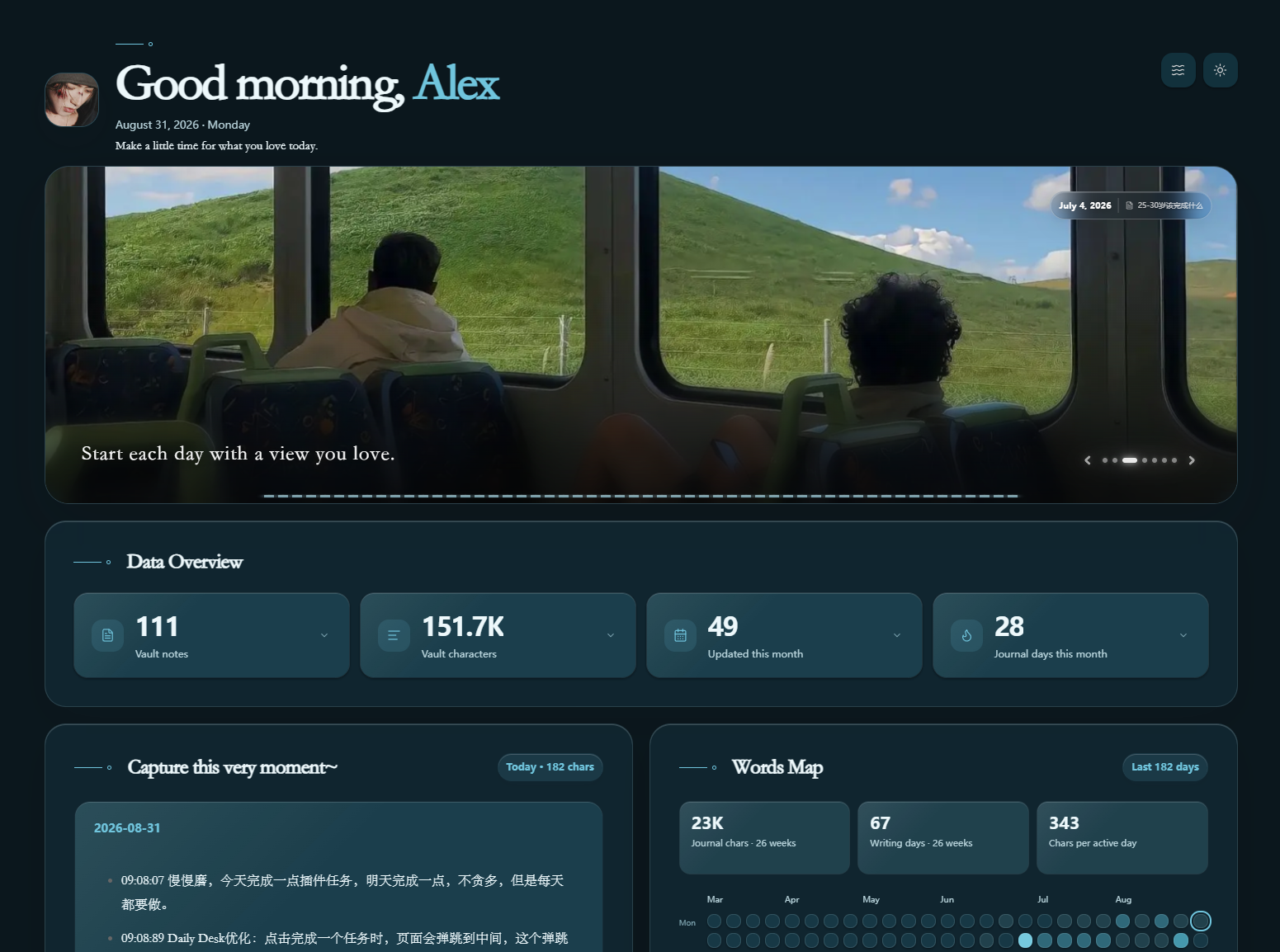
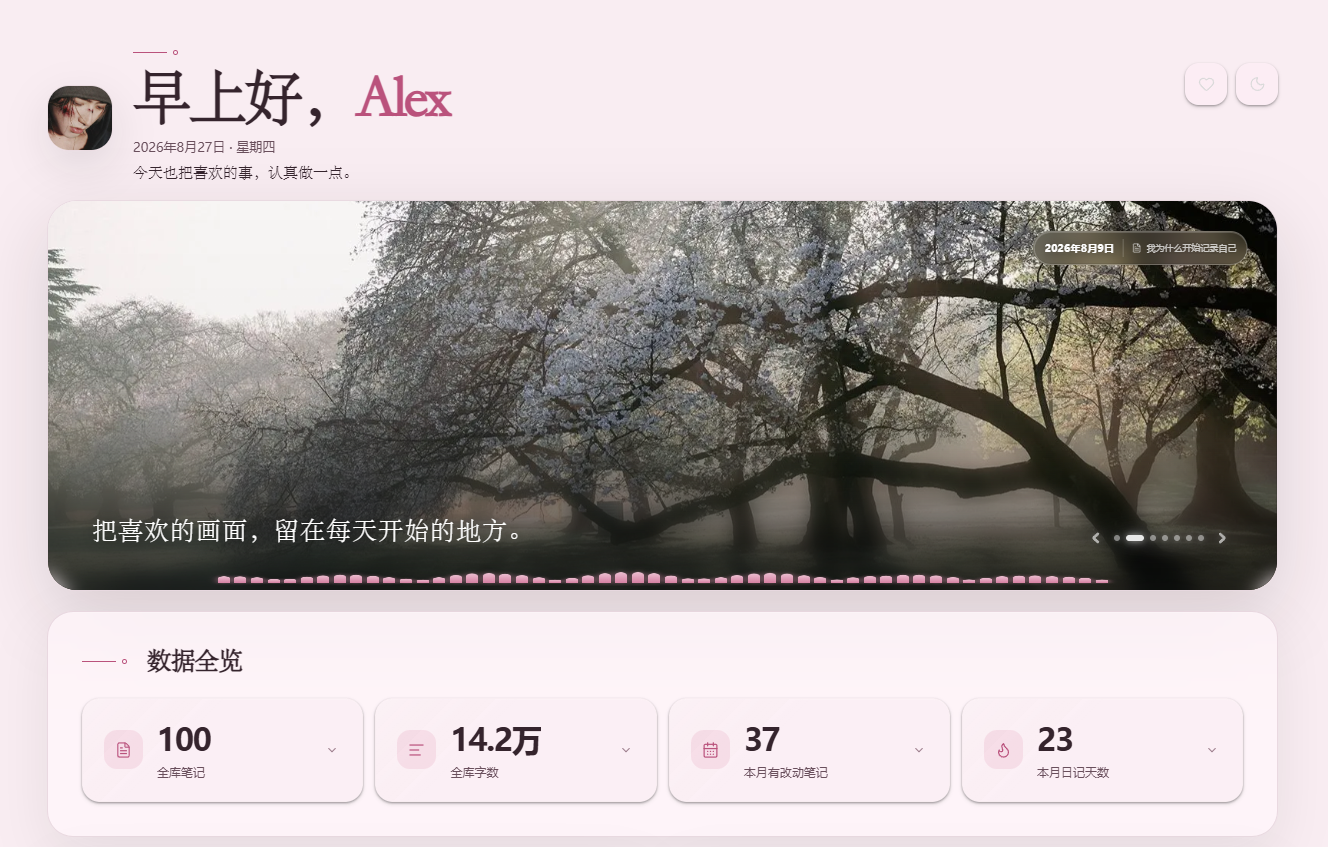
Preview / 界面预览
| Light / 浅色 | Dark / 深色 |
|---|---|
 |  |
 |  |
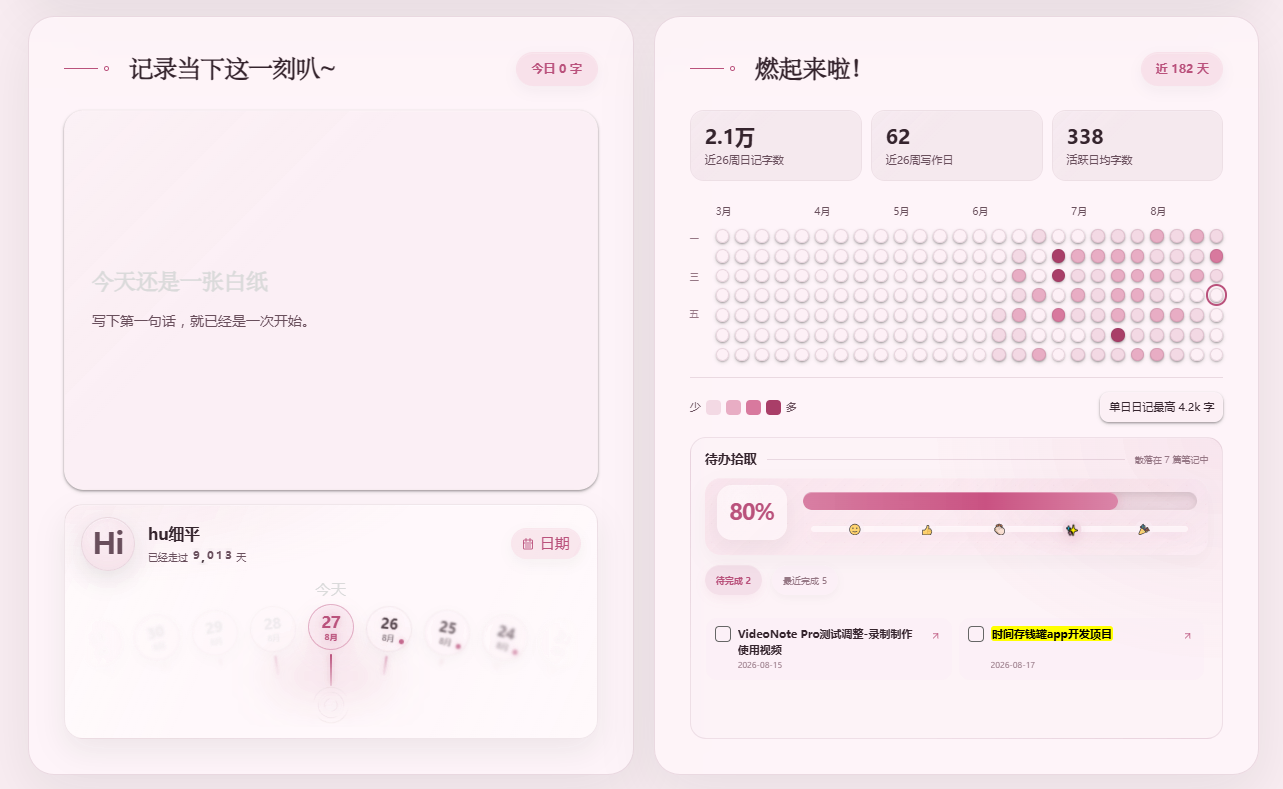 | 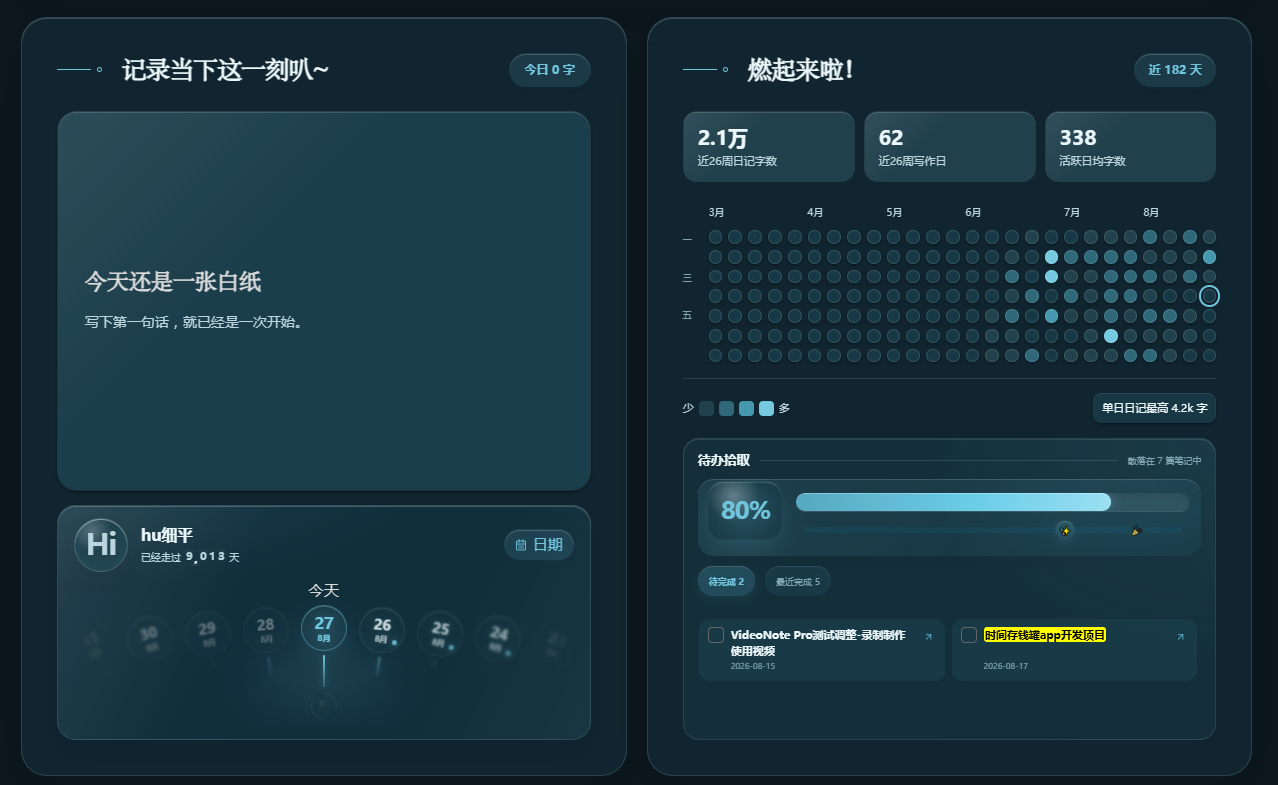 |
Screenshots show customized English and Chinese interfaces. New installations include two example cover photos and matching notes; the screenshots' avatar and other custom content are not bundled.
截图展示自定义后的英文与中文界面;首次安装会附带两张示例横幅和对应笔记,截图中的头像及其他自定义内容不随插件提供。
English
What it does
Daily Desk brings daily notes, Markdown tasks, character counts, a writing heatmap, and a life timeline into a single local dashboard. Statistics link back to their source notes. No Dataview, Templater, account, or cloud service is required.
- Read today's note and open its source.
- Collect tasks from the whole vault or selected folders. Check off tasks directly and see the five most recently completed items.
- Explore note counts, character totals and 12–52 weeks of writing activity.
- Browse past dates with a timeline and calendar.
- Customize the avatar, image carousel, elastic banner, palette, and light/dark appearance.
- Optionally enable a system audio visualizer with four styles, theme/custom colors, sensitivity control, and fade-out after ten seconds of silence.
Language
The interface follows Obsidian → Settings → General → Language after restarting Obsidian. Since version 1.10.22, it supports English and Simplified Chinese; other languages fall back to English. No online translation is used.
Built-in greetings, settings, buttons, tooltips, empty states, dates, numbers and default captions switch together. Custom names, titles, note content, image paths and folder paths are never translated. Leave a customizable text field blank to use its language-aware default. Legacy values that exactly match a shipped default are migrated once.
The public plugin name remains Daily Desk in every language. Previously known as Alex Desk / 每日专注主页, it retains the ID alex-desk so existing settings remain compatible.
Install
Requires Obsidian 1.8.7 or newer, desktop only.
Community directory
Open the Daily Desk community listing and select Add to Obsidian, then install and enable the plugin in the desktop app. Alternatively, open Settings → Community plugins → Browse and search for Daily Desk.
The listing's Scorecard shows the current automated review results. A public listing and an installation link do not imply that every warning has been cleared or that a separate manual review has concluded.
Manual installation (fallback)
If directory installation is unavailable, download the three individual assets from the latest published Release:
main.jsmanifest.jsonstyles.css
Put them in <vault>/.obsidian/plugins/alex-desk/, restart Obsidian and enable Daily Desk. When upgrading, preserve your existing data.json. GitHub's automatically generated source ZIP is not an installation package.
First setup and privacy
On first install, Daily Desk creates Daily Desk Examples/ with two example images and localized source notes, then enables them in the carousel. The notes show the vault-relative paths to copy into Cover images; absolute filesystem paths do not work. Choose your daily notes folder and avatar, replace or extend the examples, and leave task folders blank for the whole vault. The audio visualizer is off by default.
All notes, statistics and settings stay local. On Windows, the visualizer starts a hidden PowerShell process to read speaker output levels. Other desktop environments may use a screen/system-audio capture interface; support and permission prompts vary. Audio is processed only in memory, never saved, transcribed or uploaded. See Privacy and Security.
简体中文
插件用途
Daily Desk 将每日笔记、Markdown 待办、字数统计、写作热力图和人生日期回看整合到一个本地主页。统计结果可以跳转至来源笔记,无需 Dataview、Templater、账户或云服务。
- 阅读当日笔记并跳转原文。
- 汇总全库或指定多个文件夹的待办,直接勾选,显示最近完成的五项。
- 查看笔记数量、字符数和最近 12–52 周的写作记录。
- 使用日期滚轮和日历回看过去。
- 自定义头像、图片轮播、弹性横幅、配色和昼夜模式。
- 可选系统音频频谱:四种样式、主题/自定义颜色、灵敏度调节,以及静音十秒后渐隐。
自动跟随语言
在 Obsidian → 设置 → 常规 → 语言 中切换并重启后,插件随之切换。自 1.10.22 起支持简体中文和英文,其他语言回退英文,不使用在线翻译。
预设问候、设置项、按钮、提示、空状态、日期、数字和默认文案一起切换。你填写的称呼、标题、笔记正文、图片路径和文件夹路径保持原样。自定义文字字段留空时使用当前语言的默认文案;旧设置中与历史默认文案完全相同的值会进行一次迁移。
插件对外名称统一为 Daily Desk,不随语言变化。旧名为 Alex Desk / 每日专注主页,ID 仍是 alex-desk,已有安装与设置可以继续使用。
安装
需要 Obsidian 1.8.7 及以上,仅支持桌面端。
社区商店安装
打开 Daily Desk 社区商店页面,点击 Add to Obsidian,在桌面应用中安装并启用。也可以进入 设置 → 第三方插件 → 浏览,搜索 Daily Desk。
商店页面的 Scorecard 展示当前自动检查结果。页面公开且提供安装入口,不代表所有警告已消除,也不代表另行申请的人工复审已经结束。
手动安装(备用)
如果商店安装不可用,请在最新正式版本下载三个独立附件:main.js、manifest.json、styles.css。放入 <仓库>/.obsidian/plugins/alex-desk/,重启并启用 Daily Desk。升级时保留自己的 data.json,不要把 GitHub 自动生成的源码压缩包当成安装包。
首次设置与隐私
首次安装会在仓库中创建 Daily Desk Examples/,其中包含两张示例横幅及与 Obsidian 语言一致的来源笔记,并自动加入轮播。示例笔记提供可复制到“封面图片”的仓库相对路径;系统绝对路径无法显示。确认每日笔记文件夹和头像后,可以替换或继续添加示例图片;待办文件夹留空表示扫描全库。音频频谱默认关闭。
笔记、统计和设置均在本地处理。Windows 频谱通过隐藏 PowerShell 进程读取系统输出峰值;其他桌面环境可能使用屏幕/系统音频采集接口,支持情况和权限提示因环境而异。音频只在内存中分析,不保存、不转写、不上传。详见隐私说明和安全策略。
Development / 开发
npm ci
npm run build
npm run check
Edit src/ and styles.css; the build bundles runtime dependencies and translations into main.js. Tests cover both languages and settings migration.
修改 src/ 与 styles.css,构建将运行依赖和翻译打包进 main.js;测试覆盖两种语言和设置迁移。
Contributing / 贡献指南 · Publishing / 发布流程 · Submission / 上架资料 · Changelog / 更新记录
License / 许可证
The project's original code is MIT licensed. Adapted React Bits ElasticMesh code is subject to MIT + Commons Clause; OGL is under Unlicense. These third-party terms still apply. See LICENSE and Third-party notices.
项目原创代码采用 MIT 许可证;改编的 React Bits ElasticMesh 代码适用 MIT + Commons Clause,OGL 适用 Unlicense。第三方条款仍然有效,请阅读相关声明。
Buy me a coffee / 请我喝杯咖啡
If Daily Desk makes your day a little easier, you can support its development with a coffee. Support is entirely voluntary. All plugin features remain free, and no payment is required or unlocks extra features. Thank you for using Daily Desk, with or without a contribution.
如果 Daily Desk 让你的记录和整理更轻松,欢迎请我喝杯咖啡,支持后续维护。赞助完全自愿,全部插件功能仍然免费,不付费也能完整使用,赞助不解锁额外功能。 无论是否赞助,都谢谢你的使用。
| Alipay / 支付宝 | PayPal |
|---|---|
 |  |
Scan with a compatible payment app, or open an image to view it at full size. Verify the recipient and amount before confirming. Payments are handled by the payment provider, not by the plugin.
请使用支持的支付应用扫码,或点击图片查看原图;确认付款前,请核对收款方及金额。付款由支付平台处理,插件不处理付款。
For plugin developers
Search results and similarity scores are powered by semantic analysis of your plugin's README. If your plugin isn't appearing for searches you'd expect, try updating your README to clearly describe your plugin's purpose, features, and use cases.