by Johannes Kaindl
Mirror CalDAV events and CardDAV contacts as notes; the server stays the source of truth.
Calendar and Contact Notes
🇬🇧 English · 🇩🇪 Deutsch
Mirror CalDAV events and tasks and CardDAV contacts as notes in your vault — the server stays the source of truth, and every change back to it goes through an explicit command.




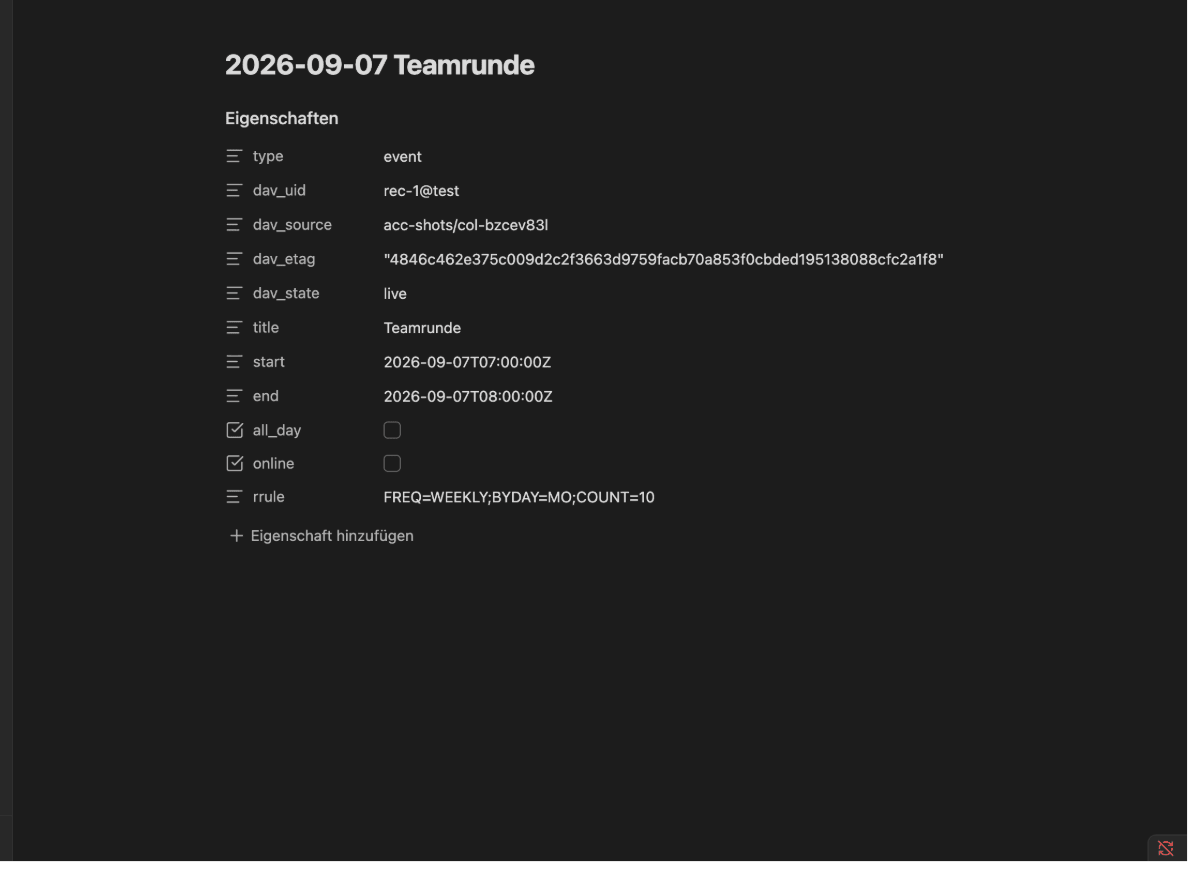
Calendars, tasks and contacts usually live on a server you never see from inside Obsidian — not linkable, not queryable, not part of your vault. This plugin mirrors CalDAV calendars and CardDAV address books as Markdown notes, one note per event, task or contact, kept in sync on an interval. The mirror is read-only by convention: editing a note's frontmatter by hand does not write to the server. Changes go back through explicit commands — move an event, change a phone number, add an attendee — each shown as a diff before anything is sent.
Features
- Two-way visibility, one-way writes. The server's state becomes your notes automatically; your notes only change the server through a command you run and confirm.
- Tasks, too — from your calendar server into your vault. If you keep tasks in Thunderbird, the iOS Reminders app or any other CalDAV client, they show up as notes with due date, status, priority and categories in the frontmatter, written the way TaskNotes expects it. A button in the settings reads the status names out of this vault's own TaskNotes installation and writes them into the profile — shipping defaults would be wrong, because those names are freely renamable. Most providers keep tasks and events in separate calendars; the plugin detects that itself and assigns the matching profile. An open task is always mirrored, even without a date — unlike events, which only appear inside the configured time window.
- And tasks go back the other way, too. Tick a task off in your vault, move its due date or rename it, then run Sync tasks with the server — a task you created in the vault is created on the server in the same pass. The command never writes on its own: it first shows every difference, grouped into changed in the vault, new and changed on both sides, and asks per row which side wins. Preselected is what you evidently meant — ticking off and creating go along, a conflict stays untouched until someone decides. Fields that cannot be transferred are named before you send, not missing afterwards. A cancelled task is never reinterpreted as a completed one, even though TaskNotes usually gives both the same status.
- CalDAV and CardDAV in one plugin, sharing a transport, with server-agnostic discovery (RFC 4791/6352/6578) — tested against Radicale, and designed to the same standards as mailbox.org and Nextcloud (not yet verified against either live server).
- A managed block, not a managed note. Frontmatter fields and a
%%dav:begin%%…%%dav:end%%body block are kept in sync; everything else in the note — your own notes, links, whatever you add — survives every sync untouched. - Adopt notes you already have. Point the plugin at an existing folder of contact or event notes and it proposes matches (by email, phone, fuzzy title/name) with a confidence level, so you link instead of duplicate.
- Explicit commands for writing, not free-text editing: move/resize an event, change a location or attendee, edit a contact field, undo the last change — each opens a small form, shows a diff, and writes only once you confirm.
- A read/write API for other plugins (
app.plugins.plugins["calendar-notes"].api, versioned) — events/contacts as data, commands as LLM tool definitions, aplan()→execute()step for anything that writes. Seedocs/API.md. - No mail sending built in. An invitation goes out via the server's own scheduling
(RFC 6638) if it has one, otherwise via a mail plugin that registers itself with
calendar-notes, otherwise as an.icsfile you copy or save yourself.
Requirements
- Obsidian 1.13.0 or newer, desktop or mobile (
isDesktopOnlyis not set). - A CalDAV/CardDAV server reachable over HTTPS with Basic Auth — mailbox.org or Nextcloud are the intended targets; the plugin has been tested end-to-end against Radicale and follows the same standards (RFC 4791/6352/6578) those two servers implement, but neither has been verified live yet. Report a mismatch as an issue.
- Nothing else. There is no telemetry and no third-party service beyond the DAV server and, optionally, a mail plugin you register yourself.
Install
From Obsidian's Community plugins browser (recommended)
- Settings → Community plugins → Browse, search for "Calendar and Contact Notes", select Install.
- Enable it.
Updates then arrive like any other community plugin update.
With AnySource Sideloader
AnySource Sideloader installs and updates plugins from any git forge, independent of the Community Store. Add this repository as a source: https://git.jkaindl.de/jkaindl/calendar-notes, then install Calendar and Contact Notes and enable it.
Manual install
Download main.js, manifest.json and styles.css from the latest Forgejo release and copy them into your vault. Releases from 0.1.10 on also ship checksums.sha256, so you can verify what you downloaded with shasum -a 256 -c checksums.sha256.
cp main.js manifest.json styles.css "<your-vault>/.obsidian/plugins/calendar-notes/"
Then: Obsidian → Settings → Community plugins → reload → enable Calendar and Contact Notes.
From source
git clone https://git.jkaindl.de/jkaindl/calendar-notes
cd calendar-notes && npm install && npm run build
# main.js manifest.json styles.css → <vault>/.obsidian/plugins/calendar-notes/
Repository: git.jkaindl.de/jkaindl/calendar-notes
Usage
Setup: account → discovery → collections → profile
- Settings → Calendar and Contact Notes → Accounts → Add account. Enter a name, the server's base URL and your username, then Test connection and find calendars. The password goes into Obsidian's own secret storage — see Security.
- Successful discovery adds every calendar and address book the server reports under Calendars & address books, each with a Mirror as notes toggle (off by default) and a Profile dropdown. Turn on the ones you want mirrored.
- Each collection uses a mapping profile — which frontmatter fields to write, which
folder, which filename pattern. Two defaults ship (
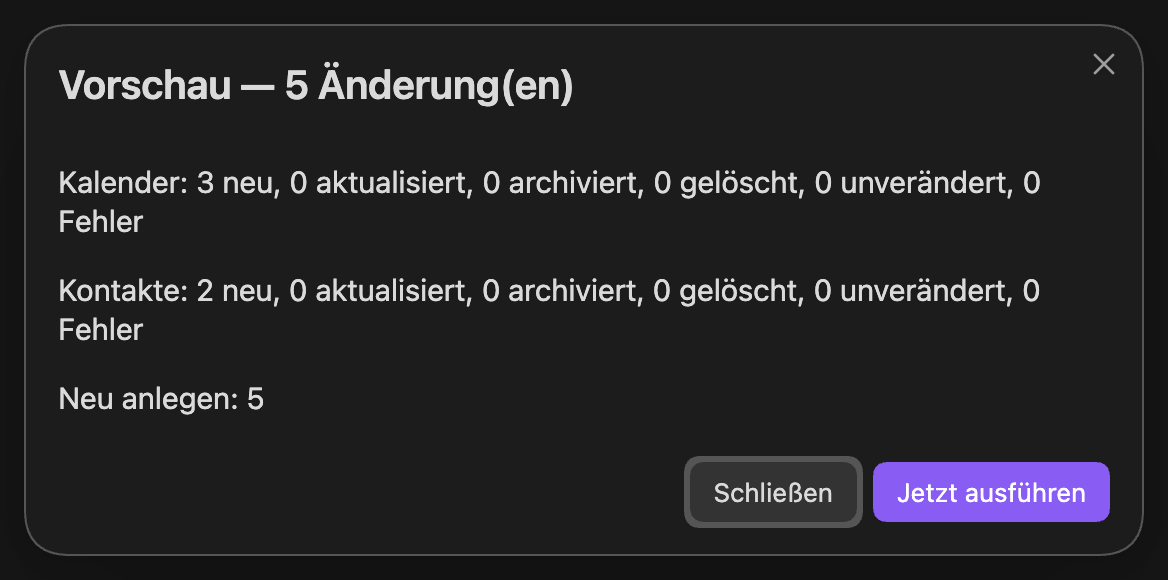
Contacts (default),Events (default), writing toContacts//Events/); under Profiles you can edit one as JSON, import/export, or generate one from an existing note's frontmatter shape (Create from note, or the command Create mapping profile from active note) — handy if your vault already has a contact/event structure you want to keep. - Run Sync all collections (or Sync everything now under Actions, or wait for the interval) to pull the first batch of notes. Preview sync (dry run) (in the settings: Preview: what would a sync change?) shows what would happen — creates/updates/archives/deletes per collection — without writing anything, any time.
Adoption: link existing notes instead of duplicating them
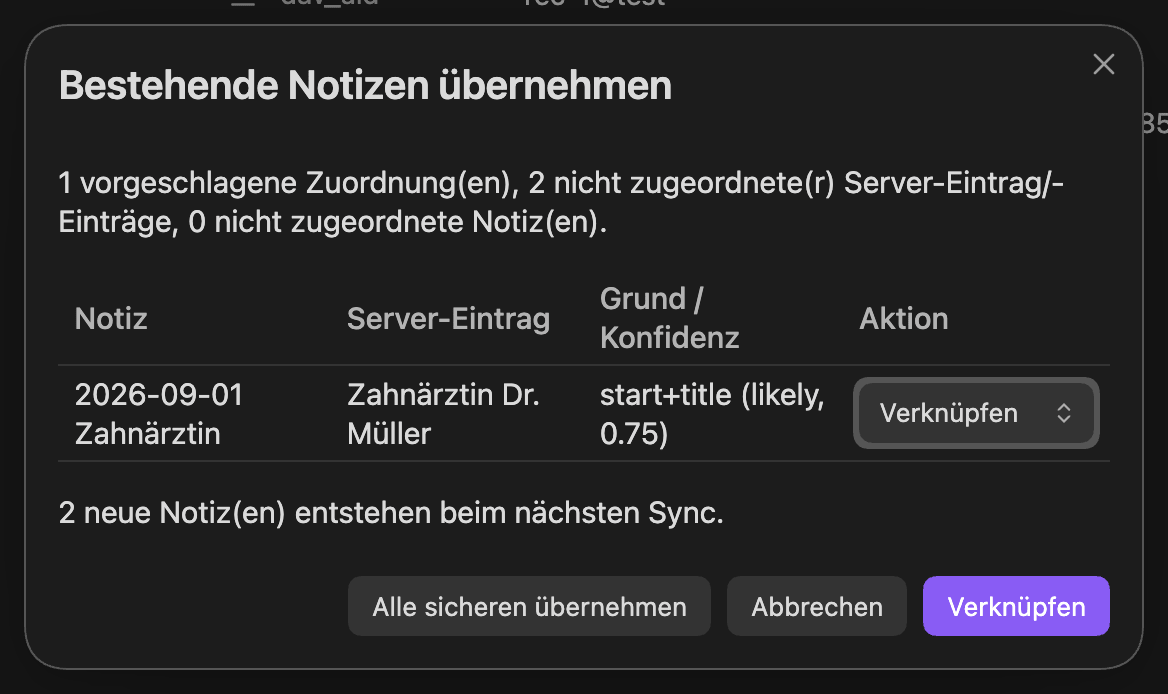
If a collection's target folder already has notes — migrated from another system, written by
hand — run Adopt existing notes… (or the button next to a collection). The plugin proposes
matches between server entries and your notes (email/phone exact, name/title fuzzy) at three
confidence levels — sure and likely link by default, weak is left for you to confirm —
shown in a table you can override row by row before anything is written. Linked notes get their
dav_uid/dav_source fields set and start updating in place on the next sync instead of
generating a duplicate.
Commands
Click the preview for full size
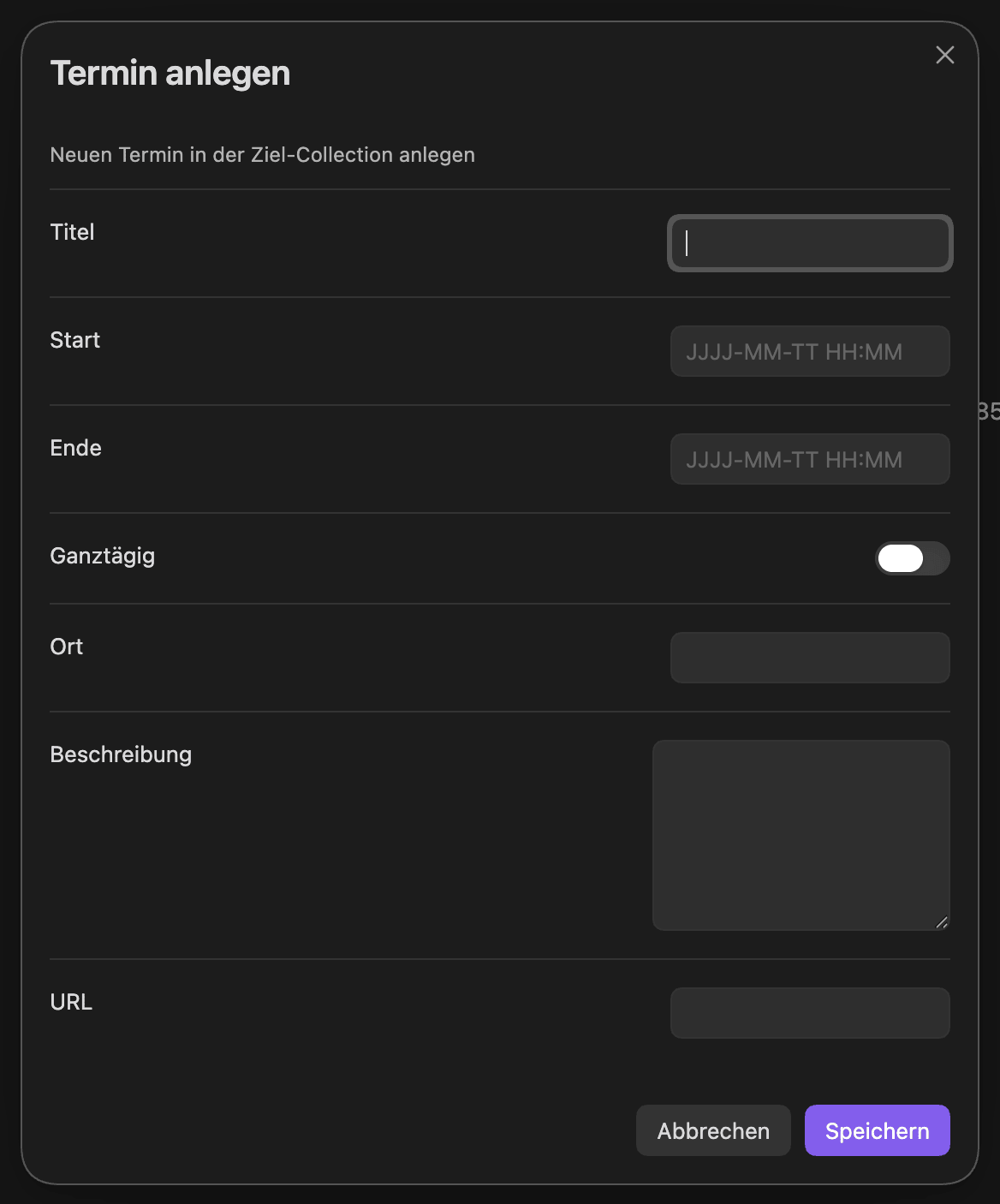
The middle column is what you type in the command palette; on a German Obsidian the commands appear under their German names instead.
| Command | In the command palette | What it does |
|---|---|---|
| Sync everything | Sync all collections | Runs a real sync across every enabled collection |
| Preview | Preview sync (dry run) | Shows planned operations without writing |
| Sync one collection | Sync one collection… | Picks a single collection to sync |
| Adopt existing notes | Adopt existing notes… | Opens the adoption review for a collection |
| Profile from note | Create mapping profile from active note | Derives a mapping profile from the active note's frontmatter |
| Change event/contact | Change event/contact… | Suggests applicable commands for the active note, opens a form, shows a diff |
| New event | New event… | Creates an event on the server (and its note) via a form |
| New contact | New contact… | Creates a contact on the server (and its note) via a form |
| Undo | Undo last change | Reverts the target's last recorded change |
| Sync tasks | Sync tasks with the server | Shows every difference between your task notes and the server and asks per row which side wins |
| Push hand edits | Write hand edits to the server | Diffs your manual frontmatter edits against the server and offers to write them |
Configuration
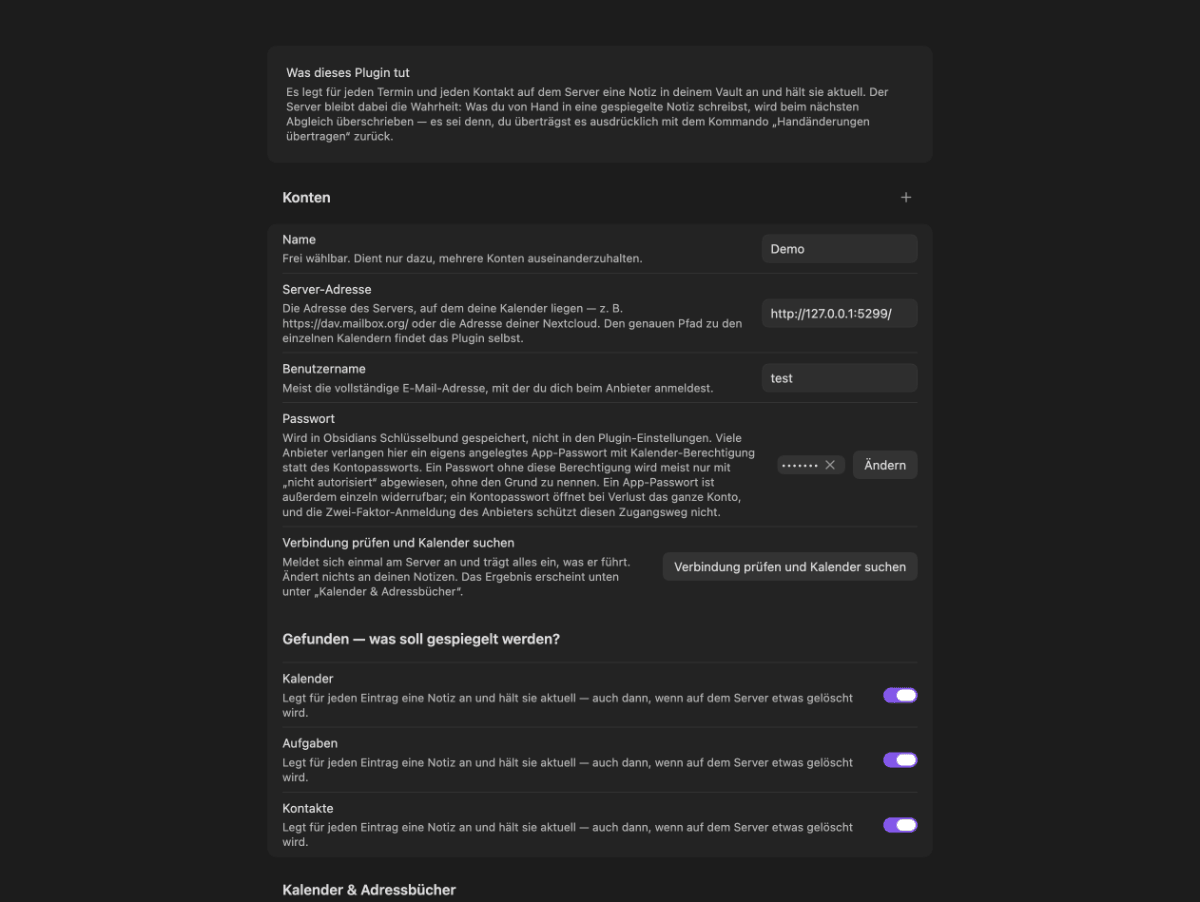
Click the preview for full size
| Setting | What it does | Default |
|---|---|---|
| Accounts | Server URL, username; password in Obsidian's secret storage | — |
| Calendars & address books → Mirror as notes | Whether a discovered calendar/address book is synced | off |
| Calendars & address books → Profile | Which mapping profile a collection uses | the matching default profile |
| Calendars & address books → Different target folder | Overrides the profile's folder for this collection only | profile's folder |
| Gap between runs (desktop, minutes) | Minutes between automatic syncs | 15 |
| Gap between runs (mobile, minutes) | Minutes between automatic syncs on mobile | 60 |
| Days back | How far into the past events are mirrored (older ones are archived, not deleted) | 90 |
| Days ahead | How far into the future events are mirrored | 365 |
| Wait after startup (seconds) | Seconds after Obsidian loads before the first sync runs | 10 |
| Language of the plugin's texts | UI language: Automatic (follows Obsidian), English, German | Automatic |
How it works
The server is the source of truth; the note is a mirror. Every sync pulls the server's
current state — via sync-token or ctag/etag comparison, whichever the server supports — and
turns it into a plan: create a note, update its managed fields, archive it (fell outside the
sync window), or send it to Obsidian's trash (deleted on the server, unless the note has
backlinks or content you added, in which case it's marked dav_state: deleted instead so
nothing you wrote is silently lost). Editing a note's frontmatter does not write to the
server — there is no merge, in either direction, outside of an explicit command.
Writing goes the other way, deliberately narrow: a command takes the last-synced server
object, applies one mutation (move a date, change a field, add an attendee), and sends a PUT
with If-Match: <etag>. A conflicting change on the server (412) is surfaced as "sync the
fresh version and try again," never silently overwritten. Every command shows its diff before
it runs, and the previous state stays in a per-object history — Undo last change reverts
it. This is why editing a note by hand never reaches the server: a mirror that could be pushed
back by editing text would need a bidirectional merge, and this plugin deliberately doesn't
have one (see Limits).
Plugin API
Other plugins can read events/contacts, get the plugin's commands as LLM tool definitions, and
write through the same plan() → execute() step the UI uses — never bypassing the diff, and
the API itself never opens a modal (confirmation is the caller's job). Full reference,
versioning rules and a mail-transport integration contract: docs/API.md.
Security & privacy
- Passwords live in Obsidian's own secret storage (keychain), per device. They are not written into your notes, your settings file, or synced with the vault — a second device needs its own password entered once.
- No mail is sent by this plugin. An invitation goes through the server's own scheduling if
it offers one, otherwise through a mail plugin you explicitly register, otherwise you get an
.icsfile to send yourself. - No telemetry, no analytics, no third-party service. The only network traffic is to the DAV server(s) you configure and, if you use it, the mail transport you registered.
Limits
- No bidirectional merge. The server is the source of truth; a note's frontmatter is
read-only from the plugin's perspective outside of an explicit command (
Write hand edits to the serveris the one deliberate exception — a diff you review and confirm, not a silent merge). - Deleting is never mirrored, in either direction. Delete a task note in your vault and the note is gone — the task on the server stays. That is deliberate: an accidentally deleted mirror must not take server data with it.
- Writing tasks back covers the fields the mapping knows — title, due date, start, description, status, priority and categories. Progress and completion time follow from the status change instead of being writable by hand, and recurrence rules are not written back at all. Whatever a change touches beyond that is listed in the dialog before you send.
- Recurring events are one note per master, not one note per occurrence. A server-side exception to a single occurrence gets its own note, linked to the master.
- On mobile, the secret is per device — there is no cross-device credential sync, by design (see Security).
- Calendars sync within a time window (90 days back / 365 days ahead by default); events outside it are archived, not deleted, and reappear if the window is widened.
- Not yet verified against mailbox.org or Nextcloud live — the plugin follows the same standards those servers implement and has been tested end-to-end against Radicale; report a live mismatch as an issue.
Development
npm install
npm run gate    # lint + typecheck + unit tests + build — the full pre-commit check
npm test        # unit tests only
npm run test:integration   # starts a disposable Radicale via uvx, runs integration tests
Architecture, milestone-by-milestone status and the manual smoke procedure:
AGENTS.md. GUI smoke checklist (runs against a live, running Obsidian via CDP):
docs/SMOKE.md.
Documentation
- Documentation index
- Getting started — from the install to your first mirrored event note
- Troubleshooting — the messages you may see, what they mean and what to do
- Plugin API — for plugin authors (in German)
License
- Code: AGPL-3.0-or-later (
LICENSE). - Documentation: CC BY-SA 4.0 (
LICENSE-DOCS). - Third-party:
ical.js(MPL-2.0, iCalendar/vCard parsing),fast-xml-parser(MIT, WebDAV multistatus parsing). - Full third-party notices:
THIRD-PARTY.md. A commercial license is available on request if AGPL-3.0's copyleft doesn't fit your use case:LICENSING.md.
Copyright © 2026 Johannes Kaindl.
For plugin developers
Search results and similarity scores are powered by semantic analysis of your plugin's README. If your plugin isn't appearing for searches you'd expect, try updating your README to clearly describe your plugin's purpose, features, and use cases.