CalendarZ
approvedby Kecheng Zhang
A visual calendar with heatmap & dots tracking for your daily notes. - This plugin has not been manually reviewed by Obsidian staff.
★ 4 stars↓ 385 downloadsUpdated 4mo agoMIT
CalendarZ
A visual calendar plugin for Obsidian with heatmap & dots tracking for your daily notes.
I love obsidian-calendar-plugin, but the last update was 4 years ago, and I want some new features.
So, I made a new calendar plugin, CalendarZ.
Features
Visual Note Tracking
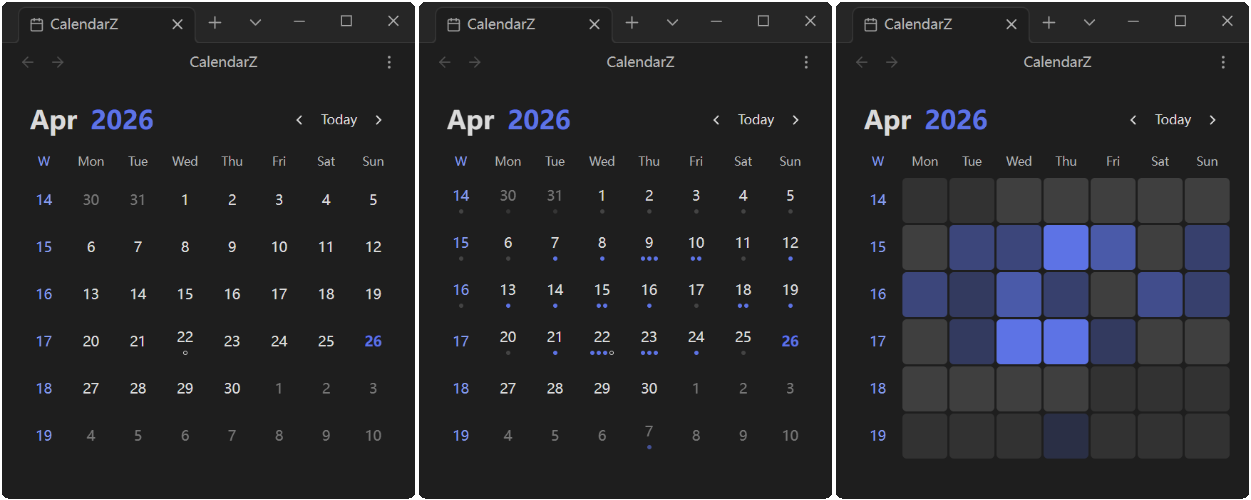
- Heatmap Mode: Display varying color intensities based on note count or word count, giving you an instant overview of your writing activity
- Dots Mode: Each dot represents a configurable number of notes or words, providing a clean visual representation of daily output
- None Mode: Clean calendar view focused purely on date navigation
Flexible Date Recognition
- YAML Frontmatter: Extract dates from note frontmatter with customizable field names
- Filename Parsing: Parse dates from filenames, supporting various date formats
- Both YAML and Filename: Automatically detect and use dates from both sources
Periodic Note Integration
- Daily Notes: Click any date to open or create the corresponding daily note
- Weekly Notes: Enable weekly notes and click week numbers to create or open weekly notes
- Monthly Notes: Enable monthly notes and click month headers to create or open monthly notes
- Yearly Notes: Enable yearly notes and click year headers to create or open yearly notes
- Customizable Naming: Configure naming formats for all note types (e.g.,
YYYY-[W]WW,YYYY-MM,YYYY) - Template Support: Use templates and custom folder paths for all periodic note types
- Confirmation Prompt: Optional confirmation before creating new notes to prevent accidental creation
Todo Status Indicators
- Visual indicators show todo completion status on calendar dates
- Quickly identify dates with pending or completed todos at a glance
- Option to hide completed todos for a cleaner view
Statistics Options
- Note Count: Track the number of notes per day
- Word Count: Track total word count per day
Customization
- Week Start: Sunday or Monday
- Month Display Format: Numeric, short, or long format
- Title Format: Year-Month or Month-Year order
- Ignored Folders: Exclude specific folders from note statistics
- Week Numbers: Optionally display week numbers on the left side of the calendar
Usage
- Settings → Community Plugins → CalendarZ → Open Calendar View
- Use the Command Palette (
Ctrl/Cmd + P) and search for "CalendarZ: Open Calendar"
Supported Languages
- English (en-US)
- 简体中文 (zh-CN)
- Português Brasileiro (pt-BR)
Contributing
Issues and Pull Requests are welcome!
Special Thanks
- liamcain for the obsidian-calendar-plugin.
- All the contributors who have helped me improve this plugin.
If you find this plugin helpful, please consider giving it a ⭐️
For plugin developers
Search results and similarity scores are powered by semantic analysis of your plugin's README. If your plugin isn't appearing for searches you'd expect, try updating your README to clearly describe your plugin's purpose, features, and use cases.