Activity Calendar
unlistedby RebelRosemary
A sidebar calendar with heatmap visualization showing your daily note activity.
Activity Calendar
中文说明
这是一个适用于 Obsidian 的侧边栏日历插件,用 GitHub 风格热力图来可视化你的笔记活动。你可以快速看出哪些日期最活跃,点开任意一天查看当天具体做了什么,并长期追踪自己的写作连续性。
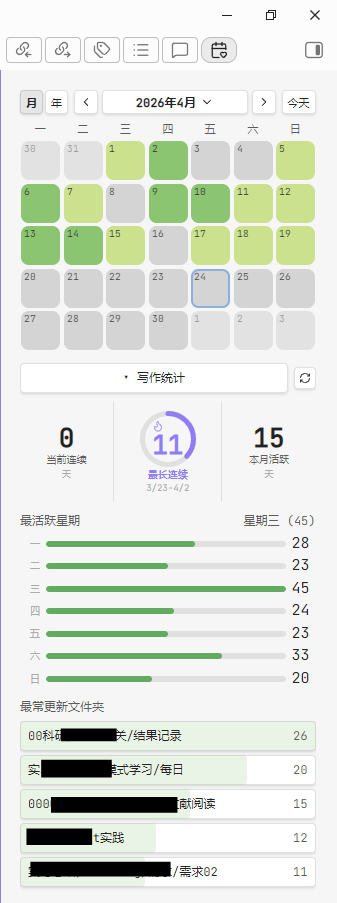
功能特性
热力图日历
月视图会以熟悉的日历网格展示每天的活动强度。每天格子的颜色深浅代表你当天创建或修改笔记的数量,不需要任何特殊命名规则,插件直接读取文件元数据。
时间轴详情面板
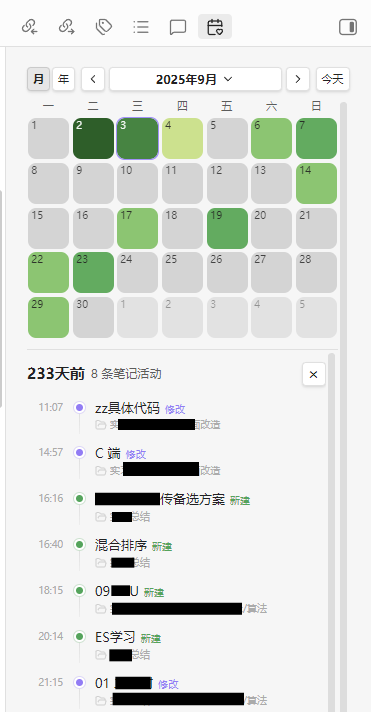
点击任意一天即可在日历下方展开时间轴。每条记录会显示时间、笔记标题、状态(新建或修改)以及文件夹路径。点击标题可直接打开笔记,点击文件夹路径可在文件管理器中定位该文件夹。
年度总览
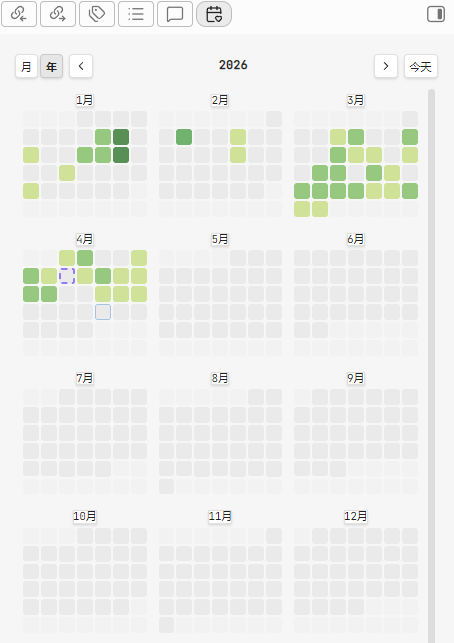
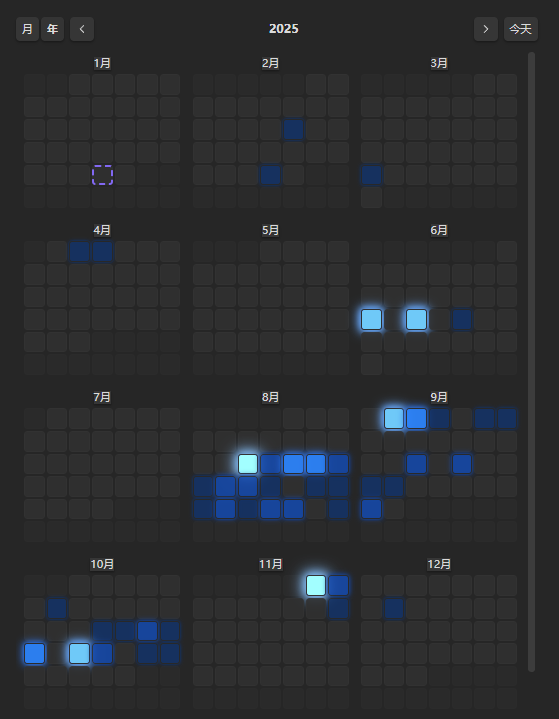
切换到年视图后,可以一次看到 12 个月的缩略热力图。它适合用来观察季节性规律、找出自己最活跃的月份,并支持点击任意格子继续下钻。
写作统计
可折叠的统计面板会展示:
- 当前连续与最长连续:连续有活动的天数
- 本月活跃进度:本月活跃天数的可视化概览
- 最活跃星期:横向条形图展示一周中你最常写作的日子
- Top 5 文件夹:按活动次数排序的高频文件夹
预设色带
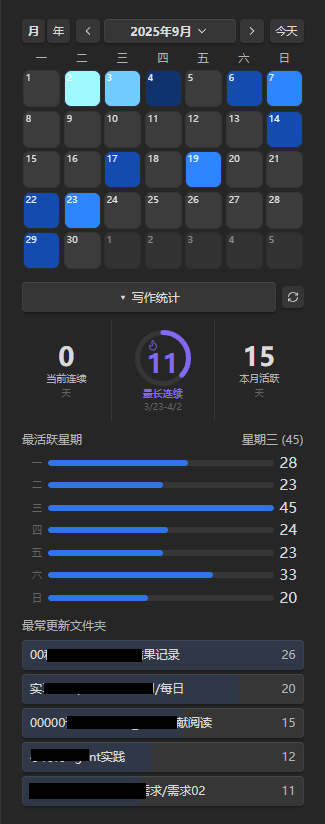
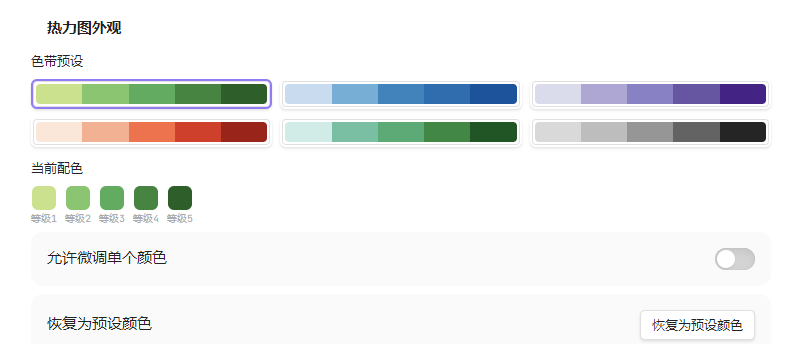
内置 6 套色带(森林绿、海洋蓝、薰衣草紫、日落橙、青碧、灰阶),可一键切换。每套预设都提供浅色主题与深色主题两个版本。在深色主题下,活动越多会越亮、越有发光感,而不是单纯变得更深。如果预设不符合你的偏好,也可以继续手动微调各级颜色。
深色主题适配
插件会自动适配 Obsidian 默认主题以及 Cyberglass 等社区主题。深色模式下,热力图会切换到更适合暗背景的 glow 配色逻辑,即活动越多格子越亮,从而更自然地融入玻璃态、半透明一类主题风格。
键盘导航
无需鼠标即可浏览日历:方向键移动日期焦点,Enter 打开详情,Escape 关闭详情。
安装
从 Obsidian 社区插件安装(即将上线)
- 打开 Settings -> Community Plugins -> Browse
- 搜索 Activity Calendar
- 点击 Install,然后 Enable
手动安装
- 从 GitHub Releases 下载最新发布版本
- 将
main.js、manifest.json、styles.css解压到你的 vault 的.obsidian/plugins/activity-calendar/目录 - 回到 Settings -> Community Plugins,刷新后启用 Activity Calendar
配置项
打开 Settings -> Activity Calendar 后可以自定义:
数据范围
- 包含或排除指定文件夹
- 选择统计文件类型:Markdown、Canvas 或同时统计两者
- 控制“新建”和“修改”是否都计入活动
热力图外观
- 选择预设色带,或手动微调每一级颜色
- 自定义活动等级阈值(默认:1 / 2 / 4 / 6 / 9+)
- 设置空白日期格子的背景色
- 开关“今天”高亮边框,并自定义边框颜色
显示
- 周起始日(周一、周日或周六)
- 显示或隐藏周数
- 点击笔记时在新标签页或当前标签页打开
- 启动时自动展开今天的详情面板
语言
- 支持中文与英文
活动统计规则
插件直接扫描 vault 中的文件元数据,不依赖特殊文件名、frontmatter 或 Daily Note 规范。
- 当笔记的
ctime落在某天时,该笔记在这一天记为 created - 当笔记的
mtime落在某天时,该笔记在这一天记为 modified - 如果同一篇笔记在同一天既创建又修改,时间轴中只显示一次,并标记为 “created”
- 同一篇笔记在同一天被修改多次时,会显示 “modified N times” 徽标
- 修改次数会在插件运行期间实时追踪,并持久化保存,跨会话保留
运行要求
- Obsidian v1.4.0 或更高版本
- 仅支持桌面端,暂不支持移动端
开发
git clone https://github.com/RebelRosemary/obsidian-activity-calendar.git
cd obsidian-activity-calendar
npm install
npm run dev
npm run dev 会监听文件变化并自动重新构建。开发时可以把仓库复制或建立符号链接到 vault 的 .obsidian/plugins/ 目录中,便于实时测试。
规划路线
未来版本计划支持:
- 目标设定:支持每日/每周目标,并在日历上展示达成情况
- Daily Note 联动:点击日期时优先联动每日笔记
- 数据导出:将活动数据导出为 CSV / JSON
许可证
MIT
作者
RebelRosemary/Mikklensen
欢迎反馈与贡献!
English
A sidebar calendar plugin for Obsidian that visualizes your note-taking activity with a GitHub-style heatmap. See at a glance which days you were most active, drill into any day to review what you worked on, and track your writing streaks over time.
Features
Heatmap Calendar
The month view displays a familiar calendar grid where each day is colored by how many notes you created or modified. Darker cells mean more activity — no special file naming required, the plugin reads directly from file metadata.
Timeline Detail Panel
Click any day to expand a timeline below the calendar. Each entry shows the time, note title, status (created or modified), and folder path. Click a title to jump to the note; click the folder path to reveal it in the file explorer.
Year Overview
Switch to the year view to see all 12 months at once as mini heatmap grids. Spot seasonal patterns, identify your most productive months, and click any cell to drill down.
Writing Stats
A collapsible stats panel tracks your habits:
- Current & longest streak — consecutive days with activity
- Monthly progress ring — visual indicator of active days this month
- Most active weekday — horizontal bar chart showing which days of the week you write most
- Top 5 folders — ranked by activity count
Color Palette Presets
Six built-in color ramps (Forest Green, Ocean Blue, Lavender Purple, Sunset Orange, Teal, Monochrome) with one-click selection. Each preset has separate light and dark theme variants — in dark themes, higher activity glows brighter rather than getting darker. Fine-tune individual colors if the presets don't match your taste.
Dark Theme Adaptation
The plugin adapts to any Obsidian theme, including community themes like Cyberglass. In dark mode, heatmap colors automatically switch to a "glow" palette where more activity = brighter cells, blending naturally with translucent and glassmorphic theme styles.
Keyboard Navigation
Navigate the calendar without touching the mouse: arrow keys move between days, Enter opens the detail panel, Escape closes it.
Installation
From Obsidian Community Plugins (coming soon)
- Open Settings → Community Plugins → Browse
- Search for Activity Calendar
- Click Install, then Enable
Manual Installation
- Download the latest release from GitHub Releases
- Extract
main.js,manifest.json, andstyles.cssinto your vault at.obsidian/plugins/activity-calendar/ - Open Settings → Community Plugins, refresh, and enable Activity Calendar
Configuration
Open Settings → Activity Calendar to customize:
Data Scope
- Include/exclude specific folders
- Choose file types: Markdown, Canvas, or both
- Toggle whether created and/or modified notes count as activity
Heatmap Appearance
- Pick a preset color palette or fine-tune individual level colors
- Set custom thresholds for activity levels (default: 1 / 2 / 4 / 6 / 9+)
- Configure empty-day background color
- Toggle today's highlight border and set its color
Display
- Week start day (Monday, Sunday, or Saturday)
- Show/hide week numbers
- Open notes in new tab or current tab
- Auto-expand today's detail panel on launch
Language
- Chinese (中文) and English supported
How Activity Is Counted
The plugin scans your vault's file metadata — no special file naming or frontmatter required.
- A note counts as created on the day its
ctimefalls - A note counts as modified on the day its
mtimefalls - If a note is created and modified on the same day, it appears once in the timeline (as "created")
- The same note modified multiple times in one day shows a "modified N times" badge
- Modification counts are tracked in real time while the plugin is running and persisted across sessions
Requirements
- Obsidian v1.4.0 or later
- Desktop only (mobile not yet supported)
Development
git clone https://github.com/RebelRosemary/obsidian-activity-calendar.git
cd obsidian-activity-calendar
npm install
npm run dev
npm run dev watches for changes and rebuilds automatically. Symlink or copy the repo into your vault's .obsidian/plugins/ directory for live testing.
Roadmap
Planned features for future releases:
- Goal setting — define daily/weekly targets and visualize achievement on the calendar
- Daily Note integration — prioritize daily notes when clicking a date
- Data export — export activity data as CSV/JSON
License
MIT
Author
RebelRosemary/Milkklensen
Feedback and contributions welcome!
For plugin developers
Search results and similarity scores are powered by semantic analysis of your plugin's README. If your plugin isn't appearing for searches you'd expect, try updating your README to clearly describe your plugin's purpose, features, and use cases.