Callout menu
approvedby Reaty
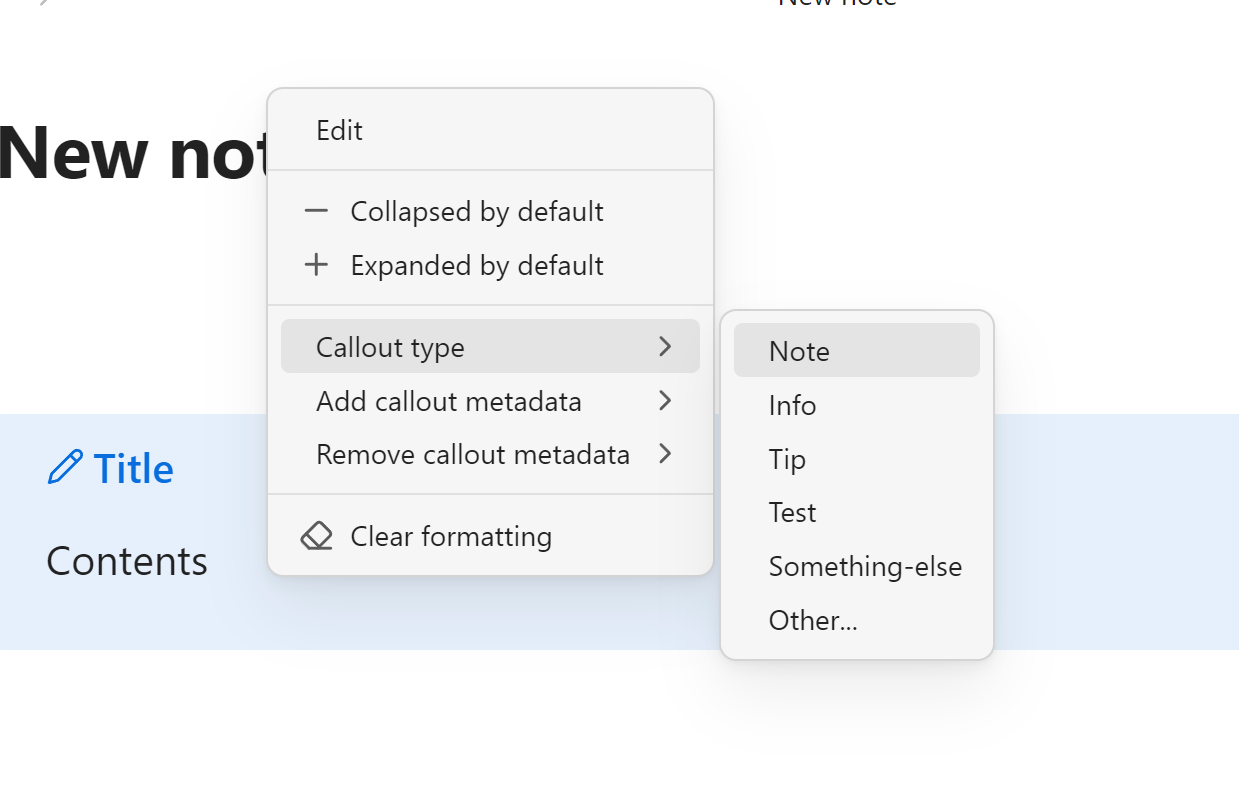
Adds some extra options to callouts context menu and allows you to add your own custom callouts.
Callout menu
This plugin can be useful for people who use a lot of custom callouts instead of default ones and want to have ability to quickly change callout types from context menu. Now you can chose which callout types will be shown in the menu. Also it adds the ability to easily add or remove callout metadata and "+" or "-" signs for collapsing.
How to use
Open plugin settings an enter the list of callout types and metadata types you want to appear in the context menu.
Installation via BRAT
- Install the BRAT plugin from "Community plugins" page.
- Go to the BRAT settings.
- Click "Add Beta Plugin" button.
- Paste the following URL in the text field: https://github.com/anareaty/callout-menu.
- Make sure that "Enable after installing the plugin" is checked.
- Click "Add Plugin" button.
For plugin developers
Search results and similarity scores are powered by semantic analysis of your plugin's README. If your plugin isn't appearing for searches you'd expect, try updating your README to clearly describe your plugin's purpose, features, and use cases.