by htmikan
Save official ChatGPT and Gemini web conversations to your vault—not an API chat client.
ChatTaker
Open the official ChatGPT / Gemini web UI in Obsidian and save conversations to your vault.
Desktop Obsidian only (isDesktopOnly).
日本語
ChatGPT / Gemini の公式 Web UI で行った会話を、Vault に Markdown ノートとして保存するプラグインです。API キーは不要です。
Cursor を使用してバイブコーディングで作成しました。
- 有効にすると Left Ribbon にボタンが現れ、ボタンを押すと Right Sidebar に ChatGPT / Gemini が表示されます。
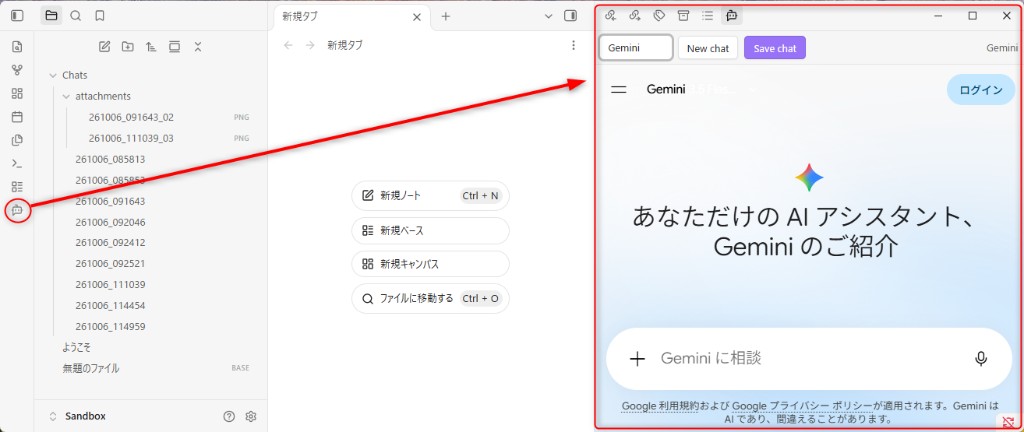
- プロンプトに入力して回答を記録したいとき、保存ボタンを押してください。あなたが指定したフォルダ、ファイル名で保存されます。
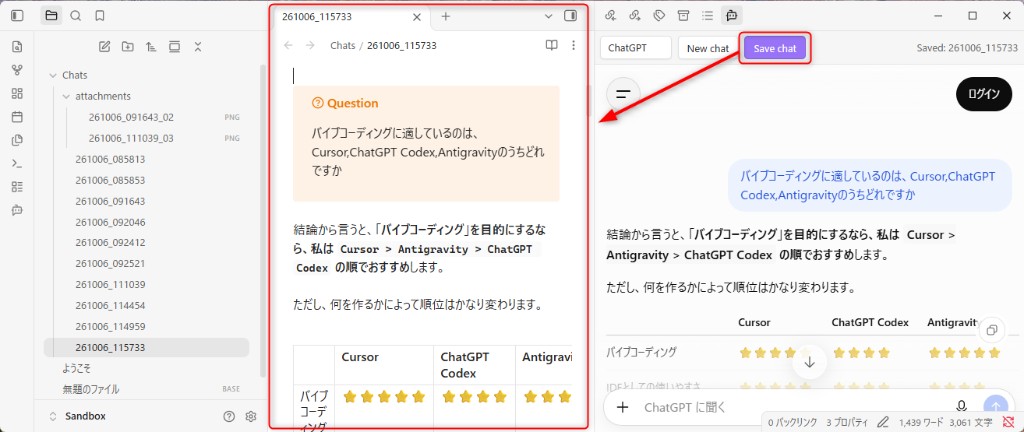
このプラグインが、あなたの発想を記録して整理する助けになることを期待しています。
制限事項
- ChatGPT、Gemini は常に非ログイン状態で開きます。
- これは主に ChatGPT ですが、ログイン時には一時チャットでも会話履歴を読み込み、回答内容に影響を及ぼしています。この「エコーチャンバー」を回避するための、意図的な仕様です。
- URL 等は自動的に変換されますが、一部表示(動的な地図、特殊リンク等)は正常に保存されないことを留意してください。
- ChatGPT、Gemini の仕様が変更した場合、予期せぬ不具合が発生する可能性があります。
English
A simple plugin that records ChatGPT and Gemini conversations from their official web UIs into your vault. No API key required—this is not an API chat client.
I created it using Cursor and Vibe Coding.
- When enabled, a button appears on the Left Ribbon; clicking it displays ChatGPT and Gemini in the Right Sidebar.
- When you enter a prompt and want to save the response, click the Save button. It will be saved in the folder and with the filename you specify.
I hope this plugin helps you record and organize your ideas.
Limitations
- ChatGPT and Gemini always open in an unlogged-in state.
- This applies primarily to ChatGPT; when logged in, even in a temporary chat, it loads conversation history, which can influence the responses. This is an intentional design choice to avoid this “echo chamber” effect.
- While URLs and similar content are automatically converted, please note that some elements (such as dynamic maps and special links) may not be saved correctly.
- If the specifications of ChatGPT or Gemini change, unexpected issues may occur.
Network use
- This plugin embeds ChatGPT and Gemini in an Obsidian webview and loads those sites over the network.
- It does not call ChatGPT or Gemini APIs, and it does not send telemetry to the plugin author.
- By design, sessions start logged out. If you choose to sign in inside the webview, login state is kept by Electron partitions in Obsidian’s user data (not in your vault notes).
Settings (brief)
- Save folder — vault-relative path (default
Chats) - Filename — template such as
{{date:YYMMDD_HHmmss}}(.md/.pdfis added from the save format) - Language — plugin UI / saved-note labels (
en/ja; extra languages viai18n.yamlin the plugin folder) - Citation debug — optional
*.debug.jsonsidecar for troubleshooting
Default strings ship inside main.js. To add or override languages, place i18n.yaml next to main.js in the plugin folder and reload the plugin.
Build (developers)
See docs/developer.md.
npm install
npm run check
Place main.js, manifest.json, and styles.css in .obsidian/plugins/chattaker/.
License
MIT — see LICENSE.
For plugin developers
Search results and similarity scores are powered by semantic analysis of your plugin's README. If your plugin isn't appearing for searches you'd expect, try updating your README to clearly describe your plugin's purpose, features, and use cases.