ChordPro Viewer
approvedby Jason Heddings
Render ChordPro format code blocks in Obsidian. - This plugin has not been manually reviewed by Obsidian staff.
ChoPro Plugin for Obsidian
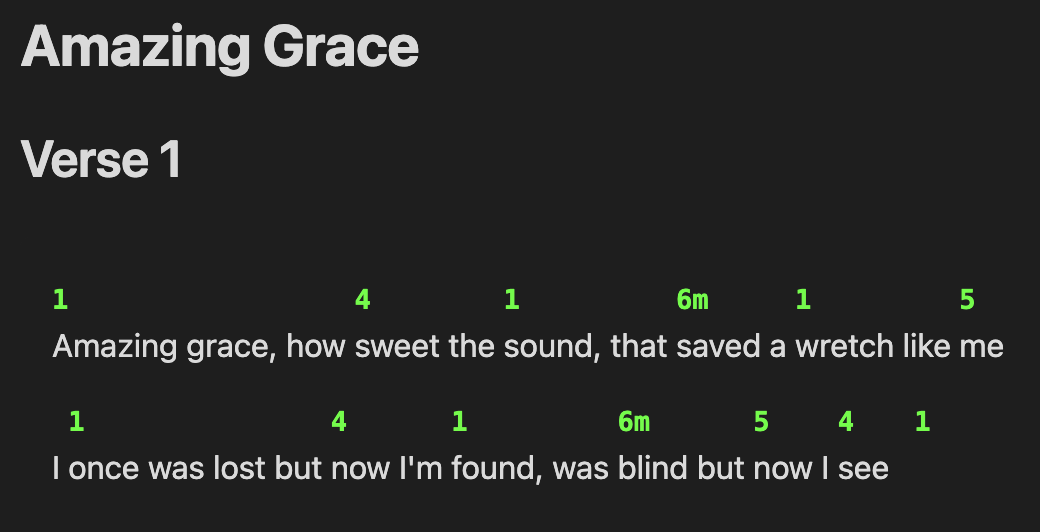
An Obsidian plugin that renders ChordPro format chord sheets with accurate chord positioning above lyrics.
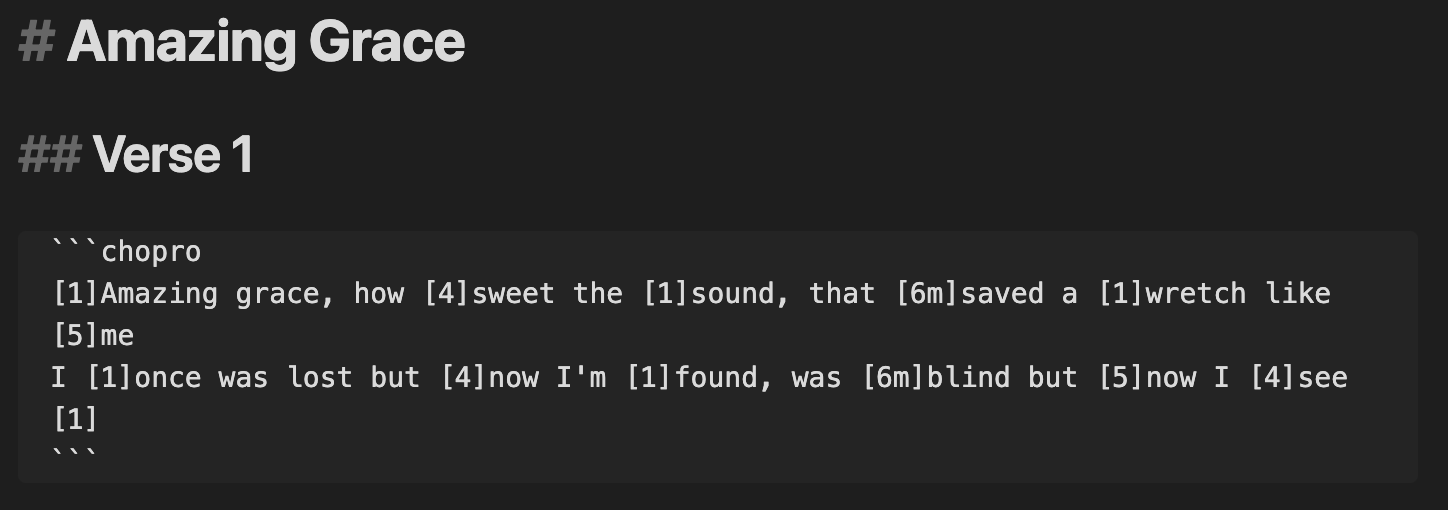
... becomes ...
Features
- Accurate Chord Positioning: Improved algorithm for precise chord-to-lyric alignment
- Configurable Styling: Customizable chord color, directive display
- Chord Normalization: Automatic cleanup and standardization of chord notation
- Transpose Files: Transpose entire files between keys or chord notations
- ChoPro Callouts: Custom
[!chopro]callouts for advanced song transclusion with flow control and key transposition - Metadata Rendering: Render metadata from frontmatter in a typical chord sheet format
Usage
Create a code block with the chopro language identifier:
```chopro
[C]Amazing [F]grace how [G]sweet the sound
That [C]saved a [Am]wretch like [F]me[G]
[C]I once was [F]lost but [G]now am found
Was [C]blind but [Am]now I [F]see[C]
```
ChoPro Callouts
The plugin supports custom [!chopro] callouts for advanced song rendering with flow control:
> [!chopro] [[song-name]]
> flow: on
This feature allows you to:
- Transclude entire song files or render with custom flow
- Control rendering order with flow definitions in frontmatter
- Create dynamic set lists and practice sheets
See docs/callout.md for detailed documentation.
Commands
These actions are available using the Command Palette:
- Transpose chords in current file: Open the transpose dialog for the current file
- Insert flow content from file: Insert song flow content from files with flow properties
Flow System
The plugin supports a powerful flow system for organizing and reusing song content. Define flow patterns in your song files' frontmatter and use them with callouts or the insert command.
See docs/flow.md for detailed documentation.
Configuration
Access settings via Settings → Community Plugins → ChordPro Viewer:
- Chord Color: Set the color for chord text (CSS color value, default:
#2563eb) - Chord Size: Font size for chord text (CSS size value, default:
1em) - Superscript Chord Modifiers: Display chord modifiers (7, maj7, sus4, etc.) as superscript
- Chord Decoration: Wrap chords with bracket pairs for emphasis (None, [ ], ( ), { }, < >)
- Italic Annotations: Display annotations (text starting with asterisk) in italics
- Song Folder: Limit song file selection to a specific folder (e.g., "Songs/")
The settings panel includes a live preview that updates as you change configuration options.
Supported ChordPro Features
Chords
- Basic chords:
[C],[F],[G],[Am], etc. - Complex chords:
[Am7],[Bmaj7],[C#dim],[F/A],[Gsus4] - Nashville numbers:
[1],[4],[5],[6m],[1maj7],[5/7], etc. - Multiple consecutive chords:
[C][F][G]or[1][4][5] - Chords at any position: Beginning, middle, or end of lines
- Chord modifiers: Support for superscript display of extensions (7, maj7, sus4, etc.)
Annotations
- Performance markings:
[*Rit.],[*Forte],[*Andante] - Dynamic markings:
[*pp],[*ff],[*Crescendo] - Structural annotations:
[*Fine],[*D.C. al Fine],[*Begin softly] - Configurable styling: Toggle italic display for all annotations
Installation
Manual Installation
- Download the latest release files from the GitHub repo.
- Unzip the release file in your vault's
.obsidian/plugins/directory - Enable the plugin in Settings → Community Plugins
Development Installation
- Clone this repository into your vault's
.obsidian/plugins/directory - Run
npm installto install dependencies - Run
npm run devfor development with hot reload - Run
npm run buildfor production build
BRAT
- Add this repo to your BRAT plugin list.
- Enable the plugin in Settings → Community Plugins
License
MIT License - see LICENSE file for details
Support
If you encounter any issues or have feature requests, please open an issue on the GitHub repository.
For plugin developers
Search results and similarity scores are powered by semantic analysis of your plugin's README. If your plugin isn't appearing for searches you'd expect, try updating your README to clearly describe your plugin's purpose, features, and use cases.