Leadsheet
approvedby chrisamber
Render ChordPro lead sheets with transpose, capo shapes, chord diagrams, set lists, and autoscroll. - This plugin has not been manually reviewed by Obsidian staff.
Leadsheet

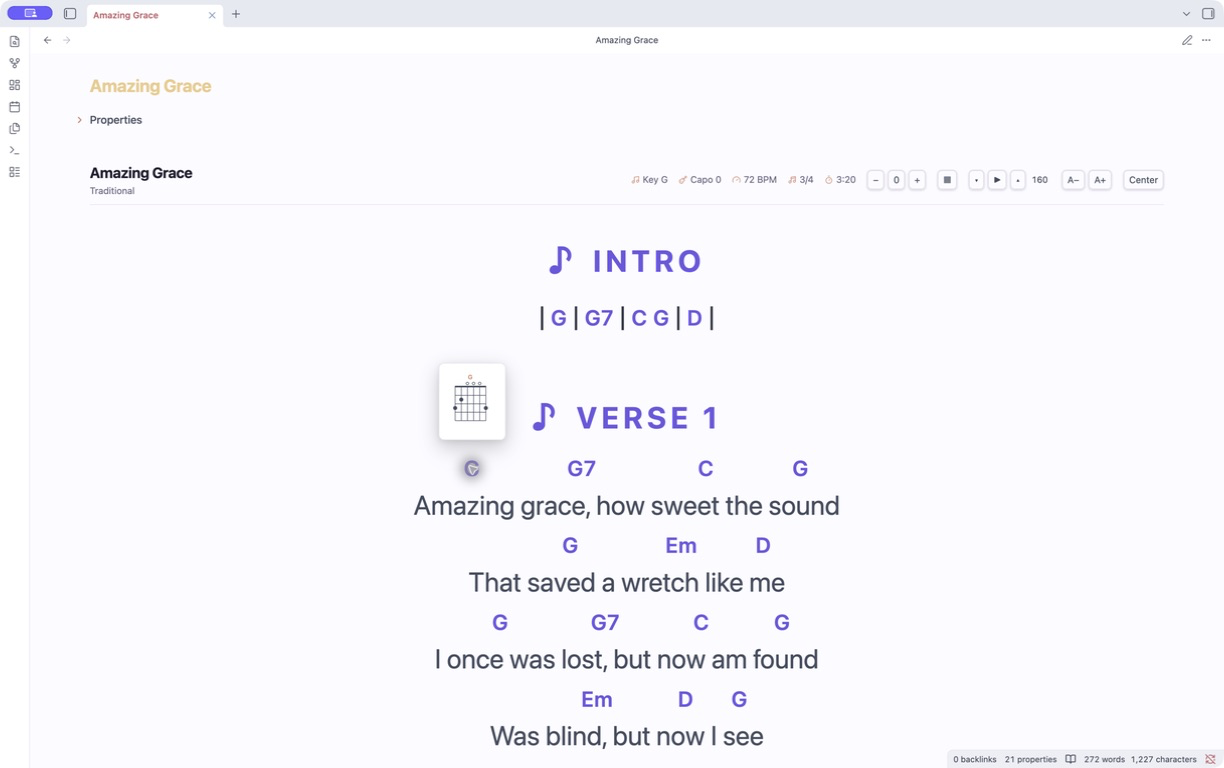
Turn Obsidian notes into performance-ready lead sheets. Render ChordPro with per-file transpose, capo-aware shapes, guitar chord diagrams, set lists, and hands-free autoscroll. Chords align per-syllable, so CJK lyrics work without monospace tricks.
Features
- Chord-over-lyric rendering aligned per-syllable — CJK-safe, no fixed-width fonts.
- Transpose per file, with sharps vs flats following the target key signature.
- Capo-aware shapes — toggle between concert sounding pitch and the shapes your hands play.
- Chord diagrams — hover, focus, or tap a chord for its guitar fingering, or toggle a strip for the whole song. Both follow transpose and capo mode.
- Autoscroll paced from the song's
duration, with tap-to-pause, a music-stand performance mode, and font sizing. - Set lists — one continuous, scrollable view over several songs with Prev/Next.
- Authoring aids — paste-convert chords-over-lyrics,
{Chorus: repeat}shorthand, and live invalid-chord underlining. - CLI — validate, transpose, export to JSONL, and derive chord-progression frontmatter.
Quick start
After enabling Leadsheet:
- Create or open a note.
- Open Obsidian's command palette and run Leadsheet: Insert starter leadsheet. On iPad, open the command palette from the mobile menu.
- Edit the starter text, then tap outside the block or switch to Reading view. Tap any chord to open its diagram.
You can also copy this starter template directly:
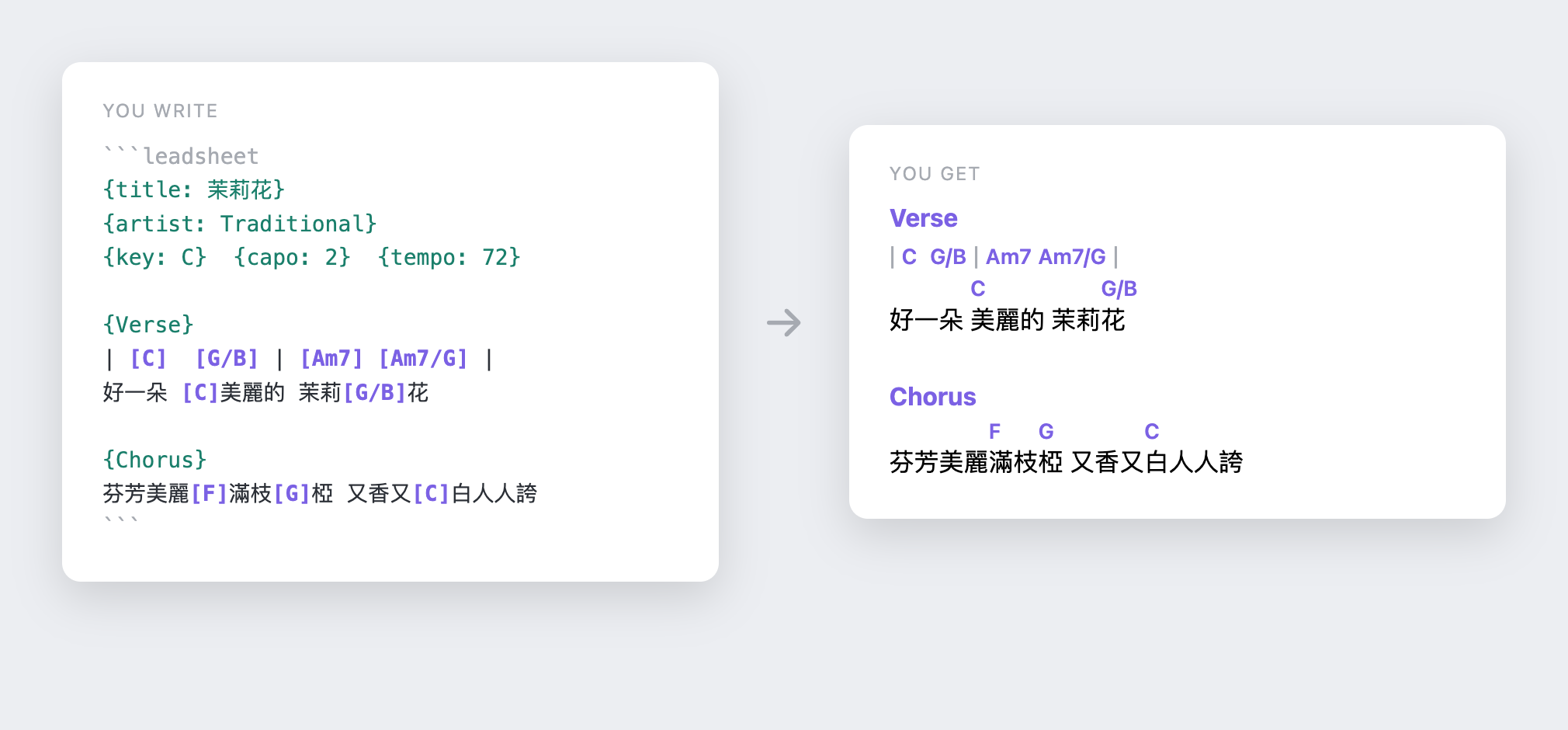
```leadsheet
{title: My Song}
{artist: Artist}
{key: C}
{capo: 0}
{tempo: 72}
{time: 4/4}

{Verse}
| [C] | [F] [G] |
[C]Write your lyrics [F]here

{Chorus}
[F]Add a chorus [G]here [C]too
```
The toolbar gives you:
- − / +2 / + — transpose down/reset/up. The offset is remembered per file. The displayed key updates; flats vs sharps follow the target key signature.
- ▶ / ⏸ — autoscroll the note (also the hotkeyable command Leadsheet:
Toggle autoscroll). ▾ / ▴ adjust speed (px/s, in settings too). If the
song's frontmatter has
duration:(seconds), ▶ paces the whole sheet over that time. Tap the sheet body to pause. - A− / A+ — grow/shrink the leadsheet font (global). Leadsheet: Toggle performance mode hides the app chrome, keeps essential controls reachable on mobile, and keeps the screen awake when the platform supports Screen Wake Lock.
- Center / Left — switch the sheet alignment globally.
- Sounding / Shapes — with a
capo:set, toggle between concert pitch and the shapes your hands play. Bad capo values (outside 0–11) are flagged and clamped. - Chord popovers — hover, keyboard-focus, or tap a recognized chord to see its current fingering without showing the full diagram strip.
- ▦ — show/hide guitar chord diagrams for every chord used in the song
(standard tuning). Diagrams follow the current transpose offset and the
Sounding/Shapes capo mode, so in Shapes mode they show the grips you
actually play. Unrecognized chords (e.g.
N.C.) are skipped.
Set lists
A setlist code block renders several songs as one continuous, scrollable view
with Prev/Next navigation:
```setlist
- [[Song A]]
- [[Song B]]
```
Authoring
- Leadsheet: Convert selection: chords-over-lyrics → inline rewrites a pasted
Ultimate-Guitar-style block (chords on their own line above the lyric) into
inline
[C]chords. {Chorus: repeat}re-emits an earlier section instead of pasting it again. Multi-word names work too:{Chorus 2: repeat}.- Invalid chord tokens are marked in the editor.
See SPEC.md for the full schema.
Install
Community Plugins
- Open Settings → Community plugins in Obsidian and select Browse.
- Search for Leadsheet, then select Install and Enable.
Beta updates with BRAT
- Install BRAT from Community plugins.
- In BRAT settings, select Add beta plugin.
- Enter
https://github.com/chrisamber/obsidian-leadsheetand enable Leadsheet.
Manual install
- Download
main.js,manifest.json, andstyles.cssfrom a GitHub release. - Copy them into
<vault>/.obsidian/plugins/leadsheet/. - Enable Leadsheet under Settings → Community plugins.
Please report beta feedback and bugs through GitHub Issues.
CLI
# report unrecognized chord tokens
node cli.mjs validate "My Song.md"
# rewrite chords + {key:} in place
node cli.mjs transpose +2 "My Song.md"
# dump song(s) as JSONL (frontmatter + sections)
node cli.mjs export "My Song.md"
# write chords_used + roman progression to frontmatter
node cli.mjs annotate "My Song.md"
Development
npm install
npm test        # esbuild + tsc + node --test
npm run build emits main.js (the plugin) and per-module .mjs bundles used
by the CLI and tests.
Credits
Chord diagram popovers were inspired by Obsidian Chord Sheets by Marcel Schaeben.
License
MIT — © 2026 chrisamber.
The example song 茉莉花 (Jasmine Flower) is a traditional folk song in the public domain.
For plugin developers
Search results and similarity scores are powered by semantic analysis of your plugin's README. If your plugin isn't appearing for searches you'd expect, try updating your README to clearly describe your plugin's purpose, features, and use cases.