by danielnichiata96
Search scholarly databases, insert formatted citations in 60 styles, and check whether the references in a note exist. No account needed.
CiteMe - Academic Citations for Obsidian
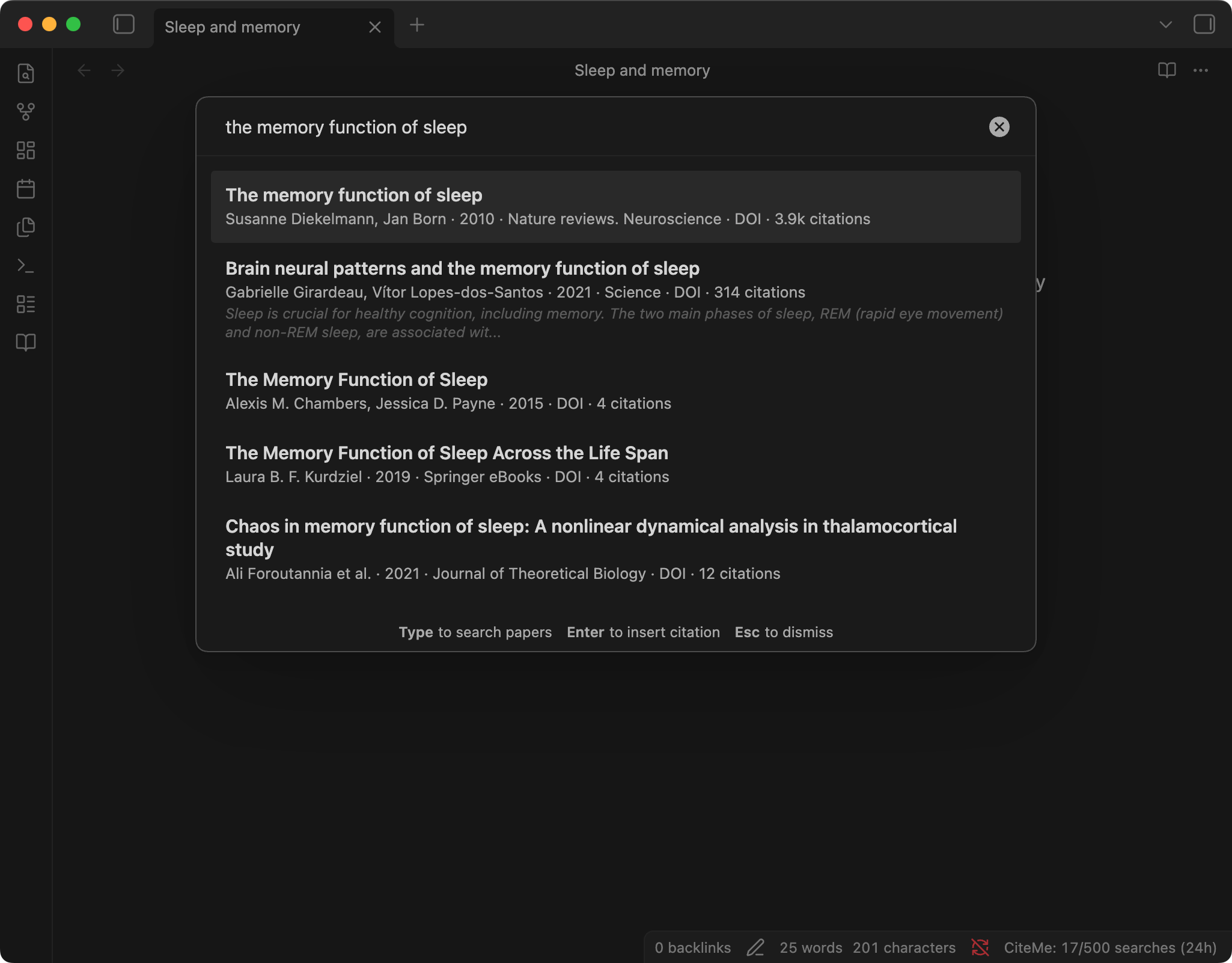
Search scholarly databases, insert formatted citations, and check whether the references in a note exist, without leaving Obsidian. No account needed.
Features
- Instant search - Search millions of academic papers without leaving Obsidian
- 60 citation styles - APA, MLA, Chicago, Harvard, IEEE, Vancouver, ABNT, and more, all available without an account
- Smart insertion - Insert in-text citations, full bibliography entries, or both
- References management - Automatically builds and maintains a References section in your notes
- Duplicate detection - Prevents adding the same citation twice (checks by DOI and text)
- Reference check - Checks the references in a note against scholarly databases and marks each one found, to review, or not found
- DOI lookup - Search directly by DOI for precise results
- Usage visibility - Shows your searches in the last 24 hours in the Obsidian status bar
- Mobile compatible - Works on both desktop and mobile Obsidian
Installation
In Obsidian, open Settings → Community plugins → Browse, search for "CiteMe", then select Install and Enable. The link obsidian.md/plugins?id=citeme opens the plugin page directly in Obsidian.
Manual Installation
- Download
main.js,manifest.json, andstyles.cssfrom the latest release - Create a folder
citemeinside your vault's.obsidian/plugins/directory - Copy the downloaded files into the
citemefolder - Restart Obsidian and enable the plugin in Settings > Community Plugins
From Source
cd obsidian-citeme
npm install
npm run build
Copy main.js, manifest.json, and styles.css to your vault at .obsidian/plugins/citeme/.
Usage
Search Citations
- Command palette: Open command palette (Cmd/Ctrl+P) and type "Search citations"
- Ribbon icon: Click the book icon in the left sidebar
- Right-click menu: Select text, right-click, and choose "Search citation for selected text"
Insert Modes
| Mode | What it inserts |
|---|---|
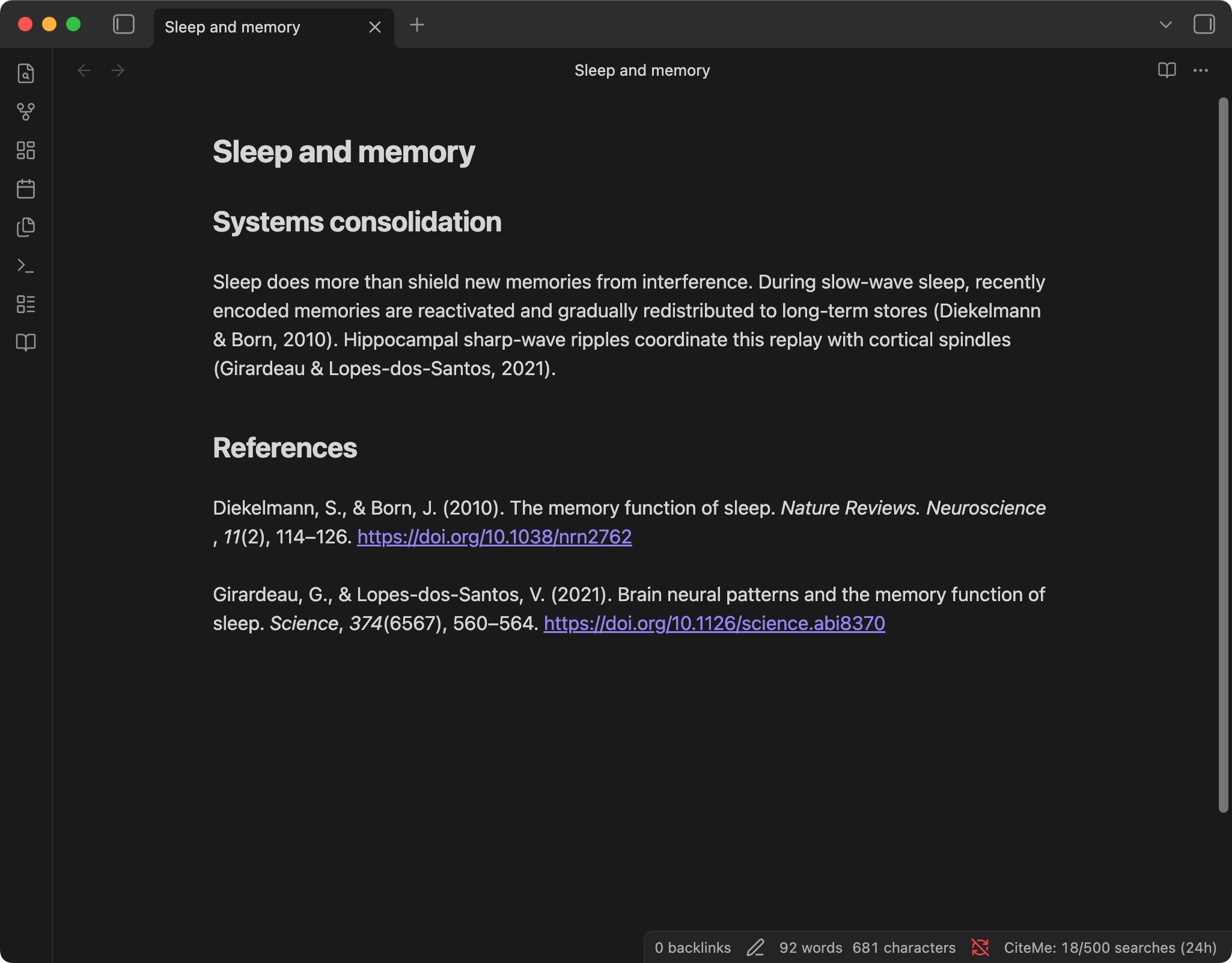
| Bibliography | Full formatted citation at cursor position, with italics as Markdown |
| In-text | The style's in-text citation, e.g., (Vaswani et al., 2017) |
| Both | In-text at cursor + full citation in References section |
Insert as New Note
Run "Insert as new note" from the command palette, search, and pick a paper. The plugin creates a note named after the first author, the title and the year, with the paper's metadata (authors, title, year, venue, DOI link, abstract) as note properties. Notes go to the "Citation notes folder" and carry the "Citation note tag".
Check References
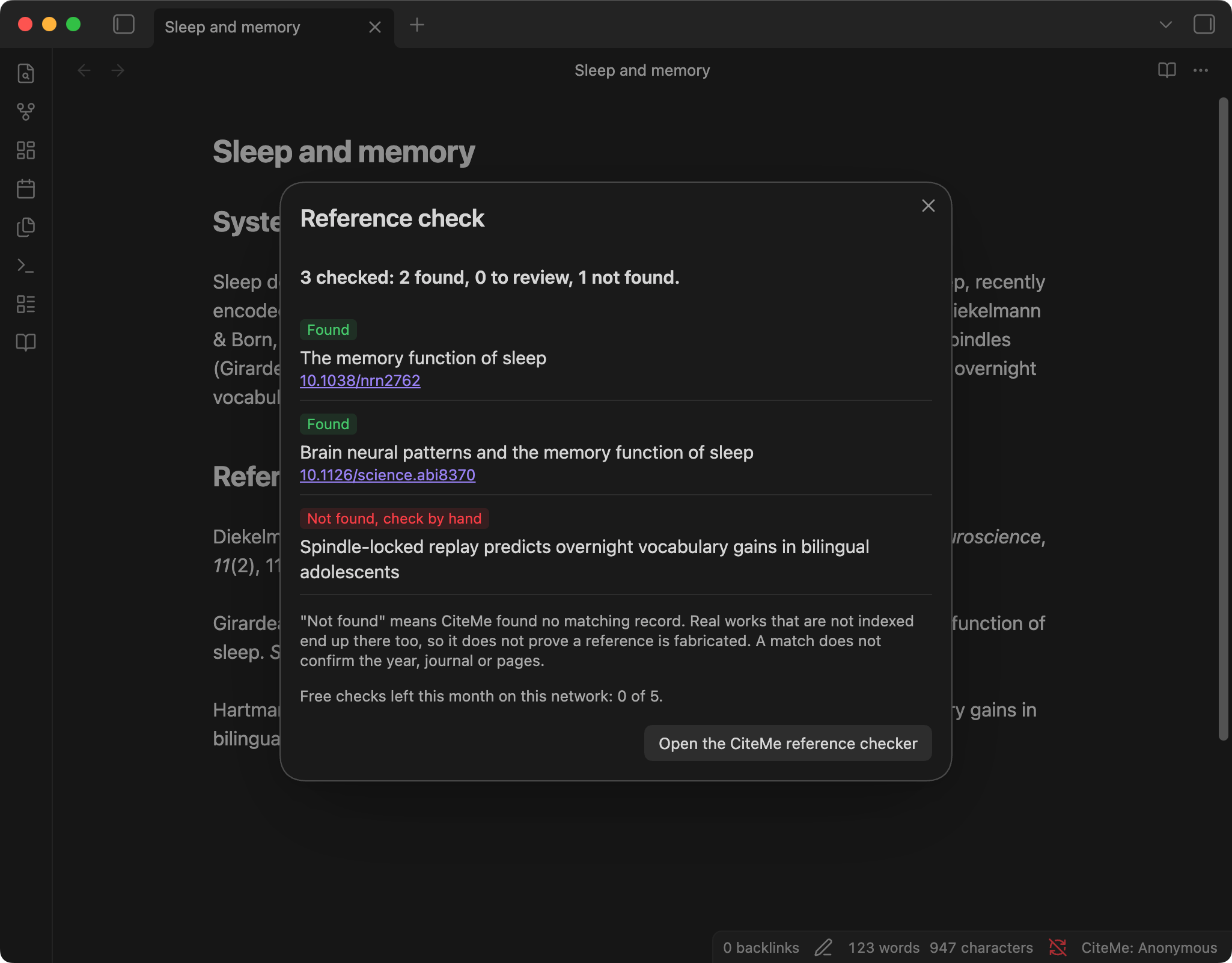
Run "Check references in this note" from the command palette. The plugin sends the selected text, or the entries under your References heading when nothing is selected, to CiteMe's reference checker. You can also select references, right-click, and choose "Check selected references".
Each reference comes back as:
| Result | Meaning |
|---|---|
| Found | A matching record exists; the DOI links to it |
| To review | A partial match, a different DOI, a retracted work, or grey literature |
| Not found | No matching record. Real works that are not indexed also end up here, so check it by hand before assuming it is fabricated |
A match does not confirm the year, journal, or pages.
Limits
The plugin needs no account. Searches share CiteMe's anonymous budget of 500 searches per 24 hours per network, and the status bar shows how many you have used. Search runs after you pause typing, so each query costs one search.
Without an account, a reference check covers up to 10 references and each network gets 5 checks a month. To check longer lists, create a token in your CiteMe settings and paste it into the plugin's "CiteMe token" setting: checks then use your CiteMe plan. A free account checks up to 50 references at a time, 3 checks a month. Longer lists and more checks need payment: CiteMe Pro (subscription) has no monthly limit, and the Thesis Pass gives 30 days of Pro for one payment, with no subscription. Prices are on https://citeme.app/pricing.
DOI Lookup
Use "Search by DOI" from the command palette to find a paper by its DOI. This opens a detail view with all formatted citation variants before inserting.
References Section
When enabled (default), the plugin automatically:
- Finds or creates a
## Referencesheading in your note - Appends full bibliography entries alphabetically
- Skips duplicates (matched by DOI or exact text)
Settings
| Setting | Default | Description |
|---|---|---|
| CiteMe on the web | Link | Opens citeme.app (library, reference checking, exports) |
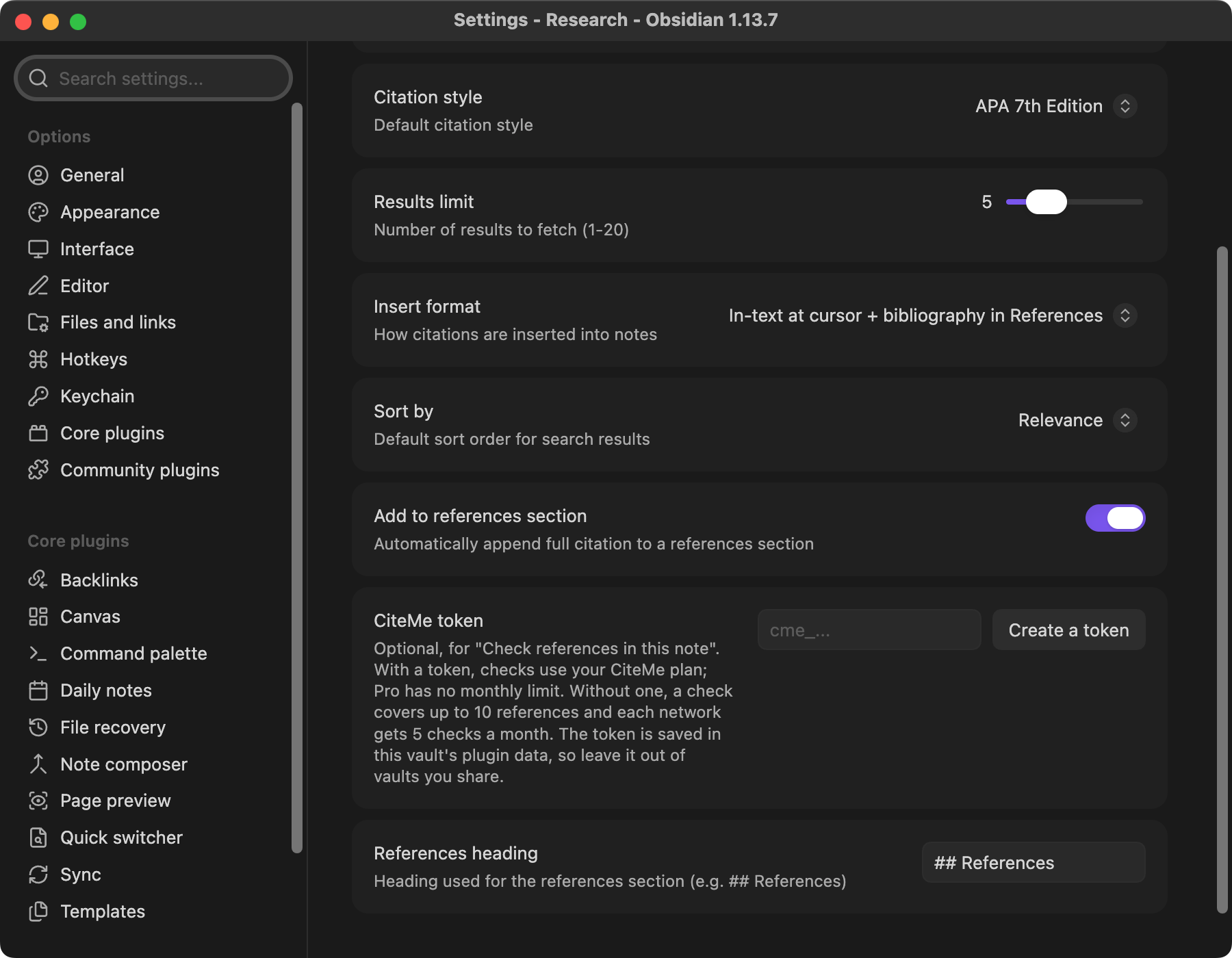
| Citation style | APA | Default citation format |
| Results limit | 5 | Number of search results (1-20) |
| Insert format | Bibliography | How citations are inserted |
| Sort by | Relevance | Result sorting order |
| Add to References | On | Auto-append to References section |
| CiteMe token | Empty | Optional. Reference checks use your CiteMe plan instead of the anonymous limits |
| References heading | ## References | Heading text for the references section |
| Citation notes folder | CiteMe | Folder for notes created by "Insert as new note" (nested paths work) |
| Citation note tag | CiteMe | Tag written to the properties of those notes |
Supported Citation Styles
All 60 curated CiteMe styles are available, including APA, MLA, Chicago (Author-Date and Note), Harvard, IEEE, Vancouver, ABNT, AMA, ACS, Turabian, OSCOLA, Bluebook, Nature, Science, Cell, The Lancet, ISO 690, DIN 1505, and German and French university styles. The list is kept in sync with CiteMe by npm run sync:saas-contract.
Network & Privacy Disclosure
This plugin connects to the CiteMe API (https://citeme.app) to search academic databases, format citations, and check references. Your search text is sent to CiteMe to run the search. A reference check sends the selected text, or the entries under your References heading, to CiteMe. Requests are tagged with X-Source: obsidian-plugin for channel attribution. Searches carry no account credentials. If you add a CiteMe token, reference checks send it in the Authorization header; the token is stored in the plugin's data.json inside your vault, so leave it out of vaults you share or publish. See CiteMe's privacy policy at https://citeme.app/privacy.
Development
git clone https://github.com/danielnichiata96/obsidian-citeme.git
cd obsidian-citeme
npm install
npm run sync:saas-contract # Optional: refresh SaaS parity snapshot when ../citeme exists
npm run dev   # Watch mode (rebuilds on file change)
npm run build # Production build
Links
- CiteMe - The citation search engine powering this plugin
- Obsidian - A powerful knowledge base on top of a local folder of plain text Markdown files
License
MIT
For plugin developers
Search results and similarity scores are powered by semantic analysis of your plugin's README. If your plugin isn't appearing for searches you'd expect, try updating your README to clearly describe your plugin's purpose, features, and use cases.