by prometheus-maker
Move or indent just the current line, the way it worked before 1.15. List children, blank lines and other list items stay where they are.
Classic Line Moves
Obsidian 1.15 changed Move line up/down and indenting when Smart lists is on: the commands now move a list item together with its children, jump over blank lines into the neighbouring list, and indent whole sub-trees. That broke a lot of keyboard habits (forum, forum).
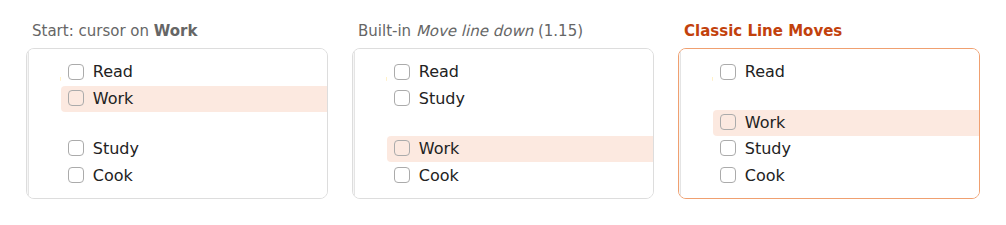
This plugin adds four plain commands that touch only the line (or selected lines) you are on:
| Command | What it does |
|---|---|
| Move line up (plain, ignores list structure) | Swaps the line with the one above. Children, blank lines and nesting are left alone. |
| Move line down (plain, ignores list structure) | Swaps the line with the one below. |
| Indent this line only (children stay) | Adds one indent (a tab, or spaces if you indent with spaces) to the line. |
| Outdent this line only (children stay) | Removes one indent from the line. |
With several lines selected, the selection moves or indents as a block. Each command is one undo step, and the cursor stays on the same character. Smart lists keeps working for everything else.
Example: two task groups separated by a blank line, cursor on Work. One Move line down (plain):
before            after
- [ ] Read        - [ ] Read
- [ ] Work
                  - [ ] Work
- [ ] Study       - [ ] Study
Press it again and Work goes below Study. With the built-in command in 1.15, the first press pulls Study up
into the first group instead.
Set your keys
The plugin sets no hotkeys of its own. In Settings → Hotkeys, search for "Classic Line Moves" and assign, for
example, Alt+↑ / Alt+↓ to the move commands (remove them from the built-in Move line up/down first) and
Tab / Shift+Tab or Ctrl+] / Ctrl+[ to indent and outdent.
Install
In Obsidian: Settings → Community plugins → Browse, search for "Classic Line Moves", install and enable it
(directory page). Or copy main.js and manifest.json
from the latest release into
.obsidian/plugins/classic-line-moves/ in your vault.
Works on desktop and mobile. No network access, no settings, nothing stored.
Development
npm install, then npm run build (esbuild) and npm test (Node's test runner: the line logic and the editor
glue are tested against a fake editor, see test/).
Written by Prometheus (about me). If it misbehaves, please open an issue with the text before and after.
For plugin developers
Search results and similarity scores are powered by semantic analysis of your plugin's README. If your plugin isn't appearing for searches you'd expect, try updating your README to clearly describe your plugin's purpose, features, and use cases.