Simplified Chinese Word Splitting
approvedby Aiden Liu
Adds Simplified Chinese word splitting support for the editor and Vim mode.
Simplified Chinese Word Splitting
Adds Simplified Chinese word splitting support for the editor and Vim mode for Obsidian.md
增加 Obsidian 内置编辑器的(简体)中文分词支持,使得编辑模式的双击可以选中中文,以及在 Vim 模式下可以按中文分词移动光标
Special Thanks to @fengkx for jieba-wasm module 感谢 @jiyee 实现的Vim分词支持!
注意:从 v1.8.0 开始,默认分词引擎由结巴分词更换为系统自带分词引擎,结巴分词不再是必备组件,若你需要结合 omnisearch 插件使用,或仍需要使用结巴分词提供的更精确的分词结果,以及新词发现、自定义词库功能,请在设置打开选项后,按照弹窗提示进行安装(若系统不提供分词引擎,无论选项是否打开,本插件仍会提示安装结巴分词)
Demo
| Obsidian's Default Word Splitting 默认分词 | Patched 安装插件后 |
|---|---|
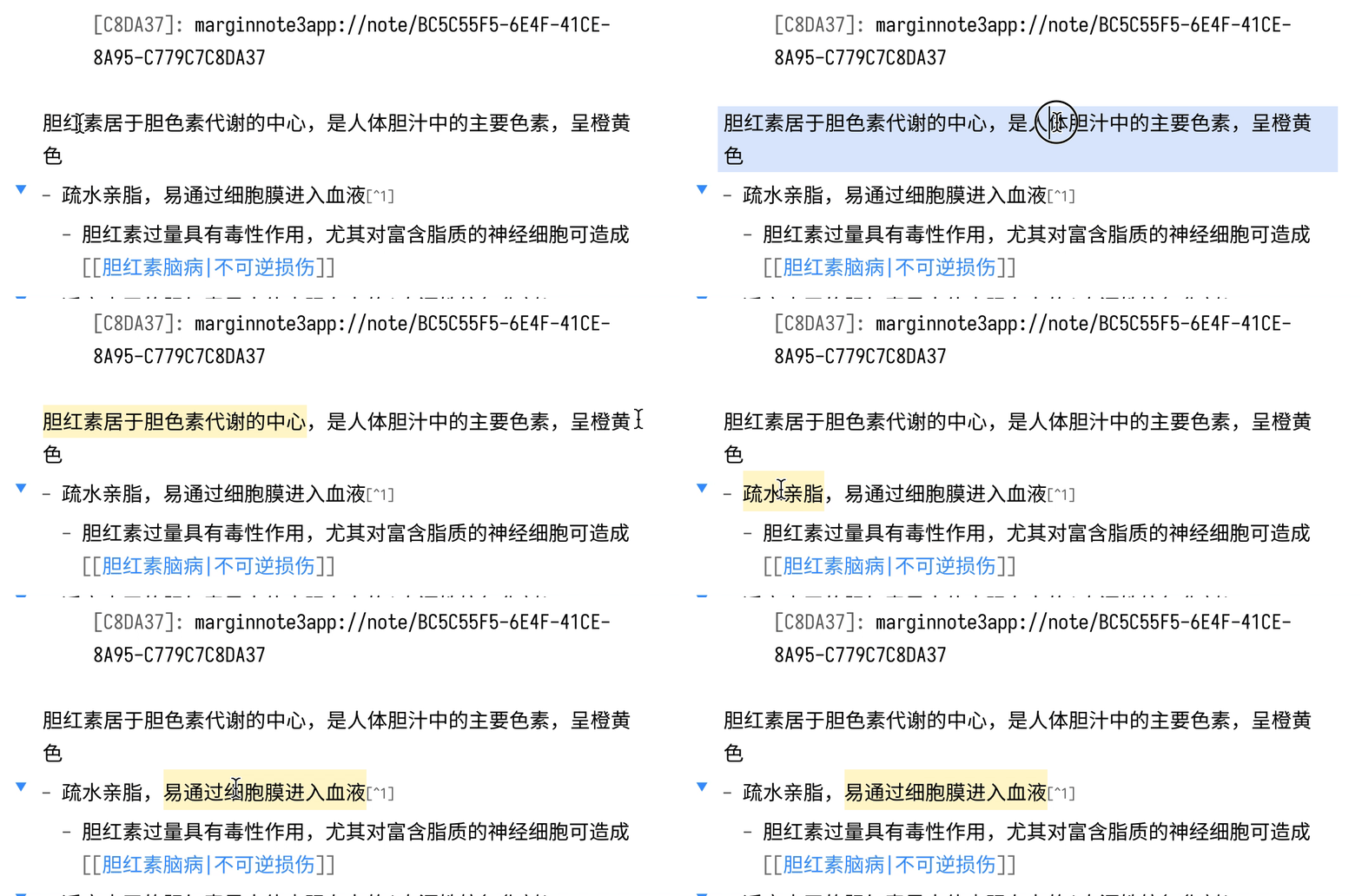 | 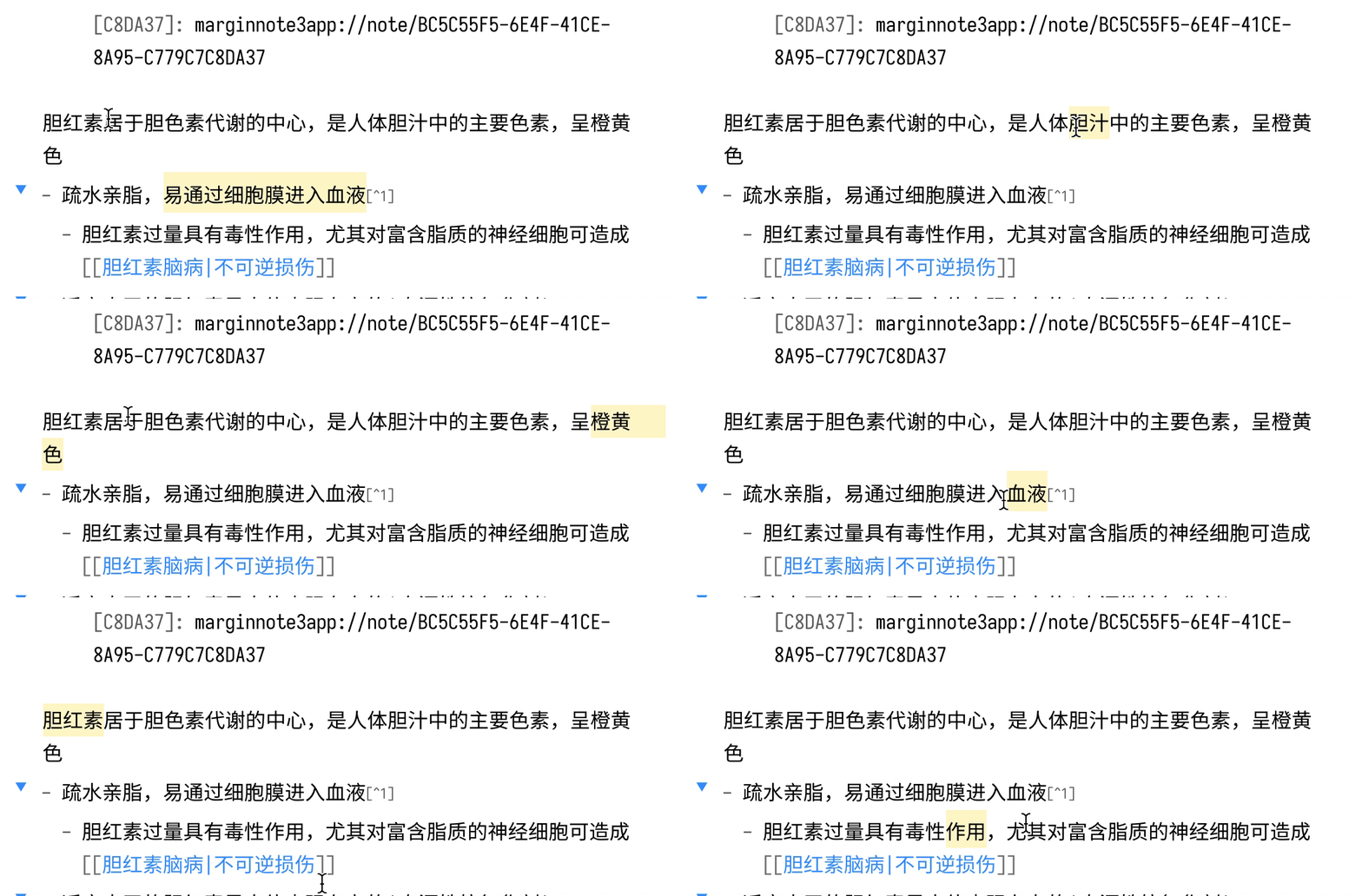 |
Disclosure 安全声明
[!WARNING] 直接文件系统访问:在桌面端,本插件使用 Node.js
fs模块在 Obsidian Vault API 之外读写文件。这用于将结巴分词 WASM 文件(jieba_rs_wasm_<版本号>.wasm)存储在 Obsidian 的共享userData目录中,从而避免在每个库中重复安装:
平台 路径 macOS ~/Library/Application Support/obsidian/jieba_rs_wasm_<版本号>.wasmWindows %APPDATA%\obsidian\jieba_rs_wasm_<版本号>.wasmLinux ~/.config/obsidian/jieba_rs_wasm_<版本号>.wasm在移动端,该文件通过标准 Obsidian Vault API 存储在库的配置目录(
<vault>/.obsidian/jieba_rs_wasm_<版本号>.wasm)中,不涉及直接文件系统访问。
[!WARNING] Direct Filesystem Access: On desktop, this plugin uses the Node.js
fsmodule to read and write files outside of the Obsidian vault API. This is used to store the jieba WASM binary (jieba_rs_wasm_<version>.wasm) in Obsidian's shareduserDatadirectory so that it does not need to be duplicated in every vault:
Platform Path macOS ~/Library/Application Support/obsidian/jieba_rs_wasm_<version>.wasmWindows %APPDATA%\obsidian\jieba_rs_wasm_<version>.wasmLinux ~/.config/obsidian/jieba_rs_wasm_<version>.wasmOn mobile, the file is stored inside the vault's config directory (
<vault>/.obsidian/jieba_rs_wasm_<version>.wasm) using the standard Obsidian vault API, and no direct filesystem access is involved.
Installation 安装
From Obsidian
- Open
Settings>Third-party plugin - Make sure Safe mode is off
- Click
Browse community plugins - Search for this plugin
Simplified Chinese Word Splitting - Click
Install - Once installed, close the community plugins window and the patch is ready to use.
- 打开
设置>第三方插件 - 确保安全模式为
关闭 - 点击
浏览社区插件 - 搜索此插件
Word Splitting for Simplified Chinese in Edit Mode and Vim Mode - 点击
安装 - 安装完成后,关闭安装窗口,插件即可使用
From GitHub
- Download the Latest Release from the Releases section of the GitHub Repository
- Put files to your vault's plugins folder:
<vault>/.obsidian/plugins/cm-chs-patch - Reload Obsidian
- If prompted about Safe Mode, you can disable safe mode and enable the plugin. Otherwise head to Settings, third-party plugins, make sure safe mode is off and enable the plugin from there.
Note: The
.obsidianfolder may be hidden. On macOS you should be able to pressCommand+Shift+Dotto show the folder in Finder.
- 从 GitHub 仓库的 Releases 下载最新版本
- 把文件放在对应 Vault 的插件文件夹下:
<vault>/.obsidian/plugins/cm-chs-patch - 重新加载 Obsidian
- 如果出现有关安全模式的提示,则可以禁用安全模式并启用插件。否则,请转到
设置→第三方插件,确保关闭安全模式,然后从第三方插件启用插件
注意,
.obsidian文件夹为隐藏文件夹,在 macOS 的 Finder 下可以按Command+Shift+.以显示隐藏文件夹
Development
Prerequisites
- Node.js 26+ — pinned in
mise.toml; the easiest way to provision it is mise. If you manage Node yourself, runcorepack enableto activate pnpm. - pnpm 11.0.9 — sourced from
packageManagerinpackage.jsonvia corepack. No global install needed. - Git with submodule support (any modern version).
One-time setup
# 1. Clone with the cm-view submodule populated.
#    If you already cloned without `--recurse-submodules`, run the second line instead.
git clone --recurse-submodules https://github.com/aidenlx/cm-chs-patch.git
git submodule update --init --recursive

cd cm-chs-patch

# 2. Provision Node 26 + enable corepack (skip if you manage Node yourself).
mise install

# 3. Install dependencies. The `packages/cm-view` workspace package's `prepare`
#    hook builds its `dist/` (the @codemirror/view internal bundle) automatically.
pnpm install
Scripts
| Command | Purpose |
|---|---|
pnpm dev | Vite watch build to build/; also writes .hotreload for the Obsidian Hot-Reload plugin |
pnpm build | Production bundle to build/main.js; the version from package.json is stamped onto manifest.json |
pnpm typecheck | tsc --noEmit |
pnpm lint | oxlint (pnpm lint:fix to autofix) |
pnpm format | oxfmt check (pnpm format:fix to apply) |
pnpm release | release-it (maintainers only) |
Loading the build into Obsidian
Symlink (or copy) build/ into a test vault as <vault>/.obsidian/plugins/cm-chs-patch, then enable the plugin in Obsidian's Community Plugins settings. With Hot-Reload installed in the same vault, pnpm dev triggers live reloads on rebuild.
For plugin developers
Search results and similarity scores are powered by semantic analysis of your plugin's README. If your plugin isn't appearing for searches you'd expect, try updating your README to clearly describe your plugin's purpose, features, and use cases.