Code Block Fold
approvedby mkali
Fold and unfold code blocks in the editor with a single click. - This plugin has not been manually reviewed by Obsidian staff.
Code Block Fold
An Obsidian plugin that lets you fold and unfold code blocks in the editor with a single click, keeping long snippets out of the way until you need them.
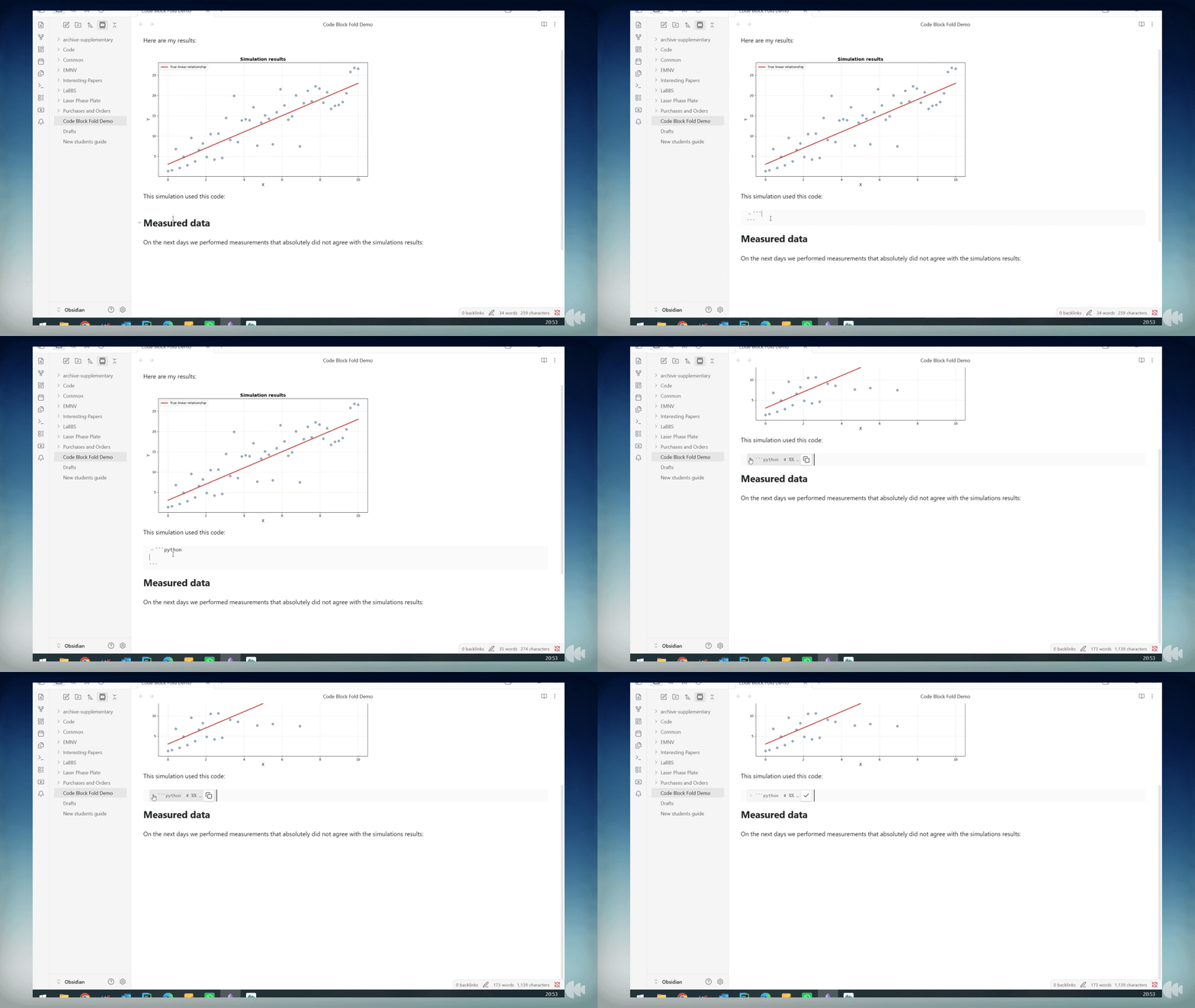
Features
- Click the ▶ arrow to the left of any code block to fold it into a single preview line
- Folded blocks show the language, first line of code, and a copy button — no need to unfold just to copy
- Click the arrow again (or the preview line) to unfold and return to the full block
- Fold state is saved in the file as
{fold}on the opening fence, so it persists across sessions and syncs to other devices - Two commands for bulk operations: fold/unfold all blocks at once, or toggle the block under the cursor
Usage
Folding a block
Click the ▼ chevron that appears to the left of any code block's opening fence. The block collapses into a one-line preview:
▶ ```python x = compute_result(data) … [python]
Click the ▶ chevron to expand it again.
Copying without unfolding
The clipboard button on the right of a folded block copies the full block content to the clipboard without needing to unfold it first. The icon briefly changes to a checkmark to confirm.
Commands
| Command | Description |
|---|---|
| Toggle fold all code blocks | Folds all blocks if any are open; unfolds all if all are folded |
| Toggle fold code block at cursor | Folds or unfolds the block the cursor is currently inside |
Both commands are available from the Command Palette and can be assigned a keyboard shortcut in Settings → Hotkeys.
How fold state is stored
The {fold} marker is appended to the opening fence line:
```python {fold}
x = compute_result(data)
```
This means fold state is part of the note and syncs automatically alongside your vault content.
For plugin developers
Search results and similarity scores are powered by semantic analysis of your plugin's README. If your plugin isn't appearing for searches you'd expect, try updating your README to clearly describe your plugin's purpose, features, and use cases.