Cognitive Glow
approvedby Justin Shank
Note activity heatmap in a sidebar. Navigate your vault by visual glow instead of hunting filenames. - This plugin has not been manually reviewed by Obsidian staff.
Cognitive Glow
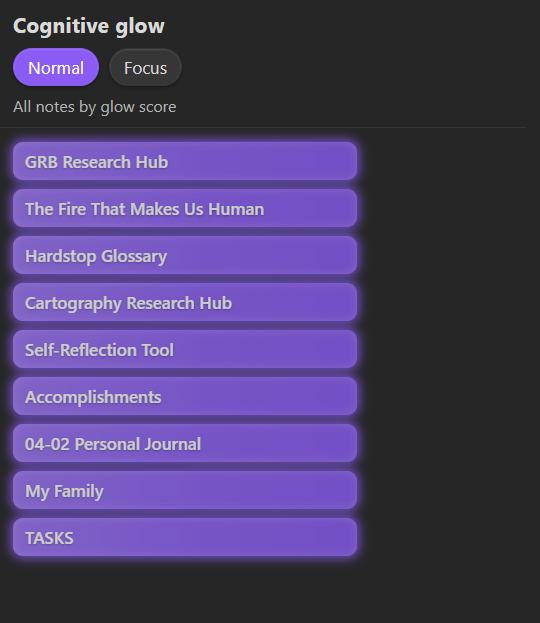
An Obsidian plugin that surfaces the notes you actually use. Notes you actively visit glow brighter in a ranked sidebar; ones you haven't touched fade out. No tags, no manual curation — just open notes and let the glow tell you where your attention lives.
Why
Most note-taking setups bury active work under search results and folder hierarchies. Cognitive Glow gives you a persistent, at-a-glance view of what matters right now, ranked by a blend of recency and visit frequency.
Features
- Visual glow — notes render as embers on a darkened ground. Freshly visited notes ignite white-gold; aging ones cool through amber to ash. Row width tracks visit frequency, brightness tracks rank, and color temperature tracks how recently you were there — three signals you can read at a glance.
- Normal and Focus modes — Normal shows your full ranked list; Focus narrows it to your top N.
- Dwell-time gating — visits only count after a configurable minimum open time (default 30 s), so quick flick-throughs don't inflate scores.
- Folder scope — restrict tracking to specific folders, or exclude folders like
Templates/orArchive/. - Sidebar placement — left or right, whichever fits your layout.
- Ribbon shortcut — sparkles icon in the ribbon opens the panel.
Installation
From community plugins
In Obsidian, go to Settings > Community plugins > Browse, search for Cognitive Glow, and install.
Manual
npm install
npm run build
Copy manifest.json, main.js, and styles.css into .obsidian/plugins/cognitive-glow/, then enable in Settings > Community plugins.
Usage
- Open notes normally — Cognitive Glow tracks visits automatically.
- Open the panel from the ribbon (sparkles icon) or command palette (
Open sidebar). - Toggle between Normal and Focus with the header buttons.
- Click any row to jump to that note.
Settings
Display
| Setting | Default | Description |
|---|---|---|
| Glow fades after | 3 days | How quickly a note loses glow. Presets: 1 day / 3 days / 1 week / 1 month. |
| Max notes in focus mode | 5 | Top N notes shown in focus mode. |
| Hide faded notes | Off | Only show notes above a minimum score. |
| Sidebar placement | Right | Which sidebar hosts the panel. |
Tracking
| Setting | Default | Description |
|---|---|---|
| Minimum open time | 30 s | A note must stay open this long to count as a visit. Set to 0 for instant tracking. |
| Tracked folders | (all) | Only track notes in these folders. One path per line. |
| Excluded folders | (none) | Never track notes in these folders. Takes priority over inclusions. |
Advanced
| Setting | Default | Description |
|---|---|---|
| Recency weight | 0.6 | Contribution of recent activity to the score (0-1). |
| Frequency weight | 0.4 | Contribution of visit count to the score (0-1). |
| Manual pin weight | 0 | Boost for manually pinned notes (0-1). |
| Frequency scale | 20 | Opens treated as "max frequency". |
| Max tracked notes | 3000 | Memory cap. 0 = unlimited. |
| Recency decay (ms) | 259200000 | Raw exponential decay constant. Overrides dropdown. |
Commands
| Command | Description |
|---|---|
| Open sidebar | Opens or reveals the Cognitive Glow panel. |
| Pin or unpin active note | Toggles a manual glow boost on the current note (also on the file right-click menu). |
| Dump glow scores to console | Logs the top 20 notes by score (dev console). |
| Show persisted data (JSON) | Opens a modal with the full saved payload. |
Pinning: a pin sets the note's manual gravity to its maximum. Pins only affect the score when Manual pin weight (Advanced settings) is above 0 — it defaults to 0, so raise it first if you want pins to glow.
How scoring works
recency   = exp(-(now - lastOpened) / tauRecencyMs)
frequency = log(1 + hitCount) / log(1 + hitCountMaxScale)
gravity   = manualGravity  (0 if unset)

glowScore = wRecency * recency + wFrequency * frequency + wGravity * gravity
Weights are normalized if their sum exceeds 1. See SPEC.md for full implementation details.
Development
npm install          # install dependencies
npm run build        # compile plugin
npm run dev          # watch mode
npm run lint         # eslint (Obsidian rules)
npm run test         # unit tests
Data
Stored in .obsidian/plugins/cognitive-glow/data.json. No network requests, no telemetry.
License
For plugin developers
Search results and similarity scores are powered by semantic analysis of your plugin's README. If your plugin isn't appearing for searches you'd expect, try updating your README to clearly describe your plugin's purpose, features, and use cases.