Similar Notes
unlistedby watthem
Find semantically similar notes using local TF-IDF. No API keys, no external calls.
Similar Notes
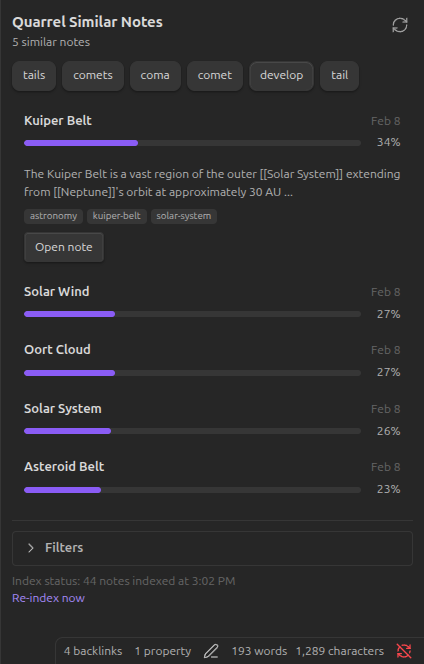
Similar Notes is an Obsidian plugin that surfaces related notes in a sidebar using local TF-IDF + cosine similarity via @watthem/quarrel. It is designed to be fast, private, and explainable: no network calls, no accounts, and no black-box ranking.
Status
Manual install is available from GitHub Releases. The plugin is not yet listed in Obsidian's Community Plugins directory.
Features
- Local-first: Indexing and ranking happen entirely on-device.
- Explainable results: Similarity is based on TF-IDF terms and cosine similarity, not embeddings.
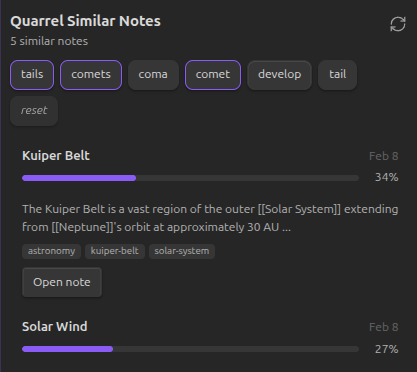
- Keyword chips: Promote terms from the active note to quickly bias the ranking.
- Change detection: See when notes have changed since the last index build and rebuild in one click.
- Optional auto-reindex: Rebuild automatically after vault changes with a configurable delay.
Installation
- Download
main.js,manifest.json, andstyles.cssfrom the latest release. - Create a folder at
.obsidian/plugins/quarrel-similar-notes/inside your vault. - Copy the three release files into that folder.
- Reload Obsidian and enable Similar Notes in Settings -> Community plugins.
Usage
- Open the Similar notes view from the ribbon or the command palette.
- Build the index the first time you open the plugin.
- Switch between notes to see related notes update in the sidebar.
- Click keyword chips to boost specific terms in the ranking.
- Rebuild the index after large vault changes, or enable auto-reindex in settings.
Commands
Show similar notes panel: Open the sidebar view.Rebuild similarity index: Rebuild the TF-IDF index for the current vault.Check for changes: Show how many notes changed since the last index build.
Settings
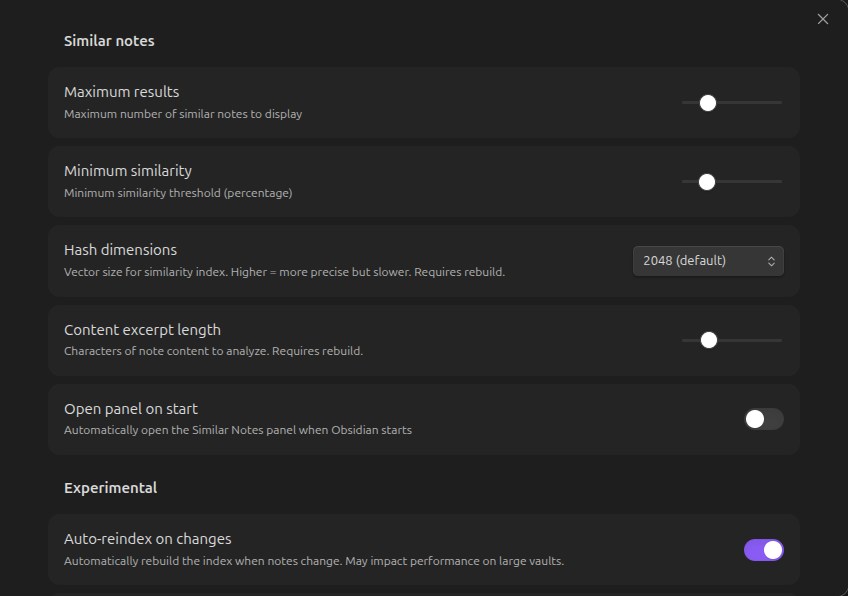
| Setting | Default | Description |
|---|---|---|
| Maximum results | 5 | Number of similar notes to show (1-20). |
| Minimum similarity | 15% | Minimum score required for a result to appear (0-50%). |
| Hash dimensions | 2048 | Vector size used for hashing. Higher is more precise but slower. |
| Content excerpt length | 1500 | Characters of note content to analyze. |
| Open panel on start | Off | Open the view automatically when Obsidian starts. |
| Auto-reindex on changes | Off | Rebuild automatically when notes change. |
| Auto-reindex delay | 30s | Debounce window before an automatic rebuild. |
How It Works
Similar Notes builds a TF-IDF index across markdown files in your vault:
- Tokenize each note into meaningful terms.
- Weight terms by how distinctive they are across the vault.
- Hash the term weights into fixed-size vectors.
- Rank notes by cosine similarity.
This favors notes that share distinctive vocabulary, which makes the ranking easier to inspect and reason about than embedding-based approaches.
Privacy And Disclosures
This plugin follows Obsidian's disclosure guidance for community plugins.
| Concern | Status |
|---|---|
| Network calls | None |
| External APIs | None |
| Accounts required | None |
| Telemetry or analytics | None |
| External file access | Reads markdown files from the current vault only |
| Local storage | Stores the index in the plugin data folder inside the vault |
| Dependencies | @watthem/quarrel only |
| Payments | None |
| Ads | None |
| Closed-source components | None |
Development
git clone https://github.com/watthem/quarrel-similar-notes.git
cd quarrel-similar-notes
npm install
npm run dev
Useful commands:
npm run buildbuilds the release bundle.npm testruns the test suite.npm run releasecopies release assets todist/release/.
Feedback
Bug reports and feature requests are welcome in GitHub Issues. If you want to discuss ranking behavior or UX, the Obsidian forum is a good place to start a thread.
License
MIT. See LICENSE.
For plugin developers
Search results and similarity scores are powered by semantic analysis of your plugin's README. If your plugin isn't appearing for searches you'd expect, try updating your README to clearly describe your plugin's purpose, features, and use cases.