Color Math
approvedby Aditya
Automatically apply semantic colors to LaTeX and MathJax equations in Obsidian Markdown. - This plugin has not been manually reviewed by Obsidian staff.
🎨 Obsidian Color Math
Automatically apply beautiful, semantic colors to LaTeX and MathJax equations in Obsidian Markdown.
Obsidian Color Math dynamically transforms plain monochrome equations into rich, readable mathematical expressions. It operates seamlessly across both Live Preview and Reading View, with support for dynamic real-time coloring and permanent Markdown exports.
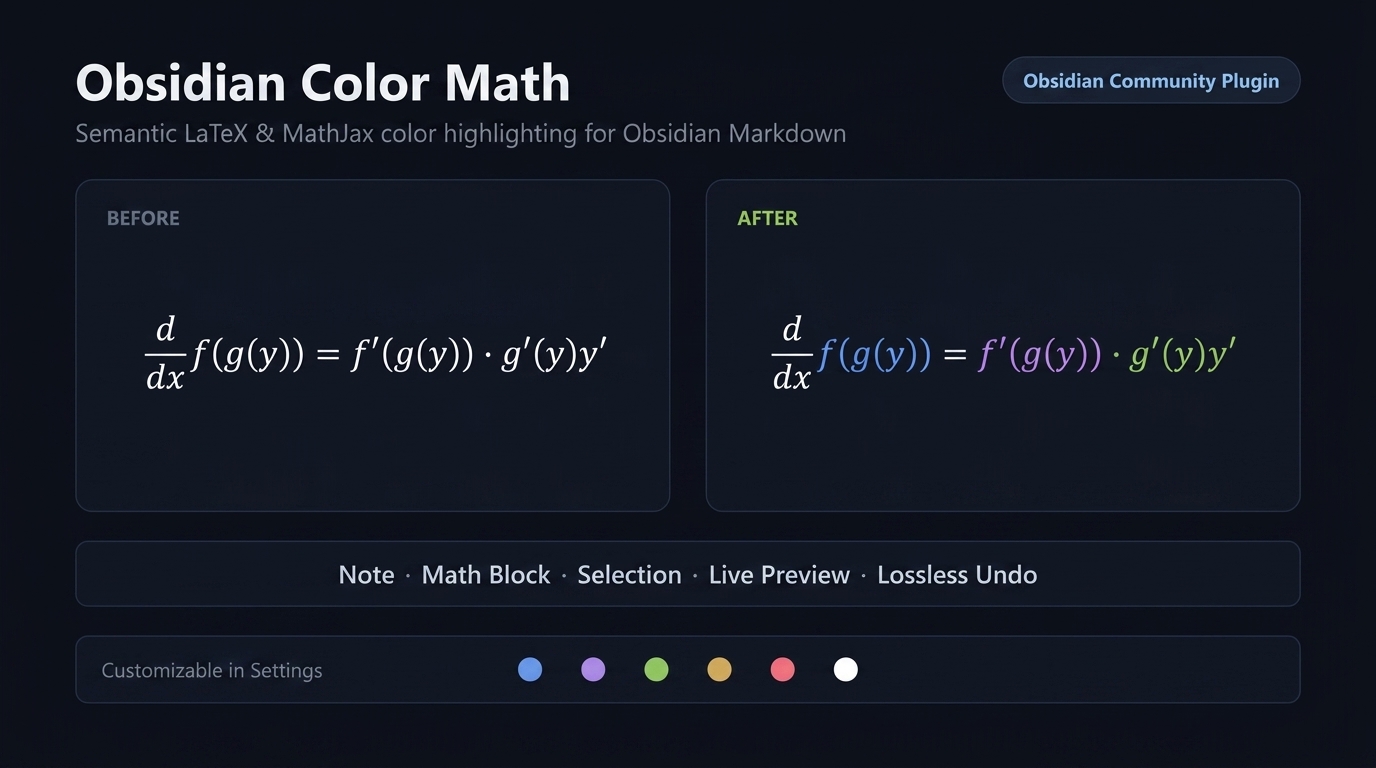
Rendered MathJax equations displayed with signature Tokyo Night semantic color roles.
[!TIP] 100% Local, Pure TypeScript & Zero Dependencies: Color Math runs completely offline on Desktop and Mobile (iOS & Android). It makes zero network requests, collects no telemetry, and requires no external tools or AI services.
[!NOTE] Looking for the Python CLI & Library? Check out python-color-math (
pip install python-color-math) to colorize equations in batch scripts, terminal pipelines, Jupyter notebooks, or Quarto documents without needing Obsidian open!
✨ Key Features
1. ⚡ Dynamic MathJax Interceptor (Zero Note Modification)
- Automatic Rendering: Color Math hooks directly into Obsidian's internal MathJax pipeline (
tex2chtmlandtex2svg). Rendered equations in Live Preview and Reading View appear in full color automatically without altering your raw notes! - Both Inline & Display Math: Full support for inline equations (
$...$) and display blocks ($$...$$). - Piecewise Environments (
\begin{cases}): Full multi-branch recognition with condition alignment (&) and relations (\ge,\le,\ne,<,>).
2. 🌈 Rich Semantic Palette & Theme Integration
- Signature Tokyo Night Palette: Carefully calibrated pastel tones designed to reduce visual clutter and eye strain.
- Theme Auto-Sync: One-click extraction of accent and syntax colors from your active Obsidian theme.
- Light / Dark Mode Contrast Adaptability: Automatically shifts operator contrast (e.g.
=,\cdot, spacing) so equations never wash out on light backgrounds.
3. 🧠 Smart Mathematical Disambiguation
- Piecewise Cases & Relations: Accurately formats and colors multi-branch conditional functions without swallowing subsequent lines.
- Half-Colored Completion: Automatically detects partially colored or edited equations and completes them end-to-end rather than skipping them.
- Physical Units & Metric Prefixes: Distinguishes metric prefixes (e.g.
1.064\, \mu m,10 m/s,500 nm,50 kg) from algebraic variables, with a dedicated "Natural Color" option to keep units uncolored if desired. - Calculus Differentials & Derivatives: Identifies infinitesimal differentials (
dx,dt,d\theta) and derivative fractions (\frac{d}{dx},\frac{df}{dx},\frac{\partial \psi}{\partial t}) so calculus operators stay unified, while preserving standalone distance$d$. - Quantum Bra-Ket Notation (Dirac): Recognizes kets (
|\psi\rangle), bras (\langle\phi|), and brackets (\langle\phi|\psi\rangle,\langle\psi|\hat{H}|\psi\rangle), keeping delimiters cleanly styled. - Dimensionless Numbers: Recognizes contiguous engineering numbers (
Re,Ma,Pr,Nu), while preserving separated variables (R e) as distinct entities.
4. 🛠️ IDE Visual Enhancements
- Rainbow Delimiters: Recursively colors nested parentheses, brackets, and braces by depth to eliminate delimiter blindness in complex algebraic expressions.
- Symbol Taxonomy: Distinguishes constants ($\pi, \hbar, \infty$), Greek parameters ($\alpha, \theta, \lambda$), standard functions ($\sin, \cos, \ln$), and bound iteration indices ($\sum_{i=1}^n$).
- Variable Data-Flow Hashing: Deterministically assigns unique, consistent colors to distinct identifiers across an equation to visually trace the flow of variables.
🚀 Usage
Ribbon Menu
Click the Color Math palette icon on the left ribbon to access quick actions:
- Bake colors into note (Permanent): Permanently embeds LaTeX
\textcolor{...}{...}wrappers into all math blocks and inline math in your note. - Clean baked colors from note: Safely strips all color wrappers back to clean, plain LaTeX.
- Bake / Clean current math block: Targets only the equation under your cursor.
- Bake / Clean selection: Targets highlighted text in the editor.
Command Palette
Open the Command Palette (Ctrl+P or Cmd+P) and search for:
Color Math: Bake colors into note (Permanent)Color Math: Clean baked colors from noteColor Math: Bake colors into current math blockColor Math: Clean baked colors from current math blockColor Math: Bake colors into selectionColor Math: Clean baked colors from selection
⚙️ Settings
| Setting | Description | Default |
|---|---|---|
| Live rendered math coloring | Automatically colorizes MathJax equations without modifying raw Markdown. | Enabled |
| Real-time editor syntax highlighting | Live syntax highlighting inside the CodeMirror editor as you type. | Disabled |
| Rainbow delimiters | Colors nested brackets, parentheses, and braces by depth. | Enabled |
| Mathematical symbol taxonomy | Categorizes constants, parameters, functions, and bound indices. | Enabled |
| Color physical units | Highlights physical units (\mu m, m/s, nm) or leaves them in natural theme font. | Enabled |
| Calculus differentials & derivatives | Highlights differentials (dx, dt) and derivative operators. | Enabled |
| Quantum bra-ket notation | Highlights Dirac state vectors and brackets. | Enabled |
| Engineering dimensionless numbers | Recognizes unified numbers (Re, Ma, Pr). | Enabled |
| Variable data-flow hashing | Hashes unique variables to distinct colors across expressions. | Disabled |
| Auto-adapt for light / dark mode | Adjusts operator contrast dynamically on light themes. | Enabled |
| Auto-match on theme change | Re-extracts colors whenever you change your Obsidian theme. | Disabled |
📦 Installation
From Obsidian Community Plugins (Recommended)
- In Obsidian, open Settings > Community plugins.
- Turn off Restricted mode.
- Click Browse and search for
Color Math. - Click Install, then Enable.
Manual Installation
- Download
main.js,manifest.json, andstyles.cssfrom the latest release. - Create a folder named
color-mathinside<vault>/.obsidian/plugins/. - Move the downloaded files into that folder.
- Reload Obsidian and enable Color Math under Settings > Community plugins.
💬 Feedback & Community
Feedback, questions, and feature requests are very welcome!
- Share your thoughts or suggest features: Join the conversation on GitHub Discussions.
- Report bugs or rendering issues: Open a GitHub Issue.
🛠️ Development & Testing
npm install
npm run build     # Builds production main.js
npm run test      # Runs Vitest test suite (97/97 passing)
npm run dev       # Watch mode with inline sourcemaps
📄 License
Released under the MIT License.
For plugin developers
Search results and similarity scores are powered by semantic analysis of your plugin's README. If your plugin isn't appearing for searches you'd expect, try updating your README to clearly describe your plugin's purpose, features, and use cases.