by uofishbox
Displays links in a compact format to reduce visual clutter during typing.
Obsidian Compact Links Plugin
An Obsidian plugin that compacts links and image alt text in the editor to reduce visual clutter, expanding them automatically when you place your cursor on them.

Features
Compact Aliased Links
For wikilinks with an alias ([[NoteTitle|Alias]]), the plugin hides the note title and displays [[|Alias]]. The full note title expands when your cursor is positioned inside the title section.
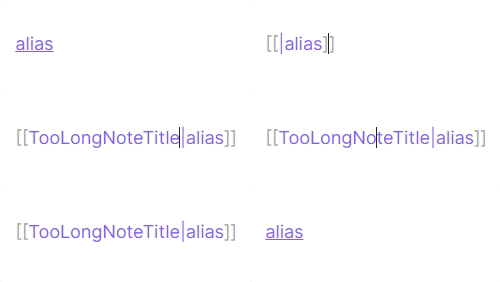
Example:
- Normal view:
[[|ShortTitle]] - When cursor is in the title section:
[[TooLongNoteTitle|ShortTitle]]
Compact External Links
For Markdown external links ([Title](url)), the plugin shortens the URL display according to the selected mode. The full URL expands when your cursor is on the URL portion or when you click the shortened text.
Domain mode:

Hidden mode:
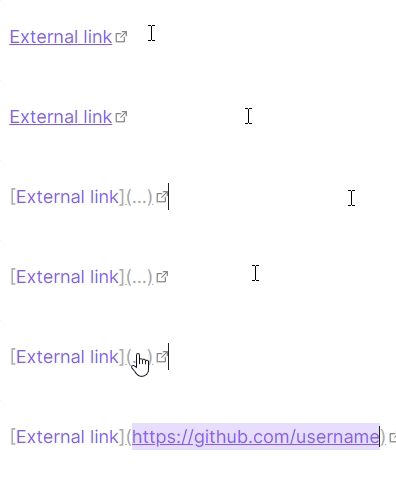
Example:
- Normal view (Domain mode):
[GitHub](github.com) - Normal view (Hidden mode):
[GitHub](...) - When cursor is on the URL:
[GitHub](https://github.com/username/repository)
Compact Image Alt Text
For Markdown image embeds (), alt text exceeding the configured display length is shortened. CJK characters count as 2 and other Unicode code points count as 1. Alt text within the limit is shown in full. Place the cursor in the alt text or click the shortened version to edit the full text.
Note: This applies only to Markdown image embeds (
), not wikilink embeds (![[image.png|alt]]).
Example:
- Normal view:
 - When cursor is in the alt text:

Installation
Development
Setup
Use Node.js 20 with npm 10 (matching the CI environment):
npm ci
npm test
npm run lint
npm run build
For plugin developers
Search results and similarity scores are powered by semantic analysis of your plugin's README. If your plugin isn't appearing for searches you'd expect, try updating your README to clearly describe your plugin's purpose, features, and use cases.