Completed Task Display
approvedby heliostatic
Controls for displaying or hiding completed tasks.
Completed Task Display
An Obsidian plugin that allows you to toggle the visibility of completed tasks globally across your vault.
Features
- Toggle completed tasks - Hide or show completed
[x]tasks with a single click - Ribbon button - Quick access from the Obsidian ribbon
- Command palette - Use
Toggle Completed Task Viewcommand - Status bar indicator - Shows current state (Hiding/Showing Completed Tasks)
- Settings panel - Configure status bar visibility and sub-bullet hiding
- Hide sub-bullets - Optionally hide indented items beneath completed tasks (Edit/Live Preview mode only)
- Persistent state - Remembers your preferences between sessions
- Custom task status support - Only hides
[x]and[X], preserving custom statuses like[?],[!],[/] - Cross-platform - Works on desktop and mobile
Demo
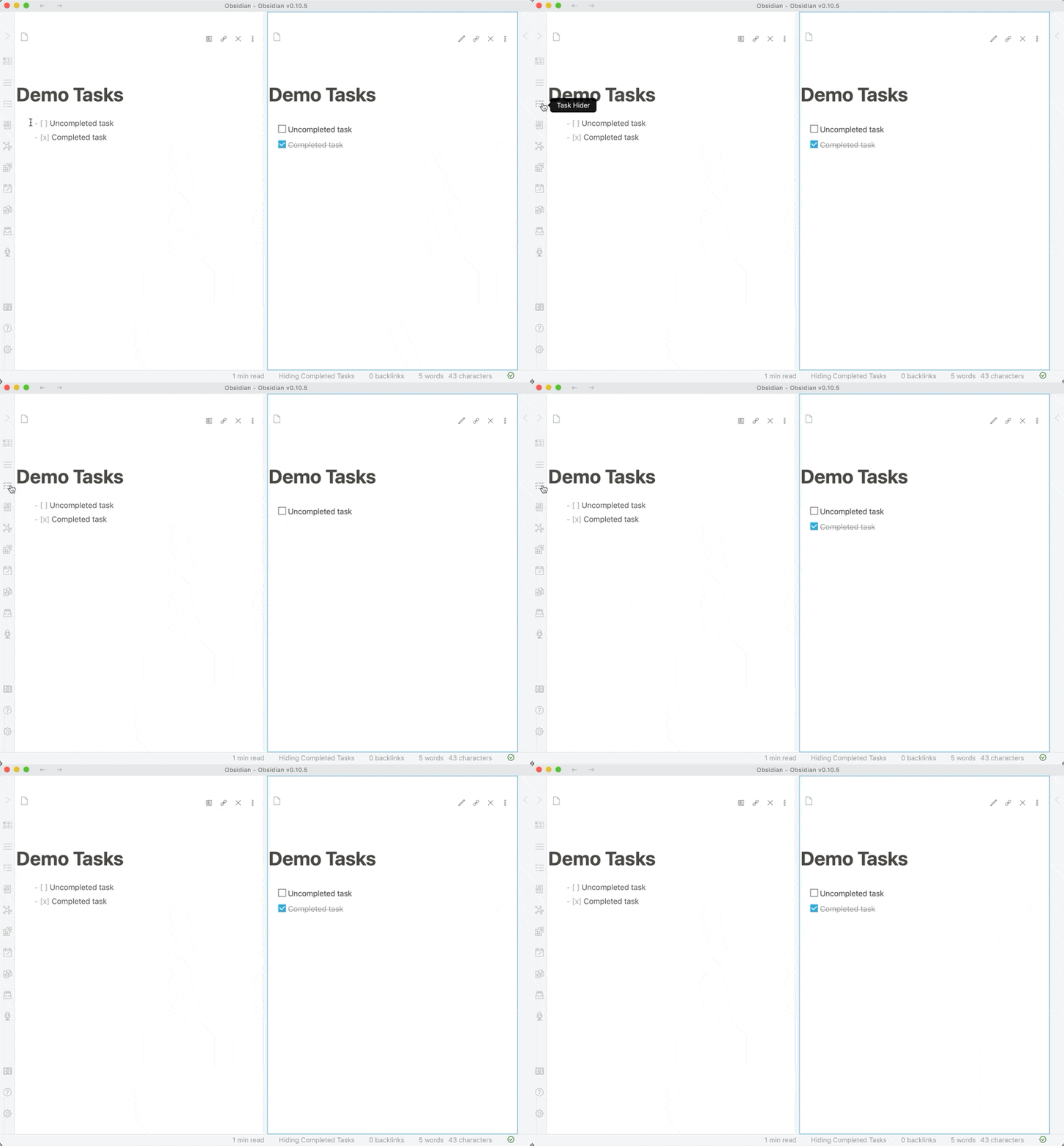
Installation
From Obsidian Community Plugins
- Open Obsidian Settings
- Go to
Community Pluginsand disableRestricted mode - Click
Browseand search for "Completed Task Display" - Click
Install, thenEnable
Manual Installation
- Download the latest release
- Extract the files into
<vault>/.obsidian/plugins/completed-task-display/ - Reload Obsidian
- Enable the plugin in Settings > Community Plugins
Usage
Toggle Completed Tasks
Using the Ribbon:
- Click the tasks icon in the left ribbon
Using Command Palette:
- Press
Ctrl/Cmd + P - Search for "Toggle Completed Task View"
Status Bar:
- Check the status bar at the bottom to see current state
Supported Task Formats
The plugin only hides truly completed tasks:
[x]- Completed (hidden)[X]- Completed (hidden)
All other task statuses remain visible:
[ ]- Uncompleted[?]- Possible task[!]- Urgent task[/]- In-progress task[-]- Cancelled task- Any other custom status
Settings
Access settings via Settings → Community Plugins → Completed Task Display:
Show status bar message
- Toggle the status bar indicator on/off
- Shows "Hiding/Showing Completed Tasks" in the status bar
Hide sub-bullets (Edit/Live Preview mode only)
- When enabled, hides indented items (sub-bullets) beneath completed tasks
- Only works in Edit and Live Preview modes
- In Reading view, sub-bullets are automatically hidden with their parent task
- Useful for cleaning up nested task lists while editing
Development
Prerequisites
- Node.js 20.x or later
- npm
- An Obsidian vault for testing
Setup
-
Clone the repository:
git clone https://github.com/heliostatic/completed-task-display.git cd completed-task-display -
Install dependencies:
npm install -
Build the plugin:
npm run build
Development Workflow
-
Link to your test vault:
# Create a symlink to your vault's plugins folder ln -s /path/to/completed-task-display /path/to/vault/.obsidian/plugins/completed-task-display -
Start development mode:
npm run devThis will watch for changes and rebuild automatically.
-
Reload the plugin in Obsidian:
- Open Command Palette (
Ctrl/Cmd + P) - Run "Reload app without saving"
- Or manually disable and re-enable the plugin
- Open Command Palette (
Project Structure
completed-task-display/
├── main.ts           # Main plugin code
├── styles.css        # Plugin styles
├── manifest.json     # Plugin manifest
├── versions.json     # Version compatibility mapping
├── package.json      # NPM dependencies
├── tsconfig.json     # TypeScript configuration
└── rollup.config.js  # Build configuration
Building
- Development build:
npm run dev(watches for changes) - Production build:
npm run build
Testing
-
Copy built files to a test vault:
cp main.js manifest.json styles.css /path/to/vault/.obsidian/plugins/completed-task-display/ -
Reload Obsidian and test:
- Toggle completed tasks on/off
- Test with various task statuses
- Verify state persistence after restart
Technical Details
Compatibility
- Obsidian API: v1.10.0
- Minimum Obsidian Version: 0.10.0
- Node.js: 20.x (for development)
- TypeScript: 5.9.3
How It Works
The plugin uses CSS classes to toggle visibility:
- Adds
hide-completed-tasksclass to document body when active - CSS selectors target completed tasks in both Reading and Edit modes
- State is persisted using Obsidian's data storage API
Dependencies
Runtime:
- Obsidian API (provided by Obsidian)
Development:
- TypeScript 5.9.3
- Rollup 4.52.5
- Various Rollup plugins for bundling
See package.json for complete dependency list.
Contributing
Contributions are welcome! Please see CONTRIBUTING.md for guidelines.
Reporting Issues
- Check existing issues first
- Use issue templates when available
- Include Obsidian version and plugin version
- Provide steps to reproduce bugs
Pull Requests
- Fork the repository
- Create a feature branch
- Follow the existing code style
- Test your changes thoroughly
- Update documentation as needed
- Submit a pull request with a clear description
License
MIT License - see LICENSE file for details.
Changelog
v1.0.7 (2025-10-21)
- 🐛 Fix: Only hide
[x]and[X]tasks, not all custom statuses - Fixes support for Tasks plugin custom statuses
- Resolves issues #3, #13, #19
v1.0.6 (2025-10-21)
- 🐛 Fix: CSS syntax error
- 🐛 Fix: Error handling for corrupted data
- 🐛 Fix: Line number display in edit mode (#28)
- 🔧 Update package.json metadata
- 🚀 Modernize dependencies (TypeScript 5.9.3, Rollup 4.52.5)
- 🚀 Modernize GitHub Actions workflow
- 📄 Add MIT LICENSE file
v1.0.5
- State persistence between sessions
See full changelog for all versions.
Credits
Created by Ben Lee-Cohen
Support
For plugin developers
Search results and similarity scores are powered by semantic analysis of your plugin's README. If your plugin isn't appearing for searches you'd expect, try updating your README to clearly describe your plugin's purpose, features, and use cases.