by sourit2001
A liquid-glass home for books, podcasts, web clips, news, and any Vault folder.
Content Library Dashboard
An independent Obsidian dashboard for books, podcasts, web clips, X briefs, custom news, and any folder in a Vault.
What it does
- Three-column liquid-glass layout on desktop and a compact single-column mobile layout.
- Auto-detects common content folders without moving or duplicating notes.
- Supports six color styles: grass, blue, pink, rose, black, and forest glass.
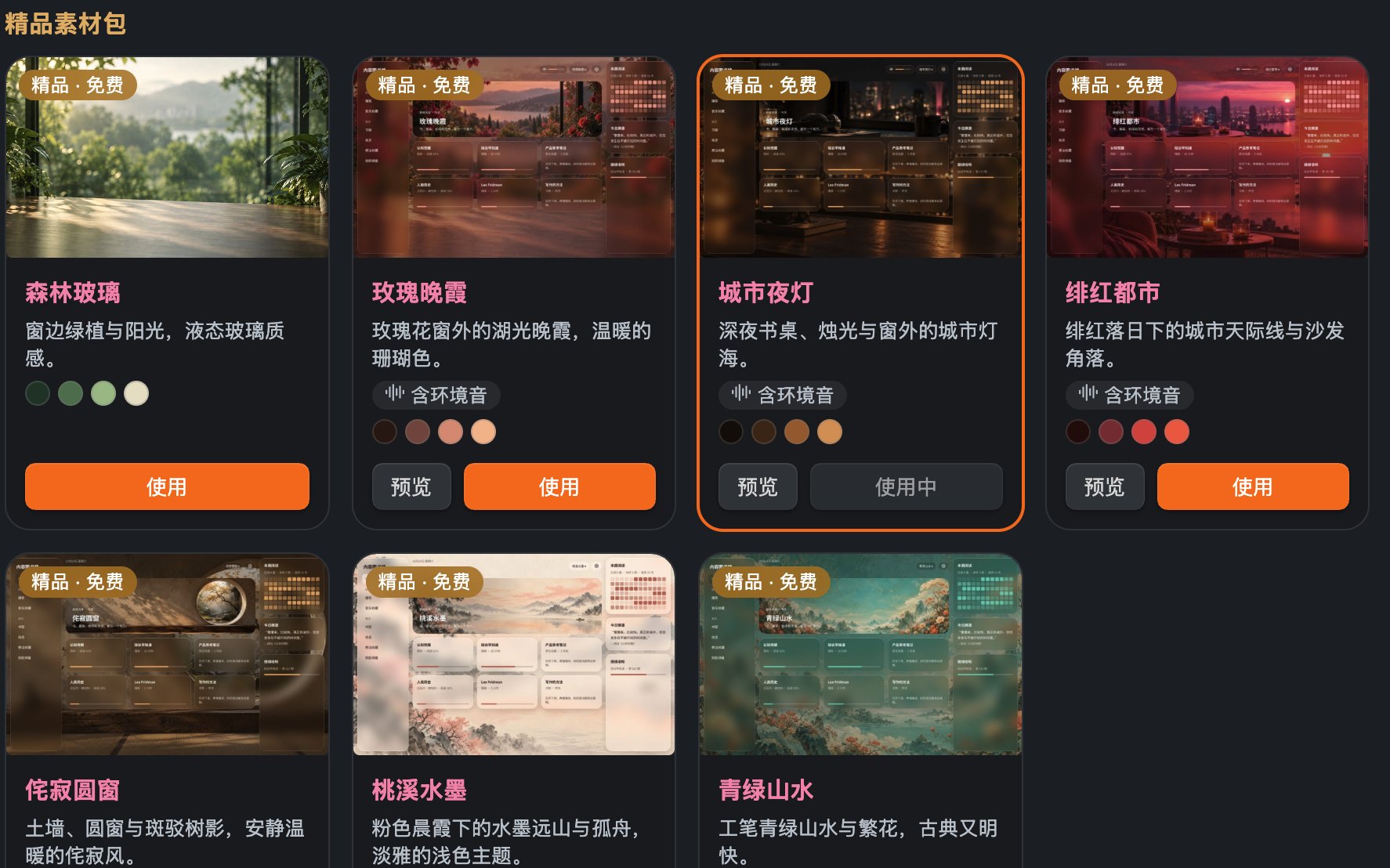
- One-click theme packs with palettes, backgrounds, and banners — all free.
- Ambient sound: three packs come with a looping background soundscape (rain, evening birdsong, late-night city) you can play while you read.
- Adds a forest liquid-glass style with a bundled green background, consistent appearance in light and dark mode, and stable mobile scrolling.
- Uses frontmatter such as
title,author,cover,source,audio, andprogresswhen available. - Opens Markdown inside a focused reading view.
- Opens Weave EPUB Reader and VaultCast through their Obsidian commands when installed.
- Plays linked local MP3, M4A, WAV, FLAC, and AAC files.
- Writes reading annotations and podcast moments back to ordinary Markdown notes.
- Lets every source folder and content item use a local or remote custom cover.
- Places card titles consistently at the top and shows text previews directly below titles when no cover is available.
- Available in English and Simplified Chinese (简体中文); follows Obsidian's language by default.
- AI chat drawer: talk to Claude, Codex, Grok or DeepSeek beside the note you're reading, in the same glass style as the dashboard.
- Podcast links: paste Apple Podcasts, Xiaoyuzhou or Spotify links, follow shows and get new episodes automatically.
Getting started
You do not need to create any special folder names before installing the plugin. Choose any existing Vault folder from the plugin settings.
- Install and enable Content Library Dashboard.
- Open Settings → Community plugins → Content Library Dashboard.
- Under My folders, click Add folder.
- Choose a folder, then set its display name and category.
The display name is independent from the real Vault path. For example,
Inbox/Podcast Notes can be shown as Podcasts without moving or renaming files.
Language / 语言
The interface follows Obsidian's language automatically: Chinese when Obsidian is set to Chinese, English otherwise. To pick one yourself, open Settings → Content Library Dashboard → 语言 / Language and choose Auto, 简体中文, or English.
Annotation notes are written with labels in the current language
(Source: / 来源:) and are read back in either language, so switching
languages never loses existing annotations.
Images and covers
Images are optional. Without a cover, the dashboard uses its built-in glass
placeholder. Covers can come from note frontmatter (cover, coverPath,
image, or thumbnail), a content card's menu, or the banner setting.
Imported images are stored in Content Library Assets/Banners or
Content Library Assets/Covers inside the Vault. These folders are created only
when you import an image.
The default annotation folder is Dashboard Notes. It is created only when the
plugin first saves a reading annotation or audio note, and can be changed in
settings. The plugin does not create sample content or copy your library.
Theme packs
Theme packs change the dashboard palette, desktop background, and banner in one click. Open them from Settings → Theme packs → Browse theme packs, the Browse theme packs command, or More theme packs… in the dashboard color menu.
- Tap a pack's thumbnail or Preview to see a full dashboard mockup before downloading.
- Every pack is free, including the premium series and the Forest glass theme. Packs with ambient sound are marked in the store (see below).
- Downloaded pack images are stored in the plugin folder
(
.obsidian/plugins/content-library-dashboard/packs/), never in your notes. Pack palettes are saved indata.json, and missing images are downloaded again automatically on a newly synced device. - To publish packs, see
packs/README.md.
Ambient sound / 环境白噪音
Three packs include a looping ambient soundscape — handy as background white noise while you read or write. 三套素材包自带循环环境音,适合阅读、写作时当背景白噪音。
| Pack 素材包 | Sound 声音 |
|---|---|
| City Lights 城市夜灯 | Rain on the window 窗边雨声 |
| Rose Dusk 玫瑰晚霞 | Evening birdsong 傍晚鸟鸣 |
| Crimson City 绯红都市 | Late-night city traffic 深夜城市车流 |
After applying one of these packs, a sound button and a volume slider appear in the dashboard's top bar. The sound fades in and out smoothly, and pauses automatically while a podcast or other audio is playing. 应用这几套素材包后,仪表盘顶栏会出现声音按钮和音量滑块;播放播客时环境音会自动暂停。 In the theme pack store these packs are marked Ambient sound. 在素材包商店里,这几套会标注「含环境音」。
All sounds are CC0 recordings from Freesound — see packs/README.md.
AI chat / AI 对话
Click the chat button in the dashboard's top bar (or in the reader) to open the AI drawer. It sits beside your note and can include the note you're reading.
- Claude, Codex, Grok run the official command-line tools you have installed and signed in to on this computer (Claude Code, Codex CLI, Grok CLI), so chats use your own account and plan. The plugin never reads or stores your sign-in. Desktop only.
- DeepSeek uses your own API key, entered in settings.
- The AI can read your vault but cannot change notes. Each chat is saved as a
Markdown note in the
AI 对话folder. - If Claude Code reports
403 Request not allowed, it isn't going through your VPN; set Proxy in the plugin settings to the local proxy address shown in your VPN app (http://127.0.0.1:<port>).
点仪表盘顶部(或阅读页)的对话按钮打开 AI 抽屉,可以边看笔记边问。Claude、Codex、Grok 调用你电脑上已登录的官方命令行工具,用你自己的账号额度;DeepSeek 填自己的 API Key。 AI 只读你的库,不会改笔记,每段对话自动保存到「AI 对话」文件夹。
Support the author / 支持作者
The plugin and every theme pack are free. If it helps you, the Support the author card at the top of the plugin settings (and the theme pack store) has WeChat Pay and Alipay tip codes. 插件和素材包都是免费的;如果对你有帮助,可以在插件设置顶部的「支持作者」卡片里扫码请我喝杯奶茶。
Network use
The plugin only connects to the network for features you use:
- Theme packs: reads the pack catalog, preview images, backgrounds and
ambient sounds from this GitHub repository through
cdn.jsdelivr.netandraw.githubusercontent.com. - Music and web previews: fetches playlist and link metadata you add.
- Podcast links: fetches episode pages and the feeds of shows you follow (checked at startup and every 3 hours).
- AI chat: Claude, Codex and Grok go through the CLIs on your computer, which
talk to their own services; DeepSeek calls
api.deepseek.comwith your key.
No telemetry or analytics are collected.
Development
npm install
npm run check
npm run build
Copy main.js, manifest.json, and styles.css into:
<Vault>/.obsidian/plugins/content-library-dashboard/
Enable Content Library Dashboard in Obsidian, then run Open content library dashboard from the command palette.
Data model
Vault files remain the source of truth. Plugin preferences are stored in the plugin's data.json; generated annotations are stored in the configurable Dashboard Notes folder. The plugin never copies the user's library into a private database.
Status
Version 0.1.0 is the first local development build. A GitHub repository and release will be created only after live Obsidian verification.
For plugin developers
Search results and similarity scores are powered by semantic analysis of your plugin's README. If your plugin isn't appearing for searches you'd expect, try updating your README to clearly describe your plugin's purpose, features, and use cases.