Book Library
unlistedby Appsyl
Index books and audiobooks into a searchable Obsidian library with covers, synopses, source links, Markdown conversion and optional AI topic wikis. Local-first, English and German.
Lokale Bücher und Audiobooks als vernetzte Obsidian-Bibliothek.
Turn local books and audiobooks into a connected Obsidian library.
Deutsch · English · Landingpage · Releases
Screenshots
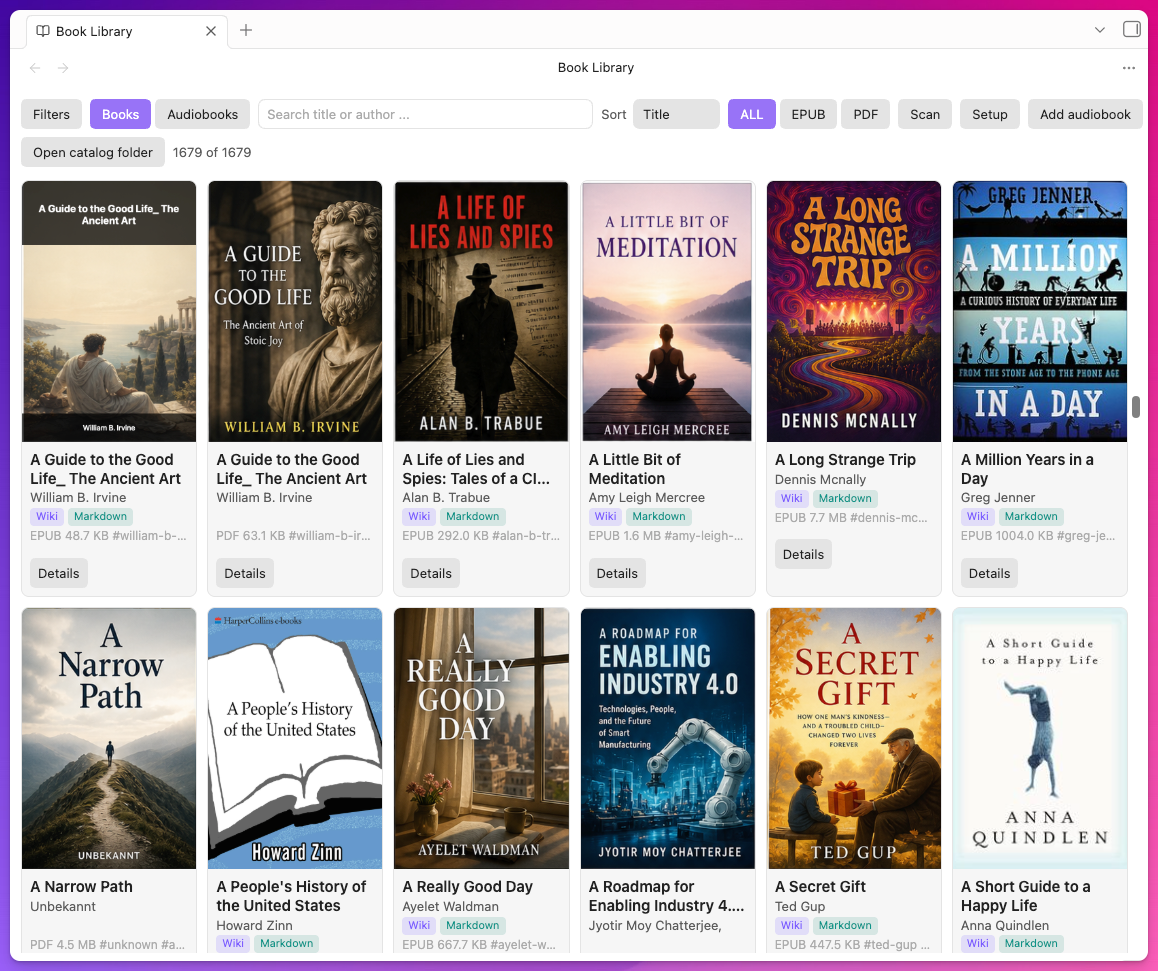
Bücher / Books
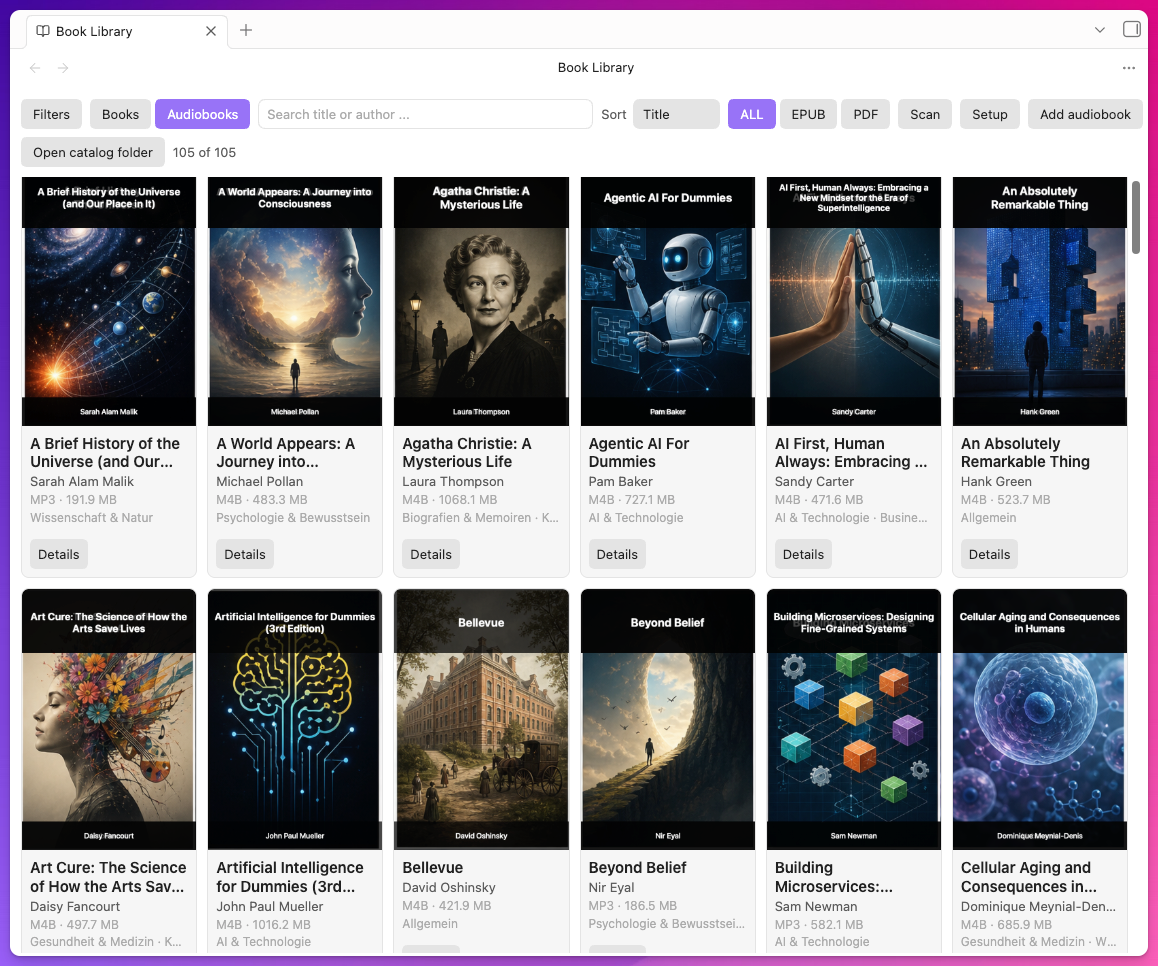
Audiobooks
Deutsch
Book Library verwandelt lokale EPUB-, PDF- und Audiobook-Ordner in eine durchsuchbare Obsidian-Bibliothek. Das Plugin erstellt lesbare Katalognotizen mit Covers, Synopsen, Quellenlinks, verwandten Büchern und Themen. Deine Mediendateien bleiben an ihrem ursprünglichen Speicherort.
Funktionen
- Inkrementeller Scan für EPUB- und PDF-Dateien.
- Lokaler Audiobook-Index für M4A, M4B, MP3, FLAC, OGG, Opus, WAV und AAC.
- Einheitliche Detailansicht für Bücher und Audiobooks mit Cover, Beschreibung, Ratings und belegten Rezensionen.
- Lokale, erklärbare Relevanzsuche über Titel, Autor, Kategorien, Themen, Tags, Beschreibungen und Synopsen.
- Automatische Audiobook-Anreicherung über öffentliche Buchquellen; vorhandene lokale Daten haben Vorrang.
- Lesbare Katalognotizen statt Hash-Dateinamen.
- Covers aus eingebetteten Dateien, Open Library oder Google Books.
- EPUB-zu-Markdown-Konvertierung.
- Erklärbare verwandte Bücher aus Autor, Kategorie, Thema und kontrollierter semantischer Relevanz.
- Optionale AI-Workflows für Themen-Wikis und Cover-Generierung.
- Lokale Pfade, Web-URLs, Cloud-Ordner und private Ablage-Links.
- Keine Telemetrie. Externe Dienste sind optional und müssen bewusst aktiviert werden.
Installation
-
Lade Book Library 0.7.9 herunter.
-
Entpacke das ZIP.
-
Kopiere
main.js,manifest.jsonundstyles.cssnach:<Vault>/.obsidian/plugins/book-library/ -
Aktiviere Book Library unter Einstellungen → Community-Plugins in Obsidian.
Bis zur Aufnahme in das Community-Plugin-Verzeichnis ist dies eine manuelle Installation. Book Library installiert und aktualisiert weder sich selbst noch andere Programme.
Upgrade-Hinweis für 0.7.9: Die internen Befehls-IDs wurden für die Community-Plugin-Regeln bereinigt. Falls du Book-Library-Befehle eigenen Hotkeys zugewiesen hast, weise diese nach dem Update einmal neu zu.
Schnellstart
- Starte Bibliothek einrichten oder öffne Setup in der Bibliotheksansicht.
- Wähle deinen Buchordner und optional einen Audiobook-Ordner.
- Prüfe Sprache und Detailanzeige.
- Starte die Indexierung und kontrolliere die Zusammenfassung.
- Lade fehlende Covers zuerst über die kostenlosen Quellen nach.
- Aktiviere AI-Workflows nur für die gewünschten Bücher und mit einem festgelegten Budget.
Wenn Titel, Autoren oder Beschreibungen fehlerhafte Zeichen wie &,  oder HTML-Fragmente enthalten, führe Metadaten-Textkodierung reparieren über die Obsidian-Befehlspalette aus. Ersetzte Katalogdateien werden archiviert und nicht gelöscht.
AI und Datenschutz
Die lokale Indexierung funktioniert ohne AI-Dienst. Metadaten und Covers können über öffentliche Buch-APIs ergänzt werden. AI-Wikis und AI-Covers sind optional und erfordern eine eigene Provider-Konfiguration. Bei einem AI-Wiki werden der ausgewählte Buchabschnitt sowie höchstens sechs lokal geprüfte Katalogziele mit ihren Begründungen an den konfigurierten Provider gesendet. Weitere Details stehen in PRIVACY.md.
Berechtigungen, externe Dateien und Dienste
- Außerhalb des Vaults: Das Desktop-Plugin liest nur die von dir ausgewählten Buch- und Audiobook-Ordner außerhalb des Vaults. Es verschiebt oder lädt diese Mediendateien nicht hoch. Erzeugte Kataloge, Covers, Markdown-Dateien und Einstellungen bleiben im Vault beziehungsweise im lokalen Plugin-Datenordner.
- Öffentliche Metadaten: Ein von dir gestarteter Scan kann Titel, Autor oder ISBN an Open Library und Google Books senden. Amazon- und Goodreads-Seiten werden nur als Such- oder Quellenlink in deinem Browser geöffnet.
- Optionale AI: Je nach deiner Einstellung werden ausgewählte Inhalte an OpenRouter, OpenAI oder ein von dir konfiguriertes lokales/CLI-basiertes Modell übergeben. Ohne aktivierten Provider findet keine AI-Anfrage statt.
- Optionale Bezahlung: Der Befehl für das Pro-Upgrade öffnet nur einen konfigurierten Stripe-Zahlungslink oder ruft einen konfigurierten Checkout-Endpunkt auf. Das Plugin verarbeitet keine Zahlungsdaten und verlangt kein Konto für die lokale Bibliothek.
- Keine Telemetrie: Das Plugin enthält keine Analytics, Werbung, Crash-Berichte oder Hintergrund-Telemetrie.
Wie Suche und Wiki-Verlinkung funktionieren
Die Suche läuft vollständig lokal und ohne externen Embedding-Dienst. Sie normalisiert deutsche und englische Suchbegriffe, gewichtet Titel und Autor besonders stark und bezieht Kategorien, Themen, Tags, Beschreibungen und Synopsen in das Relevanz-Ranking ein. Das ist ein nachvollziehbares semantisch angereichertes Relevanz-Ranking auf Basis der vorhandenen Metadaten, noch kein neuronaler Vektorindex.
Für Wiki-Links bildet Book Library zuerst eine Kandidatenliste aus bereits vorhandenen Katalogeinträgen. Ein Buch braucht mindestens ein starkes Signal: gleicher Autor, gemeinsame Kategorie, gemeinsames Thema oder eine begriffliche Überschneidung innerhalb von Kategorie oder Thema. Beschreibungen und Titel dürfen die Reihenfolge verbessern, erzeugen aber allein keinen Link. Maximal sechs geprüfte Ziele werden mit Begründung an den optionalen AI-Workflow übergeben; alle erkannten Abschnitte „Verwandte Bücher“ werden danach entfernt und durch genau eine kontrollierte Whitelist ersetzt. In diesem Buch-Querverweisabschnitt kann die AI daher keine nicht vorhandenen Katalogziele erfinden; normale Konzeptlinks in anderen Abschnitten bleiben bewusst erhalten.
Als nächste Ausbaustufe ist ein optionaler lokaler Vektorindex geplant: Passage-zu-Passage-Ähnlichkeit, robuste Beziehungen zwischen ganzen Publikationen, automatische Themencluster und ein Literaturreferenz-Abgleich mit dem eigenen Katalog. Der technische Vorschlag mit Datenschutzgrenzen und Abnahmekriterien steht in docs/SEMANTIC-ROADMAP.md.
English
Book Library turns local EPUB, PDF and audiobook folders into a searchable Obsidian library. The plugin creates readable catalog notes with covers, synopses, source links, related books and topics. Your media files stay in their original storage location.
Features
- Incremental scanning for EPUB and PDF files.
- Local audiobook index for M4A, M4B, MP3, FLAC, OGG, Opus, WAV and AAC.
- One consistent detail view for books and audiobooks, including cover, description, ratings and sourced reviews.
- Local, explainable relevance search across title, author, categories, themes, tags, descriptions and synopses.
- Automatic audiobook enrichment through public book sources; existing local data takes precedence.
- Readable catalog notes instead of hash filenames.
- Covers from embedded files, Open Library or Google Books.
- EPUB-to-Markdown conversion.
- Explainable related books from author, category, theme and controlled semantic relevance.
- Optional AI workflows for topic wikis and cover generation.
- Local paths, web URLs, cloud folders and private storage links.
- No telemetry. External services are optional and must be enabled deliberately.
Installation
-
Download Book Library 0.7.9.
-
Unzip the archive.
-
Copy
main.js,manifest.jsonandstyles.cssto:<Vault>/.obsidian/plugins/book-library/ -
Enable Book Library under Settings → Community plugins in Obsidian.
Until Book Library is accepted into the community plugin directory, this is a manual installation. Book Library never installs or updates itself or other software.
Upgrade note for 0.7.9: Internal command IDs were cleaned up for the community-plugin rules. If you assigned custom hotkeys to Book Library commands, assign them once again after updating.
Quick start
- Run Set up library or open Setup in the library view.
- Choose your book folder and, optionally, an audiobook folder.
- Review the language and detail-display settings.
- Start indexing and check the completion summary.
- Fetch missing covers from the free sources first.
- Enable AI workflows only for the books you choose and with a defined budget.
If titles, authors or descriptions contain broken entities such as &,  or HTML fragments, run Repair metadata text encoding from the Obsidian command palette. Superseded catalog files are archived rather than deleted.
AI and privacy
Local indexing works without an AI service. Metadata and covers can be enriched through public book APIs. AI wikis and AI covers are optional and require your own provider configuration. For an AI wiki, the selected book section and up to six locally approved catalog targets with their reasons are sent to the configured provider. See PRIVACY.md for details.
Permissions, external files and services
- Outside the vault: The desktop plugin reads only the book and audiobook folders you select outside the vault. It does not move or upload those media files. Generated catalogs, covers, Markdown files and settings remain in the vault or the local plugin data directory.
- Public metadata: A scan you start may send title, author or ISBN to Open Library and Google Books. Amazon and Goodreads are opened only as search or source links in your browser.
- Optional AI: Depending on your settings, selected content is sent to OpenRouter, OpenAI or a local/CLI-based model you configure. No AI request occurs without an enabled provider.
- Optional payment: The Pro-upgrade command only opens a configured Stripe payment link or calls a configured checkout endpoint. The plugin does not process payment details and the local library requires no account.
- No telemetry: The plugin contains no analytics, advertising, crash reporting or background telemetry.
How search and wiki linking work
Search runs entirely locally without an external embedding service. It normalizes German and English terms, gives title and author the strongest weights, and includes categories, themes, tags, descriptions and synopses in the relevance ranking. This is explainable, semantically enriched relevance ranking over the available metadata, not yet a neural vector index.
For wiki links, Book Library first builds a candidate list from catalog entries that already exist. A book needs at least one strong signal: the same author, a shared category, a shared theme, or a conceptual term overlap inside a category or theme. Descriptions and titles may improve ranking but can never create a link by themselves. Up to six approved targets and their reasons are passed to the optional AI workflow; every recognized “Related books” section is then removed and replaced by one controlled whitelist. The AI therefore cannot invent missing catalog targets inside that book cross-reference section; ordinary concept links elsewhere remain intact by design.
The next planned layer is an optional local vector index for passage-to-passage similarity, robust publication relationships, automatic topic clusters and citation matching against the local catalog. The technical proposal, privacy boundaries and acceptance criteria are documented in docs/SEMANTIC-ROADMAP.md.
Entwicklung / Development
npm install
npm run lint
npm test
npm run typecheck
npm run build
npm run package:release
npm run check:submission
Die CI führt dieselben Prüfungen bei jedem Push und Pull Request aus. Ein v*-Tag startet die Release-Pipeline und veröffentlicht main.js, manifest.json und styles.css einzeln sowie das passende ZIP mit Prüfsummen.
CI runs the same checks on every push and pull request. A v* tag starts the release pipeline and publishes main.js, manifest.json and styles.css individually, plus the matching ZIP and checksums.
Aktuelle Version / Current release: 0.7.9
Lizenz / License: MIT
For plugin developers
Search results and similarity scores are powered by semantic analysis of your plugin's README. If your plugin isn't appearing for searches you'd expect, try updating your README to clearly describe your plugin's purpose, features, and use cases.