by Josef
AI agent with 17 tools, 11 LLM providers, semantic RAG, PDF extraction, web search, batch processing, history search, popout window. Try Copilot AI free — 5 queries/day, no API key.
Copilot Personal v1.6.2 — Obsidian AI Agent Plugin

AI assistant for Obsidian. Multimodal chat with real streaming, RAG semantic search, autonomous agent (17 tools), 11 LLM providers, multi-provider fallback, PDF processing with unpdf, Free/Pro licensing with cloud validation + grace period, CircuitBreaker on all providers, dual-build (store/obfuscated), full i18n with 12 languages. 385 tests. TypeScript strict mode. And more: Smart Anti-Loop · Plan Detection · TOC Redirect · Keyword Tool Narrowing · Custom Agent Instructions · Complete Model Lists · /search-history · /list-chats · /load-chat · /batch-process · Popout Window · Free Trial (Copilot AI)
⚠️ Commercial Disclosure: This plugin offers a Free tier (unlimited basic chat, bring your own API key, 3 tools) and a Pro tier ($4.99/mo via Lemon Squeezy) that unlocks Agent Mode, web search, semantic RAG, PDF image extraction, and multi-provider fallback. The Pro tier requires a paid license key validated against a Cloudflare Worker (
copilot-personal-worker.copilot-personal.workers.dev). No account or payment is required for the Free tier. No telemetry or analytics are collected.
Key Features
| Feature | Description |
|---|---|
| Multimodal Chat | Real streaming chat (fetch + ReadableStream) with file drag & drop |
| Agent Mode | Autonomous tool-calling loop with 17 tools, LLM-based classification (ToolRouter), smart anti-loop (3 layers), plan detection + verification, keyword tool narrowing, and TOC smart redirect. Saves 70-90% tokens vs sending all tools. |
| Semantic RAG | Vault indexing with embeddings, cosine similarity search, JSON persistence |
| Advanced PDF | Text extraction, page rendering to PNG, embedded image extraction with unpdf |
| 11 LLM Providers | DeepSeek, OpenAI, Anthropic, Gemini, LM Studio, OpenRouter, Mistral, Groq, Perplexity, xAI, plus 💰 Copilot AI with free trial (5 queries/day, no API key) |
| Per-Provider API Keys | Each provider stores its own key — switching from DeepSeek to Gemini won't mix keys |
| Multi-Provider Fallback | Automatic capability compensation (Pro) — e.g., DeepSeek for chat + LM Studio for embeddings |
| Free/Pro Licensing | Cloud-based validation via Cloudflare Worker, device binding, grace period, rate limiting |
| CircuitBreaker | 3 failures → 30s open + exponential backoff on all providers |
| Intelligent Auto-Save | Multi-note detection, invented wiki-link validation, automatic save |
| Slash Commands | /summarize, /translate, /explain, /toc, /flashcards, /rewrite, /expand, /search-history, /list-chats, /load-chat, /batch-process |
| Chat Export | Markdown + JSON via commands (Ctrl+P) |
| Model-Specific Adapters | Optimized system prompts per model family (anti-verbose, anti-hallucination) |
| Context Management | Map-Reduce compaction, L1-L5 layers, auto-trim, CURRENT TASK reminders |
| Custom Agent Instructions | System prompt additions for the agent set behavior, language, tone, or expertise. Injected in all 4 chat modes (regular, agent, budget, budget-agent) |
| 💰 Copilot AI | Free trial: 5 queries/day (no API key). Pro: 50 queries/day. Agent mode supported. |
| Popout Window | Click Popout in the header and drag the tab to a separate window |
Screenshots
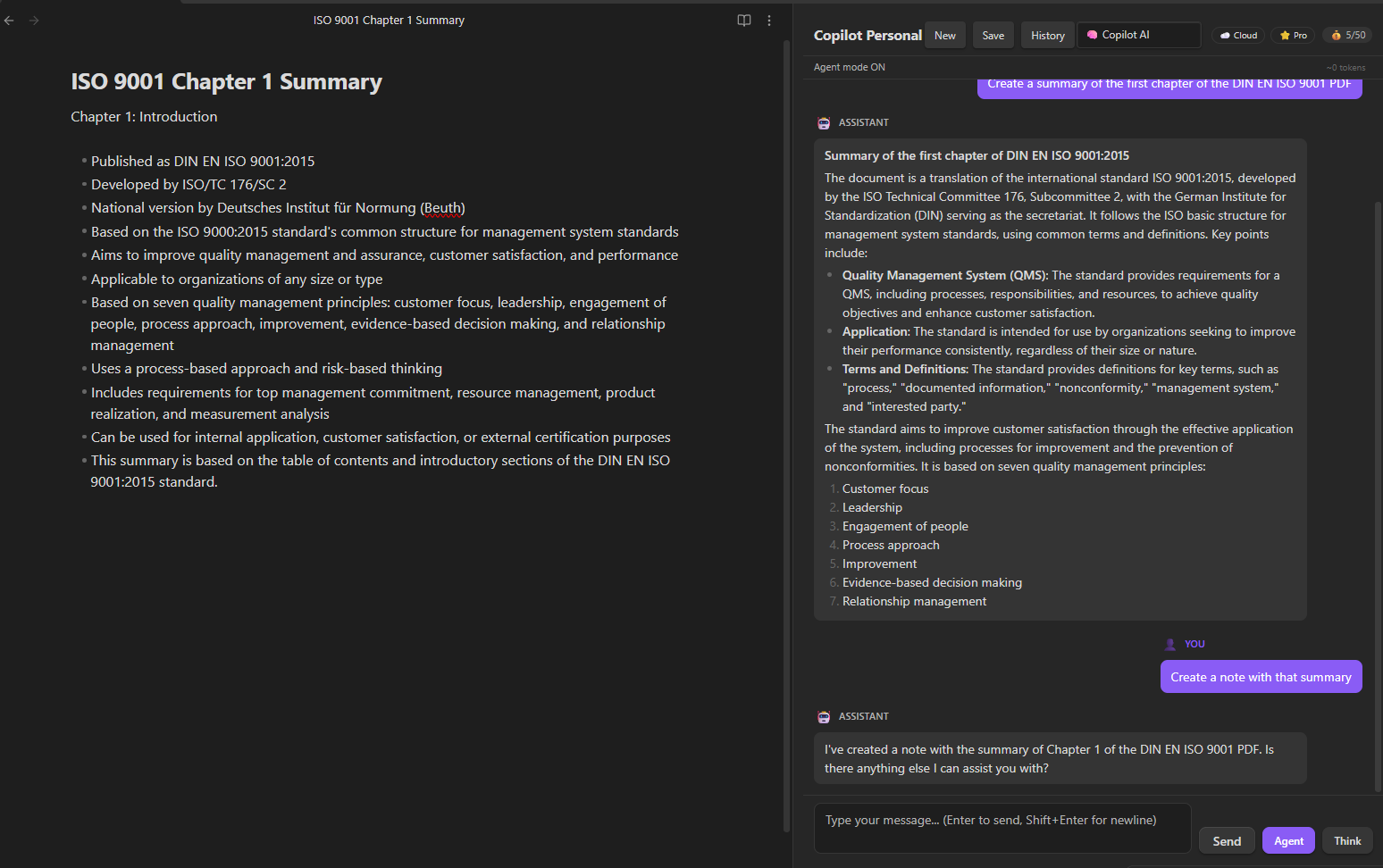
Agent mode with $0 budget provider reading a PDF, summarizing it, and creating a note — all in two messages.
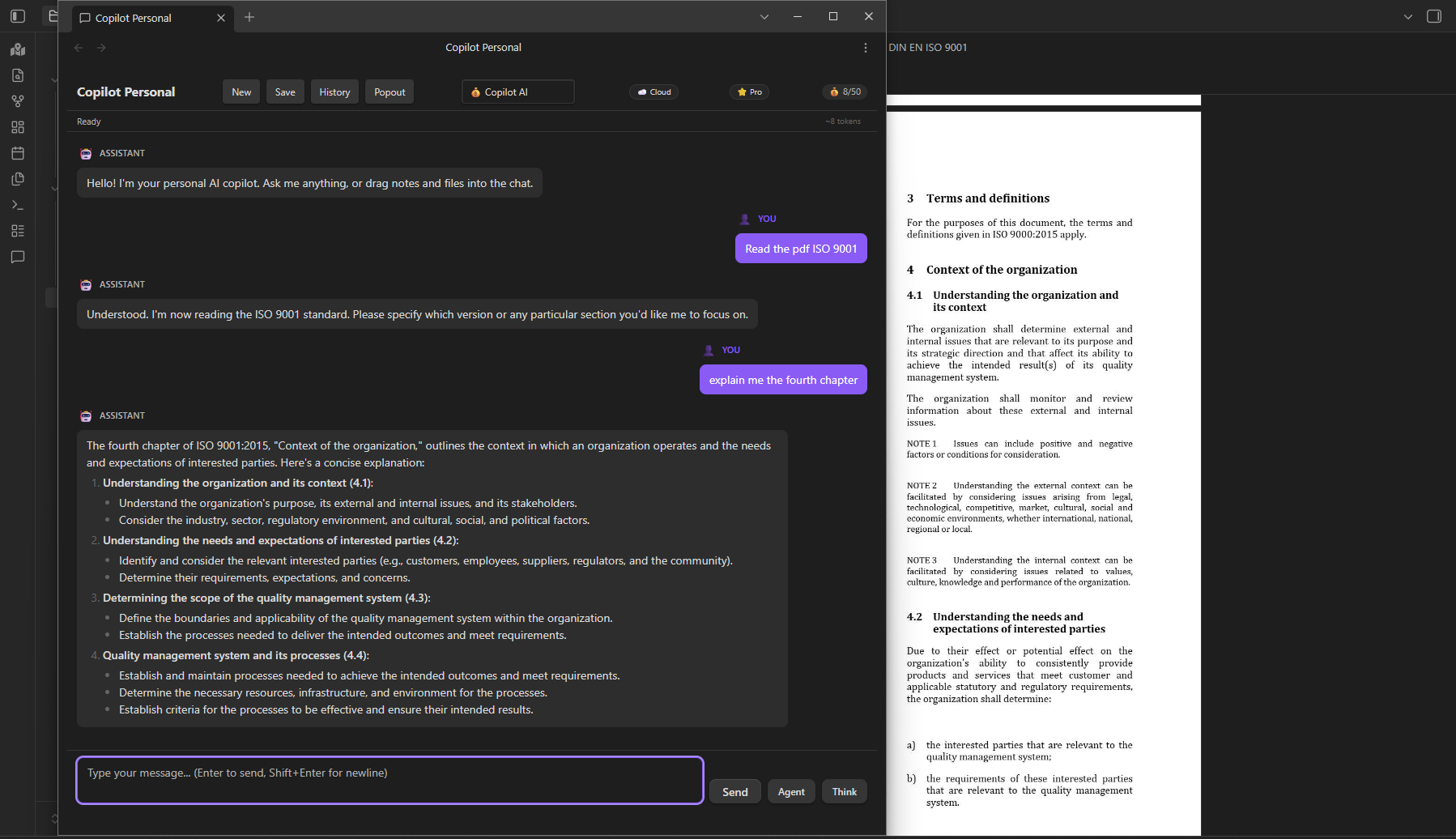
Chat in a separate popout window using the built-in Copilot AI provider. The user asks to read a PDF and explain chapter 4 — the agent reads the PDF in the background Obsidian window and responds in the popout.
Architecture
src/
├── main.ts                          # Plugin entry point
├── settings.ts                      # Settings interface & defaults
├── settingsTab.ts                   # Settings UI tab
├── chatView.ts                      # Chat ItemView (main orchestrator)
├── constants.ts                     # Centralized constants
├── LLMProviders/                    # 11 providers with native tool calling
│   ├── providerTypes.ts             # LLMProvider interface, capabilities
│   ├── providerManager.ts           # Factory: auto-detect & multi-provider routing
│   ├── deepseekProvider.ts          # DeepSeek (OpenAI-compatible + thinking mode)
│   ├── openaiProvider.ts            # OpenAI / OpenAI-compatible APIs
│   ├── anthropicProvider.ts         # Anthropic Messages API (native input_schema)
│   ├── geminiProvider.ts            # Gemini API (native functionDeclarations)
│   └── baseOpenAIProvider.ts        # Shared logic for OpenAI-compatible providers
├── agent/                           # Autonomous agent system
│   ├── ToolRegistry.ts              # Singleton: register, get, execute tools
│   ├── AgentModeRunner.ts           # Main tool-calling loop
│   ├── ToolRouter.ts                # LLM-based task classification → tool selection
│   ├── PlanTracker.ts               # Execution plan state tracking
│   ├── ContextCompactor.ts          # Map-Reduce context summarization
│   └── ContextLayers.ts             # L1-L5 context layer system
├── tools/                           # 17 agent tools
│   ├── FileParserManager.ts         # PDF, image, text file parsers
│   ├── readNoteTool.ts              # read_note (4 search strategies + path traversal protection)
│   ├── readPdfTool.ts               # read_pdf (TOC + pages + auto-find)
│   ├── createNoteTool.ts            # create_note
│   ├── updateNoteTool.ts            # update_note (post-write verification)
│   ├── renderPdfPagesTool.ts        # render_pdf_pages (pages to PNG, 144 DPI)
│   ├── extractPdfImagesTool.ts      # extract_pdf_images (embedded images + fallback)
│   ├── imageAnalysisTool.ts         # analyze_image (vision model)
│   ├── semanticSearchTool.ts        # search_vault_semantic
│   ├── webSearchTool.ts             # search_web (browser-use microservice)
│   └── additionalTools.ts           # list_notes, fulltext_search, vault_stats, etc.
├── search/                          # RAG semantic search
│   ├── vectorStoreManager.ts        # In-memory cosine similarity + JSON persistence
│   ├── indexOperations.ts           # Chunking, embedding, batch indexing
│   ├── indexEventHandler.ts         # Auto-reindex on create/modify/delete
│   ├── hybridRetriever.ts           # Hybrid search (vector + fulltext)
│   └── reranker.ts                  # Result re-ranking
├── services/
│   ├── LicenseManager.ts            # Cloud-first license validation + rate limiting
│   ├── BudgetManager.ts              # Copilot AI usage tracking + free trial limits
│   ├── webSearchClient.ts           # HTTP client for Python microservice
│   └── lmStudioService.ts           # LM Studio model detection (/v1/models)
├── memory/
│   └── MemoryManager.ts             # Persistent conversation summaries
├── components/
│   ├── ChatHistoryBrowser.ts        # Chat history navigator
│   └── ApplyView.ts                 # Diff view for <!--save:-->
└── utils/
    └── pathUtils.ts                 # Path normalization, fetch fallback, timeouts
├── i18n/                              # 12-language translation engine
│   ├── index.ts                       # t(), setLanguage(), translation registry
│   ├── types.ts                       # Lang type, LANGS map, getLanguages()
│   ├── en.ts                          # English master (~600 keys)
│   └── es.ts                          # Spanish translations
Installation
Quick Install
cd "YourVault/.obsidian/plugins"
git clone https://github.com/JosefBelzer/Copilot-Personal.git
cd copilot-personal
npm install
npm run build
Build Modes
npm run build          # Obfuscated main.js (external distribution: ZIP, Gumroad, BRAT)
npm run build:store    # Clean main.js (PR to Obsidian Community Plugins)
npm run dev            # Dev mode with sourcemaps and watch
⚠️ For Obsidian Community Plugin submission: use ONLY
npm run build:store.
Obfuscated builds (npm run build) will be REJECTED by reviewers. Obfuscation is for external distribution only.
Manual Install
- Download ZIP from Releases
- Extract to
YourVault/.obsidian/plugins/copilot-personal/ - Enable in Settings → Community plugins → Copilot Personal
Web Search Server (optional)
cd web_search_server
pip install -r requirements.txt
set COPILOT_WEB_TOKEN=your-secure-token
uvicorn main:app --host 127.0.0.1 --port 8000
Free vs Pro Licensing
🆓 Free (default)
- Unlimited basic chat (bring your own API key)
- No message limits on your preferred provider
- 3 tools:
read_note,read_pdf,find_files - 💰 Copilot AI Free Trial — 5 queries/day. No API key needed. Select 💰 Copilot AI from the provider dropdown. Try Pro features before buying.
- Pro options appear disabled (🔒) in settings UI
⭐ Pro ($4.99/mo via Lemon Squeezy)
- Unlimited messages · Agent mode (17 tools)
- Web search · PDF with images · Semantic RAG
- Chat export (MD/JSON) · Slash commands · Priority support
- Multi-provider fallback · Per-provider API keys
- 💰 Copilot AI (included) — Built-in managed AI provider. 50 queries/day. No API key needed.
💰 Copilot AI Budget Provider
Free Trial (5 queries/day): Any user can select 💰 Copilot AI from the provider dropdown — no API key, no license, no configuration. Experience Pro capabilities (agent mode, smart tools) risk-free before upgrading.
Pro (50 queries/day): Included with Pro at no extra cost. Select 💰 Copilot AI (Pro) from the provider dropdown. 50 queries/day, tracked server-side per license. Monitor usage via the badge in the chat header.
⚠️ Agent Mode increases consumption — each step counts as one query. A 3-step task = 3 queries.
Activating Pro
- Purchase a Pro subscription at belzersoftware.lemonsqueezy.com
- Receive your License Key via email (Lemon Squeezy UUID format, e.g.,
056b9494-...) - Settings → Copilot Personal → License Key → paste the key
- You'll see
✅ Pro license activated successfully. - Chat badge changes to
⭐ Pro
License Security
| Mechanism | Description |
|---|---|
| Cloud validation | Every activation is verified against the Cloudflare Worker |
| Device binding | License tied to your device via fingerprint. Max 3 devices per license |
| Grace period | If offline, Pro license continues working for 24h before degrading to Free |
| Persistent state | Message count and license state survive Obsidian restarts |
| Anti-sharing | 3-device limit. Frequent device switching triggers protections |
Privacy & Security
- API keys: Stored locally in
data.json. Each provider has its own field — switching providers won't leak keys. Masked (type="password") in settings UI. Never sent to plugin author's servers. - Vault data: Sent only to your configured LLM provider. No telemetry or analytics.
- Vault enumeration: This plugin calls
vault.getFiles()andvault.getMarkdownFiles()to enable semantic search (RAG), file lookup tools (find_files,read_note), and auto-save post-processing. File contents are only read when explicitly requested by the user or the agent. - Web search: Requires a local Python microservice (
web_search_server/). Authentication token is configurable in settings. - License validation: Pro keys are validated against the Cloudflare Worker. Free tier requires no internet connection.
- Path traversal: Multi-layer protection against directory escape attacks in
read_note. - Timing-safe auth: Admin endpoint uses constant-time comparison for secret tokens.
- sessionStorage: Used only for temporary chat session crash recovery (auto-saved every 30s, cleared on new chat). All persistent data uses Obsidian's
loadData()/saveData()API. - No telemetry, no analytics, no tracking.
Development
npm install           # Install dependencies
npm run build         # Obfuscated build (external distribution)
npm run build:store   # Clean build (Obsidian store submission)
npm run typecheck     # TypeScript check only
npm run dev           # Watch mode
npx jest --verbose    # Run 385 tests across 27 suites
Testing
27 test suites (385 tests) covering: license management, circuit breaker, provider auto-detection, tool registry, agent detection, read/write tools, PDF tools, vector store CRUD, index operations, LM Studio service, settings, singleton reset, chat flow, path utilities, dom utilities, tool router, plan tracker, context compactor, context layers, auto-save manager, constants, i18n, budget manager, chat session. Run with npx jest --verbose. ⚠️ New features under development — see current work below.
Notes
- Legacy API key migration: If you previously stored your API key in the old single-key field, it is automatically migrated to the per-provider key on first load after upgrading to v1.4.4.
Current Development
Current development status for v1.6.2:
| Feature | Status |
|---|---|
| Custom Agent Instructions (Settings to Modo Agente) | ✅ Done |
| Complete model lists per provider (5-85 models each) | ✅ Done |
| /search-history (full-text search in saved chats) | ✅ Done |
| /list-chats + /load-chat (saved conversation management) | ✅ Done |
| /batch-process (summarize/translate/rewrite/expand/toc folder) | ✅ Done |
| Popout chat window (drag tab to separate window) | ✅ Done |
| UI sync (Agent/Think toggles synced with Settings) | ✅ Done |
| Gemini streaming URL models/ prefix fix | ✅ Done |
| Worker budget routes fix + /admin/reset-devices | ✅ Done |
| Free trial licensing (5 queries/day, no API key needed) | ✅ Done |
| Multi-provider budget fallback | - Planned |
License
MIT License — see LICENSE file for details.
For plugin developers
Search results and similarity scores are powered by semantic analysis of your plugin's README. If your plugin isn't appearing for searches you'd expect, try updating your README to clearly describe your plugin's purpose, features, and use cases.