Current File Tags
approvedby trung-tran-swe
Display the active Markdown file's tags and associated files.
Current File Tags
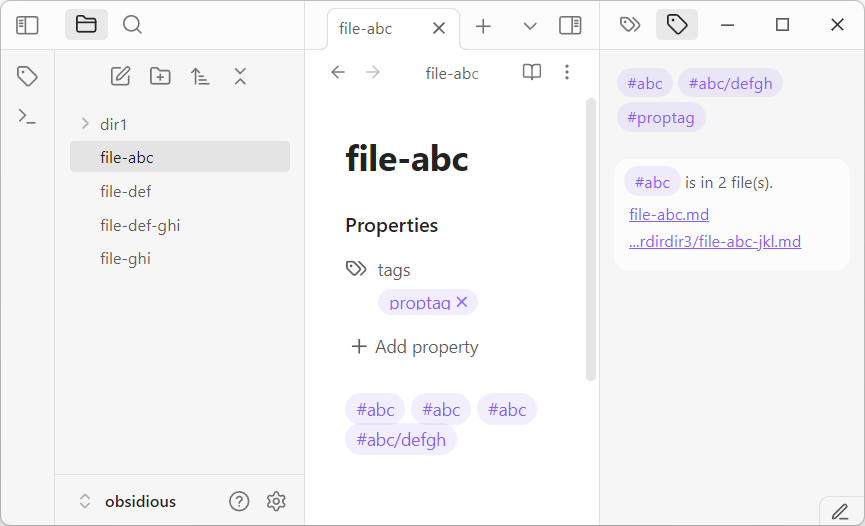
Display tags of the active Markdown file so you can have an overview of the tags being used.
- Show all tags in the file and frontmatter's "tags" property.
- Show all files containing a selected tag.
- Click on the file to open it.
- Search a selected tag with the Obsidian Search plugin when Ctrl-clicked it (not mobile friendly).
Installation
Please install from the Obsidian's Community Plugins tool.
- Search for "Current File Tags" in Obsidian's Community Plugins tool.
- Enable the plugin once installed.
How to Use
After the plugin is installed and enabled, activate it on the right panel. Whenever you edit a Markdown file, the plugin will show the file's tags. Clicking on a tag will show all files containing that specific tag. To use the Search plugin to search a specific tag, hold down the Ctrl button and click on a specific tag.
Development
See https://github.com/trung-tran-swe/obsidian-current-file-tags
Donations
This plugin is developed by Trung Tran , and is free to use.
If you are in MA, I would love to meet up for a (free?) cup of coffee. If you wish to support virtually, please check out:



For plugin developers
Search results and similarity scores are powered by semantic analysis of your plugin's README. If your plugin isn't appearing for searches you'd expect, try updating your README to clearly describe your plugin's purpose, features, and use cases.