Current Folder Notes
approvedby caffa
Shows a list of notes in the current folder, and allows you to filter the titles to include or exclude notes.
📂 Current Folder Notes Pane
Welcome to Current Folder Notes Pane—an Obsidian plugin designed to transform how you organize and navigate your writing projects! This plugin is perfect for writers who keep their chapters and related files within a single folder.
✨ What Is It?
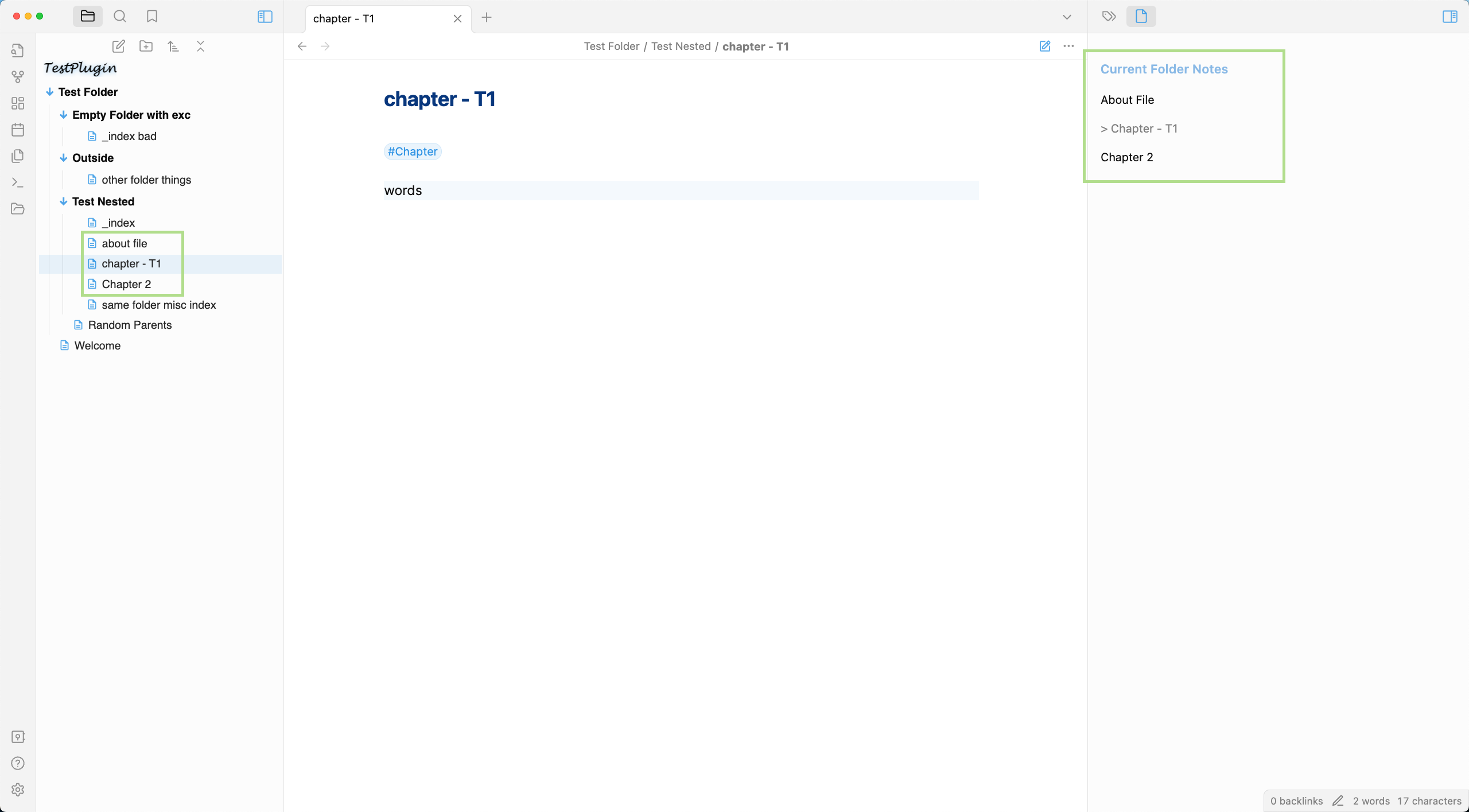
Imagine having a specialized sidebar that shows just the notes you care about from your current folder, intelligently sorted by chapter numbers. Current Folder Notes does exactly that by providing a clean, focused view of your writing project.
🌟 Key Features
- 📋 Smart Note Listing: Automatically lists and sorts notes in your current folder (perfect for chapter organization like "Chapter T1 - Hello World", "Chapter T2 - Running"...)
- 🔍 Powerful Filtering: Include only the notes that matter (like chapters or about files) and exclude others (like index files)
- ✏️ Pretty Title Case: Option to automatically format your note titles in Title Case for better readability
- 📚 Outline Integration: View headings from your current file or all files right in the pane
- 📁 Subfolder Support: Optionally include notes from subfolders
- ⭐ Visual Indicators: Current file is highlighted with a star for quick identification
🚀 How to Use
- Open the Pane: Click the folder icon in the ribbon or use the command "Open Pane"
- Navigate Your Project: Click on any file in the list to open it
- Jump to Headings: Click on any heading in the outline to jump directly to that section
Perfect for:
- 📝 Novel writing with multiple chapters
- 🎓 Research projects with related notes
- 📊 Any project where you need to see a focused list of related files
⚙️ Settings
Customize Current Folder Notes to perfectly match your workflow:
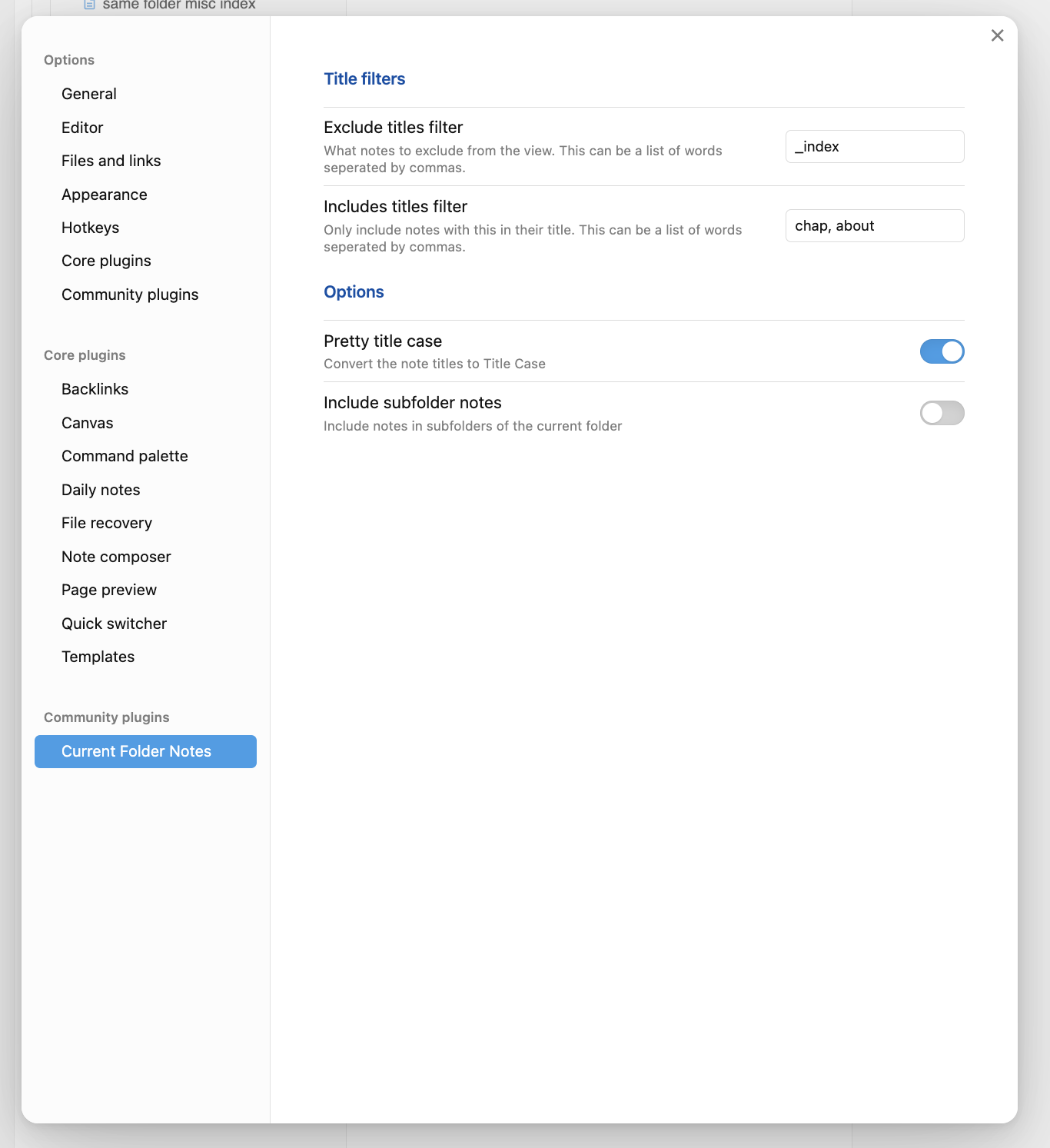
- Exclude Titles Filter: Hide specific notes (e.g., "_index" files)
- Include Titles Filter: Only show notes containing specific words (e.g., "chapter", "about")
- Pretty Title Case: Toggle automatic title formatting for better readability
- Include Subfolder Notes: Choose whether to include notes from subfolders
- Current File Outline: Show headings from your active file
- All Files Outline: Show headings from all files in the folder
📋 Example Settings
Perfect for writers organizing a novel project:
💻 Installation
Community Plugins (Coming Soon)
- Open Settings > Community plugins
- Click "Browse"
- Search for "Current Folder Notes"
- Click "Install"
- Once installed, enable the plugin
Manual Installation
- Copy over
main.js,styles.css,manifest.jsonto your vaultVaultFolder/.obsidian/plugins/current-folder-notes/ - Restart Obsidian
- Enable the plugin in Settings > Community plugins
💡 Tips for Writers
- Use a consistent naming convention for your chapters (e.g., "Chapter T1 - Introduction")
- Create an "about-characters" or "about-settings" file to keep track of your world-building
- Use headings within your chapters for easy navigation via the outline feature
☕ Support This Project
If you find Current Folder Notes Pane useful on your writing journey, I'd truly appreciate your support. Please consider buying me a coffee on Ko-fi — your contribution helps me keep making tools that make your creative life easier.
Thank you for being a part of this adventure. Happy writing and organizing your brilliant ideas!
❓ Questions or Feedback?
Love the plugin? Found a bug? Have a feature request? Feel free to reach out!
Enjoy organizing your writing projects with Current Folder Notes Pane!
For plugin developers
Search results and similarity scores are powered by semantic analysis of your plugin's README. If your plugin isn't appearing for searches you'd expect, try updating your README to clearly describe your plugin's purpose, features, and use cases.