Daily TODO
approvedby Aaron
Roll over incomplete todos from the most recent daily TODO file into today's note. - This plugin has not been manually reviewed by Obsidian staff.
Daily TODO
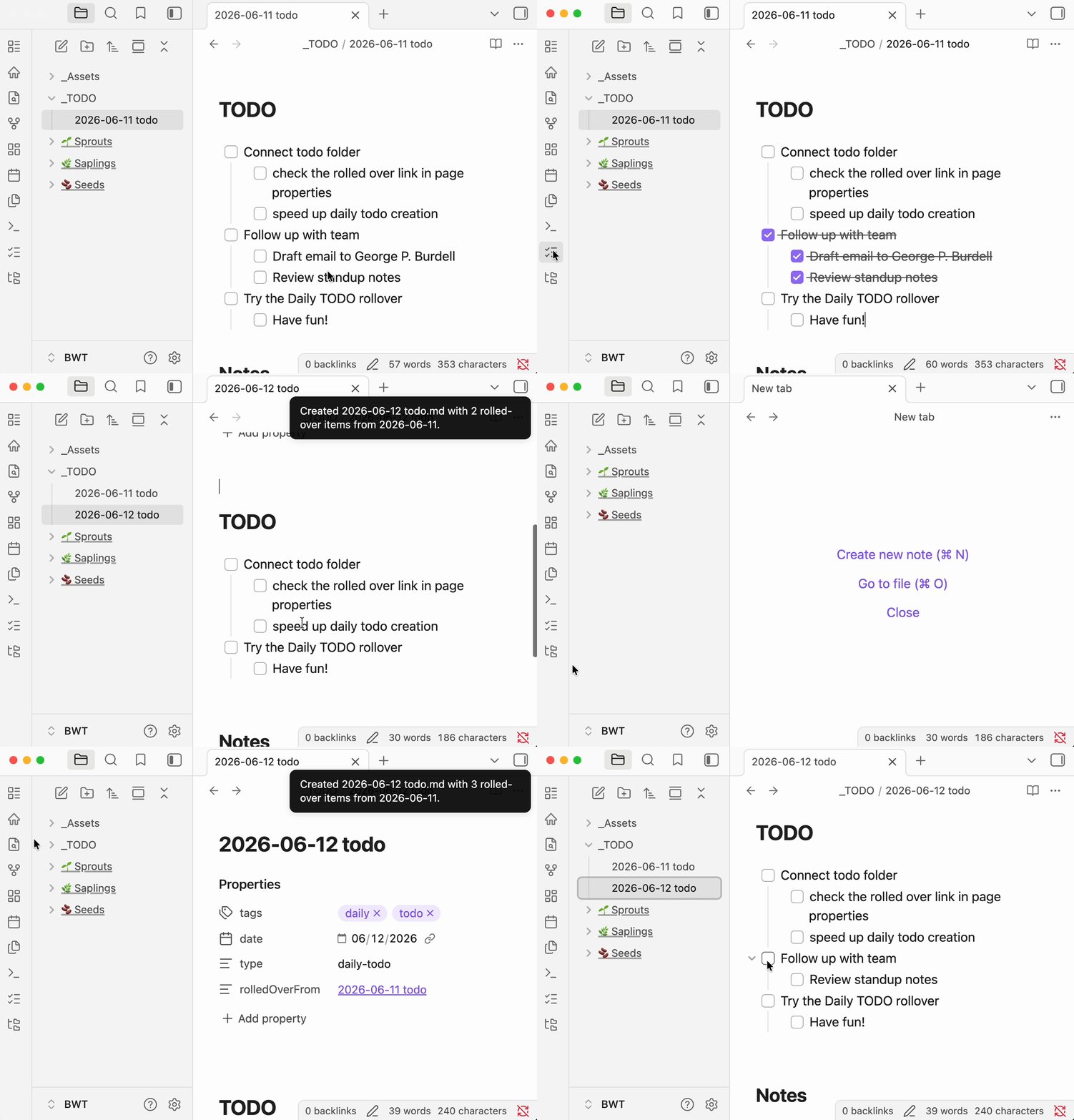
A standalone Obsidian community plugin for a dedicated daily TODO workflow. Create dated TODO files in their own folder — separate from journal or daily notes — and roll incomplete tasks forward with one click. No Daily Notes or Periodic Notes plugin required.
Features
- Standalone workflow — Does not require the Daily Notes or Periodic Notes plugins.
- One-click creation — Ribbon icon or command palette creates today's TODO file; not a hook on daily note creation.
- Dedicated TODO folder — Dated files like
2025-06-09 TODO.md, stored separately from journal or daily notes. - TODO-section scoped — Only rolls incomplete items from the
# TODOsection; stops at## Notesor other headings. - Smart nested rollover — Preserves nested content under incomplete tasks; skips completed checkbox subtrees.
- First-run setup — Modal to browse an existing folder or create
_TODOwith a sample yesterday file for immediate testing. - Frontmatter metadata —
tags,date,type: daily-todo, androlledOverFromwikilink to the source note. - Folder recovery — Re-prompts setup if the configured folder is deleted or moved.
- Automatic source detection — Finds the most recent dated TODO file before today in your configured folder (including subfolders).
- Configurable naming — Set the vault folder, file name suffix, frontmatter tag, and whether to include a
# TODOheading. - Legacy file support — Automatically renames older files that used
YYYY-MM-DDtodo.mdnaming to the currentYYYY-MM-DD TODO.mdformat.
Installation
From Obsidian Community Plugins
- Open Settings → Community plugins.
- Turn off Restricted mode if needed.
- Click Browse, search for Daily TODO, and install.
- Enable the plugin.
Manual installation
- Download
main.jsandmanifest.jsonfrom the latest GitHub release. - Create a folder
{vault}/.obsidian/plugins/dailytodo/. - Copy
main.jsandmanifest.jsoninto that folder. - Reload Obsidian and enable Daily TODO under Settings → Community plugins.
Usage
First run
The first time you use the plugin (or if your configured folder no longer exists), a setup modal appears when you run Create today's TODO:
- Browse folders — Pick an existing vault folder for daily TODO notes.
- Create
_TODO— Creates a_TODOfolder with a sample yesterday note so you can test rollover immediately.
After setup, today's TODO file is created automatically.
Daily workflow
- Configure the plugin under Settings → Daily TODO settings (optional — first-run setup handles the basics):
- TODO folder — Where daily TODO files are stored (default after setup:
_TODO). - File name suffix — Appended after the date (default:
TODO, producing2025-06-09 TODO.md). - TODO tag — Frontmatter tag added to new notes (default:
todo). - Include heading — Whether to add a
# TODOheading below the frontmatter.
- TODO folder — Where daily TODO files are stored (default after setup:
- Create today's note using either:
- The list-checks ribbon icon (Create today's TODO), or
- Command palette → Create today's TODO from previous day.
- If today's file already exists, the plugin opens it instead of creating a duplicate.
Example output
Given incomplete tasks in TODO/2025-06-08 TODO.md, running the command on June 9 creates TODO/2025-06-09 TODO.md:
---
tags: [daily, todo]
date: 2025-06-09
type: daily-todo
rolledOverFrom: "[[2025-06-08 TODO]]"
---

# TODO

- [ ] Finish report
  - [ ] Gather sources
- [ ] Email team

## Notes
The sample yesterday file created during first-run setup demonstrates nested rollover: completed sub-tasks (e.g. - [x] Draft email…) are left behind; incomplete siblings roll forward.
File naming
Daily TODO files must start with a date in YYYY-MM-DD format:
| Suffix setting | Example file name |
|---|---|
TODO | 2025-06-09 TODO.md |
| (empty) | 2025-06-09.md |
todo | 2025-06-09 todo.md |
Note structure
For best results, structure each daily TODO file like this:
# TODO

- [ ] Your tasks here

## Notes

Free-form notes that are never rolled over.
Only content between # TODO and ## Notes (or the next top-level heading) is considered for rollover.
Development
git clone https://github.com/aaronarcade/Obsidian-Daily-Todo.git
cd Obsidian-Daily-Todo
npm install
npm run dev
Symlink or copy the plugin folder into your vault's .obsidian/plugins/ directory. Use npm run dev for watch mode during development.
Build for production:
npm run build
License
MIT — see LICENSE.
For plugin developers
Search results and similarity scores are powered by semantic analysis of your plugin's README. If your plugin isn't appearing for searches you'd expect, try updating your README to clearly describe your plugin's purpose, features, and use cases.